Virtual instructor-led training has become a core part of how organizations develop their teams, but running a live session through a screen introduces challenges that a traditional classroom never had. Distractions multiply, engagement drops faster, and facilitators lose the nonverbal cues they once relied on. That’s exactly why instructor-led training best practices matter more now than ever. Without a deliberate approach, even experienced trainers can end up talking to a wall of muted microphones and turned-off cameras.
The difference between a forgettable webinar and a training session that actually changes behavior comes down to preparation, delivery, and the right tools working together. Organizations that get this right see higher completion rates, stronger knowledge retention, and a measurable return on their training investment. Those that don’t? They burn budget and lose learner trust fast.
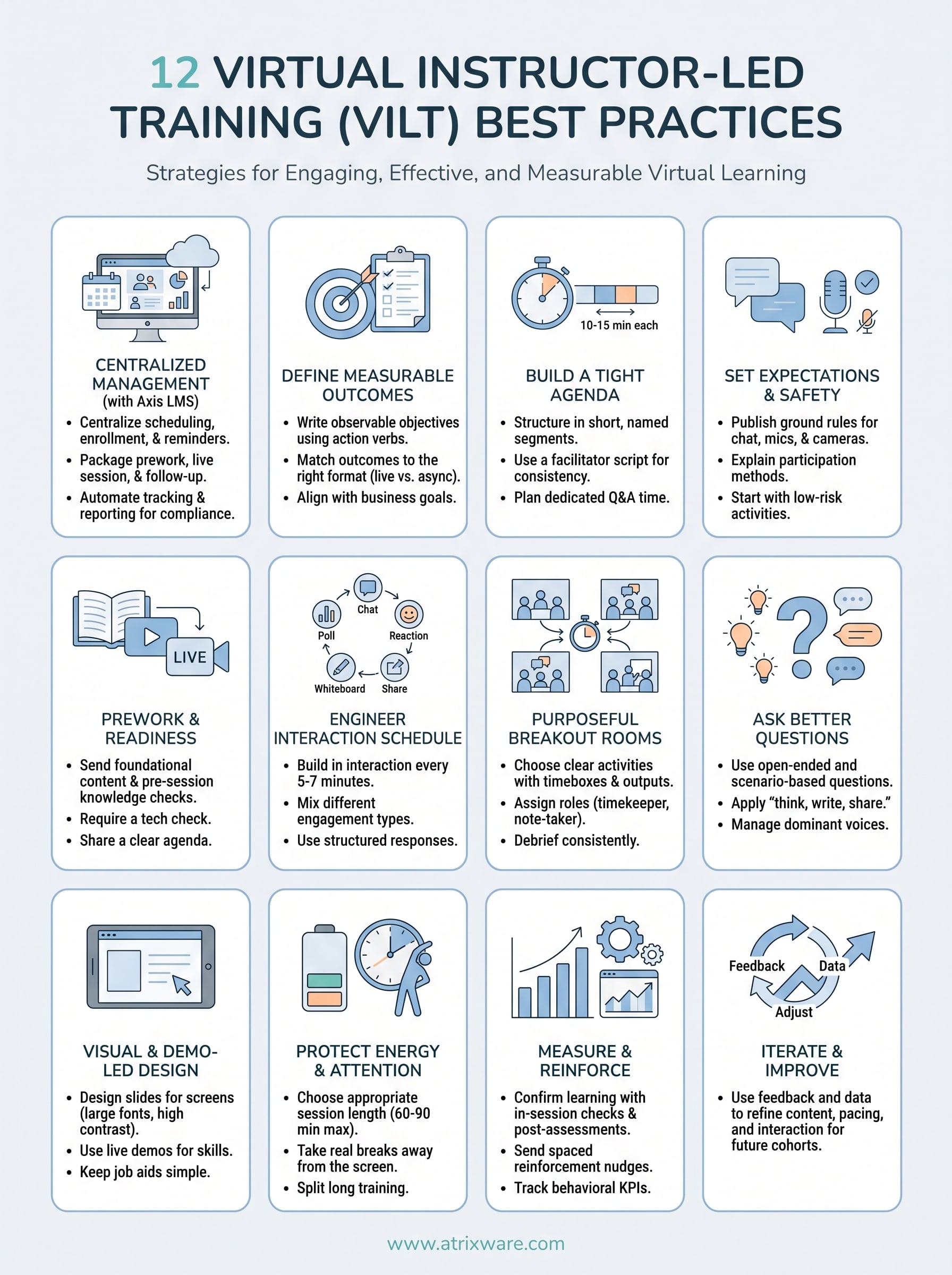
This article breaks down 12 proven practices for delivering virtual ILT that keeps learners engaged and delivers real results. Whether you’re building out your first virtual training program or refining an existing one, these strategies pair well with a platform like Axis LMS from Atrixware, which gives you the infrastructure to schedule, deliver, track, and report on instructor-led sessions at scale. Let’s get into it.
1. Run VILT through Axis LMS
Running virtual ILT without dedicated infrastructure creates unnecessary friction for everyone involved. Axis LMS gives you a single platform to manage the full lifecycle of your instructor-led sessions, from the moment you schedule a session to the reports you pull when it ends. That operational backbone is one of the most overlooked instructor-led training best practices organizations can adopt.
Centralize scheduling, enrollment, reminders, and links
When scheduling, enrollment, and session links all live in one place, you cut the coordination overhead that kills training programs before they start. Axis LMS lets you publish sessions, open enrollment, and automate reminder emails without juggling separate calendar tools or manually distributing virtual meeting links. Learners get what they need, when they need it, without chasing anyone for information.

Package prework, live session, and follow-up in one path
Your live session should be one step in a larger learning path, not an isolated event. With Axis LMS, you can bundle pre-session reading, the live session itself, and post-session assessments into a single sequential path. This structure keeps learners moving forward and ensures nothing falls through the gaps between activities.
A learning path that connects prework to live training to reinforcement consistently outperforms a standalone session with no structure around it.
Track attendance, completion, and compliance automatically
Manual attendance tracking wastes facilitator time and produces unreliable records. Axis LMS logs attendance and completion data automatically, so you always have an accurate record without relying on sign-in sheets or post-session data entry. For organizations with compliance training requirements, this kind of automated recordkeeping is essential.
Reduce no-shows with waitlists, capacity rules, and nudges
No-shows are expensive, and most of them are preventable. Axis LMS lets you set session capacity limits and activate waitlists so your sessions fill appropriately and interested learners stay in the queue. Automated nudges remind registered learners before the session date, which drives up actual attendance rates without requiring manual follow-up from your team.
Use reporting to prove participation and outcomes
Training budgets require justification, and that justification starts with data. Axis LMS gives you on-demand reports that show who attended, what they completed, and how they scored on associated assessments. You can share these reports with managers and stakeholders to demonstrate that your VILT program is delivering measurable results and not just consuming calendar hours.
2. Define measurable outcomes before you build slides
Slides built without clear outcomes produce sessions that feel busy but accomplish little. Before you open any presentation tool, write down exactly what learners should know or do differently when the session ends. This step is one of the most overlooked instructor-led training best practices and the one that shapes everything else you build.
Write objective statements you can observe and test
Vague goals like "understand compliance requirements" give you nothing to measure. Write objectives using action verbs that describe observable behavior, such as "identify the three steps required to file a report" or "demonstrate the correct escalation procedure in under two minutes." If you cannot test it, rewrite it.
Match outcomes to the right VILT format and duration
Once you have your objectives, match each one to a format that fits. A conceptual overview might work as prework, while a skill that requires real-time coaching and correction belongs in the live session.
Not every objective belongs in a live session. Some outcomes are better suited to async modules, while others genuinely need real-time practice and feedback from a facilitator.
Decide what learners must do live versus async
Split your objectives into two groups: what requires a facilitator and what does not. Pre-session async content handles foundational knowledge, while the live session handles application, practice, and discussion. This keeps your live time focused on what only live interaction can deliver.
Identify prerequisites and baseline skill assumptions
State clearly what learners need to know before they show up. Undefined prerequisites create uneven starting points inside the session and force you to reteach basics at the expense of your planned agenda and pacing.
Translate business goals into learner outcomes
Connect every objective back to a business result. If a manager asks why you ran the session, your objectives should answer that question directly. Tying learner outcomes to organizational goals also makes it easier to justify your training investment to stakeholders.
3. Build a tight agenda that respects attention spans
Attention online is a limited resource, and your agenda either protects it or wastes it. One of the most important instructor-led training best practices is treating every minute of live time as deliberate, not filler. A well-built agenda keeps your session moving at a pace learners can follow without feeling rushed or dragging.
Structure the session in short, named segments
Break your session into blocks of no more than 10 to 15 minutes, each with a clear name and purpose. Named segments give learners a mental map of the session and signal when one topic ends and another begins, which reduces the cognitive drift that sets in during long, unbroken stretches of content.
Use a facilitator script so delivery stays consistent
A script does not mean reading word for word. It means having a written guide that covers your key points, transitions, and timing cues so nothing important gets dropped when the session runs long or a discussion pulls the agenda sideways. Consistent delivery also produces more reliable training outcomes across cohorts.
A facilitator who knows exactly where each segment starts and ends can recover from interruptions without losing the group.
Plan time for questions instead of hoping for it
Block specific minutes on the agenda for Q&A rather than treating questions as something that happens if time allows. Learners ask better questions with higher quality answers when they know a dedicated slot exists for them.
Add contingency time for tech and discussion
Build five to ten minutes of buffer into any VILT session. Tech issues and organic discussion both take time you did not plan for, and running over damages learner trust.
Design the session for the clock you actually have
Match your content to the time you realistically have, not the time you wish you had. If the agenda only fits with zero breaks and perfect transitions, it is already too long.
4. Set expectations and create psychological safety
Learners who don’t know what’s expected of them spend mental energy on the rules instead of the content. Setting clear expectations before and during a session is one of the most underrated instructor-led training best practices, and it directly shapes how willing people are to participate and take real risks in the room.
Publish ground rules for chat, mics, cameras, and timing
Send your ground rules document to learners before the session starts, not just at the opening of the live call. Cover these basics at minimum:
- Chat: when to use it and what’s appropriate
- Microphone: muted by default or open throughout
- Camera: on, off, or optional with a clear reason why
- Timing: hard start, break windows, and hard end
When learners arrive knowing how the session runs, they focus on content faster and with less hesitation.
Explain how you will call on people and handle silence
Silence in a virtual room feels uncomfortable, and most learners fear being put on the spot unexpectedly. Tell participants upfront exactly how you plan to invite responses and whether you use cold calls or voluntary participation. This transparency reduces defensiveness and opens the door to more honest discussion.
Learners participate more freely when they understand the rules of engagement before the session begins.
Make participation low-risk early to warm up the group
Start with a simple poll or one-word chat check-in to get everyone interacting before the content gets demanding. Low-stakes early activities build momentum and signal that participation is normal and expected, not a performance.
Use inclusive language and accessibility-friendly practices
Choose language that avoids assuming shared backgrounds, and build all visuals with strong contrast, captions, and readable fonts. Never rely on color alone to convey key information, and confirm your platform supports screen readers before the session.
Prevent common VILT issues before they show up
Brief learners on common technical problems like audio lag and camera freezing so they can troubleshoot without disrupting others. A quick 60-second tech check at the session’s start recovers far more time than fixing problems mid-delivery.
5. Send prework and confirm readiness before the live session
Prework is one of the most underused instructor-led training best practices available to you. When learners arrive prepared, your live session can skip the basics and move straight into application, practice, and discussion, where real skill-building actually happens.
Use prework to remove basics from the live agenda
Send foundational content, such as short videos, readings, or quick modules, to learners at least 48 hours before the session. This frees up live time for work that genuinely requires a facilitator.
Moving knowledge transfer to prework consistently shortens the live session without reducing learning outcomes.
Run a quick knowledge check to spot gaps
A short pre-session quiz or reflection prompt tells you which concepts learners absorbed and which ones need more attention during the live session. You can adjust your agenda based on real data instead of assumptions about what learners already know.
Require a tech check for audio, camera, and platform access
Send learners a one-page tech checklist covering audio settings, camera access, and how to join your virtual platform. Catching technical problems before the session starts prevents the first ten minutes of your live time from turning into troubleshooting instead of training.
Share a simple agenda and what learners should bring
Give learners a clear one-page overview of the session structure, timing, and any materials they need to have ready. When people know what to expect, they show up mentally prepared and ready to engage from the start.
Align managers on what learners should apply afterward
Brief managers on the session goals and give them specific conversation prompts or follow-up actions they can use with learners post-session. Manager reinforcement dramatically increases the likelihood that new skills transfer from the training to the job.
6. Engineer interaction on a schedule, not by chance
Leaving interaction to chance is one of the fastest ways to lose a virtual room. One of the most effective instructor-led training best practices is treating engagement like a planned activity, not a nice-to-have. When you schedule interaction deliberately, learners stay alert because they know involvement is coming, not optional.
Use an interaction cadence learners can feel
Build interaction into your agenda every five to seven minutes, without exception. When learners sense a consistent rhythm of activity, they stay present because they know they will need to respond. A predictable cadence removes the passive observer mindset that kills engagement in long virtual sessions.

Mix chat, polls, reactions, whiteboards, and short shares
Rotating between interaction types keeps the experience fresh and reaches learners with different engagement preferences. Use polls to surface opinions quickly, chat to gather multiple responses at once, and whiteboards for collaborative problem-solving and visual thinking. Variety also prevents any single format from feeling repetitive.
The goal is not to add activities for their own sake, but to make thinking visible and keep attention in the room.
Use cold-call alternatives that still keep people engaged
Instead of calling on individuals without warning, use structured response formats like everyone types in chat on your count or raises a reaction before you pick a responder. These approaches generate broad participation without the anxiety that kills honest answers.
Turn passive content into decisions, debates, and practice
Replace information dumps with short scenarios, forced-choice questions, or quick judgment calls that require learners to apply what you just covered. Active processing produces stronger retention than listening alone.
Avoid the long monologue trap
Cap any uninterrupted stretch of facilitator talking at five minutes. After that point, insert a question, poll, or chat prompt to bring learners back into the session before attention drifts further.
7. Use breakout rooms for practice, not busywork
Breakout rooms fail when facilitators send learners into groups without a clear purpose. One of the most common violations of instructor-led training best practices is treating breakouts as filler time while you catch a breath. When you design breakouts around specific, observable practice, they become the highest-value portion of your session.
Choose breakout activities with clear outputs and timeboxes
Every breakout needs a defined deliverable and a hard time limit. Tell learners upfront exactly what they should produce and when they need to report back. A five to ten minute timebox with a concrete output keeps groups focused and makes the debrief more productive.
An activity without a clear output is not practice, it is just a conversation with a countdown.
Assign roles so everyone participates
When you place people in a breakout without structure, one or two people dominate while others observe. Assign a timekeeper, a note-taker, and a spokesperson at the start of each breakout. Defined roles distribute responsibility and prevent the passive participation that defeats the purpose of the activity.
Use worksheets, prompts, and examples to speed up momentum
Groups waste the first few minutes of a breakout figuring out where to start. Send learners in with a one-page worksheet or guiding prompts so they begin immediately. Examples also help groups calibrate output quality quickly without needing facilitator input.
Debrief with a consistent report-out pattern
Bring groups back with the same format every time. Ask each spokesperson to share one key finding and one open question in under 90 seconds, which removes the awkward silence that follows an open-ended debrief prompt.
Troubleshoot common breakout problems fast
Some learners will end up alone, lose audio, or freeze during a breakout. Have a clear fallback ready: solo participants type responses in chat, and audio issues get resolved by rejoining the main room. Anticipating these problems before the session means you fix them in seconds.
8. Ask better questions to drive discussion and retention
The quality of your questions determines the quality of your session. Weak questions get yes-or-no answers and silence. Strong questions produce real thinking, honest responses, and discussions that reinforce what learners need to remember. This is one of the most practical instructor-led training best practices you can apply immediately without changing anything else about your delivery.
Use open-ended prompts that produce real answers
Replace closed questions with prompts that require learners to construct an answer rather than recall one. "What would you do first in this situation?" produces far richer responses than "Does everyone understand?" Write your key discussion questions into your facilitator script before the session so you are not improvising them under pressure.
Apply think, write, share to include quieter learners
Give learners 30 seconds to write a response in chat before anyone speaks. This levels the playing field between fast and slow processors and surfaces answers from people who would otherwise stay silent.
Think, write, share is one of the simplest tools you have for generating broader participation without calling on anyone directly.
Use scenario questions that mirror real work
Tie every major question to a realistic workplace situation your learners will actually face. Scenario-based questions force application rather than recall, which accelerates retention and makes the content feel immediately relevant.
Manage dominant voices while inviting more participation
Acknowledge a strong contributor, then explicitly redirect to others: "Thanks, who else has a different take?" This keeps one voice from filling the room while signaling that multiple perspectives are expected and valued.
Capture questions and park items without losing trust
Keep a visible parking lot for off-topic or unanswered questions. Commit to a specific follow-up time, and always close that loop after the session ends.
9. Make content visual, demo-led, and easy to follow
Content that looks fine on a conference room projector often falls apart on a laptop screen. One of the most practical instructor-led training best practices you can apply is designing your visuals specifically for the environment where learners will experience them. A screen-first design philosophy changes how you build every slide, demo, and job aid in your session.
Design slides for screens, not conference rooms
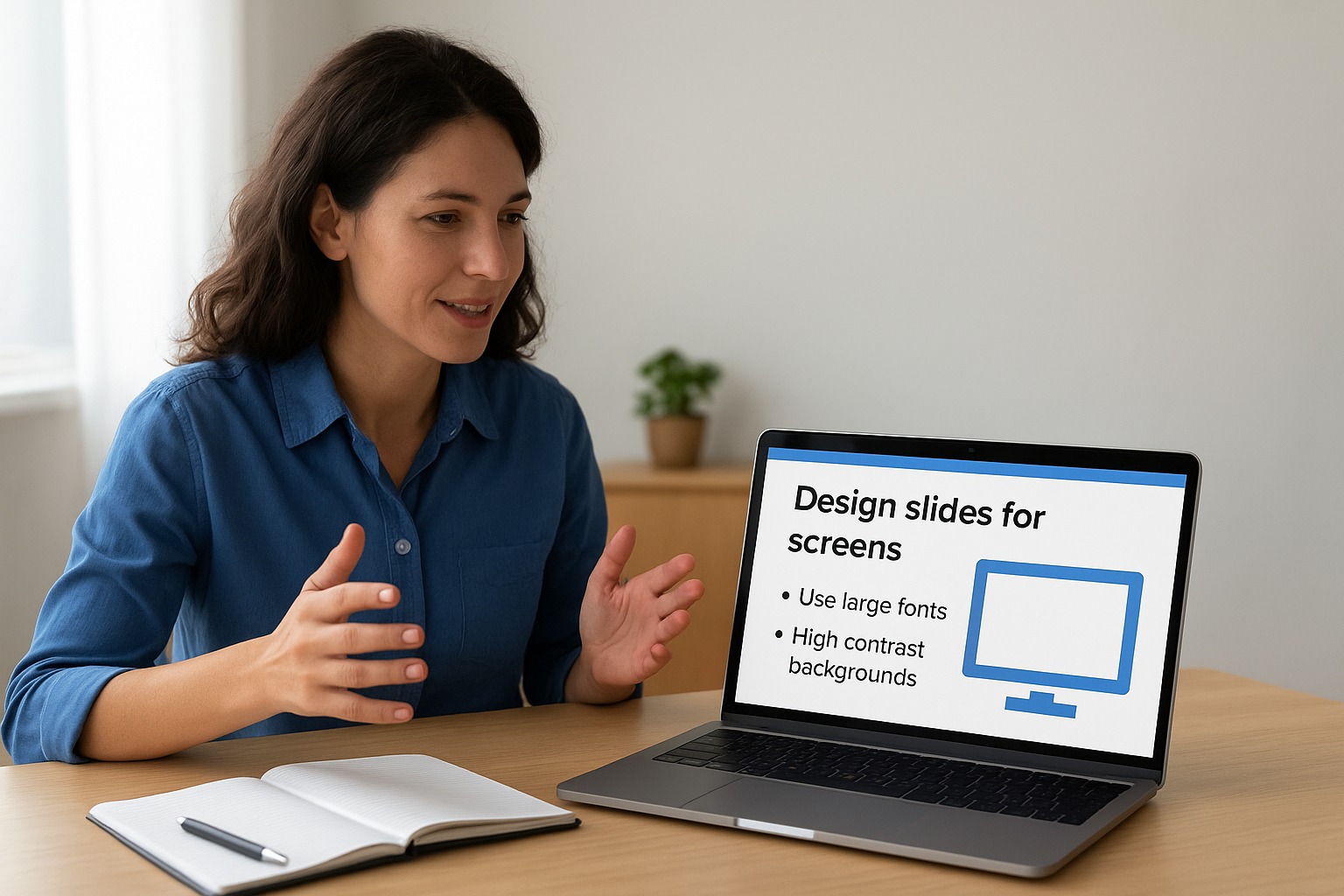
Shrink your text to nothing on a 13-inch laptop screen, and you’ve lost your learner. Use large fonts, high contrast backgrounds, and minimal text per slide so your content reads clearly on any screen size. Avoid dense bullet lists that require zooming in to read.
Use live demos and guided practice when skills matter
When your objective requires learners to perform a task, show the task live and then walk learners through it step by step. A live demo anchors abstract concepts to real actions and gives learners a model to copy during practice.
Watching a skill performed live, then immediately practicing it, produces far stronger retention than reading a description of that skill.
Reduce cognitive load with one idea per screen
Pack two or three concepts onto one slide and learners split their attention between reading and listening. One idea per screen keeps the visual aligned with what you’re saying, so both channels reinforce the same point at the same time.
Support accessibility with captions, contrast, and readable fonts
Enable live captions and check your color contrast ratios before the session. Avoid fonts smaller than 24 points and never rely on color alone to signal meaning.
Keep job aids simple and action-oriented
A job aid should work as a quick reference card, not a training manual. Limit each aid to the five to seven steps a learner actually needs to execute the task on the job without asking for help.
10. Protect energy with shorter sessions and real breaks
Learner fatigue is one of the biggest threats to virtual ILT effectiveness, and most facilitators underestimate how fast it sets in. Following solid instructor-led training best practices means designing sessions around human attention limits, not around how much content you want to cover.
Choose the right session length for your topic
Most learners hit a meaningful attention drop after 60 to 90 minutes of continuous virtual training. Match your session length to your content complexity, not your calendar slot. If your topic genuinely requires three hours, split it into two separate sessions rather than pushing through a single block that exhausts everyone.
Use breaks to reset attention and reduce multitasking
A real break means stepping away from the screen entirely, not checking email in a different tab. Schedule breaks every 45 to 60 minutes and explicitly tell learners to stand up, move, or get water. Groups that take real breaks return more focused and produce better responses during post-break activities.
A five-minute break that actually disconnects learners restores more attention than a ten-minute break spent on other work.
Split long training into a series with a clear cadence
Break multi-hour programs into a structured series of shorter sessions spaced across days or weeks. A consistent cadence also gives learners time to apply concepts between sessions, which strengthens retention.
Keep pacing tight without rushing practice time
Move through content segments at a brisk pace, but protect your practice and discussion windows from compression. Cutting practice time to save the clock defeats the purpose of the live session.
Prevent facilitator fatigue with a delivery plan
Plan your energy and voice just like you plan your agenda. Identify the high-demand moments in your session and reduce facilitator load before them by using breakouts or async activities so you arrive at critical segments sharp.
11. Measure learning, reinforce on the job, and improve
Training that ends when the session closes rarely changes behavior. One of the most critical instructor-led training best practices is treating measurement and reinforcement as core parts of the program, not afterthoughts you address when someone asks for results.
Confirm learning during the session with quick checks
Build short knowledge checks into the session itself, such as a quick poll, a scenario question, or a chat-based quiz. These in-session checks tell you whether your delivery landed before learners walk away with unresolved gaps.
Run a post-session assessment that matches the objectives
Send a formal assessment within 24 hours of the session that directly tests the objectives you defined before building your content. An assessment tied to specific outcomes gives you evidence of learning, not just evidence of attendance.
A post-session assessment is only useful if it tests what you actually taught, not generic comprehension questions that any learner could guess through.
Reinforce with follow-ups, nudges, and spaced practice
Send brief reinforcement nudges at spaced intervals after the session, such as a short scenario, a tip, or a reflection prompt. Spaced practice significantly improves long-term retention compared to a single training event with no follow-through.
Track KPIs that show behavior change and business impact
Define two or three behavioral KPIs before the session, such as reduced error rates, faster onboarding time, or improved customer satisfaction scores. Tracking these metrics connects your training directly to business outcomes your stakeholders care about.
Use feedback and data to iterate the next cohort
Collect a short post-session survey and combine it with your assessment scores and attendance data. Use that combined picture to adjust your content, pacing, and interaction design before you run the next cohort.
Next Steps
These 12 instructor-led training best practices give you a complete blueprint for designing and delivering virtual ILT that actually changes behavior. Each practice builds on the others: clear outcomes shape your agenda, tight agendas support interaction, and measurement closes the loop so every cohort performs better than the last. The gap between a session people forget by Friday and one that drives real skill transfer comes down to how deliberately you execute each of these steps.
Your next move is to evaluate what infrastructure you have supporting your VILT program. If you are scheduling sessions manually, tracking attendance in spreadsheets, or missing follow-up assessment data, you are leaving performance and compliance visibility on the table. Axis LMS handles all of that in one place, so your facilitators can focus on delivery instead of administration. Take the Axis LMS admin demo and see exactly how it fits your training workflow.
