Picking the right course authoring tool can make or break your training program. Whether you’re building compliance modules, onboarding sequences, or product training for customers, the software you use to create that content directly impacts how learners engage with it. The market for best course authoring tools has grown significantly, and each option comes with its own strengths, quirks, and trade-offs that affect your workflow and budget.
At Atrixware, we’ve spent years building Axis LMS to help businesses deliver and manage online training at scale. That experience has given us a front-row seat to what works, and what doesn’t, when it comes to course creation. We know that an LMS is only as effective as the content running through it, which is why choosing the right authoring tool matters so much.
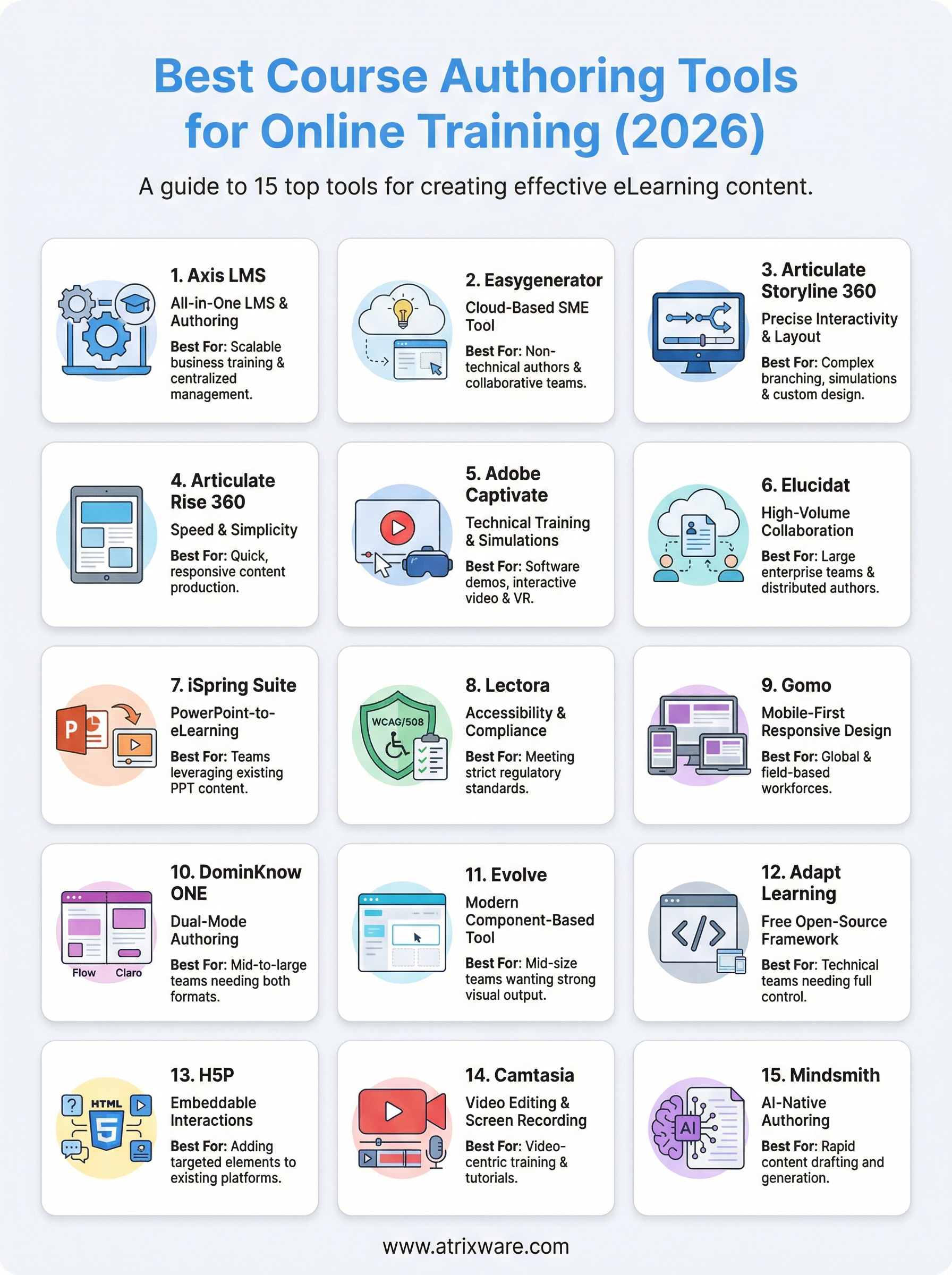
This guide breaks down 15 course authoring tools worth considering in 2026. For each one, you’ll find an honest look at core features, pricing, and ideal use cases so you can match the right tool to your specific training goals, without the guesswork or hours of trial-and-error testing.
1. Axis LMS
Axis LMS sits at the intersection of course authoring and learning management, giving you a single platform to build, deliver, and track training without juggling separate tools. Built by Atrixware, it stands out among the best course authoring tools for businesses that want a scalable, centralized solution that grows alongside their training programs.

What it is and how it works
Axis LMS combines a built-in course authoring environment with full LMS functionality, so you don’t need to export content from one platform and import it into another. You build courses directly inside the platform using a drag-and-drop interface, then publish, assign, and track them in the same workflow without switching between applications.
Best for
Axis LMS works best for businesses and organizations that want to eliminate tool sprawl by managing course creation, delivery, and reporting in one place. It’s a strong fit for teams running employee onboarding, compliance training, customer education, or channel partner programs who don’t want to rely on separate dedicated instructional design software.
Content types you can build
You can create video-based lessons, quizzes, assessments, and surveys directly inside the platform. Axis LMS also supports virtual classroom sessions and blended learning paths, letting you combine self-paced modules with live instructor-led components inside a single structured course.
Standards and integrations
Axis LMS supports SCORM and xAPI (Tin Can) standards, which means you can import externally built content with no compatibility issues. It connects with HR and CRM systems like ADP, Salesforce, BambooHR, and Zoho, includes 5,000+ integrations through its Integration Builder, and supports SAML SSO with providers including Okta, Azure, and Ping Identity.
If your business already runs on platforms like Salesforce or ADP, Axis LMS connects directly to them rather than forcing you to manage training data manually on the side.
Strengths
Axis LMS gives you extensive branding control, letting you customize the learner interface to match your organization’s identity precisely. The reporting suite delivers both on-demand and automated reports that cover learner progress, completion rates, CEU tracking, and compliance status without manual data exports.
Limitations
Because Axis LMS is an all-in-one platform, it may exceed what you need if you’re only looking for a lightweight standalone authoring tool. Teams that require advanced multimedia production, such as detailed screen capture workflows or complex animation, may want to pair it with a tool like Camtasia for that specific layer of content creation.
Pricing
Axis LMS offers custom pricing based on your organization’s size and specific training requirements. You can contact Atrixware directly to request a demo or get a tailored quote that reflects your actual needs.
2. Easygenerator
Easygenerator is a cloud-based authoring tool built around the idea that subject matter experts, not just instructional designers, should be able to create training content. If you’re looking for one of the best course authoring tools that lowers the barrier to entry for non-technical authors, Easygenerator makes a strong case.
What it is and how it works
Easygenerator runs entirely in your browser, so there’s no software to install or maintain. You build courses through a guided, template-driven interface that walks you through adding content, questions, and learning objectives step by step, making it accessible for people with no formal instructional design background.
Best for
This tool fits teams where multiple subject matter experts contribute to course creation and need a simple, consistent process to do so without extensive training on the tool itself.
Content types you can build
You can build text-based lessons, knowledge checks, quizzes, and video-embedded modules. The platform keeps content types intentionally simple, which speeds up production but limits complex interactivity.
Standards and integrations
Easygenerator supports SCORM 1.2 and SCORM 2004 for LMS publishing, along with xAPI. It also connects to tools like Microsoft Teams and Salesforce, making it easier to push content into platforms your team already uses.
If your organization already runs on Microsoft 365, Easygenerator’s Teams integration lets subject matter experts author content without leaving a familiar environment.
Strengths
The collaboration features let multiple authors work on the same course simultaneously, which reduces bottlenecks when content comes from several departments across your organization.
Limitations
Easygenerator’s simplicity is also its ceiling. You won’t find advanced branching scenarios, complex animations, or deep customization options here.
Pricing
Easygenerator offers tiered subscription plans starting with individual author licenses and scaling up to enterprise plans with dedicated support. Contact their sales team directly for exact pricing.
3. Articulate Storyline 360
Articulate Storyline 360 is among the most recognized best course authoring tools for instructional designers who need precise control over interactivity and layout. It brings a slide-based authoring environment with powerful customization options that go well beyond what simpler tools offer.

What it is and how it works
Storyline 360 is a desktop application for Windows that lets you build courses slide by slide, similar to PowerPoint but with far deeper interactive capability. You add triggers, variables, and branching logic to create content that responds directly to learner choices.
Best for
This tool fits dedicated instructional designers who need fine-grained control over learner pathways and visual layout. It works particularly well for teams building complex branching scenarios, software simulations, or custom interactions that template-based tools can’t accommodate.
Content types you can build
You can produce interactive slides, branching scenarios, screen recordings, software simulations, quizzes, and assessments. The built-in screen capture feature lets you document on-screen workflows and convert them into step-by-step simulations without separate software.
If your training includes software walkthroughs, Storyline 360’s recording tools remove the need for a standalone screen capture application.
Standards and integrations
Storyline 360 publishes to SCORM 1.2, SCORM 2004, xAPI, and cmi5, covering virtually any LMS you might use. It also outputs to HTML5 for mobile-compatible delivery.
Strengths
The trigger and variable system gives you granular control over learner pathways, letting you build scenarios where each decision changes what the learner sees next. This depth of interactivity is difficult to match in simpler tools.
Limitations
Windows-only support creates a barrier for Mac-based teams who can’t install it natively. The learning curve is also steeper than most browser-based authoring tools, so new authors should plan time to get comfortable.
Pricing
Storyline 360 is available as part of the Articulate 360 subscription, starting at around $1,299 per user per year, with higher-tier team plans also available.
4. Articulate Rise 360
Articulate Rise 360 takes a different approach from Storyline 360, prioritizing speed and simplicity over deep customization. Where Storyline hands you a blank canvas, Rise gives you structured building blocks that produce polished, responsive courses faster than most alternatives on this list.
What it is and how it works
Rise 360 is a browser-based authoring tool included with the Articulate 360 subscription. You build courses by stacking pre-built content blocks, such as text, media, timelines, and interactions, vertically on a page. Each course automatically adjusts to fit any screen size without extra configuration on your end.
Best for
If you’re comparing the best course authoring tools for fast, consistent content production, Rise 360 is a strong option for L&D teams that need professional-looking output quickly without spending time on custom layouts or visual design work.
Content types you can build
You can build scrolling lessons, interactive blocks, quizzes, flashcards, timelines, and labeled graphics. Rise also lets you embed Storyline 360 blocks inside Rise courses, giving you access to more complex interactions when your content demands it.
Embedding Storyline blocks inside Rise lets you add advanced interactivity without rebuilding your entire course from scratch in a more technical environment.
Standards and integrations
Rise 360 publishes to SCORM 1.2, SCORM 2004, xAPI, and cmi5, and outputs HTML5 for mobile-ready delivery across devices and screen sizes.
Strengths
The block-based structure keeps course design consistent across multiple authors, which matters when your team has several contributors working on the same content library at the same time.
Limitations
Rise’s template-driven design limits how far you can deviate from built-in layouts. Teams that need pixel-level control over visual design will hit a ceiling quickly.
Pricing
Rise 360 comes included in the Articulate 360 subscription, which starts at approximately $1,299 per user per year.
5. Adobe Captivate
Adobe Captivate is one of the best course authoring tools for teams that need to produce highly technical training content, including software simulations and responsive eLearning, without sacrificing interactivity or visual fidelity.

What it is and how it works
Captivate is a desktop-based authoring tool available for both Windows and Mac that lets you record on-screen activity, build interactive slides, and create responsive courses that adapt to different screen sizes. You work inside a timeline-based interface where you control exactly how each element appears and behaves throughout the course.
Best for
Captivate suits IT trainers and instructional designers who build software simulations or technical process walkthroughs as a core part of their training programs.
Content types you can build
You can create software simulations, interactive videos, branching scenarios, quizzes, and VR-ready 360-degree experiences. The platform’s simulation recording tools capture mouse movements and clicks automatically, turning on-screen workflows into step-by-step training modules.
Captivate’s VR module lets you build immersive 360-degree learning experiences without specialized coding knowledge, which sets it apart from most tools on this list.
Standards and integrations
Captivate publishes to SCORM 1.2, SCORM 2004, xAPI, and HTML5, covering compatibility with virtually any LMS. It also integrates with Adobe Experience Manager and Adobe Learning Manager for teams already inside the Adobe ecosystem.
Strengths
The simulation recording engine is one of the most detailed available, capturing granular on-screen actions for technical training with precision.
Limitations
Captivate carries a steep learning curve that slows down authors who are new to timeline-based production environments.
Pricing
Adobe Captivate is available as a subscription starting at $33.99 per month, with enterprise licensing options available for larger teams.
6. Elucidat
Elucidat is a cloud-based authoring platform built for large teams that need to produce high volumes of training content consistently without bottlenecking your instructional design team.
What it is and how it works
Elucidat runs entirely in your browser and gives teams a shared collaborative workspace where authors build courses using templates and a component-based editor. It centers on a guided workflow that helps distributed contributors produce consistent output faster than most desktop-based alternatives.
Best for
This tool suits large L&D teams and enterprise organizations that need multiple authors contributing to a shared content library with clear governance controls. If you manage training content across regions or departments, Elucidat gives you the structure to keep everything aligned without losing quality control.
Content types you can build
You can build interactive scenarios, assessments, video-embedded lessons, and branching narratives. The template library speeds up production when your team needs to publish content across multiple topics quickly.
Elucidat’s template system makes it one of the best course authoring tools for teams that prioritize speed and brand consistency over fully custom visual design.
Standards and integrations
Elucidat publishes to SCORM 1.2, SCORM 2004, and xAPI, covering compatibility with most enterprise LMS platforms. It also connects with tools like Salesforce and Workday for streamlined learner data sharing.
Strengths
The author permissions system lets you control who can edit, review, or publish content, which reduces costly errors when many contributors work across the same platform at the same time.
Limitations
The enterprise pricing model positions Elucidat toward larger budgets, making it less accessible for small teams or individual creators working with limited resources.
Pricing
Pricing is fully custom and based on team size and usage volume. Contact their sales team directly for a quote tailored to your organization’s needs.
7. iSpring Suite
iSpring Suite is one of the best course authoring tools for teams already invested in Microsoft PowerPoint, turning familiar presentations into polished eLearning content without requiring authors to learn an entirely new interface.
What it is and how it works
iSpring Suite installs as a PowerPoint add-in, meaning you build your courses directly inside PowerPoint with a dedicated iSpring ribbon added to the toolbar. Once you finish, you publish the content as a standalone eLearning module compatible with any major LMS, preserving your animations, transitions, and formatting exactly as they appear in the original file.
Best for
This tool works best for teams that already produce PowerPoint presentations as part of their workflow and want to convert that existing content into structured training without rebuilding it from scratch in a separate application.
Content types you can build
You can create interactive slides, video lectures, dialogue simulations, quizzes, and role-play scenarios. iSpring also includes a built-in screen recording tool that lets you capture on-screen software workflows directly from the suite.
If your trainers already present content in PowerPoint, iSpring Suite removes the need to recreate that content in a separate tool, cutting your production time significantly.
Standards and integrations
iSpring Suite publishes to SCORM 1.2, SCORM 2004, xAPI, and HTML5, ensuring compatibility with most LMS platforms on the market. It also integrates with iSpring Learn, the company’s own LMS, for teams that want a tightly connected authoring and delivery environment.
Strengths
The PowerPoint-native workflow dramatically reduces the learning curve for subject matter experts who already know their way around a presentation.
Limitations
Your content’s visual quality depends heavily on your underlying PowerPoint design skills, since the tool amplifies what you already create rather than compensating for weak visual structure.
Pricing
iSpring Suite starts at approximately $770 per author per year, with a Max tier that includes additional collaboration and character animation features at a higher price point.
8. Lectora
Lectora is a long-standing authoring platform that specializes in accessibility-compliant course development, making it one of the best course authoring tools for organizations that must meet strict regulatory or legal training standards without extensive manual remediation after publishing.
What it is and how it works
You get two deployment options with this platform: a desktop application (Lectora Desktop) and a cloud-based version (Lectora Online), giving your team flexibility in how authors access and collaborate on content. You build courses on a page-based canvas with granular control over every element’s placement, timing, and behavior.
Best for
Lectora suits compliance-focused organizations and government agencies that need training content meeting WCAG 2.1 and Section 508 accessibility standards from the start of the authoring process, not just at the end.
If accessibility compliance is non-negotiable for your training program, Lectora’s built-in tools reduce the remediation work other platforms push you to handle after publishing.
Content types you can build
You can produce branching scenarios, assessments, video-embedded lessons, and responsive courses that adapt to multiple screen sizes. Lectora also supports importing existing PowerPoint files and converting them into structured eLearning modules directly inside the platform.
Standards and integrations
Lectora publishes to SCORM 1.2, SCORM 2004, xAPI, and cmi5, covering compatibility with virtually any LMS. It also supports HTML5 output for mobile-ready delivery across devices.
Strengths
The accessibility-first authoring environment gives you built-in tools to check and fix WCAG compliance issues directly inside the platform, saving significant time during the review and approval process.
Limitations
Lectora’s interface feels dated compared to newer browser-based tools, and the learning curve can slow down authors who are new to page-based production environments.
Pricing
The online version starts at approximately $1,299 per author per year, with enterprise pricing available for larger teams that need additional seats or dedicated support.
9. Gomo
Gomo is a cloud-based course authoring platform that prioritizes mobile-first design, making it one of the best course authoring tools for teams that need training content to look and function correctly across smartphones, tablets, and desktops without building separate versions for each device.
What it is and how it works
Gomo runs entirely in your browser and uses a responsive design engine that automatically reformats your course layout to fit any screen size. You build content using a component-based editor, stacking text, media, interactions, and assessments into structured pages that publish as a single package compatible with multiple devices and LMS platforms.
Best for
This tool works well for global organizations and distributed teams that deliver training to learners across different time zones, devices, and connectivity conditions. If your workforce is largely mobile or field-based, Gomo removes the friction of forcing learners onto desktop environments to complete required training.
Content types you can build
You can create interactive scenarios, assessments, video-embedded lessons, and branching narratives directly inside the platform. Gomo also supports multi-language content, letting you localize a single course into several regional versions without duplicating the entire build.
Gomo’s multi-language support makes it a practical option when your training needs to reach learners across different countries from a single content source.
Standards and integrations
Gomo publishes to SCORM 1.2, SCORM 2004, and xAPI, covering compatibility with most enterprise LMS platforms you’re likely using.
Strengths
The automatic responsive formatting saves time that other tools require you to spend manually adjusting layouts for different screen sizes.
Limitations
Gomo offers fewer advanced interaction types than desktop-based tools, which limits complexity in branching scenarios.
Pricing
Gomo uses custom enterprise pricing. Contact their sales team directly for a quote.
10. DominKnow ONE
DominKnow ONE is a cloud-based collaborative authoring platform that gives your team two distinct authoring environments inside a single tool, letting you choose the right approach for each course type without switching between separate applications.
What it is and how it works
DominKnow ONE runs entirely in your browser and offers two authoring modes: Flow mode for responsive, scrolling content and Claro mode for slide-based, pixel-precise layouts. You pick the mode that fits your content structure, then build, review, and publish directly from the same shared workspace your entire team accesses simultaneously.
Best for
This tool suits mid-to-large L&D teams that need multiple authors contributing to the same project without version conflicts or manual file handoffs slowing down production timelines.
Content types you can build
You can produce interactive simulations, branching scenarios, assessments, and responsive lessons across both authoring modes. DominKnow ONE also includes built-in screen capture tools for software training content, removing the need for a separate recording application.
Having two distinct authoring modes inside one platform means you don’t need separate tools for responsive courses and slide-based simulations, which reduces your overall licensing costs.
Standards and integrations
DominKnow ONE publishes to SCORM 1.2, SCORM 2004, xAPI, and cmi5, giving you broad compatibility across LMS platforms. It also supports HTML5 output for mobile-ready delivery across devices.
Strengths
The real-time collaboration features let multiple authors edit content simultaneously, which speeds up production when your team works across different locations or time zones.
Limitations
New authors face a steeper learning curve when navigating two distinct environments, particularly if they’re coming from simpler tools among the best course authoring tools available today.
Pricing
DominKnow ONE uses subscription-based pricing with plans scaling by team size and usage. Contact their sales team directly for a tailored quote.
11. Evolve
Evolve is a browser-based course authoring platform developed by Intellum that gives instructional designers a clean, component-driven workspace for producing responsive eLearning content without the overhead of a desktop installation.
What it is and how it works
Evolve builds courses through a drag-and-drop component editor that runs entirely in your browser. You add and arrange content blocks, interactions, and assessments on a responsive canvas that automatically adjusts to fit any screen size your learners use.
Best for
This tool fits mid-size L&D teams that want a modern authoring interface with strong visual output and don’t need the complexity of a full enterprise platform to get there.
Content types you can build
You can produce interactive scenarios, assessments, multimedia lessons, and branching narratives directly inside the platform. Evolve includes a solid library of pre-built interaction templates that speed up production without locking you into a rigid visual style.
Evolve’s component library gives you a fast starting point for each course type without forcing you to rebuild common interactions from scratch every time.
Standards and integrations
Evolve publishes to SCORM 1.2, SCORM 2004, and xAPI, covering compatibility with most modern LMS platforms you’re likely already running across your organization.
Strengths
The responsive design engine handles layout adjustments automatically, saving you the manual work of reformatting content for mobile learners after you’ve finished building.
Limitations
Among the best course authoring tools, Evolve delivers fewer advanced branching options than desktop-based competitors, which limits complexity in scenario design when your content demands it.
Pricing
Pricing follows a subscription-based model tied to team size and usage volume. Contact Intellum directly for a quote that matches your organization’s scale.
12. Adapt Learning
Adapt Learning is a free, open-source course authoring framework built around responsive HTML5 output, giving teams that are comfortable with open-source workflows a capable authoring option without any licensing fees attached.
What it is and how it works
Adapt Learning provides a browser-based authoring interface layered on top of its open-source framework, so you can build courses through a structured visual editor without writing code from scratch. The platform renders your finished content as responsive HTML5 packages that automatically reformat to fit any screen size your learners happen to use.
Best for
Adapt Learning fits technically capable teams and budget-conscious organizations that want full control over their course output. It works best when you have a developer or technical resource on hand who can configure the framework and manage updates as the open-source project evolves.
Content types you can build
You can build text-and-media lessons, interactive assessments, and narrative-driven modules using the platform’s core component library. The open-source community also contributes additional components regularly, which expands what you can produce beyond the default feature set.
Because Adapt Learning is community-driven, new components get added over time, but your team is responsible for evaluating and integrating them independently.
Standards and integrations
Adapt Learning publishes to SCORM 1.2 and xAPI, covering compatibility with most standard LMS platforms your organization is likely already running.
Strengths
Among the best course authoring tools at zero licensing cost, Adapt Learning delivers solid responsive output without requiring you to pay for a commercial subscription to achieve mobile-ready results.
Limitations
The platform demands technical knowledge to install and maintain, and community forums replace the dedicated customer support you get from paid alternatives, which matters when you hit a blocking issue on a deadline.
Pricing
Adapt Learning is completely free and open-source, though costs for developer time, hosting, or custom component development may still apply depending on your team’s technical capacity.
13. H5P
H5P is a free, open-source content framework that lets you create interactive eLearning modules directly inside platforms you already use. It stands out among the best course authoring tools for teams that need to embed targeted interactions into a website or LMS without the overhead of building full standalone courses from a separate application.
What it is and how it works
H5P runs through a browser-based editor where you select from a library of over 50 content types and configure each one with your own material. The platform outputs a self-contained HTML5 package you embed directly into WordPress, Moodle, Canvas, or any compatible host without a separate export-and-import workflow slowing you down.
Best for
This tool suits educators and training teams who want to add focused interactive elements to an existing platform rather than produce complete course sequences from scratch. It works particularly well when your goal is targeted interactions rather than a structured, beginning-to-end learning journey for each learner.
Content types you can build
You can produce interactive videos, quizzes, flashcards, branching scenarios, timelines, and presentations using the pre-built content type library that the H5P community maintains and expands over time.
H5P’s interactive video feature lets you embed timed questions directly inside a video at specific points, keeping learners engaged without interrupting the lesson flow.
Standards and integrations
H5P supports xAPI for learner data tracking, with SCORM compatibility available through third-party wrappers depending on your hosting environment. It integrates natively with WordPress, Moodle, Canvas, and Brightspace without additional configuration on your end.
Strengths
H5P produces highly embeddable content that drops into platforms your team already runs without requiring a dedicated LMS to deliver it to learners.
Limitations
The tool handles individual interactions rather than full course sequences, so you need a host platform to structure and deliver a complete training program built around H5P content.
Pricing
H5P is completely free and open-source when you self-host it. The H5P.com cloud plan starts at around $8 per month for individuals, with team and enterprise tiers available at higher price points.
14. Camtasia
Camtasia, made by TechSmith, is a screen recording and video editing tool that doubles as a course authoring platform for teams that build training content primarily around video. It sits in a unique position among the best course authoring tools because it excels where most authoring platforms fall short: producing polished, professional video-based training efficiently.

What it is and how it works
Camtasia works as a desktop application available on both Windows and Mac, combining a screen recorder with a multi-track video editor in a single interface. You record your screen, webcam, or both simultaneously, then edit the footage using a timeline-based editor that lets you cut, annotate, and add interactive elements directly to the video.
Best for
Camtasia fits software trainers, IT educators, and instructional designers who build training programs where demonstrating on-screen processes is the core delivery method rather than a secondary component.
Content types you can build
You can produce screen recordings, annotated video lessons, software tutorials, and quizzes embedded directly inside videos. Camtasia also lets you add callouts, zoom effects, and chapter markers to guide learner attention through complex on-screen workflows.
Camtasia’s in-video quiz feature lets you pause playback at specific points and require a response before the learner continues, adding a layer of accountability to video-based training.
Standards and integrations
Camtasia exports to SCORM-compatible packages when combined with a hosting platform, and outputs MP4 and HTML5 formats for flexible delivery across LMS platforms and web environments.
Strengths
The timeline editor gives you precise control over pacing, annotations, and visual emphasis throughout each recording without requiring separate video production software alongside it.
Limitations
Camtasia is not a full-featured authoring tool for complex branching scenarios or structured multi-module courses without pairing it alongside a dedicated LMS.
Pricing
Camtasia offers a perpetual license starting at $299.99 per user, with subscription options also available for teams that prefer annual billing.
15. Mindsmith
Mindsmith is an AI-native course authoring platform designed to help learning and development teams generate structured training content faster than traditional authoring workflows allow. If you’re evaluating the best course authoring tools that incorporate AI into the core production process rather than adding it as a secondary feature, Mindsmith sits in a category of its own.
What it is and how it works
Mindsmith runs entirely in your browser and uses AI-assisted generation to help you draft course outlines, lesson text, and assessment questions from a prompt or a source document you provide. You then refine the output through a structured editing interface before publishing, keeping human review at the center of the process rather than treating AI output as final.
Best for
This tool fits small teams and individual instructional designers who need to produce a high volume of training content quickly without sacrificing structure or instructional quality in the output.
Content types you can build
You can create AI-drafted lessons, knowledge checks, and structured modules that follow a consistent format throughout your course library.
Standards and integrations
Mindsmith publishes to SCORM 1.2, which covers compatibility with most standard LMS platforms your organization currently runs.
SCORM 1.2 output covers the majority of LMS platforms, but check your system’s xAPI support before committing if you need granular learner tracking.
Strengths
The AI generation engine cuts the initial drafting phase significantly, which matters most when your team faces tight production deadlines across multiple concurrent projects.
Limitations
Mindsmith’s content type library is narrower than most mature authoring platforms, limiting your options for complex branching or rich multimedia production.
Pricing
Mindsmith offers a free tier for individual users, with paid plans scaling by usage and team size available through their website.
Next steps
Choosing from the best course authoring tools comes down to matching the right tool to your actual training goals, team size, and technical requirements. Each option on this list serves a distinct use case, so the right answer for a five-person L&D team looks very different from the right answer for a multinational organization running compliance training across dozens of departments.
If you want a platform that handles both course authoring and delivery in a single, integrated environment, Axis LMS removes the back-and-forth between separate tools and gives you full control over how you build, deliver, and track training from one place. Before committing to any platform, it helps to know exactly where your organization stands. Take the LMS readiness quiz to get a clear picture of what stage you’re at in the buying process and which features matter most for your specific situation.
