
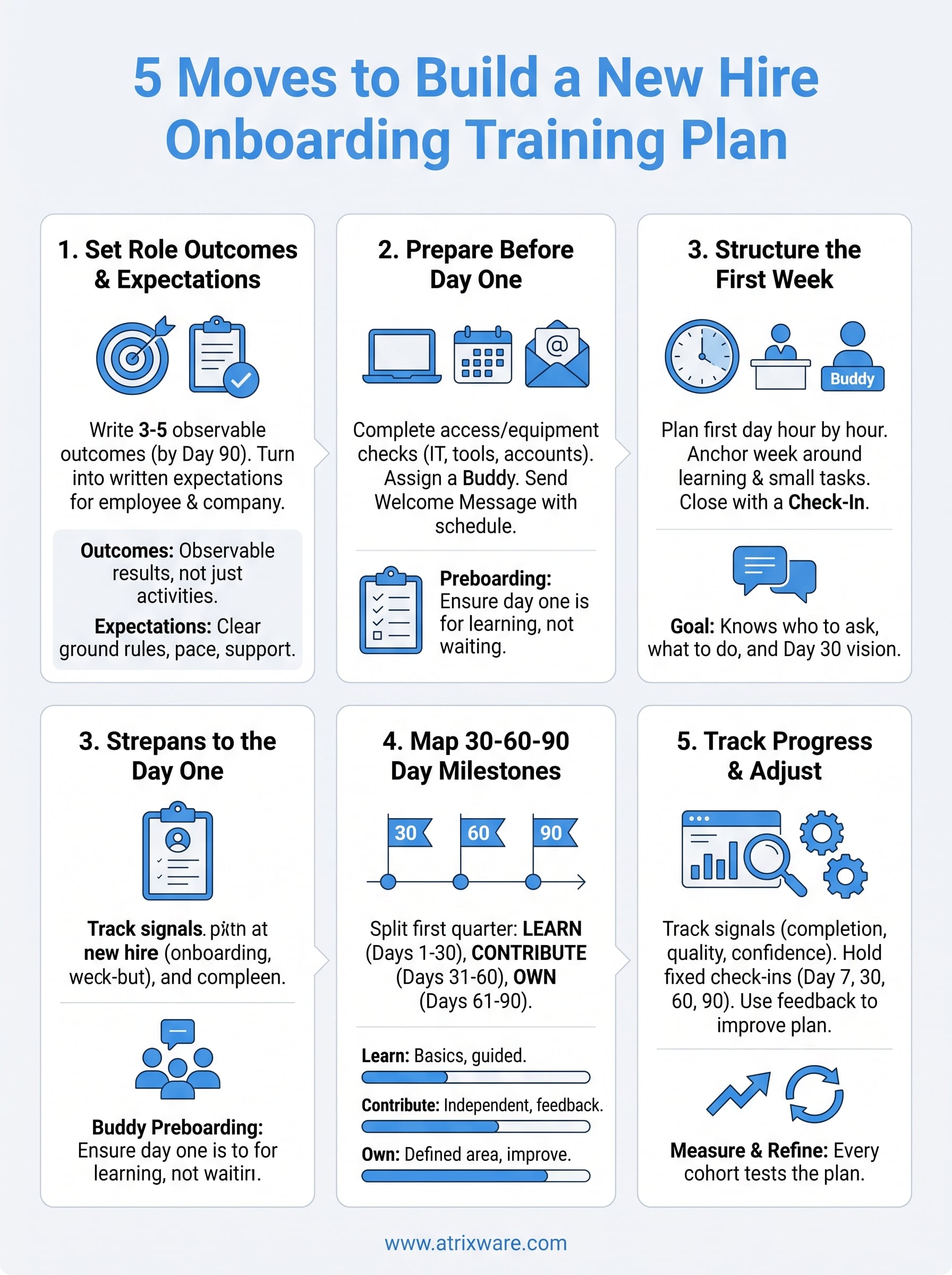
A new hire onboarding training plan is a written timeline that shows what a new employee must learn, who teaches it, and how you will confirm it worked. Build it in five moves: set role outcomes and expectations, prepare before day one, structure the first week, map the 30-60-90 day milestones, and track progress with fixed check-ins. The templates below are ready to paste into your own document.
Most new hires get a calendar invite, a few links, and a manager who is stretched thin. HR assumes the manager covered the role training. The manager assumes HR covered the policies. Nobody writes down what "good" looks like at week four, so the employee guesses. Ramp-up slows, questions go unasked, and people start wondering whether they took the right job.
At Atrixware, we build Axis LMS, the learning management system that training teams use to deliver and track onboarding courses. That gives us a close view of what separates plans that work from plans that stall. This guide walks you through each step with examples, tables, and copy-ready templates, so you can finish a plan before your next hire starts.
What a new hire onboarding training plan covers
A new hire onboarding training plan covers everything an employee must learn to perform their role, laid out on a timeline with owners and success checks. It is broader than an onboarding checklist, which only tracks administrative tasks such as signing forms and receiving a laptop.

Plan versus checklist
A checklist item says "Set up CRM access." A plan item says "Complete the CRM course, update five sample records, shadow two calls, and get manager sign-off." The first proves access exists. The second proves the employee can do the work. You need both, but build the plan first, because it decides which checklist items matter.
Many HR teams use the five Cs as a sanity check: compliance, clarification, culture, connection, and check-back. Compliance covers required policies and legal training. Clarification covers role expectations. Culture covers how work actually gets done. Connection covers relationships with teammates and stakeholders. Check-back covers scheduled feedback. A solid plan has at least one item under each.
A checklist proves access exists. A plan proves the employee can do the job.
What to gather before you start
Collecting a few inputs first keeps you from writing a generic plan. Pull these together before you open a blank document:
- The current job description and any role scorecard
- Three to five outcomes a successful hire reaches by day 90
- A list of every system, tool, and permission the role needs
- Required compliance or safety courses, with legal deadlines if any
- Existing training material, such as SOPs, recorded demos, and courses
- Names of a buddy, a trainer for each skill area, and an HR contact
- Time blocks on the manager’s calendar for the first 30 days
If a piece of material does not exist yet, note it as a gap. Do not hold the whole plan hostage to it. A short screen recording from a senior employee often fills the gap well enough for the first cohort.
Who owns each part of the plan
A plan fails fastest when ownership is vague. Assign one named person to every task, and write the name into the plan.
| Owner | Responsible for |
|---|---|
| Hiring manager | Role outcomes, expectations, weekly one-on-ones, sign-offs |
| HR or people team | Policies, benefits, compliance courses, plan template upkeep |
| IT | Equipment, accounts, permissions, security training |
| Buddy | Day-to-day questions, culture, introductions, shadowing |
| Trainer or subject expert | Skill-specific sessions and practice tasks |
| New hire | Completing tasks, asking questions, giving feedback |
Step 1. Set role outcomes and training expectations
Start by writing three to five outcomes the employee must reach by day 90, then convert each into a training expectation they can read in plain language. Outcomes drive every later step in your new hire onboarding training plan, so spend the most thinking time here.
Write outcomes, not activities
An activity says "attend product training." An outcome says "explain the three main use cases to a prospect without notes." Outcomes are observable, so a manager can confirm them by watching the work instead of trusting a completion checkbox.
To find them, ask the manager and two experienced peers one question: "What would a new person need to do by day 90 for you to say the hire is going well?" Merge the answers and cut anything that is nice to have. Here is how that looks for a tier 1 customer support representative:
- Day 30: Resolve the ten most common ticket types using the knowledge base, with every reply reviewed.
- Day 60: Work the full tier 1 queue alone and meet the team’s response-time target.
- Day 90: Handle escalations correctly and submit one improvement to the knowledge base.
Turn outcomes into new hire training expectations
New hire training expectations are the written ground rules of the learning period: pace, attendance, quality, communication, and the support the employee can count on. Cover both directions. If you only list what the employee owes you, the document reads like a warning. If you list what they can expect from you too, it reads like a commitment.
Copy this template and fill in the brackets:
NEW HIRE TRAINING EXPECTATIONS: [Role], [Team]

What we expect from you
- Complete assigned training modules by the due date in your plan.
- Tell [Manager] within one business day if you are blocked or behind.
- Bring at least two questions to every weekly one-on-one.
- By day 30, you can: [Outcome 1].
- By day 60, you can: [Outcome 2].
- By day 90, you can: [Outcome 3].

What you can expect from us
- A weekly one-on-one with [Manager], [day and time].
- A buddy, [Name], for questions about tools and team habits.
- Feedback on your work at least once a week, good and critical.
- A formal review of progress on days 30, 60, and 90.
- Time on your calendar for training, protected from meetings.
Share expectations twice
Send the document in the welcome message before day one, then walk through it in person on day one. Ask the new hire to restate the day-30 outcome in their own words. If they cannot, the expectation is not clear yet, and you have found that out in week one instead of month three.
An expectation that lives only in the manager’s head is a surprise waiting to happen.
Step 2. Prepare everything before day one
Preboarding means finishing access, equipment, scheduling, and the welcome message before the employee arrives, so that day one is spent learning instead of waiting. Give yourself a target of five business days ahead, and treat this step as the foundation of the whole new hire onboarding training plan.

Complete the access and equipment checks
Idle time on day one sends a quiet message that nobody expected the new person. Send requests to IT early and verify the results, because a request is not the same as a working login. Use this list:
- Laptop or workstation configured and tested
- Email, calendar, and chat accounts active
- Role-specific tools provisioned (CRM, ticketing, code repository, and so on)
- Shared folder and meeting-list access granted
- Badge, keys, or building access arranged, or VPN set up for remote hires
- Learning platform account created with day-one courses already assigned
- Phone, headset, and any required hardware shipped for remote employees
The manager should log in as the new hire’s role, or ask IT to confirm, at least one day ahead. Test the logins and assign the first courses before anyone walks in.
Assign a buddy and block the calendar
A buddy is a peer, not the manager, who answers the small questions people hesitate to ask a boss. Pick someone who has been in the company for at least six months, knows the work well, and has time. Tell the buddy exactly what the job involves: a daily check-in for the first two weeks, lunch in week one, and an introduction to key colleagues.
Then block the calendar for the first 30 days. Training sessions, shadowing time, the weekly one-on-one, and quiet study time should all be on the new hire’s calendar before they start. Protected time is what turns a plan on paper into a plan that happens.
Send the welcome message
A short, specific welcome message reduces first-day anxiety. Include the schedule, logistics, and the expectations document from Step 1.
Subject: Welcome to [Company], here is your first week

Hi [Name],

We are glad you are joining [Team] on [Start date]. Here is what to expect.

Day one
- Arrive at [time] at [location / video link]. Ask for [Manager].
- Your first day runs until about [end time]. Lunch is with the team.

What to bring or have ready
- [ID and forms, if needed]
- [Anything for remote setup]

Your buddy is [Buddy name], who will check in with you daily in your first two weeks.

I have attached your training expectations and your 30-60-90 day plan. Please read them before Monday, and bring your questions to our first one-on-one.

See you soon,
[Manager name]
Step 3. Run a structured first day and first week
Run the first day as a guided schedule that mixes welcome, setup, and one small real task, then spend the rest of week one on role basics and required training. The goal is a new hire who finishes day five knowing who to ask, what to do first, and what day 30 looks like.
Plan the first day hour by hour
An unstructured first day leaves the new hire reading policy PDFs alone. A scheduled day keeps them moving and lets the manager spot problems early. Adjust the times to your workday:
| Time | Activity | Owner |
|---|---|---|
| 9:00 | Welcome, agenda, review of expectations document | Manager |
| 9:30 | Workspace tour, login check, security basics | IT or manager |
| 10:30 | Meet the buddy and the immediate team | Buddy |
| 11:30 | Role overview: the day-30, 60, and 90 outcomes | Manager |
| 12:30 | Lunch with the team | Buddy |
| 1:30 | Required policy and compliance modules, first set | HR or LMS |
| 3:00 | First small task or shadowing session | Buddy |
| 4:30 | End-of-day check-in and plan for day two | Manager |
Keep the day lighter than you think it should be. People retain little after six hours of presentations, so leave gaps for questions and quiet time to organize notes.
Structure week one around learning, not paperwork
HR forms and benefits enrollment have to happen, but they should not fill the week. Anchor each day to one learning goal, and finish each day with a small win. A sample pattern:
- Day 2: Shadow the core workflow from start to finish and write down open questions.
- Day 3: Complete the main product or process training course.
- Day 4: Practice on sample data or a low-risk task, with the buddy reviewing.
- Day 5: Do one real task with support, then present what was learned to the manager.
Add the required compliance courses in short blocks across the week rather than in one marathon. Role knowledge goes in the morning when energy is high, and policy modules fit the quieter afternoon hours.
Close the week with a check-in
The end-of-week conversation is your first real data point. Keep it to 30 minutes and ask the same questions every time, so you can compare across hires:
- What went well this week?
- What was confusing or missing?
- Do you know what you should focus on next week?
- What do you need from me?
The first Friday check-in tells you more about your plan than any dashboard will.
Write down the answers. If three hires in a row say the same tool was confusing, fix the training, not the people.
Step 4. Map the 30-60-90 day training timeline
The 30-60-90 day timeline splits the first quarter into three phases: learn, contribute, and own. Each phase has defined outcomes, training tasks, and a manager review, which makes the new hire onboarding training plan concrete for the whole first quarter.

The 30-60-90 day framework
The 30-60-90 rule is a simple pacing device. In the first 30 days the employee learns the company, the tools, and the basics of the job. In days 31 to 60 they start contributing, with feedback. In days 61 to 90 they own defined work and begin to improve it.
| Phase | Focus | Example outcomes | Manager actions |
|---|---|---|---|
| Days 1 to 30: Learn | Company, tools, role basics | Completes core courses, works with guidance, knows who to ask | Weekly one-on-ones, review work closely, day-30 review |
| Days 31 to 60: Contribute | Independent practice with feedback | Handles routine work alone, quality meets the standard | Reduce review frequency, set stretch tasks, day-60 review |
| Days 61 to 90: Own | Ownership and improvement | Owns a defined area, suggests one improvement | Agree on goals for the next quarter, day-90 review |
Note the shift in manager behavior. Early on you review nearly everything. By day 60 you spot-check. By day 90 you are discussing goals, not corrections.
Fill in the plan template
Copy this into a document or spreadsheet and complete one for each hire. It carries the outcomes, tasks, owners, and success checks in a single page.
NEW HIRE ONBOARDING TRAINING PLAN
Employee: [Name]          Role / team: [Role, Team]
Start date: [Date]        Manager: [Name]
Buddy: [Name]             HR contact: [Name]

DAY-90 OUTCOMES
1. [Outcome]
2. [Outcome]
3. [Outcome]

PHASE 1: LEARN (Days 1 to 30)
Task | Owner | Due | Success check | Status
Complete day-one policy modules | HR | Day 3 | LMS completion |
Product / process course | Trainer | Day 7 | Quiz or demo |
Shadow [N] live sessions | Buddy | Day 14 | Notes reviewed |
First supervised task | Manager | Day 21 | Manager sign-off |
Check-ins: Day 7, weekly one-on-ones, Day-30 review

PHASE 2: CONTRIBUTE (Days 31 to 60)
Task | Owner | Due | Success check | Status
Role-specific advanced training | Trainer | Day 45 | Practical test |
Independent routine work | Manager | Day 50 | Quality review |
Cross-team introductions | Buddy | Day 45 | Meetings held |
Check-ins: weekly one-on-ones, Day-60 review

PHASE 3: OWN (Days 61 to 90)
Task | Owner | Due | Success check | Status
Own [defined area or project] | Manager | Day 80 | Result vs. target |
Propose one improvement | New hire | Day 85 | Presented to team |
Development plan for next quarter | Manager | Day 90 | Plan agreed |
Check-ins: biweekly one-on-ones, Day-90 review
Adapt the timeline by role
The framework holds across roles, but the content and length change. A sales hire might spend days 1 to 30 on product knowledge and CRM workflows, days 31 to 60 on live calls with coaching, and days 61 to 90 owning a small pipeline. A software developer typically starts with environment setup and a first small pull request in the first weeks, then moves to larger tickets and code review.
Roles with heavy regulation, such as healthcare, finance, or manufacturing, need compliance training and documented sign-offs earlier in the timeline, often before the person does any live work. Extend the plan to six months for complex roles or probationary periods, keeping the same three-phase logic with a longer "contribute" phase.
Step 5. Track progress and adjust the plan
Track progress by checking a small set of signals at fixed points, then use what you learn to correct the new hire’s path and to improve the new hire onboarding training plan for the next cohort. A plan without measurement is only a wish list.
Choose the signals you will track
Completion is the weakest signal, because someone can finish every module and still feel lost. Combine completion with evidence of ability and the employee’s own view:
- Training completion: Percent of assigned modules finished by their due dates.
- Manager sign-offs: Number of skills demonstrated and approved against the plan.
- Time to first independent task: Days until the employee does a real task without review.
- Work quality: Error rates, review feedback, or customer scores relevant to the role.
- Confidence rating: A 1 to 5 self-rating at each check-in.
- Early retention: Whether new hires are still with you at 90 days and six months.
Pick four or five and stick with them. Reviewing the same measures for each hire is what lets you compare cohorts and see trends.
Hold check-ins at fixed points
Put the review meetings on the calendar when you set up the plan, and treat them as non-negotiable. Each has a distinct purpose:
| Check-in | Purpose | Questions to ask |
|---|---|---|
| Day 7 | Catch setup and clarity problems | Do you have everything you need? Is anything unclear? |
| Day 30 | Review learning and outcomes | What do you feel confident in? Where do you need more training? |
| Day 60 | Review contribution and feedback | What is working? What is slowing you down? |
| Day 90 | Review ownership and set goals | What would you change about this onboarding? What are your goals next quarter? |
In each one, share specific observations from the work, not general impressions. "Your last three ticket replies were accurate and warm" lands better than "You’re doing great." If performance is off track at day 60, say so plainly, agree on a fix, and document it. For roles with a formal probationary period, follow your company’s HR policy for evaluation timing and forms.
Automate tracking with an LMS
Spreadsheets work for one or two hires. Beyond that, manual tracking breaks down: someone forgets to assign a course, reminders go unsent, and HR cannot see who is behind. A learning management system such as Axis LMS handles that layer. You can assign courses automatically when a hire joins, send reminders, record completions, and run reports on progress across the whole cohort. It can also sync user data with HR systems such as BambooHR or ADP, so a new record in your HR tool creates the learner account without extra work. For regulated roles, completion records give you proof that required training happened.
After each cohort, review the numbers and the feedback together and change something concrete. Cut the module nobody found useful. Add the session three people asked for. Move the compliance block to a better time of day.
Every cohort that goes through your plan is a free test of the plan itself.
Put your plan to work
A strong new hire onboarding training plan starts with clear outcomes, finishes preparation before day one, structures the first week, paces learning across 30-60-90 days, and checks progress at set points. The templates above give you the expectations document, welcome message, and plan layout. Pick one open role, fill in the outcomes, and have a first draft done before the next start date. You will improve it with every hire.
If you want the tracking, reminders, and reporting handled automatically, see how it works in practice. Request an Axis LMS admin demo and walk through how onboarding courses, assignments, and completion reports fit your plan.
