New hires decide whether they’re staying within the first few weeks, and a clunky onboarding process pushes many of them right out the door. If you’re still juggling spreadsheets, paper forms, and scattered welcome emails, you’re already losing people before they’ve had a chance to contribute. That’s why so many HR teams are searching for employee onboarding software that automates the onboarding busywork instead of just digitizing it.
This guide compares the platforms worth your time in 2026, based on how well they handle new hire onboarding software essentials: course delivery, compliance tracking, e-signatures, and reporting that shows what’s actually working. Whether you’re a five-person startup or running onboarding across multiple departments, you’ll find options built for your scale, including tools flexible enough to carry training from onboarding into upskilling as full onboarding training software for ongoing employee development.
Below, you’ll get a breakdown of the 10 best platforms, what each does well, where they fall short, and who they fit best. We’ll also point out which ones offer the strongest integrations and compliance features, so you can match a solution to your actual hiring volume and training needs, not just a features list.”}
1. Axis LMS by Atrixware
Axis LMS tops this list because it does something most onboarding-only tools can’t: it grows with your training needs instead of forcing you onto a new platform once onboarding is done. Built by Atrixware, it’s a full LMS built for employee training that handles new hire orientation, compliance training, and ongoing skill development in one place. For teams that want employee onboarding and training software rather than two separate systems, that’s a real advantage, and it’s a big part of what makes Axis LMS a fit for employee training.

Key features
Axis LMS gives administrators a drag-and-drop course builder, so you can assemble onboarding tracks, policy acknowledgments, and role-specific modules without touching code. It supports both self-paced online courses and live virtual classroom sessions inside the LMS, which matters if part of your onboarding still involves a manager-led walkthrough. The platform’s compliance management tools track certifications, CEUs, and re-certifications automatically, and it’s built to support regulated environments under standards like GDPR and FDA 21 CFR Part 11.
- Drag-and-drop course authoring for fast onboarding content creation
- Automated and on-demand reporting on learner progress and completion rates
- SSO support (SAML, Okta, Azure, Ping Identity) for secure single-sign-on access
- REST API, webhooks, and a 5,000+ system integration builder connecting to ADP, Salesforce, BambooHR, and Zoho
- Full UI branding so the portal matches your company’s look and feel
- E-commerce functionality for selling training externally, useful for partner or customer onboarding
A platform that handles onboarding today and full employee development tomorrow saves you from migrating systems twice.
Pros and cons
| Pros | Cons |
|---|---|
| Scales from onboarding into full onboarding training software for ongoing L&D | Full feature depth takes some setup time upfront |
| Deep compliance tracking (GDPR, FDA 21 CFR Part 11, CEUs) | Best suited to teams ready to use reporting and automation fully |
| Extensive integrations and REST API for HR/CRM sync | Smaller businesses may only need a subset of features initially |
| Strong branding and UI customization options | |
| Supports both online and virtual classroom delivery |
Best for
Axis LMS fits organizations that need onboarding software for new employees now but don’t want to outgrow the tool in a year. Compliance-heavy industries like healthcare, finance, and manufacturing benefit most from its certification tracking and audit-ready reporting. It’s also a strong pick for companies running channel partner training or selling courses externally, since the e-commerce and branding tools are built for that from the start. HR teams juggling multiple training use cases, employee onboarding, compliance, and customer education, get the most value because everything lives in one system instead of three.
Pricing
Atrixware doesn’t publish flat tiered pricing publicly, because Axis LMS is priced based on your user count, feature needs, and whether you require the hosted or self-hosted version. This works in your favor if you’re a small business that doesn’t need the full integration suite yet, since you’re not paying for capacity you won’t use. You can request a customized quote and a live demo directly through the Axis LMS pricing page to see costs based on your actual headcount and rollout plan, rather than guessing from a generic price list.
2. BambooHR
BambooHR built its reputation as an HR information system first, and onboarding is one piece of a broader people-management suite. If you already run payroll, benefits, and performance reviews through BambooHR, adding new hires into that same system means less duplicate data entry and fewer logins for your HR team to manage. It’s a popular pick for companies that want new employee onboarding software bundled with the HR functions they already need.
Key features
BambooHR automates the paperwork side of onboarding: offer letters, e-signatures, tax forms, and equipment requests all trigger from a single new-hire record. Preboarding tasks can start before day one, so new hires fill out forms and review handbooks before they ever walk in the door.
- Customizable onboarding checklists assigned automatically by role or department
- E-signature collection for offer letters and compliance documents
- New hire packets with welcome messages, org charts, and company info
- Mobile app access so new hires can complete tasks from their phone
- Integration with BambooHR’s payroll and benefits modules
Bundling onboarding with your core HR system cuts down on the double data entry that slows new hires down before day one.
Pros and cons
| Pros | Cons |
|---|---|
| Onboarding tasks connect directly to payroll and benefits setup | Limited course-building tools compared to dedicated LMS platforms |
| Clean, easy-to-navigate interface for HR admins and new hires | Deeper compliance training and certification tracking aren’t built in |
| Strong preboarding workflows before start date | Pricing isn’t published, requiring a sales call for quotes |
| Mobile-friendly for remote or field-based new hires |
Best for
BambooHR suits small and mid-sized businesses that want one system covering HR records, payroll, and onboarding without stitching together separate tools. It works well for companies whose onboarding needs are mostly administrative (forms, checklists, introductions) rather than heavy on training content or compliance certification. Teams that eventually need robust course delivery or CEU tracking will likely outgrow it.
Pricing
BambooHR doesn’t list public pricing. You’ll need to request a quote based on employee count and which modules (payroll, time tracking, onboarding add-ons) you want bundled in. Most reviews put per-employee costs in a range comparable to other mid-market HR suites, but exact numbers depend on your negotiated contract.
3. Gusto
Gusto started as a payroll platform and still leads with that strength, but it’s added enough onboarding functionality to make the list for small businesses that want simplicity over depth. If your primary need is getting a new hire’s tax paperwork, direct deposit, and benefits enrollment sorted without hiring an HR department to manage it, Gusto handles that cleanly. It’s a common answer when people search for employee onboarding software for small business rather than enterprise-scale systems, though fitting a training platform into small-business HR is a separate step.
Key features
Gusto’s onboarding flow centers on getting new hires into payroll and benefits fast, with self-service forms that pull data straight into the system administrators already use for payday. New hires get a checklist and welcome message, but the platform’s real strength is eliminating manual entry between hiring and first paycheck.
- Self-onboarding portal where new hires enter their own tax and bank details
- Automatic I-9 and W-4 form collection with e-signature
- Offer letter templates and digital signing
- Software and equipment provisioning checklists
- Direct integration with Gusto payroll, benefits, and time tracking
When payroll accuracy matters more than training depth, a payroll-first onboarding tool beats a feature-heavy LMS you’ll only half use.
Pros and cons
| Pros | Cons |
|---|---|
| Onboarding data flows directly into payroll, no re-entry | No course builder or training content delivery |
| Simple, guided setup for non-HR-specialist admins | Compliance tracking limited to basic tax/employment forms |
| Transparent, published pricing tiers | Not built for multi-department or enterprise onboarding needs |
| Good benefits administration bundled in | Reporting is thinner than dedicated HR or LMS platforms |
Best for
Gusto fits small businesses and startups, typically under 100 employees, where onboarding mostly means paperwork and payroll setup rather than structured training. It’s a strong fit if you don’t yet need compliance certification tracking or a formal learning curriculum, and you’d rather keep HR software costs low and predictable. Companies that expect to scale into heavier compliance or training requirements should treat Gusto as a starting point, not a long-term home for onboarding.
Pricing
Gusto publishes its pricing openly, starting around $49 per month plus a per-employee fee on its base Simple plan, with higher Plus and Premium tiers adding features like time tracking, PTO management, and dedicated support. Onboarding tools are included across plans rather than sold as a separate add-on, which makes budgeting straightforward for small teams.
4. Rippling
Rippling built its name on combining HR, IT, and finance into one system, and onboarding is where that combination actually pays off. When a new hire starts, Rippling can provision their laptop, install their software licenses, add them to Slack and email, and enroll them in payroll and benefits, all from the same workflow. For companies tired of IT and HR working off separate checklists, this is one of the few digital employee onboarding software platforms that genuinely unifies both sides.

Key features
Rippling’s standout feature is device and app provisioning tied directly to the onboarding record, so a new hire’s laptop arrives pre-configured with the right software before day one. Everything runs through a single employee profile that feeds payroll, benefits, IT permissions, and org charts at once, cutting down on the admin sprawl most onboarding tools leave behind.
- Automated device and software provisioning triggered by hire date
- Custom onboarding workflows by department, role, or location
- E-signature collection for offer letters, policies, and tax forms
- Global hiring and compliance support for international new hires
- Native payroll, benefits, and time-tracking integration
Onboarding that also configures a new hire’s laptop and software access saves IT a full day of manual setup.
Pros and cons
| Pros | Cons |
|---|---|
| Combines HR, IT, and payroll onboarding in one workflow | Pricing structure is modular and can get complex to estimate |
| Strong global and multi-country hiring support | No dedicated course-building or LMS-style training delivery |
| Automated device/app provisioning is rare among competitors | Steeper learning curve for smaller teams without dedicated IT |
| Highly customizable workflows by role or department | Best value requires buying into multiple Rippling modules |
Best for
Rippling fits growing companies, especially those with remote or distributed teams, that need onboarding to cover more than paperwork. It’s a strong match if your new hires need laptops shipped, software accounts created, and payroll set up simultaneously, and you want one system managing all three instead of coordinating between HR and IT tickets. Companies hiring internationally also benefit from its built-in compliance handling across countries.
Pricing
Rippling doesn’t publish flat pricing, since costs depend on which modules you activate, HR, IT, payroll, or all three, plus your headcount. The base platform starts with a per-employee monthly fee, but most companies end up requesting a custom quote once they factor in device management and global payroll needs. Expect a sales conversation before you get real numbers.
5. Greenhouse
Greenhouse built its reputation as an applicant tracking system, and its onboarding module picks up exactly where recruiting leaves off. The idea is simple: the same profile a candidate had during interviews carries straight into their new-hire record, so nobody re-enters resumes, interview notes, or start dates by hand. If your hiring and onboarding teams currently work off disconnected spreadsheets, Greenhouse closes that gap by treating onboarding as the final stage of recruiting rather than a separate process.
Key features
Greenhouse’s onboarding tools focus on handoff quality between recruiters, hiring managers, and new hires. Task lists auto-assign based on role and start date, and hiring managers get visibility into what’s been completed before day one arrives.
- Automated task assignments triggered by candidate-to-employee conversion
- Structured onboarding plans by role, department, or location
- New hire portal with company info, team introductions, and paperwork
- Reporting on time-to-productivity and onboarding task completion
- Integrations with HRIS platforms like BambooHR, Workday, and ADP
Carrying candidate data straight into onboarding removes the re-entry step that slows most new-hire paperwork down.
Pros and cons
| Pros | Cons |
|---|---|
| Seamless recruiting-to-onboarding handoff, no duplicate data entry | Onboarding module is secondary to its core ATS function |
| Strong reporting on hiring-to-productivity timelines | No built-in course delivery or training content tools |
| Wide HRIS integration library | Requires pairing with a payroll or HRIS system separately |
| Structured task ownership across hiring teams | Pricing skews toward mid-size and larger recruiting teams |
Best for
Greenhouse fits companies with active, high-volume hiring where recruiting and onboarding need to stay tightly connected. It’s a strong choice for talent acquisition teams already using Greenhouse as their applicant tracking system, since adding onboarding avoids a second data migration. Businesses looking for standalone staff onboarding software without an existing ATS relationship will likely find better value elsewhere, since Greenhouse’s pricing assumes you’re using its recruiting tools too.
Pricing
Greenhouse doesn’t publish flat rates and prices based on company size, hiring volume, and which modules (recruiting, onboarding, or both) you need. Quotes typically scale with headcount and require a sales conversation, so budget-conscious small teams should confirm onboarding costs aren’t bundled into a larger recruiting contract you don’t need.
6. Deel
Deel built its platform around global hiring, and onboarding is where that focus shows up most clearly. If you’re bringing on contractors or full-time employees in countries where you don’t have a legal entity, Deel handles the compliance paperwork, local contracts, and tax forms that would otherwise require hiring a local law firm. It’s become a default answer for companies that need onboarding employee software built for cross-border teams rather than single-country hiring.
Key features
Deel’s onboarding workflow generates country-specific contracts automatically, pulling from a library of localized templates so new hires sign agreements that actually hold up under their local labor law. The platform also manages background checks, equipment shipping, and benefits enrollment across dozens of countries from one dashboard.
- Automated, localized employment contracts for 100+ countries
- Built-in compliance checks for local labor law and tax requirements
- Global payroll and benefits enrollment tied to onboarding tasks
- Equipment procurement and shipping for remote international hires
- E-signature and document storage for contracts and tax forms
Hiring across borders without local compliance built into onboarding is how companies end up with fines they didn’t see coming.
Pros and cons
| Pros | Cons |
|---|---|
| Strong compliance coverage for international contractors and employees | Less useful if you only hire domestically |
| Automated, localized contract generation saves legal review time | No dedicated training or course-building tools |
| Global payroll and benefits handled in one platform | Costs add up quickly across many countries |
| Equipment logistics support for remote hires | Onboarding features feel secondary to its core EOR service |
Best for
Deel fits companies hiring internationally, whether that’s a handful of contractors abroad or a distributed team spread across a dozen countries. It’s a strong pick for startups scaling globally without the budget to set up legal entities everywhere they hire. Companies onboarding only domestic staff won’t get much value from Deel’s core strength and should look elsewhere.
Pricing
Deel charges per contractor or employee, with contractor management starting around $49 per person per month and Employer of Record (EOR) services priced higher to cover local compliance costs. Full pricing depends on the countries involved, since local tax and legal requirements vary the administrative overhead Deel takes on. You’ll need a quote for exact EOR costs, but contractor pricing is published and predictable.
7. Justworks
Justworks operates as a professional employer organization (PEO), which means it co-employs your staff to handle payroll, benefits, and compliance on your behalf. Onboarding here isn’t a bolt-on feature, it’s baked into the PEO relationship, so new hires get enrolled in health insurance, 401(k), and payroll tax filings the moment they’re added to the system. Small businesses that don’t want to manage benefits compliance in-house often choose Justworks specifically for that safety net, making it a common pick among onboarding software for new employees at companies without a dedicated HR department.
Key features
Justworks centers its onboarding around getting new hires enrolled in benefits and payroll without requiring HR to chase paperwork manually. New employees complete their own tax forms and banking details through a self-service portal, and the platform automatically applies the correct state and local tax rules based on where they work.
- Self-service new hire portal for tax forms, direct deposit, and benefits selection
- Automated compliance with state-specific employment laws and tax filings
- Access to large-group health insurance rates through the PEO model
- Digital document storage for offer letters and signed policies
- Basic onboarding checklists assignable by admin
A PEO model means new hire benefits and tax compliance run automatically instead of falling on one overworked HR generalist.
Pros and cons
| Pros | Cons |
|---|---|
| Compliance handled automatically across states via the PEO structure | No course-building or training content delivery |
| Access to better group health insurance rates than most small businesses get alone | Co-employment model isn’t a fit for every company culture or legal preference |
| Simple, guided onboarding portal for non-HR admins | Limited customization compared to standalone HR platforms |
| Predictable flat-fee pricing | Less useful once you’re large enough to negotiate your own benefits directly |
Best for
Justworks fits small businesses, typically under 500 employees, that want benefits administration and compliance handled without building an internal HR compliance function. It suits companies operating across multiple states where tracking each state’s employment law manually would eat up too much HR time. Businesses that need structured training content or certification tracking alongside onboarding will need to pair Justworks with a separate LMS.
Pricing
Justworks charges a flat monthly fee per employee rather than a percentage of payroll, with two main tiers: Basic and Plus, the latter adding full health insurance benefits access. Pricing generally starts in the $50 to $100+ per employee per month range depending on the tier and benefits selected, which Justworks publishes more transparently than most PEO competitors.
8. Connecteam
Connecteam built its platform for the deskless workforce, the retail associates, warehouse crews, and field technicians who never sit at a computer during their shift. Onboarding here happens entirely through a mobile app, which matters if your new hires are clocking in at a job site rather than logging into a laptop on day one. It’s a solid answer for companies searching for staff onboarding software that doesn’t assume everyone has desk access.

Key features
Connecteam packages onboarding into a mobile-first hub where new hires complete training modules, sign documents, and check off tasks straight from their phone. Managers build custom onboarding flows without code, and the app doubles as an ongoing communication tool once training wraps up.
- Mobile-first onboarding checklists and document signing
- Built-in course builder for training modules, quizzes, and videos
- Time clock and scheduling tied to the same employee profile
- Company-wide chat and updates feed for new hire communication
- Custom forms for equipment, uniforms, and compliance acknowledgments
Deskless teams need onboarding that lives on a phone, not a portal nobody checks between shifts.
Pros and cons
| Pros | Cons |
|---|---|
| Purpose-built for mobile and deskless workforces | Less depth for office-based, desk-heavy onboarding needs |
| Combines onboarding with scheduling and time tracking | Compliance and certification tracking is lighter than dedicated LMS platforms |
| Simple course builder included at lower price points | Reporting is functional but not as granular as enterprise HR suites |
| Affordable for small operations with hourly staff | Advanced HR integrations are limited compared to HRIS-first tools |
Best for
Connecteam fits businesses running hourly, shift-based, or field teams, think restaurants, retail chains, cleaning services, and construction crews, where new hires rarely touch a company laptop. It’s a strong match if your onboarding needs to double as day-to-day shift communication rather than a one-time event. Companies needing deep compliance certification tracking or white-collar training curriculums should look toward a dedicated LMS instead.
Pricing
Connecteam offers a free plan for very small teams, with paid tiers starting around $29 per month for up to 30 users and scaling up based on headcount and feature bundles like advanced HR tools or training modules. Pricing is published openly on its site, which makes it easy for small operators to budget without a sales call.
9. Paycor
Paycor markets itself as an HR and payroll suite built for mid-sized companies that have outgrown basic small-business tools but aren’t ready for an enterprise system like Workday. Onboarding sits inside a broader HR platform that includes payroll, benefits administration, and performance management, so new hires flow into the same record used for every other HR function. Businesses in healthcare, manufacturing, and restaurants often pick Paycor specifically because it ships with industry-tuned compliance templates rather than generic ones.
Key features
Paycor’s onboarding module walks new hires through paperwork, direct deposit setup, and policy acknowledgments before their first day, with progress visible to managers in real time. Automated workflows assign tasks by department, and the platform’s analytics dashboard flags where new hires stall out during the process.
- Self-service onboarding portal with e-signature for forms and policies
- Automated task routing by role, department, or location
- Built-in compliance templates for regulated industries (healthcare, manufacturing)
- Employee self-service for tax withholding, direct deposit, and benefits selection
- Reporting dashboard tracking onboarding completion and bottlenecks
Industry-specific onboarding templates save HR teams from rebuilding compliance paperwork from scratch every time regulations shift.
Pros and cons
| Pros | Cons |
|---|---|
| Strong analytics on where onboarding tasks stall | No dedicated course-building or training content tools |
| Industry-specific compliance templates included | Pricing requires a sales call, nothing published upfront |
| Onboarding data feeds directly into payroll and benefits | Interface feels dated compared to newer HR platforms |
| Scales well for mid-size, multi-location businesses | Smaller teams may find it feature-heavy for their needs |
Best for
Paycor fits mid-sized businesses, roughly 50 to 1,000 employees, that need onboarding employees software tied tightly to payroll and want compliance templates built for their specific industry. It works well for multi-location employers who need consistent onboarding steps applied automatically regardless of which branch or department is hiring. Companies wanting structured training curriculums or certification tracking alongside onboarding will need a separate LMS, since Paycor’s strength is administrative HR, not course delivery.
Pricing
Paycor doesn’t publish flat pricing and instead quotes based on employee count and which modules, payroll, benefits, onboarding, performance, you activate. Expect a demo and sales conversation before getting real numbers, with costs typically scaling per employee per month across bundled HR services rather than a flat platform fee.
10. Workday
Workday sits at the enterprise end of this list, built for companies with thousands of employees and HR operations spread across multiple business units or countries. Onboarding here isn’t a standalone module bolted onto a smaller system, it’s one piece of a full enterprise resource planning suite that also covers finance, payroll, talent management, and workforce planning. If you’re comparing best employee onboarding software options for a global workforce already running on Workday HCM, adding onboarding keeps everything inside one data model instead of syncing between separate vendors.

Key features
Workday’s onboarding tools pull directly from its core HCM record, so a new hire’s role, manager, location, and compensation data populate onboarding tasks automatically without manual setup. Configurable business processes let large HR teams build onboarding paths that vary by country, job family, or business unit, which matters once you’re managing thousands of hires a year across different regulatory environments.
- Automated onboarding workflows tied to the core HCM employee record
- Configurable business processes by country, job family, or department
- Manager and buddy task assignments with built-in reminders
- Deep analytics and workforce planning dashboards
- Global payroll, benefits, and compliance support across large employee populations
Enterprise onboarding only works when it’s built on the same data model as the rest of your HR system, not bolted on as an afterthought.
Pros and cons
| Pros | Cons |
|---|---|
| Deep integration with core HCM, payroll, and finance data | Overkill and expensive for small or mid-sized businesses |
| Highly configurable for complex, multi-country organizations | Long implementation timelines, often months |
| Strong workforce analytics and reporting | Requires dedicated admin resources to configure and maintain |
| Scales to tens of thousands of employees reliably | No lightweight course-building tools for training content |
Best for
Workday fits large enterprises, generally 1,000+ employees, already running or planning to run their core HR operations on the Workday platform. It suits organizations with complex approval chains, multiple business units, or heavy international compliance needs where a lightweight onboarding tool won’t hold up. Smaller companies without dedicated HRIS administrators will find the setup burden outweighs the benefit.
Pricing
Workday doesn’t publish pricing publicly, and costs are negotiated based on employee count, modules activated, and implementation scope. Expect a lengthy sales and implementation process, often involving third-party consultants, with contracts typically running into six figures annually for mid-to-large deployments.
11. How to choose the right onboarding software
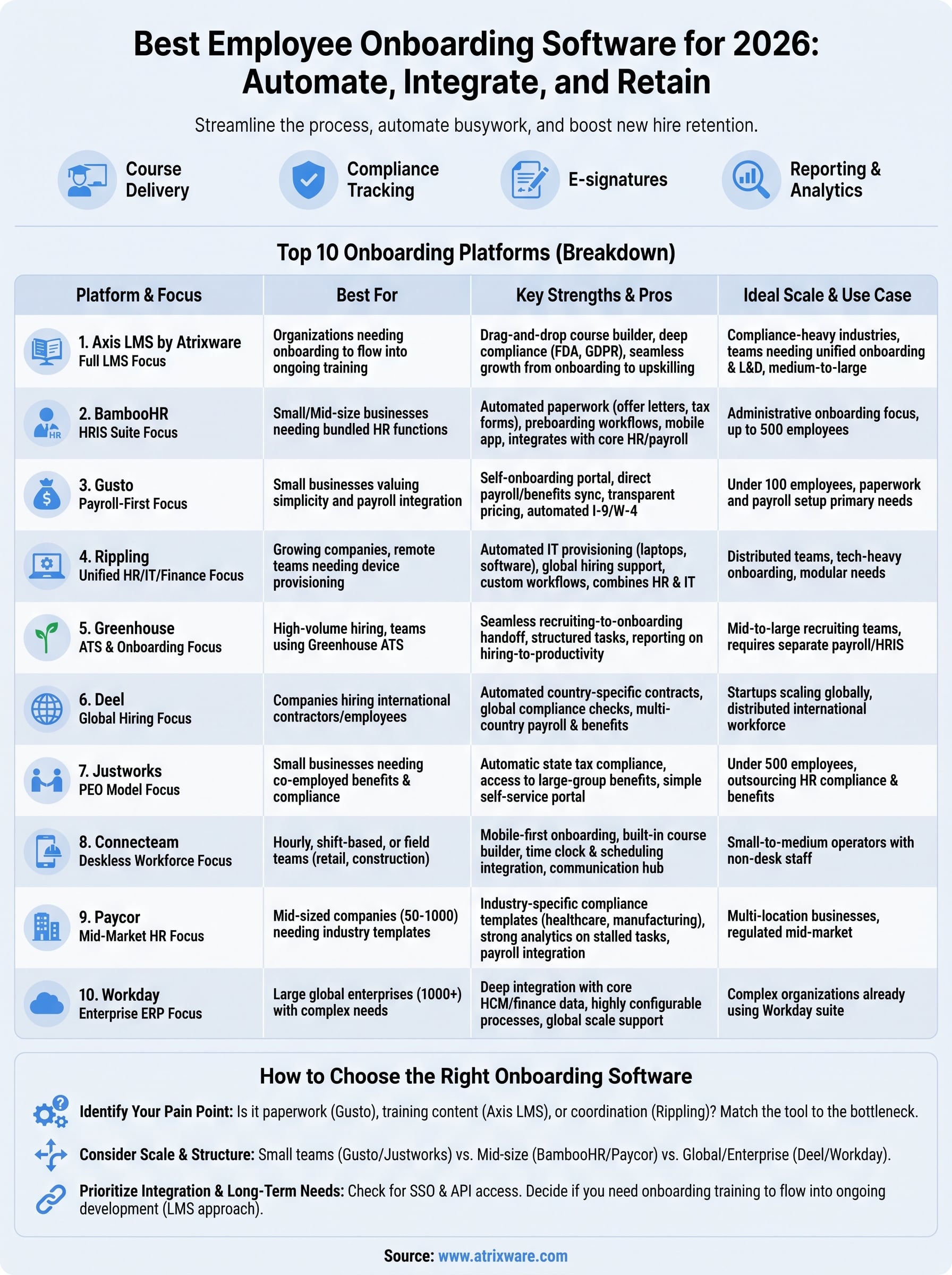
Picking the right platform starts with an honest audit of what’s actually broken in your current process, not a feature checklist copied from a vendor’s homepage. Ask whether your pain point is paperwork (offer letters, tax forms, e-signatures), training content (courses, compliance certifications, skill-building), or coordination (IT provisioning, manager task lists, cross-department handoffs). A payroll-first tool like Gusto solves a different problem than an LMS built for compliance training like Axis LMS, and buying the wrong type wastes budget no matter how polished the interface looks.
The right onboarding software matches your actual bottleneck, not the longest feature list on a sales page.
Match the tool to your hiring volume and structure
Company size and hiring cadence should drive your shortlist more than brand recognition, so compare platforms step by step before you narrow it down. A five-person startup hiring twice a year doesn’t need Workday’s enterprise workflow engine, and a 2,000-employee company spread across a dozen countries won’t get far on a basic checklist app.
- Under 50 employees: Gusto or Justworks for payroll and compliance without overhead
- 50-500 employees: BambooHR, Paycor, or Connecteam depending on desk vs. deskless staff
- Global or remote teams: Deel or Rippling for cross-border compliance and device provisioning
- Compliance-heavy or training-intensive industries: Axis LMS for certification tracking and course delivery
- 1,000+ employees: Workday for enterprise-grade data integration
Check integration depth before you commit
Don’t sign a contract until you’ve confirmed how the platform integrates with payroll, CRM, and HR systems, since a tool that requires manual data exports defeats the purpose of automating onboarding in the first place. Look specifically at SSO support and API access, since these determine whether IT can plug the software into your identity provider without months of custom development.
Weigh training depth against administrative convenience
Finally, decide whether onboarding ends once paperwork clears or whether it needs to feed into ongoing employee development. Teams that need onboarding training software capable of tracking certifications, re-certifications, and skill growth over years, not just weeks, should prioritize platforms built as a full LMS rather than a paperwork tracker with a training tab bolted on, which is what building a repeatable, compliant onboarding program really requires.
Finding the right fit for your team
Most of the platforms on this list solve one slice of onboarding well: payroll setup, IT provisioning, or paperwork. Few handle the part that determines whether a new hire actually becomes productive, structured training that continues past their first week. That’s the gap employee onboarding software built as a full LMS closes, and it’s why Axis LMS opens this list rather than closing it as an afterthought.
Before you sign anything, map your actual bottleneck against the shortlist above. If compliance tracking, course delivery, or certification renewals matter as much as getting forms signed, a paperwork-first tool will leave you stitching together a second system within a year.
If you’re not sure which category fits your situation, find out how ready you are for an LMS before you commit budget to the wrong tool.
