Moodle LMS is a free, open source Learning Management System that helps organizations create, deliver, and track online training. Built for flexibility and control, it powers training programs for universities, businesses, nonprofits, and government agencies around the globe. You can use it to build courses, manage learners, track progress, and measure results without paying licensing fees.
This guide covers everything you need to know about Moodle LMS. You’ll discover why thousands of organizations choose it, how to get your platform up and running, and what features matter most. We’ll walk through pricing models, hosting options, and key capabilities that set Moodle apart from other learning platforms. Whether you’re evaluating Moodle for the first time or looking to understand how it compares to alternatives like Axis LMS, you’ll find practical answers to help you make an informed decision about your organization’s training needs.
Why Moodle LMS is popular and widely used
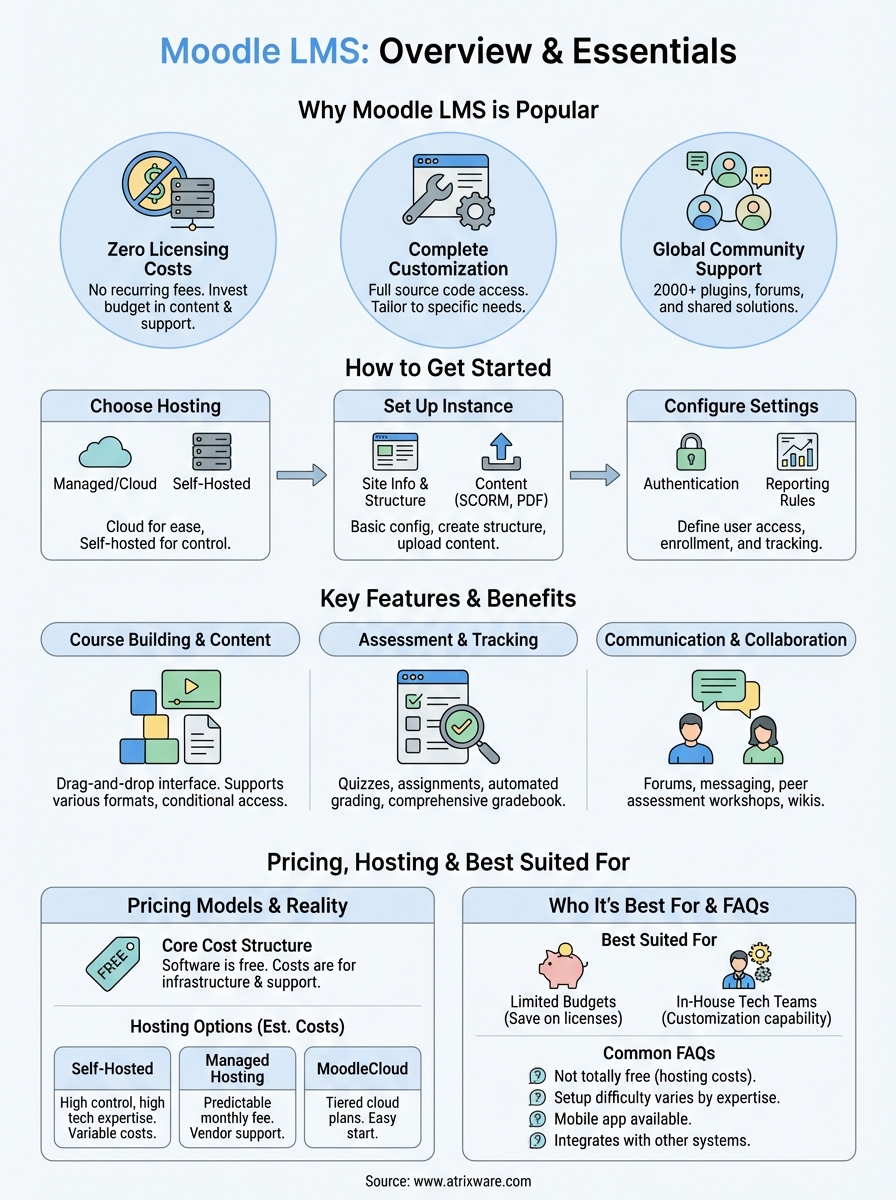
Organizations choose Moodle LMS because it delivers enterprise-level training capabilities without the recurring licensing fees that drain budgets. More than 213 million users worldwide rely on this platform to power their learning programs. The combination of cost savings, technical flexibility, and proven reliability makes it a top choice for organizations that want complete control over their training infrastructure.
Zero licensing costs
You save thousands of dollars annually when you choose open source software over proprietary alternatives. Moodle eliminates license fees entirely, which means your budget goes toward hosting, customization, and content development instead of vendor subscriptions. Organizations with tight budgets find this particularly valuable because they can scale their user base without triggering price increases tied to seat counts or feature unlocks.
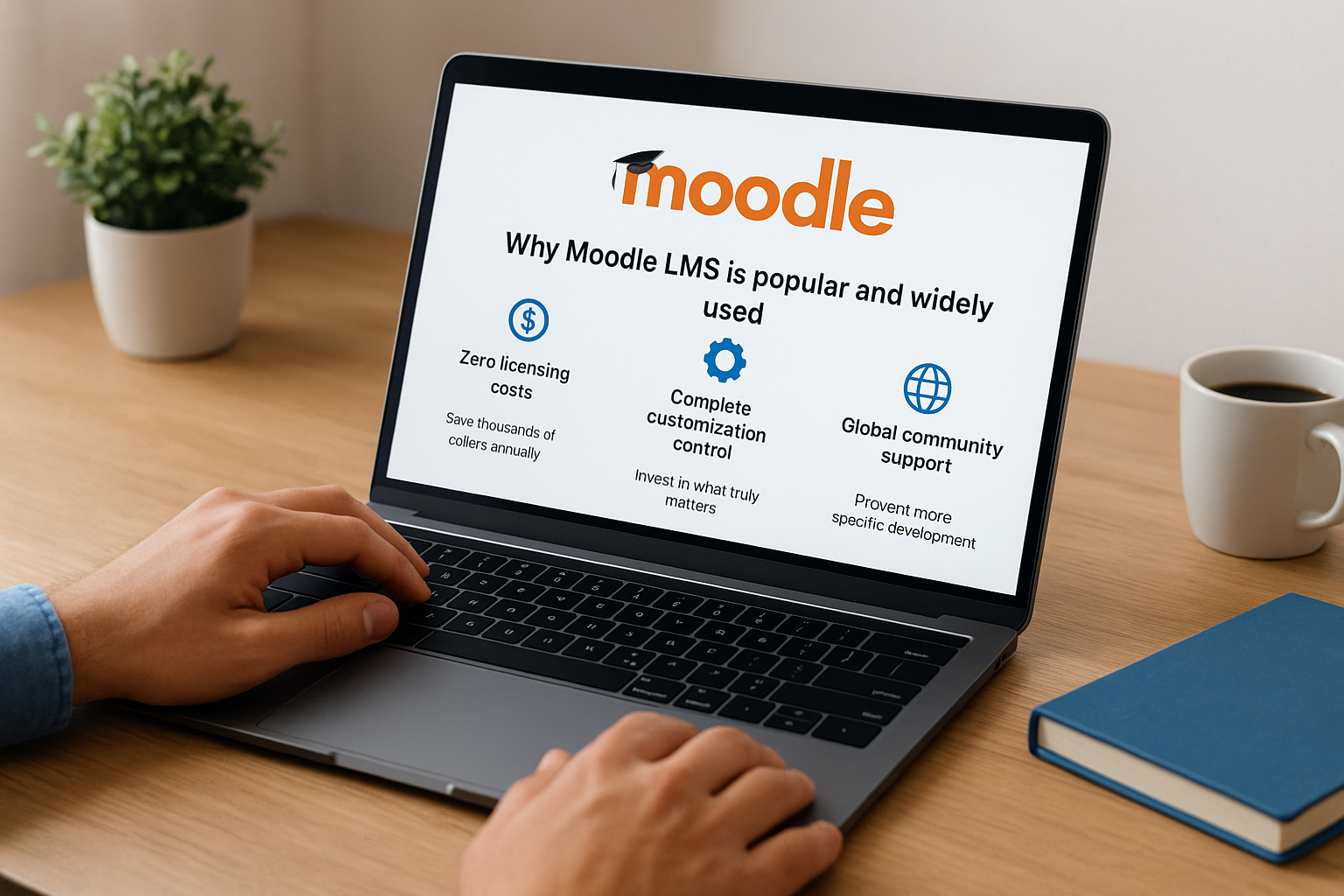
The absence of licensing fees allows you to invest in what truly matters: creating effective training experiences and supporting your learners.
Complete customization control
Moodle gives you full access to its source code, which lets your team modify any aspect of the platform to match your specific requirements. You can adjust the interface, add custom features, integrate with existing systems, and brand the entire experience to reflect your organization’s identity. This level of control attracts organizations that need specialized functionality or have unique compliance requirements that off-the-shelf solutions cannot address.
Global community support
A massive developer and user community contributes improvements, plugins, and solutions that benefit everyone using the platform. You gain access to over 2,000 plugins that extend core functionality without custom development costs. The community forums provide answers to technical questions, share best practices, and offer troubleshooting guidance when you encounter challenges. This collaborative ecosystem means you’re never alone in solving problems or discovering new ways to enhance your training programs.
How to get started with Moodle LMS
Getting your Moodle LMS up and running requires three main decisions: how you’ll host it, who will manage it, and what initial configuration you need. You can launch a basic instance in hours or spend weeks customizing an enterprise deployment. The path you choose depends on your technical expertise, budget constraints, and specific training requirements. Organizations typically start with either a cloud-hosted option for speed or a self-hosted setup for maximum control.
Choose your hosting approach
You face two primary hosting options when implementing Moodle LMS. Cloud-based hosting through MoodleCloud or a managed service provider eliminates technical setup requirements and gets you operational quickly. Your provider handles server maintenance, security updates, and technical support while you focus on building courses and managing learners. This approach works best when you want minimal IT involvement and predictable monthly costs.

Self-hosting on your own servers gives you complete infrastructure control but demands significant technical expertise. Your IT team needs to install Moodle, configure databases, manage security patches, and handle ongoing maintenance. Organizations choose this route when they have strict data sovereignty requirements, existing server infrastructure, or development teams that can customize the platform extensively.
The hosting decision shapes everything that follows, from your monthly costs to your ability to customize features and integrate with other systems.
Set up your first instance
Start by creating an administrator account and configuring your site’s basic information, including the site name, time zone, and default language. You’ll establish the course structure that determines how learners navigate through training materials. Most organizations begin with a simple category system that mirrors their departments or training types before expanding into more complex hierarchies.
Upload your first course content using SCORM packages, PDF documents, or video files that align with immediate training needs. Test the learner experience by creating a sample user account and enrolling in your pilot course. This hands-on testing reveals navigation issues, broken links, or confusing instructions before you roll out training to your entire organization.
Configure essential settings
Set up user authentication methods that match how employees access other company systems. Single sign-on integration streamlines the login process and reduces password fatigue across your organization. Configure enrollment rules that automatically assign courses based on department, role, or hire date to eliminate manual course assignments.
Establish your reporting framework early by identifying which metrics matter most for your training programs. You need visibility into course completion rates, assessment scores, and time spent learning. Create administrator accounts for managers who need to monitor their team’s progress without accessing sensitive system-wide settings. These foundational configurations prevent rework later when you have hundreds of active learners depending on your platform.
What Moodle LMS is and how it works
Moodle LMS functions as a centralized web-based platform where administrators create training content, learners access courses, and managers track progress across the entire organization. The system operates through a three-tier architecture that separates the user interface, business logic, and data storage layers. You interact with a browser-based interface while the platform handles complex operations like tracking completion, calculating grades, and managing user permissions in the background. This architecture allows Moodle to scale from small teams to organizations with hundreds of thousands of users without degrading performance.
The core architecture
Moodle runs on a LAMP stack (Linux, Apache, MySQL, PHP) or similar server environment that processes requests and stores data in a relational database. Your content lives on the server alongside user records, course structures, and activity logs. The modular design means each feature operates as a distinct component that you can enable, disable, or replace without affecting other system functions. Database tables track every learner interaction, from quiz attempts to discussion forum posts, which feeds the reporting engine that generates progress insights.
How content flows through the system
You build courses by adding activities and resources that learners complete in sequence or access freely based on your configuration. Administrators upload content files, create assessments, and set completion criteria that determine when learners finish each module. The system monitors enrollment status, access permissions, and prerequisite requirements before displaying content to individual users. Learners see only the courses assigned to them, complete activities at their own pace, and receive immediate feedback on assessments when you configure automatic grading.
The platform tracks every click, submission, and milestone to give you complete visibility into how learners interact with your training materials.
Content delivery happens through your learners’ web browsers, which means they access training from any device with internet connectivity. Files stream from the server when learners click links, while SCORM packages communicate completion data back to Moodle through a standardized protocol. Assessment results flow into gradebooks automatically, triggering notifications and certificates when learners meet completion thresholds.
The role-based access model
Moodle assigns specific capabilities to different user roles that control what actions each person can perform within the system. Administrators configure site-wide settings, create courses, and manage users across the entire platform. Teachers build course content, grade assessments, and communicate with learners enrolled in their specific courses. Learners access assigned training, submit assignments, and participate in discussions without seeing administrative functions or other users’ grades. You customize these roles by adding or removing permissions that align with your organization’s hierarchy and security requirements. This granular control prevents unauthorized access to sensitive data while giving each user exactly the tools they need to accomplish their tasks.
Key Moodle LMS features and benefits
Moodle LMS delivers a comprehensive feature set that covers every aspect of online training delivery. You gain access to course creation tools, assessment engines, progress tracking systems, and communication features that work together to create effective learning experiences. These capabilities help you build structured training programs, measure learner outcomes, and maintain engagement throughout the learning journey. Understanding which features matter most for your organization helps you maximize the platform’s value and avoid paying for unnecessary functionality found in competing systems.
Course building and content management
You create courses using a drag-and-drop interface that requires no technical expertise or programming knowledge. The course builder lets you organize content into sections, add various activity types, and control the sequence in which learners access materials. Upload SCORM packages, videos, PDFs, presentations, and interactive content directly into your courses without format conversion or special plugins. The system supports unlimited file types and sizes based on your server configuration.
Content restrictions give you precise control over when learners see specific materials. You can lock modules until learners complete prerequisites, release content on scheduled dates, or hide activities from specific user groups. These conditional access rules create structured learning paths that prevent learners from skipping ahead or accessing advanced materials before mastering foundational concepts. Your training programs maintain logical progression while accommodating different learning speeds across your organization.
Assessment and tracking capabilities
Built-in assessment tools let you create quizzes, assignments, surveys, and interactive activities that measure knowledge retention and skill development. The quiz engine supports multiple question types including multiple choice, true/false, matching, short answer, and essay responses. You configure automatic grading for objective questions while manually reviewing subjective answers through the integrated grading interface. Question banks store reusable questions that you deploy across multiple assessments, saving time when building similar tests for different courses.
Progress tracking happens automatically as learners complete activities and submit assessments. The gradebook aggregates scores from all activities into a comprehensive view of each learner’s performance. You generate reports that show completion rates, average scores, time spent on activities, and engagement levels across your entire training program. These insights help you identify struggling learners who need additional support and high performers ready for advanced content.
Automated completion tracking eliminates manual record-keeping while giving you real-time visibility into training effectiveness across your entire organization.
Communication and collaboration tools
Discussion forums facilitate peer-to-peer learning where learners share insights, ask questions, and collaborate on problem-solving without instructor involvement. You moderate discussions, highlight valuable contributions, and guide conversations that enhance understanding beyond what your course content delivers. The messaging system enables direct communication between instructors and learners for personalized support and feedback on individual performance.
Collaborative activities like wikis and workshops engage learners in group projects that mirror real-world teamwork scenarios. Wikis let multiple learners contribute to shared documents that evolve throughout the course. Workshop activities enable peer assessment where learners review and provide feedback on each other’s submissions using rubrics you define. These social learning features transform passive content consumption into active engagement that improves knowledge retention and builds communication skills your organization needs.
Moodle LMS pricing, hosting, and plans
Moodle LMS operates on a unique pricing model that separates software costs from infrastructure and support expenses. The platform itself costs nothing because it’s open source software, but you still pay for hosting, implementation, maintenance, and technical support. Your total investment depends on whether you host the platform yourself, use the official MoodleCloud service, or partner with a managed hosting provider. Understanding these cost components helps you budget accurately and choose the approach that delivers the best value for your organization’s size and technical capabilities.
The core cost structure
You download and install Moodle software without paying licensing fees or per-user charges regardless of how many learners access your platform. This zero-license model saves organizations thousands of dollars annually compared to proprietary learning management systems that bill based on active users or feature access. However, you still incur costs for server infrastructure, storage space, bandwidth, and technical expertise needed to maintain a production environment.
Implementation expenses vary widely based on your customization requirements and internal technical resources. Organizations with experienced IT teams often handle basic installations internally, while others engage consultants who charge $5,000 to $50,000 or more for enterprise deployments with custom integrations and branded interfaces. Ongoing maintenance costs include security updates, plugin management, backup systems, and technical support for administrators and learners experiencing issues.
Self-hosting vs. managed hosting options
Self-hosting gives you complete infrastructure control and potentially lower long-term costs if you already maintain servers for other applications. Your IT team installs Moodle on your hardware or cloud servers, configures the database, and manages all technical aspects of the platform. This approach works when you have dedicated technical staff with Linux server administration experience and the capacity to handle ongoing maintenance without disrupting other responsibilities.
Managed hosting transfers technical responsibility to a specialized provider who maintains your Moodle instance on their infrastructure. You pay a monthly or annual fee that covers hosting, backups, security patches, and technical support. Providers typically charge $50 to $500+ per month depending on your user count, storage needs, and support level requirements. This option eliminates the need for internal technical expertise while ensuring your platform stays updated and secure.
Managed hosting converts unpredictable maintenance costs into fixed monthly expenses that simplify budgeting and free your team to focus on creating effective training content.
MoodleCloud pricing tiers
MoodleCloud provides official cloud hosting directly from Moodle with tiered pricing based on user capacity and features. The starter plan accommodates up to 50 users and offers basic functionality suitable for small organizations testing the platform. Standard plans scale from 200 to 10,000 users with pricing that increases based on your maximum active learner count and storage requirements.

Premium plans add advanced features like custom branding, priority support, and integration capabilities that enterprise organizations require. Each tier includes automatic updates, daily backups, and SSL security certificates without additional configuration. You upgrade or downgrade plans as your needs change, which gives you flexibility that traditional software licenses cannot match. Organizations choosing MoodleCloud sacrifice some customization control compared to self-hosted installations but gain immediate deployment and predictable operational costs.
Who Moodle LMS is best suited for
Moodle LMS works best for organizations that prioritize cost control, technical flexibility, and complete platform ownership over out-of-the-box simplicity. You benefit most from this platform when your team has internal technical resources to handle implementation and ongoing maintenance, or when you’re willing to invest in managed hosting services. Organizations that need highly customized training solutions with specific branding, compliance requirements, or complex integrations find Moodle’s open architecture particularly valuable.
Organizations with limited training budgets
You should consider Moodle when licensing fees consume too much of your training budget and you need to redirect those funds toward content development or learner support. Nonprofits, small businesses, and educational institutions with tight financial constraints benefit from the zero-cost software model that eliminates recurring vendor payments. The money you save on licenses funds better course content, additional support staff, or improved hosting infrastructure that directly enhances learner experiences.
Organizations that invest saved licensing costs into quality content creation and learner support typically see better training outcomes than those spending heavily on feature-rich platforms they never fully utilize.
Teams with in-house technical capabilities
Moodle delivers maximum value when your organization employs IT professionals familiar with web server administration, database management, and PHP development. Your technical team can customize the platform extensively, troubleshoot issues independently, and integrate Moodle with existing business systems without relying on vendor support. Organizations lacking this expertise face higher managed hosting costs and longer implementation timelines that may eliminate the financial advantages of choosing open source software over fully-supported commercial alternatives like Axis LMS that deliver comparable training capabilities with simpler deployment and ongoing management requirements.
Common questions about Moodle LMS
Organizations evaluating Moodle LMS ask similar questions about costs, technical requirements, and platform capabilities. You need clear answers to these questions before committing resources to implementation and training. Understanding the practical realities of running Moodle helps you avoid surprises after deployment and ensures the platform aligns with your organization’s technical capacity and training goals. These frequently asked questions address the most common concerns that decision-makers face when considering this open source learning management system.
Is Moodle completely free to use?
You pay nothing for the Moodle software itself because it’s open source, but running a functional platform requires investment in hosting, setup, and maintenance. The misconception that Moodle costs nothing ignores expenses like server infrastructure, technical support, and implementation services that add up quickly. Organizations typically spend $1,000 to $10,000 annually depending on whether they self-host with internal staff or purchase managed hosting services from providers.
How difficult is Moodle to set up and manage?
Setup complexity depends entirely on your technical expertise and customization requirements. Organizations with experienced IT staff can install basic Moodle instances in a few hours, while those needing custom integrations or specialized configurations face weeks of development work. Ongoing management requires regular security updates, plugin maintenance, and user support that demands consistent technical attention throughout the platform’s lifecycle.
Your implementation timeline and difficulty level correlate directly with how extensively you customize the platform beyond its default configuration.
Can Moodle integrate with existing business systems?
Moodle supports integrations with HR platforms, CRM systems, and authentication services through its API and available plugins. You can sync user data from systems like BambooHR or Salesforce, implement single sign-on through providers like Okta or Azure, and exchange information with other business applications. These integrations often require custom development work or paid plugins unless you find existing solutions in the Moodle plugin directory that match your exact requirements.
Does Moodle work on mobile devices?
The official Moodle app gives learners access to courses, activities, and communications from smartphones and tablets running iOS or Android. Your learners download the free app, connect to your Moodle instance, and complete training on the go with full offline capability for downloaded content. The mobile experience mirrors desktop functionality for most standard activities, though some custom plugins and advanced features may not work properly on mobile devices.
What support options exist for Moodle users?
You access free community support through Moodle forums where experienced users and developers answer questions, or you purchase paid support packages from Moodle Partners and hosting providers. Community support response times vary widely and offer no guarantees, while paid support delivers defined response times and dedicated assistance for critical issues. Organizations running business-critical training typically invest in paid support to ensure rapid problem resolution and minimize training disruptions.
Final thoughts on Moodle LMS
Moodle LMS delivers powerful training capabilities through its open source architecture and extensive feature set, but success depends entirely on your organization’s technical resources and long-term commitment to platform maintenance. You save money on licensing fees while gaining complete control over your training infrastructure, yet these advantages disappear quickly when you underestimate the technical expertise required for implementation, customization, and ongoing support.
Organizations seeking a ready-to-deploy solution with comprehensive support and streamlined administration should explore alternatives that eliminate technical complexity. Axis LMS from Atrixware provides enterprise-level training management with intuitive administration, built-in integrations, and dedicated support that gets your training programs operational faster. You focus on creating effective learning experiences while the platform handles technical operations behind the scenes.
