Axis LMS reviews are consistently positive on ease of use, flexibility, and support, and the criticism is mostly about fit rather than flaws. Axis LMS is a cloud learning management system from Atrixware. Organizations use it to build, deliver, and track online and virtual classroom training for employees, customers, channel partners, or paying learners. Reviewers describe it as easy to navigate, adaptable, and good value for what it does.
We build Axis LMS, so treat this as a vendor’s summary of what reviewers say, with the trade-offs stated plainly. A review score tells you little on its own. What matters is whether the strengths reviewers praise are the ones your training program needs, and whether the limits they mention will affect you.
Below you will find what reviewers agree on, how to test Axis LMS against your own requirements, a table of pros and cons, and a breakdown of the plans and what each includes. By the end you should know whether Axis LMS belongs on your shortlist and what to ask in a demo.
Why read Axis LMS reviews before you shortlist it
Reviews help you spot patterns that a feature list hides, such as how hard daily administration feels and how support behaves after the sale. They are most useful when you know which product a review covers and how much weight each source deserves.
Which Axis LMS the reviews are about
The name is shared by unrelated products. Axis Communications runs a learning portal for its own certification courses, AxisCare is home care software, and Axis Bank is a lender. Check that a review covers the learning management system from Atrixware before you trust its score. Reviews of the LMS appear on software directories and in expert write-ups, and they describe the same product.
What reviewers consistently say
The same themes repeat. Users call the platform easy to use for both administrators and learners, including people who are not comfortable with technology. They describe it as flexible and cost-effective, and they often single out fast, friendly customer support.
Many directory reviews list no cons at all, or only "nothing we can’t resolve with a few customizations." That is a good sign, but it is also thin evidence. A short review rarely shows how a platform copes with your reporting rules, your HR system, or your approval workflows. Use reviews to build your shortlist, then verify the details yourself.
Reviews tell you how Axis LMS feels to use, but only your own test tells you whether it fits your training.
How to evaluate Axis LMS against your own needs
Evaluate Axis LMS by writing down your use case and size first, then testing the few features your program cannot work without. This keeps a glowing review from steering you toward capabilities you will never use.
Match your use case to what the platform does
Axis LMS supports employee training, customer training, compliance training, channel training, and selling training. Each use case leans on different features:
- Employee onboarding and skills: a drag-and-drop course builder, automated workflows, and on-demand reports.
- Compliance: tracking for Continuing Education Units and re-certifications, plus controls built for rules such as GDPR and FDA 21 CFR Part 11.
- Customer or partner training: extensive branding of the learner interface and separate portals.
- Selling training: e-commerce for individual buyers and seat licenses for B2B sales.
Test the integrations and security you depend on
Integration claims are easy to make and hard to judge from a review. Axis LMS syncs user data with HR and CRM systems such as ADP, Salesforce, BambooHR, and Zoho. It offers an integration builder with more than 5,000 system integrations, a REST API with webhooks, and SAML single sign-on for services like Okta, Azure, and Ping Identity. Atrixware also builds custom integrations with just about any system, and it offers PCI compliant and HIPAA compliant hosting options.
Ask to see your systems in the demo, not a generic one. If you use Okta for sign-in and BambooHR for people data, those two connections should work on screen before you sign.
A short checklist for your demo
- Write down your top three training goals and one metric for each.
- Build a sample course with the drag-and-drop builder, using your own content.
- Run the report your manager or auditor asks for most.
- Confirm sign-in and data sync with your actual identity and HR tools.
- Ask about contract length, support terms, and what is included in your tier.
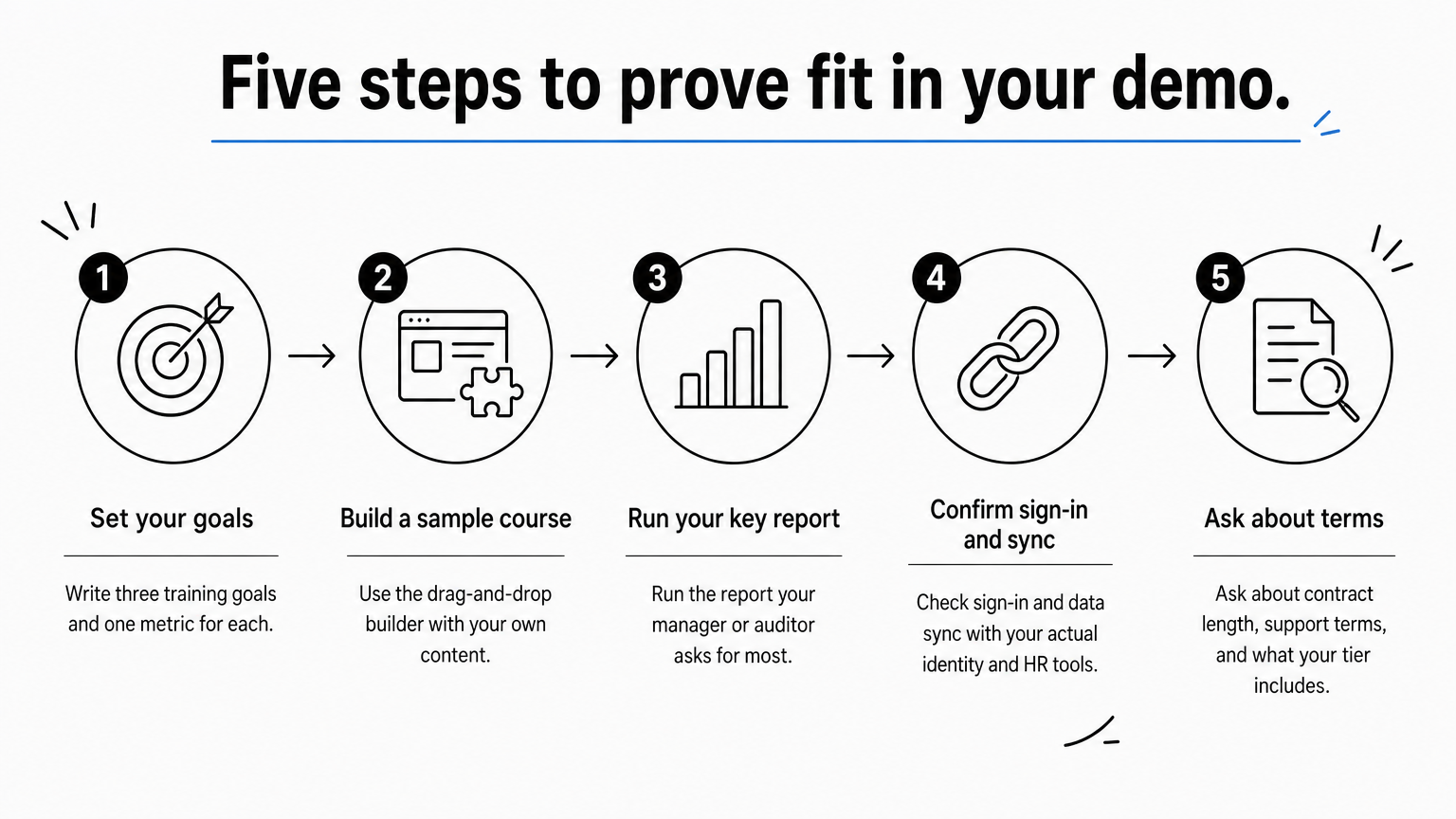
Pick the three features your program cannot live without and prove each one in the demo.
Axis LMS pros and cons at a glance
Axis LMS wins on usability, flexibility, support, and integrations. Its trade-offs are commitment length, the decisions that come with a flexible system, and limits on the smaller plans.
Where Axis LMS earns its praise
The strengths below match what reviewers say and what the platform includes.

- Ease of use: an intuitive interface for administrators and learners.
- Flexibility: extensive branding control and the option to choose only the features you need.
- Support: tech support comes with every subscription or license and currently covers an unlimited number of incidents.
- Maintenance: patches, updates, and upgrades are applied automatically at no additional cost.
- Setup speed: systems are usually set up within 1 to 3 business days after purchase.
Where it may not fit
No platform suits everyone, so here are the trade-offs. The Lite plans start at 25 users, so a team of ten is not the target. Contracts run 1 to 3 years, which suits a long-term program but is a commitment if you are still experimenting. Flexibility also means more choices to make during setup, and some reviewers mention needing a few customizations.
Limits rise by tier. The Core and Pro plans carry an API limit of 500, and only the Enterprise plan includes a sandbox account. If you plan heavy integration work or want a safe test environment, look at the higher tiers.
| Area | What works well | What to watch |
|---|---|---|
| Usability | Easy for admins and learners | Rich options need setup time |
| Support | Unlimited incidents, included | Support level rises with tier |
| Integrations | 5,000+ integrations, API, SSO | API limit is 500 on Core and Pro |
| Commitment | Predictable 1 to 3 year terms | Less room for short pilots |
| Scale | Lite for small teams, up to 100,000 users | Lite packages start at 25 users |
The biggest drawback of Axis LMS is fit: it suits organizations with a committed training program, not a one-off course.
Axis LMS plans and pricing explained
Axis LMS Lite has published prices of $209 and $299 for a 25-user package. The Core, Pro, and Enterprise tiers scale by user count and the features you choose, so you contact sales for current pricing.
Axis LMS Lite for small teams
Lite is built for organizations of 25 to 100 employees. It also suits seasonal operations and companies selling training to small audiences. The online training package costs $209 for 25 users, and the package that adds streaming virtual classroom training costs $299. The difference is $90. Both include 1 sub administrator, 2 report administrators, 10 page groups or portals, and 25 automation workflows. Confirm the billing term on the pricing page before you compare costs.
Core, Pro, and Enterprise compared
These three tiers serve organizations of 150 to 100,000 people.

| Core | Pro | Enterprise | |
|---|---|---|---|
| Included users | 150-3,000 | 250-4,000 | 500-100,000 |
| Sub administrators | 5 | 10 | 50 |
| Report administrators | 10 | 20 | 100 |
| Automation workflows | 100 | 250 | 1,000 |
| API limit | 500 | 500 | 2,000 |
| Tech support level | Standard | Enhanced | Priority |
| Free onboarding sessions | 1 | 2 | 5 |
| Free training sessions per 1-year term | 3 | 5 | 10 |
Axis LMS for Government is separate. It comes standard with Gold Secure LMS Hosting for Government and trains 150 to 100,000 employees and contractors.
A worked example
Say you train 300 employees across several departments. Core and Pro both cover that user count. If eight department leads need sub administrator rights, Core’s limit of 5 falls short, so you would look at Pro’s 10. If your organization chart is three levels deep, Pro’s topology depth of 4 fits where Core’s depth of 2 does not. Size gets you to the right tier, and administrator counts and structure decide it.
Choose your tier by administrators, structure, and integrations, not by headcount alone.
Is Axis LMS right for you?
Axis LMS reviews point the same way: it is easy to use, flexible, and well supported, and its limits are about fit, not quality. It works best when you have a continuing training program, need reporting or compliance tracking, and want it to connect with your HR and CRM systems.
Test it before you commit. The admin demo sign-up lets you try the system the way your administrators would, with your own use case in mind. If you are earlier in the process, the LMS readiness quiz can show you where you stand. You can also call Atrixware at 1.866.696.8709.
