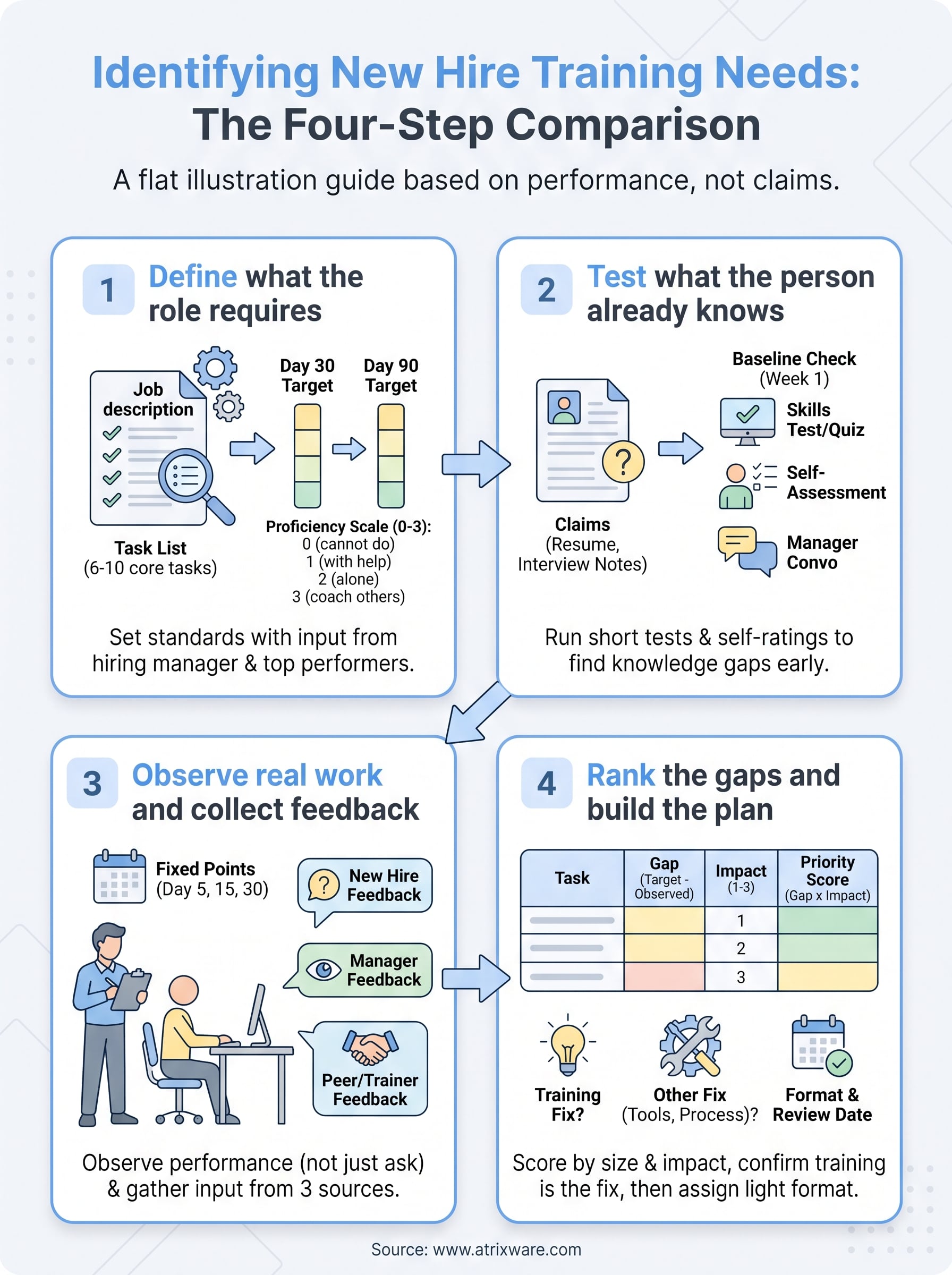
If you are asking how can training needs be identified in a new hire, the answer is a four-step comparison. Define what the role requires, test what the person already knows, observe real work and collect feedback, then rank the gaps. If you are answering a multiple-choice study question, the usual correct choice is observing job performance, because it shows what someone does instead of what they claim.
Most onboarding skips this work. Every new hire gets the same two-week schedule, so the experienced one sits through material they already know while the newcomer drowns in what nobody explained. A resume lists claims, not ability, and a manager’s gut feeling in week one is often wrong in both directions. The cost shows up later as slow ramp-up, repeated errors, and early resignations.
This guide walks you through each step with a worked example for a support rep, a simple scoring method, and a feedback template you can copy. Atrixware builds Axis LMS, so we also point out where an LMS helps you deliver baseline assessments and track results. The method works with or without one.
What makes a new hire’s training needs different
A new hire’s training needs differ from a veteran’s because you are measuring them against a job they have never done in your environment. Even a skilled hire has gaps in your tools, policies, and customers, and you can only see those gaps by checking three levels instead of just the person.

Check three levels, not just the person
Needs analysis works at three levels: the organization, the role, and the individual. The U.S. Office of Personnel Management describes the same three levels in its training needs assessment guidance. For a new hire, each level answers a different question.
| Level | Question to answer | Example for a new hire |
|---|---|---|
| Organization | Which business goals does this hire support? | The company is launching a new product, so every sales hire needs product knowledge in 30 days |
| Role | What must someone in this job know and do? | A support rep must route tickets, explain refunds, and calm upset callers |
| Individual | What does this person already do well or poorly? | This rep has strong phone skills but has never used your ticketing system |
Skipping the first two levels is the most common mistake. If you only ask the new hire what they need, you get preferences instead of requirements.
What to have ready before you start
Gather a few inputs before day one so the process stays light. You need:
- The current job description and any role scorecard
- The hiring record, including resume, interview notes, and any work samples
- Two or three business goals the role supports
- A manager who can give 20 minutes a week for the first month
- One shared place to record scores, such as a spreadsheet or your LMS
Observation beats asking because people cannot report what they do not know they are missing. A new hire who says "I’m fine with the CRM" may have only used a different one. Watching the work, then asking about it, gives you evidence and context together.
Measure the new hire against the role, not against your impression of them.
Step 1. Define what the role requires
Define the role by listing the 6 to 10 tasks that make up the job and setting a target proficiency for each at day 30 and day 90. Without targets, you have no standard to measure a gap against, and every conversation about "readiness" becomes opinion.
Pull the task list from real work
Start with the job description, then correct it. Job descriptions go stale, so ask the hiring manager and one strong performer in the same role to name the tasks that take the most time and the ones that cause the costliest mistakes. Those two lists usually overlap, and they are where training pays off.
Write each task as a verb plus an object, such as "log and route a ticket" or "run a weekly pipeline report." Vague entries like "customer service" cannot be observed or scored.
Set targets on a four-point scale
Use one scale for every task so scores can be compared and added up. This one works for most roles:
- 0: cannot do it
- 1: can do it with help
- 2: can do it alone
- 3: can coach others
Then set a target for day 30 and day 90. Here is a worked example for a customer support rep:
| Task | Day 30 target | Day 90 target |
|---|---|---|
| Log and route support tickets | 2 | 3 |
| Explain the refund policy to customers | 2 | 2 |
| De-escalate upset callers | 1 | 2 |
| Run reports in the CRM | 1 | 2 |
Keep the targets realistic. A rep at level 3 on every task by day 30 would be an exception, not a standard, and an unrealistic bar makes every hire look deficient.
If a task has no target level, you cannot call anything a gap.
Step 2. Test what the new hire already knows
Test what the new hire already knows by combining what you already hold in the hiring record with a short baseline check in week one. Ask, test, and observe are the three standard methods, and this step covers the first two.
Start with what you already have
Your hiring record is free data. Reread the resume and interview notes against your task list and mark every task where the candidate claimed experience. Those claims are your verification list, not your conclusions. Someone who says they "managed accounts in Salesforce" may have only viewed records.
Also note any task that never came up in the interview. Silence is a gap in your information, and you should fill it in the baseline check.
Run a baseline check in week one
Run the baseline in the first three to five days, before the new hire has had time to learn from coworkers and blur the picture. Keep it under 30 minutes per method, and match the method to the task type.
| Method | Best for | Watch out for |
|---|---|---|
| Skills test or work sample | Technical and procedural tasks | Takes time to build, so reuse it for every hire |
| Scenario quiz | Policy and judgment calls | Tests knowledge, not behavior |
| Self-assessment survey | Surfacing confidence gaps fast | People rate themselves too high or too low |
| Manager conversation | Context on expectations | Reflects one person’s view |
Pair a self-rating with a test whenever you can. The gap between what someone thinks they know and what a short test shows is often the most useful number you collect.
An LMS makes this repeatable. In Axis LMS you can build a short pre-boarding assessment as an online course and use on-demand reports to see learner progress and results for every new hire in one place. A paper form or a spreadsheet does the same job for a small team, just with more manual work.
Pair what people say they can do with a short test of what they can do.
Step 3. Observe real work and collect feedback
Observe real work at fixed points in the first 30 days, then confirm what you saw by collecting feedback from the new hire, the manager, and a peer. Observing job performance is the third method, and it is the one that exposes the gaps tests miss.

Observe the work, not the person
Schedule short observations around day 5, day 15, and day 30. Pick two or three tasks from your Step 1 list each time, and score the new hire on the 0 to 3 scale as you watch. Use the same checklist each visit:
- Did they finish the task without help?
- How long did it take compared with a typical performer?
- Which errors did they make, and did they repeat them?
- Where did they stop to ask a question?
- Which steps did they skip or do out of order?
Write down what you saw, not what you think it means. "Waited 4 minutes for the refund approval and did not know who to ask" is a finding. "Seems unsure" is not. Often what looks like a skill gap turns out to be a missing system permission or an unclear process, and training will not fix either.
Ask three sources the right questions
Observation tells you what happened. Feedback tells you why. Ask the new hire, the manager, and a peer or trainer, and keep the questions specific so answers are comparable. You can copy this set:
NEW HIRE (day 15 and day 30)
1. Which tasks this week did you feel least ready for?
2. What did you have to ask someone else to do for you?
3. What information or system access was missing?
4. What would have helped most in your first five days?

MANAGER
1. Which tasks did you have to redo or correct?
2. Which tasks does the hire now do without help?
3. Which mistakes keep repeating?

PEER OR TRAINER
1. Where does the hire hesitate most?
2. Which task did you end up doing for them?
Compare the three sets of answers. If the new hire says refunds were fine, but the manager corrected four refunds and the peer took over two, the rating is a 0 or 1, not a 2.
Observation shows what happened, and feedback from three people shows why.
Step 4. Rank the gaps and build the plan
Rank the gaps by multiplying gap size by business impact, check whether training is actually the fix, and assign a format and review date to each gap you keep. This turns a pile of observations into a short, ordered plan.
Score each gap by size and impact
Gap size is the day 30 target minus the observed score. Impact is how much the task affects customers, revenue, or compliance, rated 1 to 3. Multiply them. Here is the support rep example, carried over from Step 1:
| Task | Day 30 target | Observed | Gap | Impact | Priority |
|---|---|---|---|---|---|
| Log and route support tickets | 2 | 2 | 0 | 3 | 0 |
| Explain the refund policy | 2 | 0 | 2 | 3 | 6 |
| De-escalate upset callers | 1 | 0 | 1 | 3 | 3 |
| Run reports in the CRM | 1 | 0 | 1 | 1 | 1 |
Refund policy comes first with a score of 6, then de-escalation at 3. CRM reporting scores 1, so it can wait for the day 90 review. Ticket routing needs nothing.
Confirm that training is the fix
Not every gap is a training gap. Before you assign a course, check for unclear expectations, missing tools or access, and a poor fit between the person and the task. OPM’s guidance makes the same point: training is rarely the only solution, and sometimes it is the wrong one. If the rep cannot approve refunds because they lack system permission, a course changes nothing.
Assign a format and a review date
Match each remaining gap to the lightest format that works. A policy gap fits a 15-minute module and a job aid. A skill like de-escalation fits shadowing plus role-play with a coach. Then set a recheck date, usually day 60 or day 90, and score the task again against the same scale.
An LMS keeps this organized. With Axis LMS you can assign the module, track completion, and pull reports on progress. If your HR system is ADP, BambooHR, or a similar tool, user data can sync so new hires appear in the LMS without manual entry. Smaller teams of 25 to 100 employees can start with Axis LMS Lite, and larger organizations from 150 employees can use Axis LMS.
Fix the highest-scoring gap first, and recheck it against the same scale.
Start with the role, then watch the work
Identifying a new hire’s training needs comes down to four moves. Set role targets, test the baseline, observe real work with feedback from three people, and rank the gaps before you assign training. Observation carries the most weight because it shows actual performance, and the scoring table keeps your priorities honest.
Run the process once with your next hire, keep the scores, and reuse the task list and questions for the hire after that. If you want to see how assessments, assignments, and progress reports fit together for onboarding, sign up for the Axis LMS admin demo and try it on your own training.
