
If you have just been handed the keys to your company’s training platform, you probably have questions nobody answered in the job posting. Learning management system administration covers everything from setting up courses to fixing login problems at 8am on a Monday, and the scope catches a lot of new admins off guard. This role sits at the intersection of IT, HR, and training design, and it rarely looks the way people expect before they start.
So what does the job actually involve day to day, and what does it take to do it well? An LMS administrator manages user accounts, builds and maintains course content, runs compliance reports, troubleshoots technical issues, and keeps the system connected to tools like your CRM or HR software. The role demands a mix of technical troubleshooting and people skills, since you’re the person learners call when something breaks.
This article breaks down the core responsibilities of the job, the skills and certifications that make you competitive for it, and the practical steps to move into an LMS administrator position, whether you’re transitioning from HR, IT, or training and development.
Why learning management system administration matters
Most companies buy an LMS expecting instant results, then wonder why usage drops after the first month. The truth is that a platform is only as good as the person running it. Learning management system administration is the difference between a tool that drives real skill development and one that becomes a digital filing cabinet nobody opens. When the role is treated as an afterthought, tacked onto someone’s existing job with no training or time budget, the platform decays fast. Courses go stale, reports go unread, and the investment your company made in training technology quietly stops paying off.
The cost of a poorly managed LMS
Without someone actively watching the system, small problems compound quickly. Enrollment rules break, new hires sit in the wrong learning paths, and abandoned courses pile up because nobody archives them. Learners notice the neglect before management does: broken links, outdated content, and confusing navigation kill learner engagement long before anyone runs a usage report. A 2023 LinkedIn Learning report found that employees at companies with strong learning cultures are far more likely to stay, which means a badly run LMS doesn’t just waste money, it contributes to turnover.
Here’s what typically goes wrong when nobody owns LMS administration full-time:
- New hires miss onboarding deadlines because enrollment automations were never configured correctly.
- Compliance deadlines slip because reminder notifications got turned off and nobody noticed.
- Managers stop trusting reports because the data behind them is inconsistent or outdated.
- Support tickets pile up, and learners start avoiding the platform altogether.
- Renewal conversations with leadership get harder because nobody can show measurable results.
Compliance risk when nobody owns the system
For regulated industries, the stakes go beyond engagement metrics. Healthcare, finance, and manufacturing companies rely on their LMS to prove that employees completed required training, and that proof needs to hold up under audit. An administrator who understands regulatory compliance requirements, like FDA 21 CFR Part 11 or GDPR data handling rules, keeps the audit trail clean and defensible. Without that oversight, a company can find itself unable to produce completion records during an inspection, which turns a training gap into a legal problem.
A neglected LMS doesn’t just underperform, it quietly exposes your company to compliance risk nobody notices until an audit forces the question.
Why it matters for the business bottom line
Beyond risk avoidance, good administration is what makes training pay for itself. Someone has to keep system integrations working with your CRM, HR platform, and single sign-on setup, because a broken sync between your LMS and BambooHR or Salesforce means new employees don’t get enrolled and managers don’t see accurate headcount data. Revenue-generating training programs, like courses sold to customers or partners, depend even more heavily on a functioning administrator, since a checkout error or licensing bug directly costs the company sales.
Quality administration also shapes training ROI in ways leadership actually measures: completion rates, time-to-competency for new hires, and reduced support costs from better-documented processes. Platforms like Axis LMS build in automated reporting and integration tools specifically so administrators can catch these problems before they show up in a quarterly review instead of after. Zoom out far enough, and it becomes clear that LMS administration isn’t a maintenance task bolted onto someone’s job description. It’s the operational backbone that decides whether your training program actually functions.
How LMS administrators manage systems day to day
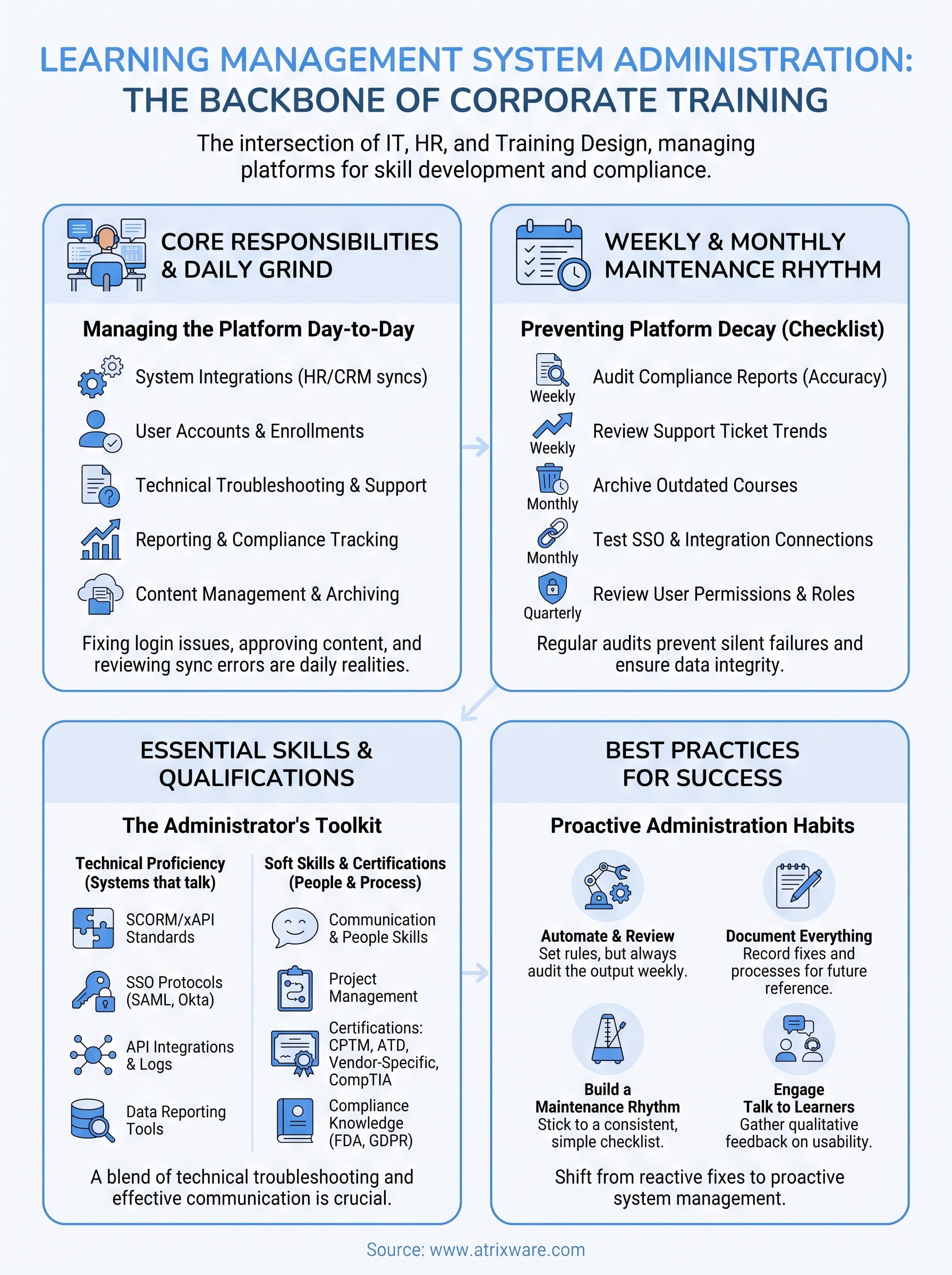
Day-to-day learning management system administration rarely looks like the strategic planning session that got the platform approved in the first place. Most of the job happens in small, repeated tasks that keep courses running and learners moving through their assigned paths without friction. An administrator opens the morning by checking the dashboard for failed enrollments, expired accounts, or stalled learning paths that stopped a new hire cold on day one.

Daily tasks that keep the platform running
Before lunch, a typical admin has usually touched several corners of the system. The list below reflects what actually fills a normal day rather than what job descriptions promise:

- Reviewing overnight sync errors between the LMS and connected HR or CRM systems
- Approving or archiving newly uploaded course content
- Answering support tickets from learners locked out of their accounts
- Adjusting enrollment rules for a department reorganization or new job role
- Pulling a quick completion report for a manager who needs numbers before a meeting
Weekly and monthly maintenance cycles
Certain responsibilities follow a slower rhythm, and skipping them is exactly how systems drift into disrepair. Administrators typically batch these into weekly or monthly reviews rather than handling them reactively:
| Frequency | Task | Why it matters |
|---|---|---|
| Weekly | Audit compliance report accuracy | Catches missing completions before deadlines |
| Weekly | Review support ticket trends | Flags recurring confusion in course design |
| Monthly | Archive outdated courses | Keeps catalog relevant and reduces clutter |
| Monthly | Test SSO and integration connections | Prevents silent sync failures |
| Quarterly | Review user permissions and roles | Closes security gaps from role changes |
The job isn’t glamorous, but skipping the weekly and monthly checklist is how a healthy LMS turns into a support ticket backlog within a quarter.
Quarterly, the work shifts toward bigger-picture questions: renewing SSL certificates, reviewing storage limits, and auditing user permissions so former employees or contractors don’t retain access they shouldn’t have. Platforms like Axis LMS build automated alerts into this cycle so administrators get flagged before a certificate expires or a sync silently fails, rather than finding out from an angry learner on a Monday morning. Ultimately, the daily grind and the periodic maintenance work together, and neglecting either one is how small issues turn into the kind of platform decay covered earlier.
Skills and qualifications for effective LMS administration
Good LMS administrators come from surprisingly different backgrounds. Some start in HR, others move over from IT support, and a few land in the role after building courses as trainers first. What matters more than the origin story is whether someone can hold technical troubleshooting and people skills in the same job without dropping either one. Learning management system administration rewards people who like solving small, concrete problems and can explain a fix to a frustrated learner without sounding condescending.
Technical skills that matter most
You don’t need a computer science degree, but you do need comfort with systems that talk to each other. Employers consistently look for these baseline technical skills:
- Working knowledge of SCORM and xAPI standards for course content compatibility
- Familiarity with SSO protocols like SAML, since most enterprise LMS deployments connect through Okta, Azure, or Ping Identity
- Basic understanding of API integrations, enough to troubleshoot a broken sync with Salesforce or BambooHR without escalating every issue to IT
- Comfort reading and interpreting system logs to diagnose enrollment or login failures
- Experience with reporting tools, since most of the job involves pulling and interpreting data rather than writing code
An LMS administrator who can read a sync error log and explain it in plain English to a manager is worth more than one who only knows how to click through the interface.
Soft skills and certifications that set candidates apart
Beyond the technical checklist, communication carries real weight. Administrators field support tickets constantly, and how you explain a fix determines whether learners trust the platform or avoid it. Project management skills help too, since rolling out a new compliance course to 500 employees requires coordinating deadlines across departments that don’t report to you.
Certifications aren’t strictly required, but they signal seriousness to hiring managers. Common credentials worth pursuing include:
| Certification | Focus area |
|---|---|
| CPTM (Certified Professional in Training Management) | Training strategy and program management |
| ATD Certification | Instructional design and learning fundamentals |
| Vendor-specific LMS certifications | Platform-specific administration skills |
| CompTIA or similar IT certs | General systems and networking literacy |
Many candidates also build credibility through hands-on experience with compliance management work, since regulated industries specifically look for administrators who understand audit requirements like FDA 21 CFR Part 11 or GDPR data handling. That background often matters more to hiring managers than a certification alone, because it proves you’ve actually handled the pressure of a real audit rather than just studied for one.
How to start a career in LMS administration
Breaking into learning management system administration rarely happens through a single, obvious path. Most people arrive here from adjacent roles, then prove themselves by fixing real problems on a live system. If you’re eyeing this career, the fastest route isn’t necessarily a certification, it’s getting your hands on an actual LMS and learning how it breaks.
Entry points that lead to the role
Companies rarely hire someone with zero platform exposure directly into an administrator seat. Instead, they promote from within or hire people who’ve already touched similar systems. Common starting points include:
- HR coordinators who manage onboarding and get pulled into enrollment troubleshooting
- IT support staff who already handle SSO and integration tickets
- Corporate trainers who built courses and started noticing what worked and what didn’t
- Compliance specialists who needed better reporting and learned the system to get it
Each path teaches a different half of the job, which is exactly why hybrid backgrounds tend to produce the strongest candidates.
Nobody gets hired as an LMS administrator without touching a real system first, so find a way to get inside one before you apply.
Building experience before you have the title
Volunteering to own a small piece of your current company’s LMS is the most practical way in. Offer to clean up the course catalog, fix a broken integration, or build the onboarding path for new hires. That hands-on work becomes the story you tell in interviews, and it matters more than a resume line.
Steps that consistently work for people making the switch:
- Ask your current employer if you can shadow or assist whoever manages the LMS now.
- Request access to a sandbox environment, since most platforms, including Axis LMS, offer test environments for exactly this kind of learning.
- Document a project you completed, like fixing a sync error or rebuilding a compliance course, with specific numbers if possible.
- Pursue one relevant certification, such as CPTM or a vendor-specific LMS credential, to round out a resume light on formal titles.
- Apply for roles labeled "LMS coordinator" or "training systems specialist," since these often serve as stepping stones to full administrator positions.
Recruiters filling these roles care more about demonstrated troubleshooting than credentials alone. Showing you’ve already solved the kind of problems covered earlier, a broken integration, a stalled enrollment, a messy report, carries more weight than any certificate on its own.
Best practices to strengthen your LMS administration
Good administrators don’t wait for problems to surface. They build habits that catch issues early and keep learning management system administration proactive instead of reactive. The practices below separate platforms that quietly run well from ones that generate a support ticket every time someone logs in.
Automate what you can, review what you can’t
Automation handles the repetitive work, but it still needs a human checking the output. Set enrollment rules, reminder notifications, and report schedules to run automatically, then review the results weekly instead of trusting them blindly. A platform like Axis LMS can trigger alerts when a sync fails or a certificate is about to expire, which turns a silent failure into a task on your list instead of a surprise from an angry manager.
Automation without review just means your mistakes happen faster and get noticed later.
Document everything, especially the fixes
Every time you solve a tricky integration bug or rebuild a broken enrollment path, write down what happened and how you fixed it. Six months later, when the same error shows up under a different symptom, that documentation saves hours. This habit also protects the company when you’re on vacation or move to a new role, since the next administrator inherits a system that makes sense instead of a black box.
Build a maintenance rhythm you actually follow
Consistency beats intensity here. A short, honest checklist run every week does more than an ambitious audit you attempt twice a year and abandon. Keep it simple enough that you’ll actually stick to it:
- Check integration health every Monday before anything else breaks your morning
- Spot-check five completion records against source data monthly
- Review user permissions quarterly, especially after reorganizations
- Archive stale courses before they clutter search results
- Test SSO login from a non-admin account periodically, since admin accounts often mask problems regular users hit
Talk to learners, not just about them
Reports tell you what happened, but they rarely tell you why. Occasionally ask a handful of learners how the platform feels to use, whether the navigation makes sense, and where they got stuck. That feedback surfaces learner engagement problems long before a usage report flags a decline, and it builds trust that the system actually listens to the people using it every day.
Putting it all together
Learning management system administration isn’t a side task you bolt onto someone’s existing job title and forget about. It’s the daily and weekly work that decides whether your training platform actually drives skill development or quietly turns into a digital filing cabinet. The best administrators mix technical troubleshooting with people skills, build maintenance habits they actually follow, and treat documentation and integration health as core parts of the job rather than afterthoughts.
If you’re evaluating whether your current platform gives an administrator the tools to do this job well, that’s worth checking before problems pile up. See what a well-built admin experience actually looks like by signing up for a free Axis LMS demo, and get a firsthand look at the dashboards, automation, and reporting tools that make administration manageable instead of overwhelming.
