Virtual instructor-led training (VILT) has become a core requirement for organizations delivering live online learning at scale. If you’re evaluating LMS platforms, understanding Docebo virtual classroom capabilities can help you determine whether it meets your training objectives. Docebo offers built-in tools and third-party integrations designed to support real-time learning experiences across distributed teams.
At Atrixware, we build Axis LMS with similar goals in mind, helping businesses deliver effective virtual and online training. We’ve put together this breakdown of Docebo’s VILT features so you can make an informed comparison when selecting the right platform for your organization.
This article covers how Docebo handles virtual classroom sessions, the specific tools available for instructors and learners, and the video conferencing integrations that extend its functionality. Whether you’re considering Docebo or exploring alternatives, you’ll find the details you need to evaluate its fit for your training programs.
Why Docebo virtual classroom matters for VILT
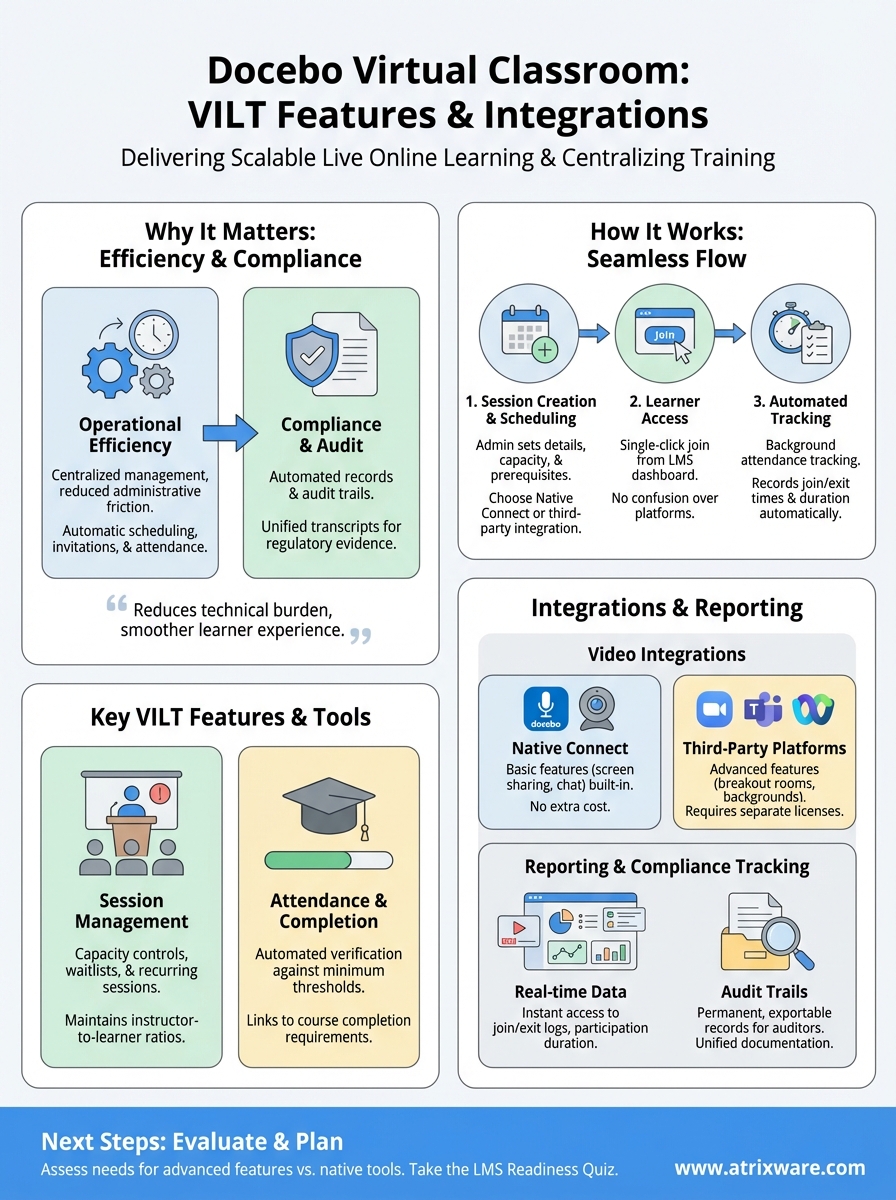
Organizations investing in virtual instructor-led training need platforms that reduce complexity while delivering measurable results. The Docebo virtual classroom addresses this challenge by centralizing live training management within your existing LMS infrastructure. Instead of juggling separate systems for scheduling, delivery, and reporting, you can coordinate VILT sessions through a single interface that your team already uses.
Operational efficiency for training teams
Your training coordinators face constant pressure to schedule sessions, manage instructors, and track learner engagement across multiple time zones. Docebo’s approach eliminates the administrative friction that comes with manual processes. When you schedule a virtual classroom session, the system automatically handles calendar invitations, reminder notifications, and attendance rosters without requiring separate workflows or spreadsheet tracking.
This integration saves your team from duplicating effort across disconnected tools. If you’ve ever manually entered attendance data or struggled to reconcile video platform records with LMS completion tracking, you understand the value of having these functions connected natively.
The ability to manage virtual sessions inside your LMS reduces the technical burden on administrators and creates a smoother experience for learners who access everything from one login.
Compliance and audit requirements
Your organization likely faces regulatory obligations that require documented proof of training completion. When you deliver VILT through disconnected platforms, creating audit trails becomes a manual reconstruction process. The docebo virtual classroom maintains attendance records, session timestamps, and completion data within the same system that tracks your other learning activities, making compliance reporting straightforward when auditors request evidence.
Financial services, healthcare, and manufacturing sectors particularly benefit from this consolidated approach. You can generate reports showing who attended which sessions, for how long, and whether they met completion criteria, all without exporting and merging data from multiple sources.
How Docebo virtual classroom works in practice
Your training workflow with the docebo virtual classroom follows a straightforward path from session creation to completion tracking. Administrators create virtual classroom events within the LMS interface, selecting dates, times, and instructors while setting capacity limits and prerequisites. Once you publish a session, eligible learners see it in their course catalog or receive automatic enrollment based on your configuration rules.
Session creation and scheduling
You begin by navigating to your course curriculum and adding a virtual classroom training object. The platform prompts you to choose between Docebo’s native Connect tool or integrated third-party platforms like Zoom or Microsoft Teams. After selecting your delivery method, you configure session details including duration, maximum attendees, and whether the session repeats on a schedule.
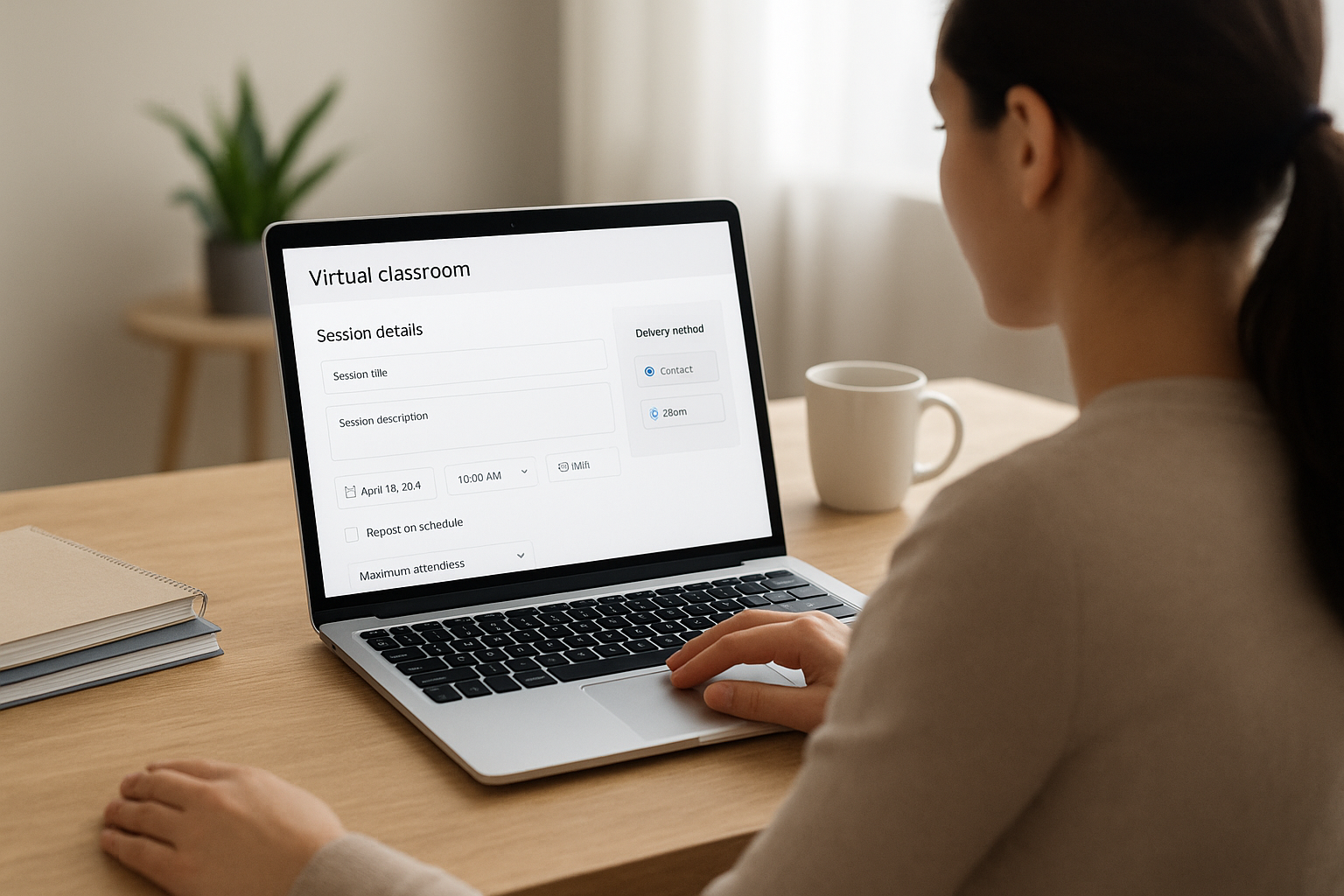
Your system sends calendar invitations automatically when learners enroll, reducing the manual communication typically required for virtual training coordination. You can also set enrollment deadlines and waitlist parameters to manage capacity constraints across multiple session offerings.
Learner access and participation flow
Learners access their scheduled sessions through the LMS dashboard, where they find join links that launch directly into the virtual classroom environment. This single-click access eliminates confusion about which platform to use or where to find meeting credentials.
Centralizing the learner entry point through your LMS reduces support tickets and ensures participants arrive at the correct session without navigating multiple systems.
During the session, attendance tracking runs automatically in the background, recording when participants join and leave the virtual classroom.
Key VILT features inside Docebo virtual classroom
The docebo virtual classroom provides instructors and administrators with specific tools designed to manage live training sessions effectively. You gain access to features that control session flow, monitor participant engagement, and maintain consistent training quality across your organization. These capabilities help you deliver structured virtual learning experiences without relying on external coordination tools.
Session management and capacity controls
Your administrators configure enrollment limits and prerequisite requirements directly within each virtual classroom object. You can set maximum attendee counts to maintain instructor-to-learner ratios that support effective interaction. The platform tracks available seats automatically and manages waitlists when sessions reach capacity, eliminating manual roster management.
When you schedule recurring sessions, the system creates multiple instances with independent attendance tracking for each occurrence. This structure supports ongoing training programs where learners need flexibility to attend different session times while you maintain accurate completion records.
Attendance tracking and completion criteria
Your LMS records when participants join and exit virtual sessions, generating attendance reports that link directly to course completion requirements. You establish minimum attendance thresholds that learners must meet to receive credit for the training, and the system enforces these rules automatically during the session.
Automated attendance verification removes the manual reconciliation work that training coordinators typically face after live sessions conclude.
This tracking integrates with your broader learning records, creating unified transcripts that include both self-paced and instructor-led activities.
Video conferencing integrations and setup options
The docebo virtual classroom connects with multiple video conferencing platforms, giving you flexibility in how you deliver live training sessions. You choose between Docebo’s proprietary Connect tool or integrate with external platforms your organization already uses. This approach lets you maintain existing video infrastructure investments while consolidating training management within your LMS.
Native Connect vs third-party platforms
Your first decision involves selecting between Docebo Connect and external integrations. Connect provides basic video functionality built directly into the platform, eliminating additional software licensing costs. You access features like screen sharing, webcam feeds, and chat without leaving the LMS environment.
Third-party integrations expand your capability set significantly. When you connect Zoom, Microsoft Teams, or Webex, you gain access to advanced features like breakout rooms, virtual backgrounds, and recording options that exceed Connect’s native functionality. Your choice depends on whether your instructors need these enhanced capabilities and whether your organization already licenses these platforms.
Configuration steps for popular integrations
Setting up external video platforms requires administrator-level access to both your LMS and the video conferencing service. You navigate to Docebo’s integration settings, select your preferred platform, and authenticate using OAuth credentials that link the accounts.
Proper integration configuration ensures learners click a single join button from their LMS dashboard rather than managing separate video platform logins.
Each platform requires specific API permissions that you grant during the connection process, allowing Docebo to create meetings automatically when instructors schedule sessions.
Reporting, attendance, and compliance tracking
Your training program’s success depends on accurate documentation of participation and completion. The docebo virtual classroom generates comprehensive reports that track learner attendance, session duration, and completion status without manual data entry. You access these records through the platform’s reporting dashboard, where you can filter by date range, instructor, course, or individual learner to build the documentation your organization requires.
Real-time attendance data and session records
Your system captures join and exit timestamps for every participant in each virtual session, creating detailed attendance logs that show exactly when learners entered and left the classroom. You can review this data immediately after sessions conclude, eliminating the waiting period associated with manual attendance reconciliation.
Reports show duration calculations automatically, comparing actual participation time against your configured minimum requirements. When learners fall short of completion thresholds, the platform flags these records so you can follow up with additional training sessions or alternative completion paths.
Automated attendance verification ensures your compliance documentation withstands audit scrutiny without requiring administrators to reconstruct participation records manually.
Compliance-ready audit trails
Your organization maintains permanent records of all virtual classroom activities within the LMS, including session dates, instructor assignments, and participant lists that auditors can review. These audit trails connect directly to learner transcripts, creating unified documentation that proves training completion across your entire curriculum.
You export compliance reports in multiple formats that meet industry-specific requirements, whether you need CSV files for internal tracking or formatted documents for regulatory submissions.
Next steps for your virtual training plan
Your evaluation of the docebo virtual classroom should focus on how its features align with your organization’s specific training delivery requirements. Consider whether you need the advanced integrations with third-party video platforms or if native functionality meets your instructor-led training needs. The platform’s reporting capabilities matter most when you face compliance obligations that require detailed attendance documentation.
Before committing to any LMS, you need clarity on which features your training program actually requires versus what vendors market as essential. Our LMS readiness quiz helps you identify your organization’s current stage in the selection process and the specific capabilities you should prioritize. Take the readiness quiz to determine whether your team needs a basic virtual classroom setup or a more comprehensive training infrastructure that includes advanced compliance tracking and extensive integration options. This assessment takes less than five minutes and provides personalized recommendations based on your responses.
