Choosing the best employee training software can feel overwhelming when dozens of platforms promise to transform your workforce development. The stakes are high, pick the wrong tool and you’re stuck with low adoption rates, clunky interfaces, and wasted budget. Pick the right one, and you unlock streamlined onboarding, better compliance tracking, and measurable skill growth across your organization.
At Atrixware, we’ve spent years building Axis LMS and studying what makes training software actually work for businesses. That experience gives us a clear view of what separates genuinely useful platforms from those that just look good in demos. We’ve put together this comparison to help you cut through the marketing noise and find a solution that fits your specific needs.
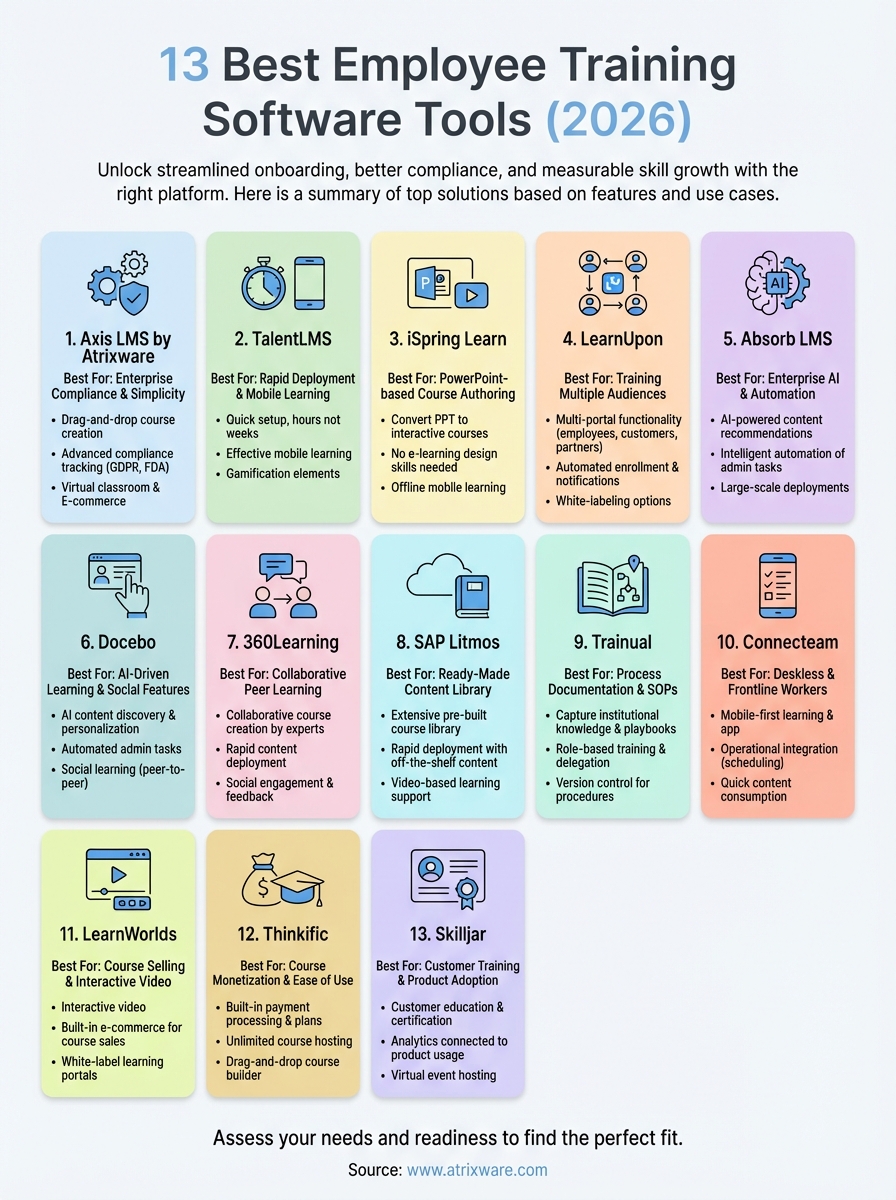
Below, you’ll find 13 employee training platforms broken down by features, pricing, and ideal use cases. Whether you’re training 50 employees or 50,000, need robust compliance tools, or want to sell courses externally, this guide covers the options worth your attention in 2026.
1. Axis LMS by Atrixware
Axis LMS delivers enterprise-grade training capabilities wrapped in an interface that your team can actually use without extensive training. Built on decades of learning technology experience, this platform handles everything from rapid course creation to advanced compliance tracking, making it one of the best employee training software options for organizations that need both power and simplicity.

How Axis LMS works
You build courses using a drag-and-drop interface that eliminates the need for technical expertise or external developers. The platform supports both online and virtual classroom training, letting you deliver content in whatever format fits your learning objectives. Administrators control the entire training lifecycle from a central dashboard, while learners access their assignments through a branded interface that matches your company’s visual identity.
What Axis LMS does best
Axis LMS excels at compliance training management with purpose-built tools for tracking certifications, managing re-certifications, and maintaining audit trails that meet regulatory standards like GDPR and FDA 21 CFR Part 11. The platform also stands out for its extensive customization capabilities, giving you control over every aspect of the learner experience without requiring custom development work.
Organizations that need both flexibility and compliance tracking find Axis LMS handles requirements that force compromises on other platforms.
Key features in Axis LMS
The reporting suite delivers on-demand and automated reports that track learner progress, completion rates, and training effectiveness across your organization. Communication tools include automated notifications, real-time messaging, and collaborative features that keep learners engaged throughout their training journey. You can also leverage the built-in e-commerce functionality to sell training to external customers or manage B2B seat licenses for partner organizations.
Integrations and SSO in Axis LMS
Axis LMS connects with over 5,000 business systems through its Integration Builder, covering CRM platforms, HR systems, email tools, and e-commerce solutions. The REST API and webhooks support custom integrations when you need specific functionality beyond standard connectors. Single sign-on works with major SAML providers including Salesforce, Okta, Azure, and Ping Identity, streamlining access for users across your technology stack.
Axis LMS pricing
Atrixware provides custom pricing based on your specific requirements, including user count, features needed, and integration complexity. Contact their sales team directly to receive a tailored quote that matches your organization’s training needs and budget parameters.
2. TalentLMS
TalentLMS positions itself as a straightforward learning platform designed for teams that want to launch training programs quickly without wrestling with complicated configuration settings. The platform focuses on simplicity and speed, making it an attractive option for small to mid-sized businesses that need functional employee training software without the overhead of enterprise-level complexity.
How TalentLMS works
You create and organize training content through a clean, intuitive interface that requires minimal technical knowledge to operate. The platform delivers courses to learners through a streamlined portal where employees access their assignments, track progress, and complete certifications. Administrators manage everything from course creation to reporting through a central dashboard that prioritizes essential functions over advanced customization.

What TalentLMS does best
The platform excels at rapid deployment and easy onboarding, letting you start training employees within hours instead of weeks. TalentLMS also handles mobile learning effectively, with responsive design that adapts to different devices without requiring separate apps or configurations.
Teams that need to get training programs running quickly find TalentLMS removes most of the traditional setup barriers.
Key features in TalentLMS
Built-in features include gamification elements like points, badges, and leaderboards that encourage learner participation. The reporting tools provide standard analytics covering completion rates, quiz scores, and time spent on training materials.
Integrations and SSO in TalentLMS
TalentLMS connects with popular business tools through native integrations for platforms like Zoom, Salesforce, and Zapier. The system supports SAML-based single sign-on for simplified user access across your technology stack.
TalentLMS pricing
The platform offers tiered pricing starting at $69 per month for up to 40 users, with higher tiers adding more users and features. Enterprise pricing requires direct contact for custom requirements.
3. iSpring Learn
iSpring Learn combines PowerPoint-based course authoring with a full-featured LMS platform, making it particularly attractive to organizations that already use Microsoft tools extensively. This platform lets you transform existing PowerPoint presentations into interactive courses, reducing content creation time while maintaining professional polish in your training materials.
How iSpring Learn works
You convert PowerPoint slides into engaging courses using the iSpring Suite authoring toolkit, then upload finished content to the iSpring Learn LMS for distribution. The platform delivers training through a learner portal where employees access assignments, complete quizzes, and track their progress across required courses.
What iSpring Learn does best
The PowerPoint integration stands out as iSpring Learn’s defining advantage, letting you build professional courses without specialized e-learning design skills. Organizations with substantial PowerPoint content find this approach dramatically reduces development time compared to other best employee training software options.
Teams that rely heavily on PowerPoint presentations can repurpose existing materials into structured training programs faster than building courses from scratch.
Key features in iSpring Learn
Standard features include assessment tools with various question types, automated reminders for overdue assignments, and reporting dashboards that track completion rates and quiz scores. The platform also supports offline mobile learning, allowing employees to download courses and complete training without internet connectivity.
Integrations and SSO in iSpring Learn
iSpring Learn connects with business systems through API access and native integrations for tools like Salesforce and Zoom. The platform supports SAML-based single sign-on for streamlined user authentication across your technology environment.
iSpring Learn pricing
Pricing starts at $3.66 per user per month when billed annually, with enterprise plans requiring direct contact for custom features and higher user volumes.
4. LearnUpon
LearnUpon delivers training management capabilities specifically designed for companies that train multiple audiences, including employees, customers, and partners. The platform focuses on multi-portal functionality, letting you maintain separate branded learning environments for different groups while managing everything from a single administrative interface.
How LearnUpon works
You create training content and organize it into learning paths through the platform’s course builder interface. The system delivers content to learners through customized portals where each audience sees only their relevant training materials and branding. Administrators control user enrollment, track progress, and generate reports from a unified dashboard that provides visibility across all your training initiatives.
What LearnUpon does best
The platform excels at managing multiple learning portals from one central system, making it an efficient choice for organizations that need to train diverse audiences with different requirements. LearnUpon also handles automated enrollment and notifications effectively, reducing manual administrative work while keeping learners engaged with timely reminders about upcoming deadlines.
Companies training customers alongside employees find LearnUpon’s multi-portal approach eliminates the need for separate systems or complicated workarounds.
Key features in LearnUpon
Core features include learning path creation tools that guide learners through structured training sequences, assessment capabilities with various question formats, and reporting dashboards that track completion rates and performance metrics. The platform also provides white-labeling options that let you customize the learner experience to match each audience’s branding requirements.
Integrations and SSO in LearnUpon
LearnUpon connects with business systems through native integrations for platforms like Salesforce, Zoom, and Microsoft Teams. The platform supports SAML 2.0 single sign-on for streamlined authentication across your technology stack.
LearnUpon pricing
The platform uses custom pricing based on your specific requirements. Contact LearnUpon directly to receive a quote tailored to your user count and feature needs.
5. Absorb LMS
Absorb LMS targets enterprise organizations that need sophisticated automation and artificial intelligence capabilities alongside traditional learning management features. The platform emphasizes AI-powered recommendations and intelligent automation that adapts to learner behavior, making it a contender among the best employee training software options for large companies with complex training requirements.
How Absorb LMS works
You manage training through a central administrative dashboard that uses AI to automate enrollment decisions, content recommendations, and learning path assignments based on user profiles and behavior patterns. The platform delivers content to learners through a personalized interface that adapts course suggestions and displays relevant training materials based on individual progress and performance data.
What Absorb LMS does best
Absorb LMS excels at automated course recommendations using machine learning algorithms that analyze learner behavior and suggest relevant training content. The platform also handles large-scale enterprise deployments effectively, with infrastructure designed to support thousands of concurrent users without performance degradation.
Organizations managing complex training programs across multiple departments find Absorb LMS automates decisions that typically require manual administrative intervention.
Key features in Absorb LMS
Core capabilities include AI-driven content curation that matches learners with relevant courses, advanced analytics dashboards that track engagement patterns, and assessment tools with adaptive question difficulty. The platform also provides mobile apps for iOS and Android that support offline learning and push notifications.
Integrations and SSO in Absorb LMS
Absorb LMS connects with business systems through native integrations for Salesforce, Zoom, Microsoft Teams, and other enterprise tools. The platform supports SAML 2.0 and OAuth single sign-on for streamlined authentication across your technology environment.
Absorb LMS pricing
The platform uses custom enterprise pricing based on your user count and feature requirements. Contact Absorb directly to receive a detailed quote for your organization’s specific needs.
6. Docebo
Docebo delivers AI-powered learning capabilities wrapped in an interface designed for enterprise-scale training operations. The platform focuses on automating administrative tasks and personalizing learner experiences through machine learning algorithms, positioning itself as a comprehensive solution for organizations that need sophisticated training management combined with modern technology.
How Docebo works
You manage training programs through an administrative interface that uses artificial intelligence to automate course assignments, content recommendations, and learning path creation. The platform delivers content to learners through a customizable portal that adapts its interface and suggestions based on individual user behavior and performance data.
What Docebo does best
Docebo excels at AI-driven content discovery, using machine learning to surface relevant training materials based on learner roles, past activity, and organizational requirements. The platform also handles social learning features effectively, with discussion boards and collaborative tools that encourage peer-to-peer knowledge sharing.
Organizations that want artificial intelligence to reduce manual training administration find Docebo automates decisions that typically require constant oversight.
Key features in Docebo
Core capabilities include learning analytics dashboards that track engagement patterns and skill development, automated certification management, and assessment tools with adaptive testing. The platform also provides content marketplace access where you can purchase pre-built courses from third-party providers.

Integrations and SSO in Docebo
Docebo connects with business systems through native integrations for Salesforce, Microsoft Teams, Zoom, and other enterprise platforms. The system supports SAML and OAuth single sign-on for streamlined user authentication.
Docebo pricing
The platform uses custom enterprise pricing based on your user count and required features. Contact Docebo directly to receive a quote tailored to your organization’s specific training needs.
7. 360Learning
360Learning takes a collaborative approach to employee training by focusing on peer-to-peer learning and rapid course creation by internal subject matter experts. The platform emphasizes social learning features that encourage employees to share knowledge directly with colleagues, positioning itself as one of the best employee training software options for organizations that want to tap into internal expertise rather than relying solely on formal training content.
How 360Learning works
You build courses through a streamlined authoring interface where subject matter experts across your organization can create and publish training materials without requiring instructional design expertise. The platform delivers content through a learner portal that combines traditional course modules with social features like discussion threads, peer reviews, and collaborative learning spaces where employees interact around training topics.
What 360Learning does best
The platform excels at collaborative course creation, letting team members contribute content and feedback throughout the development process. 360Learning also handles rapid content deployment effectively, with tools designed to get training materials from conception to publication faster than traditional course development workflows.
Teams that need to capture and distribute internal knowledge quickly find 360Learning reduces the bottleneck of formal training development cycles.
Key features in 360Learning
Core capabilities include peer review systems that let learners evaluate and improve course content, analytics dashboards tracking both completion metrics and social engagement, and mobile access for learning on various devices. The platform also provides certification management and automated reminders to keep training programs on schedule.
Integrations and SSO in 360Learning
360Learning connects with business systems through native integrations for tools like Slack, Microsoft Teams, and Zoom. The platform supports SAML-based single sign-on for authentication across your technology environment.
360Learning pricing
The platform uses custom pricing based on your user count and feature requirements. Contact 360Learning directly to receive a quote tailored to your organization’s specific training needs.
8. SAP Litmos
SAP Litmos delivers enterprise training capabilities backed by SAP’s global infrastructure and an extensive content library with thousands of pre-built courses. The platform combines rapid deployment with comprehensive course management features, making it one of the best employee training software choices for organizations that want both ready-made content and custom training programs running quickly across their workforce.
How SAP Litmos works
You access training through a web-based interface that delivers courses to learners while providing administrators with centralized control over content, users, and reporting. The platform supports both off-the-shelf courses from its content marketplace and custom content you create using built-in authoring tools or upload from external sources.
What SAP Litmos does best
SAP Litmos excels at rapid deployment with pre-built content, letting you launch training programs immediately using its library of compliance, leadership, and technical skills courses. The platform also handles video-based learning effectively, with streaming capabilities optimized for various bandwidth conditions.
Organizations needing immediate access to professional course content find SAP Litmos eliminates months of development time typically required for building training from scratch.
Key features in SAP Litmos
Core capabilities include certification tracking with automated renewals, mobile apps for iOS and Android, and reporting dashboards that track completion rates and assessment scores. The platform also provides gamification elements like leaderboards and badges to encourage learner engagement.
Integrations and SSO in SAP Litmos
SAP Litmos connects with business systems through native integrations for Salesforce, Microsoft Teams, and other enterprise platforms. The platform supports SAML-based single sign-on for streamlined authentication across your technology stack.
SAP Litmos pricing
The platform uses custom pricing based on your user count and feature requirements. Contact SAP Litmos directly to receive a quote tailored to your organization’s training needs.
9. Trainual
Trainual focuses on process documentation and standard operating procedures combined with employee training capabilities, making it particularly effective for small to mid-sized businesses that need to capture and share operational knowledge. The platform emphasizes building organizational playbooks that document how your business runs while simultaneously training employees on those processes.
How Trainual works
You create training content by documenting your business processes, policies, and procedures through a structured interface that organizes information into subjects, topics, and steps. The platform delivers this content to employees as structured learning paths that combine reading materials, quizzes, and assignments, ensuring team members understand not just what to do but why it matters.
What Trainual does best
Trainual excels at capturing institutional knowledge that typically exists only in the minds of key employees or scattered across multiple documents. The platform also handles role-based training effectively, automatically assigning relevant procedures and policies based on each employee’s position within your organization.
Companies struggling to document and standardize their processes find Trainual transforms tribal knowledge into structured training materials faster than traditional documentation approaches.
Key features in Trainual
Core capabilities include version control for tracking document changes over time, testing tools that verify employee comprehension, and accountability reporting that shows who has completed required training. The platform also provides delegation features that let managers assign specific documentation tasks to subject matter experts across your team.
Integrations and SSO in Trainual
Trainual connects with business systems through integrations for tools like Slack, Zapier, and BambooHR. The platform supports single sign-on for streamlined user authentication.
Trainual pricing
Pricing starts at $250 per month for up to 25 users, with higher tiers adding more users and advanced features.
10. Connecteam
Connecteam delivers training capabilities wrapped in an all-in-one employee management platform designed specifically for deskless and frontline workers. The system combines mobile-first learning with operational features like scheduling and time tracking, making it one of the best employee training software choices for organizations with teams that work outside traditional office environments.
How Connecteam works
You build training courses through a mobile-optimized interface that lets you create content using text, images, videos, and quizzes designed for smartphone delivery. The platform distributes learning materials directly to employees’ mobile devices through a native app that also handles other workforce management tasks like shift scheduling and task assignments.

What Connecteam does best
Connecteam excels at mobile learning delivery for teams that rarely access desktop computers, with an interface specifically designed for quick content consumption on smartphones. The platform also handles operational integration effectively, connecting training completion with other workforce management functions like certification tracking and job assignments.
Teams managing deskless workers find Connecteam delivers training directly to the devices employees already use for their daily work activities.
Key features in Connecteam
Core capabilities include quiz and assessment tools with pass/fail tracking, automatic certification reminders, and reporting dashboards that monitor completion rates across distributed teams. The platform also provides offline access for learning in areas with limited connectivity.
Integrations and SSO in Connecteam
Connecteam connects with business systems through integrations for payroll platforms and scheduling tools. The platform supports single sign-on for streamlined user authentication.
Connecteam pricing
Pricing starts at $29 per month for up to 30 users, with higher tiers adding more users and advanced features.
11. LearnWorlds
LearnWorlds delivers course creation and selling capabilities designed primarily for businesses and creators who want to monetize their training content. The platform emphasizes interactive learning experiences with tools that go beyond standard video lectures, making it one of the best employee training software options for organizations that want to sell professional development courses externally while also training internal teams.
How LearnWorlds works
You build courses using a visual page builder that supports various content formats including interactive videos, ebooks, and SCORM files. The platform delivers training through branded learning portals where your employees or customers access courses, complete assessments, and earn certificates based on their progress.
What LearnWorlds does best
LearnWorlds excels at interactive video capabilities, letting you add questions, links, and navigation elements directly into video content to boost engagement. The platform also handles white-label course selling effectively, with built-in e-commerce tools for pricing, payment processing, and customer management.
Companies that want both internal training and external revenue from course sales find LearnWorlds combines learning management with professional sales infrastructure.
Key features in LearnWorlds
Core capabilities include social learning communities where learners interact through forums and groups, certificate automation with customizable designs, and analytics dashboards tracking completion rates and revenue metrics. The platform also provides assessment tools with various question types and automated grading.
Integrations and SSO in LearnWorlds
LearnWorlds connects with business systems through native integrations for tools like Zoom, Zapier, and Mailchimp. The platform supports single sign-on for streamlined user authentication.
LearnWorlds pricing
Pricing starts at $24 per month for the Starter plan, with higher tiers at $79 and $249 monthly adding more features and removing transaction fees.
12. Thinkific
Thinkific focuses on course creation and online education delivery primarily for entrepreneurs and businesses that want to build revenue-generating training programs. The platform prioritizes ease of use for course creators who lack technical expertise, making it a viable option among the best employee training software for organizations that want to both train employees and potentially monetize their educational content externally.
How Thinkific works
You build courses using a drag-and-drop interface that supports video, text, quizzes, and downloadable resources without requiring coding knowledge. The platform delivers content through customizable learning portals where your learners progress through structured modules at their own pace.
What Thinkific does best
Thinkific excels at course monetization capabilities, with built-in payment processing, subscription management, and pricing flexibility that supports one-time purchases, memberships, and payment plans. The platform also handles unlimited course hosting on all paid plans, removing concerns about content storage limits as your training library expands.
Organizations that want to generate revenue from their training expertise find Thinkific simplifies the technical infrastructure required for selling courses online.
Key features in Thinkific
Core capabilities include student analytics dashboards tracking engagement and completion rates, certificate automation with customizable templates, and drip content scheduling that releases lessons over time. The platform also provides community features like discussion boards where learners interact around course topics.
Integrations and SSO in Thinkific
Thinkific connects with business systems through native integrations for tools like Zapier, Mailchimp, and Google Analytics. The platform supports single sign-on for streamlined user authentication.
Thinkific pricing
Pricing starts at $36 per month for the Basic plan, with higher tiers at $74 and $149 monthly adding advanced features like private courses and priority support.
13. Skilljar
Skilljar delivers customer training capabilities specifically designed for software companies and technology businesses that need to educate external users at scale. The platform emphasizes customer education infrastructure with tools built around product adoption and user certification, making it one of the best employee training software options for tech companies that prioritize external training alongside internal learning initiatives.
How Skilljar works
You manage training through an administrative dashboard that lets you create courses, organize learning paths, and track how customers engage with your educational content. The platform delivers courses through branded academies where your customers access product training, certification programs, and technical documentation in an environment that matches your company’s visual identity.
What Skilljar does best
Skilljar excels at customer onboarding and product adoption, with analytics that connect training completion to product usage patterns and retention metrics. The platform also handles certification program management effectively, with tools designed to verify customer expertise and issue credentials that validate their skills.
Companies that want training directly connected to product success find Skilljar bridges the gap between education and measurable business outcomes.
Key features in Skilljar
Core capabilities include virtual event hosting for live training sessions, advanced analytics dashboards tracking both learning metrics and business impact, and assessment tools with proctoring options. The platform also provides API access for custom integrations with your product ecosystem.
Integrations and SSO in Skilljar
Skilljar connects with business systems through native integrations for Salesforce, Zendesk, and Gainsight. The platform supports SAML-based single sign-on for streamlined authentication across your technology environment.
Skilljar pricing
The platform uses custom enterprise pricing based on your user count and feature requirements. Contact Skilljar directly to receive a quote tailored to your organization’s specific training needs.
Next steps
You’ve reviewed 13 platforms that represent the best employee training software available in 2026, each with distinct strengths that serve different organizational needs. Your choice depends on factors like whether you prioritize rapid deployment, compliance tracking, customer training, or collaborative learning features that align with your specific training objectives.
Before committing to a platform, assess your organization’s current readiness for implementing an LMS. Consider your budget constraints, technical requirements, and team size to narrow down options that fit within your operational parameters. Many organizations skip this evaluation step and struggle with adoption rates or feature mismatches after purchase.
Start by determining where you are in the selection process and what criteria matter most to your training programs. Take our LMS readiness quiz to identify which features and capabilities you should prioritize based on your organization’s unique training needs and current infrastructure.
