If you handle protected health information, you already know HIPAA training isn’t optional. But figuring out what actually counts as compliant training, and how to get your staff certified without wasting a week on it, is where most people get stuck. HIPAA compliance training online exists to solve exactly that problem: it moves the entire process out of conference rooms and into a format your team can complete on their own schedule, with a certificate of completion at the end that proves you did it.
So what does this training actually look like, and does it hold up if you’re ever audited? Good online HIPAA training covers the Privacy Rule, Security Rule, and Breach Notification Rule, tracks who finished what and when, and issues documentation you can produce on demand, which is what your LMS needs to handle for HIPAA training. Free versions exist, but most skip the tracking and reporting that regulators and auditors expect to see.
This article breaks down what HIPAA compliance training actually includes, how the online delivery model works from enrollment to certification, and what separates a credible course from a checkbox exercise, so you can choose a program that protects your organization instead of just checking a box.
Why HIPAA compliance training matters
HIPAA doesn’t ask nicely. The Privacy Rule and Security Rule both require that anyone who touches protected health information (PHI) receive training on how to handle it, and the requirement doesn’t disappear because your organization is small or your team is remote. HIPAA compliance training online exists because the law itself doesn’t specify a delivery method, only that training happens, that it’s documented, and that it’s kept current. Skip it, and you’re not just risking a bad audit. You’re operating outside the law from day one.
The legal requirement behind the training
Under the HIPAA Privacy Rule, covered entities and business associates must train workforce members on policies and procedures related to PHI, and the Security Rule adds a specific mandate for security awareness training. Neither rule hands you a syllabus. That’s why online HIPAA compliance training has become the default: it lets you build a documented, repeatable program that satisfies the letter of the law without reinventing the wheel every time you hire someone new. The U.S. Department of Health and Human Services (HHS) oversees enforcement, and its HIPAA enforcement guidance makes clear that a documented training program is one of the first things investigators ask for after a breach.
What happens when you skip it
Here’s where the stakes get concrete. HHS enforces HIPAA through the Office for Civil Rights, and penalties scale with how negligent the violation looks. An organization that never trained staff and had no idea a violation occurred sits in a far worse position than one that can show a documented, ongoing training program.
| Violation category | Penalty per violation | Annual cap |
|---|---|---|
| Unaware, reasonable diligence | $137 – $68,928 | $2,067,813 |
| Reasonable cause, not willful neglect | $1,379 – $68,928 | $2,067,813 |
| Willful neglect, corrected in time | $13,785 – $68,928 | $2,067,813 |
| Willful neglect, not corrected | $68,928 minimum | $2,067,813 |
Figures reflect current HHS civil monetary penalty tiers under HIPAA, adjusted annually for inflation.
A documented training program is often the difference between a fine in the thousands and one in the millions.
Notice that the top of the range doesn’t move much between tiers, but the floor does. That gap is where untrained staff cost you the most: a single careless email forward or an unlocked workstation can push your organization straight into the "willful neglect" bracket, simply because you can’t produce evidence that anyone told your team not to do it.
Who actually needs this training
HIPAA training isn’t limited to doctors and nurses. If a role touches PHI in any capacity, whether that’s viewing it, storing it, transmitting it, or just working in a building where it’s discussed, that role needs training. In practice, that covers a wider group than most administrators expect:

- Clinical staff who access patient records directly
- Front-desk and administrative staff who schedule appointments or handle billing
- IT and support staff who manage systems that store or transmit PHI
- HR teams who process employee health information
- Vendors and business associates with any contractual access to PHI
- Volunteers and interns, who are frequently overlooked but carry the same legal exposure
Organizations that only train clinical staff and assume the rest of the team is covered by osmosis are the ones that show up in HHS breach reports. Business associate agreements, in particular, require documented training on both sides, and auditors will ask for it by name.
The cost beyond fines
Beyond, the financial penalty is only part of the picture. A breach traced back to untrained staff triggers mandatory notification to affected patients, potential state attorney general involvement, and reputational damage that outlasts the fine itself, which is the real cost of poorly trained workers. Patients who learn their records were exposed because someone never completed basic training don’t stick around, and referral sources notice too. Consistent, well-documented HIPAA compliance training protects your organization on both fronts: it satisfies the legal mandate, and it builds the kind of operational discipline that keeps a small mistake from becoming a front-page breach.
How HIPAA compliance training online works
Most programs follow the same basic path: enroll, complete a series of self-paced modules, pass a knowledge check, and receive a certificate that lands automatically in a records folder somewhere. What varies wildly is what happens behind that simple front end. A well-built online HIPAA compliance training program tracks every click, timestamps every module completion, and generates reports an administrator can pull without chasing anyone down. A weak one just gives you a PDF at the end and hopes you never need proof of anything else.
The typical enrollment-to-certificate flow
Here’s roughly what the process looks like from the moment someone gets assigned training to the moment they’re marked compliant:
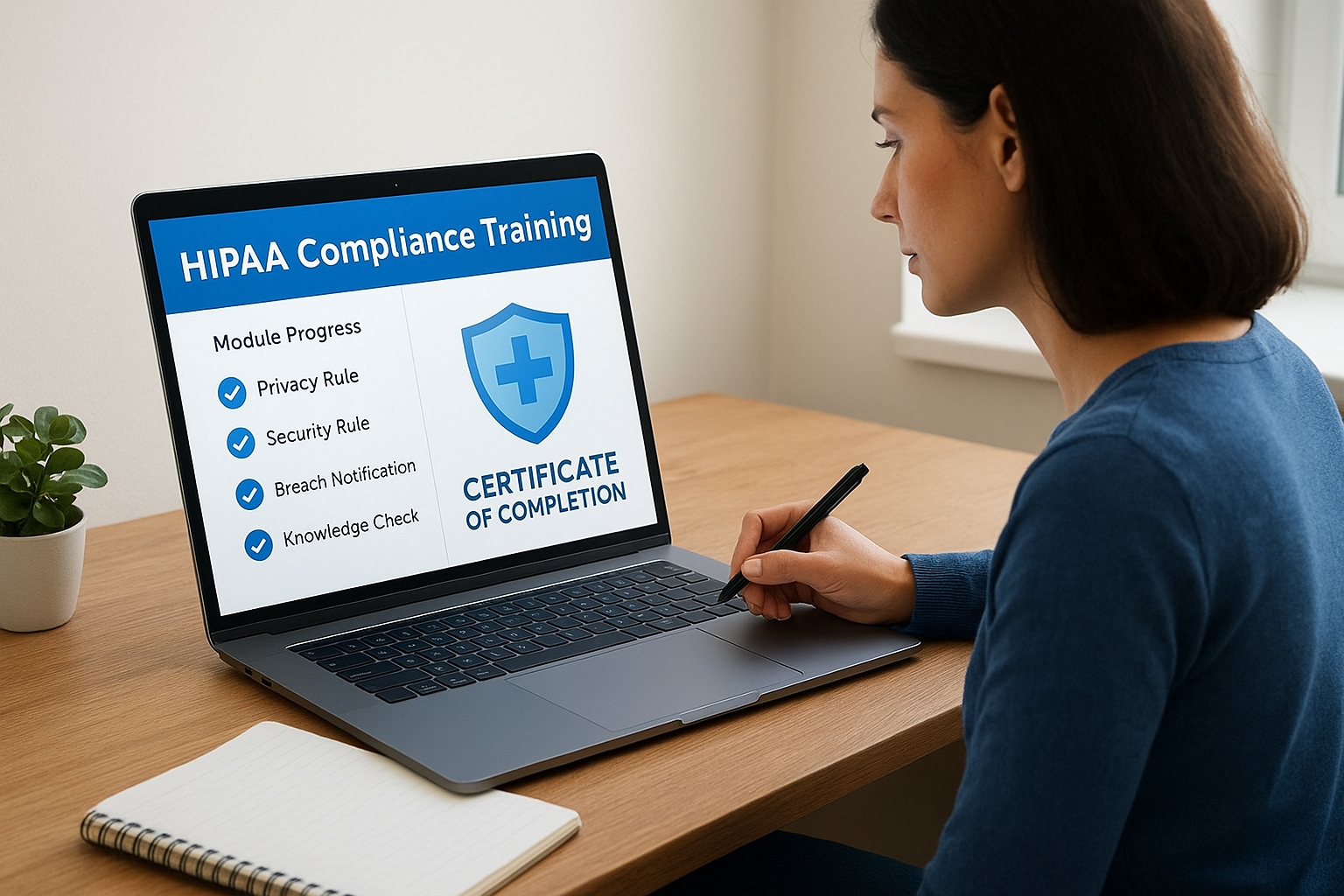
- Assignment: An admin (or an automated rule tied to a new hire’s start date) enrolls the learner in the HIPAA course.
- Notification: The learner gets an email or system alert with a deadline, often 30 or 60 days out.
- Module completion: The learner works through short lessons, usually 10 to 20 minutes each, covering the Privacy Rule, Security Rule, and Breach Notification Rule.
- Knowledge check: A quiz at the end of each module, or a final assessment, confirms retention before the course counts as complete.
- Certificate issuance: The system generates a dated certificate of completion, tied to that specific learner and course version.
- Recordkeeping: The completion data feeds into a report an admin can export for an audit or a business associate agreement review.
If a step in that chain isn’t automated and documented, it’s the step that fails you during an audit.
Self-paced versus scheduled formats
Online delivery generally splits into two models. Self-paced courses let learners start and stop whenever they want, which fits organizations with rotating shifts or remote staff spread across time zones. Scheduled or cohort-based formats set a fixed window, useful when you want an entire department to finish together ahead of an audit or a contract renewal. Neither format is inherently more compliant than the other. What matters is whether the platform enforces the deadline and flags anyone who falls behind, since an unfinished course sitting open for six months looks just as bad to an investigator as no course at all.
What the LMS does that a standalone video can’t
A plain training video satisfies almost nobody’s audit request. An LMS built for compliance work, like Axis LMS, does the parts that actually protect you: it locks course versions to a specific date so you can prove which content someone saw, sends automated reminders before deadlines lapse, and generates on-demand reports by department, role, or individual. That reporting layer is the real difference between training that checks a box and training that keeps your healthcare organization audit-ready when HHS asks for documentation.
Where free courses fall short
Free HIPAA courses aren’t fake, and many cover the required content reasonably well. Their gap is almost always tracking. Without automated reminders, version control, and exportable reports, you’re left manually managing spreadsheets to prove compliance, which is exactly the kind of gap that turns a minor incident into a willful-neglect finding. If your organization has more than a handful of employees, that manual overhead usually costs more than a paid platform would.
What a complete HIPAA training course covers
A course that only mentions HIPAA in passing isn’t training, it’s a disclaimer. A complete HIPAA compliance training online course has to walk through three specific rules in enough depth that a learner could explain them to a coworker afterward, plus role-specific content that matches what someone actually does with PHI day to day. If a course skips straight from "HIPAA is important" to a quiz, that’s a red flag, not a shortcut.
The three rules every course must address
Every credible program builds its curriculum around the same regulatory backbone. Skipping any one of these leaves a documentation gap that shows up the moment an auditor asks specific questions.

| Rule | What it covers | What learners should walk away knowing |
|---|---|---|
| Privacy Rule | Who can access PHI and under what circumstances | Minimum necessary standard, patient rights, permitted disclosures |
| Security Rule | Technical, physical, and administrative safeguards | Password practices, device security, safe transmission of PHI |
| Breach Notification Rule | What counts as a breach and reporting timelines | How to recognize a breach and who to notify immediately |
A course that skips even one of these three rules can’t call itself HIPAA training, no matter what the certificate says.
Role-based content, not one-size-fits-all
Beyond the core rules, role-based training modules separate a serious program from a generic one. A billing clerk needs different examples than a nurse or an IT administrator, and a course that treats every learner identically wastes time on irrelevant scenarios while glossing over the risks specific to that person’s job. Front-desk staff need scenarios about verbal disclosures in a waiting room. IT staff need modules on encryption and access logs. HR staff need guidance on employee health records, which HIPAA treats differently than most people assume. Good platforms let administrators assign different tracks by department, so a 20-person clinic isn’t forcing its receptionist through the same server-security module as its network engineer.
Real-world scenarios and knowledge checks
Good courses lean on scenario-based questions rather than pure definitions. Instead of asking learners to define "minimum necessary," a strong module presents a situation, like a colleague asking for more patient detail than their job requires, and asks the learner to identify the correct response. This approach sticks better than memorization, and it gives you something concrete to point to if you ever need to show that training addressed real workplace situations, not just abstract legal language. Passing scores typically sit at 80% or higher, with the option to retake failed sections rather than the entire course.
Documentation you should walk away with
Here’s the part people underestimate: the training itself matters less than what it produces on paper. When a course finishes, you should have documentation that includes:
- Learner name and role, tied to the specific course version they completed
- Completion date and time, timestamped automatically
- Score achieved, if the course includes graded assessments
- Course content summary, so you can prove what topics were actually covered
- Certificate ID or reference number, for cross-checking against your records
Without that paper trail, and without training records an investigator can actually verify, you’re relying on memory to prove compliance months or years later, and memory doesn’t hold up in front of an HHS investigator.
How to choose the right online HIPAA course
Dozens of vendors sell HIPAA compliance training online, and most of them look nearly identical from a marketing page. The differences show up once you’re comparing certificates during an audit or explaining to a business partner why your training program qualifies as adequate. Picking the right course means looking past the price tag and checking whether the platform actually produces the documentation, flexibility, and support your organization needs when something goes wrong.
Start with accreditation and content accuracy
Before anything else, confirm the course content matches current HHS guidance and cites its sources. Courses updated within the last year are safer bets than ones that haven’t touched their curriculum since the rules changed. Ask the vendor directly when the content was last reviewed, and don’t accept a vague answer. A credible provider can tell you the exact date and what changed.
If a vendor can’t tell you when the course content was last updated, assume it’s outdated.
Compare platforms on what actually matters
Cost matters, but it shouldn’t be the only column when you compare platforms side by side. Reporting capability and certificate credibility determine whether the course protects you later, not just whether it’s cheap now.
| Factor | What to look for | Why it matters |
|---|---|---|
| Cost structure | Per-seat, per-course, or unlimited-user pricing | Per-seat pricing gets expensive fast as headcount grows |
| Reporting | Exportable, filterable by role or department | Auditors want specifics, not a single completion date |
| Certificate format | Includes course version, date, and unique ID | Generic certificates don’t hold up under scrutiny |
| Update cadence | Content revised on a documented schedule | Outdated modules can’t reflect current regulations |
| Support | Live help or dedicated account contact | Matters most during rollout and audit prep |
Watch for checkbox red flags
Some courses are built to get someone through a quiz, not to teach anything retained past the final click. Signs of a checkbox program include a single 20-minute video with no role-based content, a certificate with no version number or ID, and no admin dashboard at all, meaning you’d have to email support every time you need proof of completion. If the vendor can’t answer basic questions about how their reporting works before you buy, that’s your answer about how it’ll perform after you buy.
Match the course to your organization’s size and structure
Eventually, picking the perfect healthcare LMS depends less on features and more on fit. A five-person clinic doesn’t need the same integration depth as a 500-employee hospital network with contractors, business associates, and multiple departments to track separately. Smaller teams can often get by with a standalone course and manual recordkeeping, at least for a while. Larger or growing organizations need a platform that ties into existing HR systems, assigns training automatically on hire dates, and generates department-level reports without manual pulling. Platforms built specifically for compliance training, rather than general employee education, tend to handle this better because the reporting and renewal tracking are built into the core product instead of bolted on as an afterthought.
Ultimately, the cheapest course and the best course rarely overlap once you factor in the time your team spends chasing paperwork manually. Weigh the subscription cost against the hours you’d otherwise spend building spreadsheets, sending reminder emails, and reconstructing records during an audit. That comparison usually settles the decision faster than any feature list.
How to roll out HIPAA training across your team
Rolling out HIPAA compliance training online across an entire staff is a different challenge than picking the right course. You can buy the best platform available and still end up with half your team unenrolled three months later if the rollout itself isn’t planned. A successful launch treats training like any other operational project: it needs an owner, a timeline, and a way to catch the people who fall through the cracks.
Assign an owner and a realistic timeline
Someone in your organization, usually an HR manager or a compliance officer, needs to own the rollout from start to finish. Vague ownership is how training initiatives stall after the first enthusiastic email. Set a hard enrollment deadline, typically 30 to 60 days from launch, and build in a buffer for staff who are on leave or working reduced hours. Trying to force a hospital-wide rollout into a two-week window usually backfires and just produces a wave of last-minute, half-attentive completions.
A rollout without a named owner and a deadline is a suggestion, not a compliance program.
Segment your team before you assign anything
Before you hit send on enrollment, sort your staff by role and access level and build role-based learning paths so the right people get the right modules. Sending your entire staff through an identical, generic course wastes time and dilutes the parts that matter most to each group.
- Clinical and direct-care staff: full curriculum, including PHI handling scenarios
- Administrative and front-desk staff: privacy rule focus, waiting-room and phone disclosure scenarios
- IT and technical staff: security rule depth, encryption and access-log content
- Contractors and business associates: scope-limited training tied to their specific access
- New hires: automatic enrollment triggered by start date, not a manual add-on
Communicate expectations clearly
Staff who don’t understand why training matters treat it as busywork and rush through it. A short, direct message from leadership before the course even opens sets the tone and cuts down on the "why do I need this" emails your HR team fields otherwise. Something like this works well as a template:
Subject: Required HIPAA Training - Due by [date]

Hi [Name],

You've been enrolled in our annual HIPAA compliance training,
required for anyone with access to patient information. It
takes about 45-60 minutes and covers the Privacy Rule, Security
Rule, and Breach Notification Rule.

Please complete it by [date]. Your manager will receive a
reminder if it's still incomplete a week before the deadline.

Questions? Reach out to [compliance contact].
Track completion and follow up on stragglers
Every rollout has a tail of employees who ignore the first two reminders. Automated nudges handle most of this, but someone still needs to review training progress weekly and escalate to managers for anyone approaching the deadline. Waiting until the deadline passes to check who’s finished means you’re already documenting a lapse instead of preventing one. A platform that flags overdue learners automatically, rather than requiring an admin to remember to check, is what separates a rollout that finishes on schedule from one that drags into the following quarter.
Staying certified: renewal and ongoing compliance
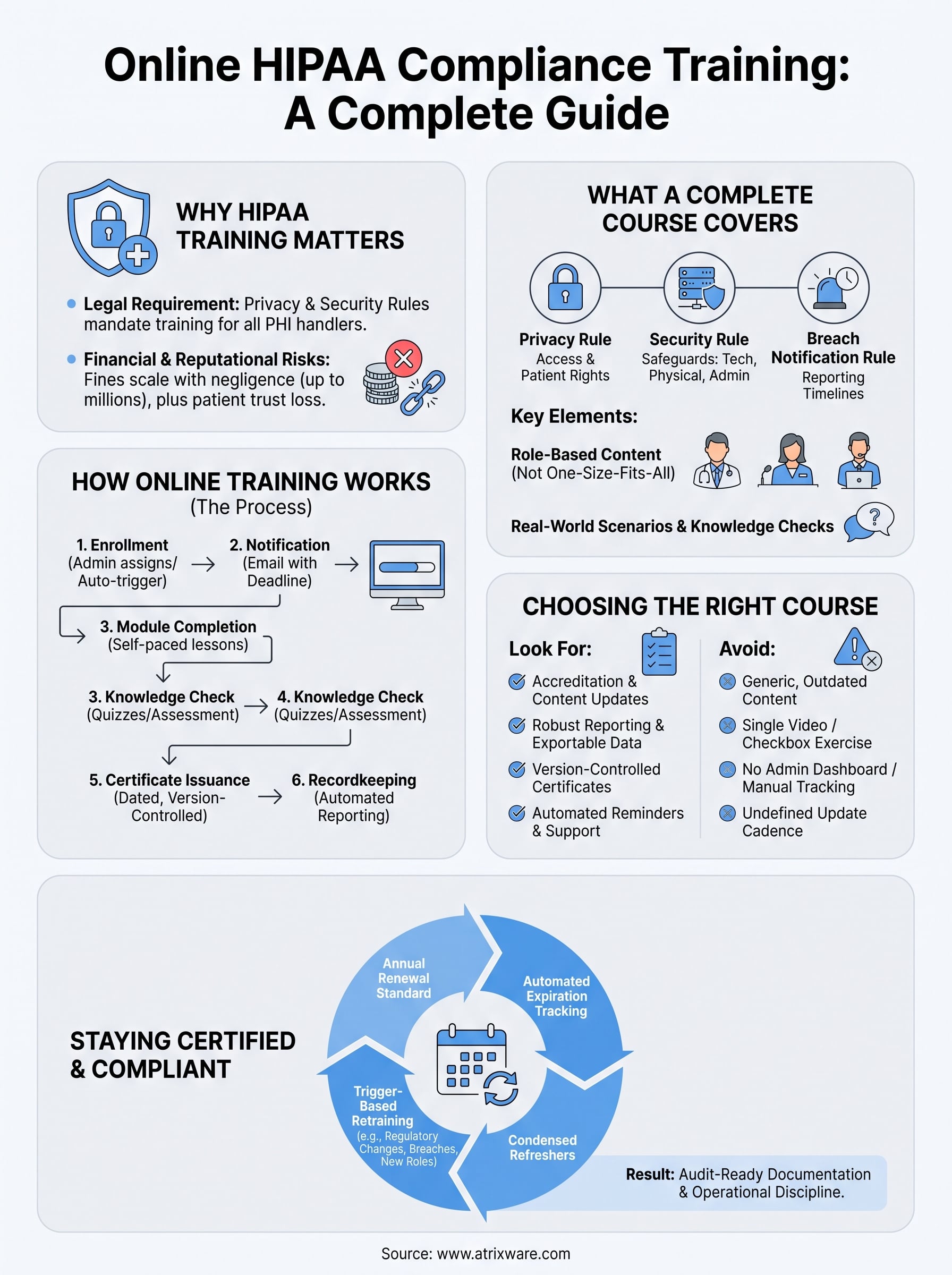
Getting your team certified once solves today’s problem, not next year’s. HIPAA compliance isn’t a one-time credential you file away, and treating it that way is how organizations end up training a workforce that’s technically certified but functionally two years behind on current regulations. Ongoing HIPAA compliance training requires a renewal cadence, a system for tracking who’s due, and a plan for retraining outside the normal schedule when something changes.
Why annual renewal is the standard
Most compliance programs default to annual retraining you plan, execute, and document, and that’s not arbitrary. Regulations get updated, breach patterns shift, and staff forget details within months of finishing a course, especially the parts they never apply day to day. HHS doesn’t publish a hard number for how often you must retrain, but the enforcement guidance treats an outdated or one-time-only training record as evidence of a weak program during an investigation. Annual renewal is the practical middle ground: frequent enough to keep knowledge current, infrequent enough that it doesn’t become background noise your staff tunes out.
Certification that never expires isn’t compliance, it’s a snapshot of what someone knew a year ago.
Events that trigger retraining outside the schedule
Beyond the annual cycle, certain events should trigger retraining regardless of when the last course was completed. Waiting for the calendar to catch up after one of these events is exactly the gap an auditor looks for.

- A regulatory update, such as a change to the Breach Notification Rule or new HHS guidance
- A role change, when an employee moves into a position with new PHI access
- A breach or near-miss, which usually warrants targeted retraining for the affected department
- A new system rollout, like a new EHR platform that changes how staff handle records
- A merger or acquisition, when two workforces with different training histories combine
Tracking expiration without losing the thread
Manually tracking renewal dates for a staff of any real size is where compliance programs quietly fail, and it’s exactly what automated certification tracking is built to prevent. Someone finishes training in March, gets busy, and nobody notices their certification lapsed until an audit request surfaces it eleven months later. A platform built for this, like Axis LMS’s compliance training tools, handles renewal the same way it handles initial enrollment: automated re-enrollment 30 to 60 days before expiration, reminder emails to the learner and their manager, and a dashboard that flags anyone who’s lapsed instead of burying that information in a spreadsheet nobody opens.
Recertification without starting from zero
With smart expiration workflows, recertification doesn’t need to mean repeating the entire course from scratch every year. Strong programs offer a condensed refresher for returning learners, focused on regulatory changes and a review of the highest-risk scenarios, with a full assessment at the end to confirm retention. This keeps annual training from feeling like a punishment and cuts down on the resentment that leads people to click through modules without reading them. What matters most is that the output looks the same as it did the first time: a dated certificate, tied to a specific course version, sitting in a report an administrator can pull without asking anyone to remember anything.
Making HIPAA training part of everyday work
Getting HIPAA compliance training online right isn’t about finding a course and forgetting it. It’s about building a documented, repeatable system that covers every rule, every role, and every renewal date without you having to remember any of it manually. The organizations that stay out of HHS’s enforcement reports aren’t necessarily the ones with the fanciest course content. They’re the ones who treat training as an ongoing operational habit, not a once-a-year scramble before an audit.
So before you commit to another spreadsheet-and-reminder-email routine, ask whether your current setup would actually hold up if an investigator asked for records tomorrow. If the answer is shaky, that’s worth fixing now rather than after a breach. A platform built for compliance tracking takes that guesswork off your plate entirely. Find out how ready your organization is for an LMS and see exactly where you stand and what to fix first.
