Managing employee training without the right platform creates unnecessary chaos. You juggle scattered spreadsheets, manual tracking, inconsistent course delivery, and no clear way to measure whether your training actually works. Your team needs better onboarding, strong compliance programs, and ongoing skill development. But finding an LMS that fits your specific needs, budget, and technical requirements feels overwhelming when dozens of vendors promise similar features yet deliver vastly different user experiences and capabilities.
This guide cuts through the noise. We evaluated 12 leading LMS platforms built specifically for employee training and broke down their core features, pricing structures, and ideal use cases. You’ll discover which systems excel at training automation, which offer the best value for smaller teams, and which provide enterprise level scalability. By the end, you’ll understand exactly which platform aligns with your training goals, team size, and organizational requirements.
1. Axis LMS by Atrixware
Axis LMS delivers a comprehensive learning management platform that prioritizes user experience and training flexibility for organizations of all sizes. You get access to a system built for employee training, customer education, compliance tracking, and channel partner development. The platform combines intuitive course creation with powerful automation features and extensive integration capabilities.
Overview
Atrixware designed Axis LMS to eliminate training complexity while maintaining enterprise-level functionality. Your team can build courses through a drag-and-drop interface that requires no technical expertise, yet the system supports advanced requirements like GDPR compliance and FDA 21 CFR Part 11 validation. The platform handles both online courses and virtual classroom training from a single dashboard, giving you complete visibility into learner progress and program effectiveness.
Best for
Organizations seeking an LMS for employee training with strong branding control and multiple training use cases find the best fit here. You benefit most if your training program requires extensive customization, robust compliance features, or the ability to sell training content directly through the platform. Mid-sized businesses and growing enterprises gain particular advantage from the scalable architecture and comprehensive integration options.
Standout features for employee training
Your training program gains access to automated workflows that trigger enrollments, reminders, and certifications based on employee actions or schedule. The system tracks Continuing Education Units (CEU) and manages re-certification requirements automatically. You can synchronize user data with HR systems like ADP, BambooHR, and Zoho through pre-built connectors or custom API integrations.
Axis LMS provides over 5,000 system integrations through its Integration Builder, connecting your training platform directly to existing business tools.
Pros and cons
Pros: Exceptional user interface design, comprehensive compliance features, extensive branding customization, robust API and webhook support, built-in e-commerce functionality, world-class security infrastructure.
Cons: Advanced customization may require initial setup time, pricing requires direct consultation for enterprise features.
Pricing and plans
Contact Atrixware directly for customized pricing based on your organization size, feature requirements, and integration needs.
2. TalentLMS
TalentLMS delivers a cloud-based learning platform that simplifies employee training through intuitive design and flexible deployment options. You access a system built for organizations that need to train internal teams, partners, or customers without complex technical requirements. The platform balances accessibility with functionality, giving you the tools to create courses quickly while maintaining professional standards across your training programs.

Overview
Your training team gains access to a platform that prioritizes rapid course deployment and straightforward administration. TalentLMS supports multiple content formats including video, PDFs, SCORM packages, and presentations, allowing you to build courses using materials you already have. The system handles role-based assignments through user groups and branches, letting you organize learners by department, location, or job function. You can customize the platform with your company branding and access training materials from any device.
Best for
Organizations with distributed teams and multi-audience training needs find strong value here. You benefit most if your training program requires quick setup, minimal technical overhead, and the ability to manage different learner groups from one portal. Small to mid-sized businesses seeking an LMS for employee training that scales without excessive complexity gain particular advantage from the streamlined interface and automation capabilities.
Standout features for employee training
Your training operations benefit from automation rules that handle enrollment, progress tracking, and certification management with minimal manual intervention. The platform offers gamification elements that increase engagement through points, badges, and leaderboards. TalentLMS provides multilingual support across 40+ languages, making global training deployment straightforward for international teams.
The platform’s branch functionality lets you create separate training portals within a single system, maintaining distinct branding and content for different audiences.
Pros and cons
Pros: Quick implementation timeline, user-friendly interface for administrators and learners, strong support for organizational hierarchies, built-in mobile compatibility, effective automation reduces repetitive tasks.
Cons: Video hosting requires external storage solutions for larger files, course editor lacks advanced design flexibility, limited options for complex adaptive learning paths.
Pricing and plans
Plans start at $119 per month when billed annually, with pricing scaling based on active user count and feature requirements.
3. Docebo
Docebo provides an AI-driven learning platform that handles both internal employee training and external audience education through a single unified system. You access a platform built for organizations that need branded learning experiences, intelligent content recommendations, and flexible delivery across multiple use cases. The system combines automation with modular extensions, giving you control over how training scales across departments, partners, and customer groups.
Overview
Your training operations gain access to AI-powered content curation that automatically tags and recommends relevant materials based on learner behavior and job roles. Docebo supports custom domains and fully branded user interfaces, allowing you to maintain consistent company identity across different training portals. The platform uses a modular approach where you select specific add-ons for certifications, social learning features, or external audience management based on your actual requirements rather than paying for unused functionality.
Best for
Organizations managing complex multi-audience training programs find strong alignment here. You benefit most if your training strategy includes employees, channel partners, and customers who all need distinct learning experiences from one platform. Companies prioritizing personalized learning paths and AI-driven content discovery gain particular advantage from the intelligent recommendation engine and sophisticated audience segmentation capabilities.
Standout features for employee training
Your team benefits from learning plans that structure sequential training based on roles, departments, or compliance requirements. The platform delivers custom reporting and analytics that track completions, engagement patterns, and program effectiveness across different learner groups. Docebo’s AI tools surface relevant content automatically, reducing the manual work of course assignment while improving content discoverability for employees.
The modular add-on structure lets you customize features precisely to your training needs without paying for capabilities you won’t use.
Pros and cons
Pros: Powerful AI-driven content recommendations, strong multi-audience support, extensive branding flexibility, scalable architecture handles growth, delivers personalized employee development at scale.
Cons: Requires strategic planning during implementation, add-on pricing model increases procurement complexity, more features than needed for simple internal-only training.
Pricing and plans
Contact Docebo directly for custom pricing based on user count, selected modules, and deployment requirements.
4. D2L Brightspace
D2L Brightspace delivers an enterprise-grade learning platform designed for organizations managing complex training requirements across multiple roles, teams, and geographic locations. You access a system built to handle sophisticated employee development programs through personalized learning paths, intelligent automation, and comprehensive analytics. The platform scales effectively from mid-sized companies to large global enterprises that need consistent training delivery across diverse workforce segments.
Overview
Your training operations gain access to adaptive learning technology that adjusts content delivery based on individual performance and learning patterns. Brightspace provides built-in course authoring tools and templates that let you create engaging content without relying on external software. The system handles both role-based enrollment and rule-based automation, automatically assigning training as employees join, change positions, or reach specific milestones in their development journey.
Best for
Organizations requiring structured employee training with deep customization capabilities find strong alignment here. You benefit most if your training program spans multiple business units, requires detailed compliance tracking, or needs to deliver different learning experiences based on job function and seniority level. Large enterprises and growing mid-market companies gain particular value from the platform’s ability to maintain consistent standards while accommodating regional variations.
Standout features for employee training
Your team benefits from real-time dashboards that provide immediate visibility into learner progress, completion rates, and program effectiveness across departments. Brightspace includes AI-powered agents that automatically send reminders, trigger follow-up actions, and identify learners who need additional support. The mobile-optimized interface ensures employees access training materials from any device without compromising functionality or user experience.
The platform’s adaptive learning paths adjust course difficulty and content sequence based on individual assessment results and engagement patterns.
Pros and cons
Pros: Exceptional scalability for complex organizations, strong analytics and reporting capabilities, extensive customization without developer resources, mobile learning fully supported, world-class customer support.
Cons: Feature depth may exceed needs for simple single-team deployments, requires strategic implementation planning, full value realization depends on defined training objectives.
Pricing and plans
Contact D2L directly for custom pricing based on user count, deployment scope, and required feature set.
5. Absorb LMS
Absorb LMS provides a unified training platform that manages employee, partner, and customer education through distinct branded portals within a single system. You access comprehensive functionality for internal workforce development, external partner enablement, and customer training without deploying separate platforms. The system combines automation capabilities with e-commerce features, making it effective for organizations that both deliver and sell training content.

Overview
Your training operations gain access to multi-portal architecture that maintains separate branding, navigation, and permissions for each audience type while centralizing administration and reporting. Absorb LMS handles complex workflows through rules-based automation that assigns courses, sends reminders, and manages eligibility requirements without manual intervention. The platform supports both self-paced online learning and instructor-led sessions, giving you flexibility in how you structure and deliver training programs across different groups.
Best for
Organizations managing multiple training audiences from one platform find strong alignment here. You benefit most if your program includes employees, channel partners, and customers who each need distinct learning experiences with separate branding. Companies requiring an LMS for employee training that extends beyond internal teams gain particular advantage from the unified administration and cross-audience reporting capabilities.
Standout features for employee training
Your team benefits from automated enrollment workflows that handle course assignments based on job roles, departments, or trigger events. The system tracks certifications, manages renewal schedules, and provides audit-friendly reporting for compliance requirements. Absorb LMS includes built-in e-commerce functionality that lets you sell training externally through catalogs, payment gateways, and subscription models.
The multi-portal setup keeps different audiences completely separate while maintaining centralized control over content, users, and analytics.
Pros and cons
Pros: Comprehensive audience management in one ecosystem, automation eliminates repetitive administrative tasks, strong integration with major HR and CRM systems, supports revenue generation through training sales.
Cons: Custom pricing model requires direct consultation, advanced reporting configurations may need additional setup.
Pricing and plans
Contact Absorb directly for custom pricing based on user count, portal requirements, and feature needs.
6. Cornerstone LMS
Cornerstone LMS delivers a comprehensive talent management platform that integrates learning with performance tracking, skills development, and career planning. You access a system built for large enterprises that treat training as part of broader HR strategy rather than a standalone function. The platform connects employee development directly to performance reviews, succession planning, and organizational talent needs, creating a unified approach to workforce growth.
Overview
Your training operations gain access to skills mapping technology that identifies capability gaps across teams and recommends targeted learning to address deficiencies. Cornerstone LMS provides certification tracking with automated compliance monitoring that ensures employees maintain required credentials across different regulatory frameworks. The system handles both self-paced courses and instructor-led training while maintaining detailed audit trails for compliance documentation.
Best for
Organizations requiring tight integration between learning and broader talent management processes find strong alignment here. You benefit most if your training program supports strategic workforce planning, succession management, or enterprise-wide skills initiatives. Large companies with complex compliance requirements and multi-level approval workflows gain particular advantage from the configurable automation and comprehensive reporting capabilities.
Standout features for employee training
Your team benefits from personalized learning recommendations powered by AI that suggests courses based on job roles, career goals, and performance data. The platform provides configurable workflows that automate approval processes, enrollment triggers, and certification renewals. Cornerstone LMS tracks global compliance requirements across different regions and automatically assigns mandatory training based on employee location and role.
The platform treats learning as part of complete talent strategy, connecting training directly to performance management and career development.
Pros and cons
Pros: Strong alignment between learning and performance systems, highly customizable for complex organizations, comprehensive compliance tracking, designed for global enterprise deployments, advanced skills management capabilities.
Cons: Interface complexity requires dedicated administrator training, feature depth may overwhelm smaller organizations focused solely on basic LMS for employee training needs.
Pricing and plans
Contact Cornerstone directly for enterprise pricing based on user count, selected modules, and deployment requirements.
7. SAP SuccessFactors Learning
SAP SuccessFactors Learning provides an enterprise learning platform that embeds training directly into your broader HR ecosystem. You access a system built for organizations that manage learning as part of complete talent strategy, connecting course delivery to performance management, succession planning, and workforce analytics. The platform focuses on continuous learning culture rather than treating training as isolated events, giving you tools to make employee development a consistent part of daily work.
Overview
Your training operations gain access to blended learning capabilities that combine self-paced online courses with instructor-led sessions and virtual classrooms. SAP SuccessFactors Learning handles compliance requirements through automated assignment rules that trigger mandatory training based on job role, location, or regulatory framework. The system provides personalized content recommendations that suggest relevant courses based on employee skills gaps, career goals, and performance review data gathered from connected SAP modules.
Best for
Organizations already using SAP ecosystem tools for HR management find natural alignment here. You benefit most if your training needs tight integration with payroll systems, performance tracking, or workforce planning modules. Large enterprises requiring an LMS for employee training that scales globally across multiple business units gain particular advantage from the platform’s ability to handle complex organizational structures and regional compliance variations.
Standout features for employee training
Your team benefits from automated compliance tracking that monitors certification expiration dates and triggers renewal assignments before credentials lapse. The platform provides learning analytics that connect training completion to business outcomes like productivity metrics and retention rates. SAP SuccessFactors Learning includes mobile access through native apps that let employees complete training during downtime without desktop requirements.
The platform treats learning as continuous process rather than discrete training events, integrating development activities into regular workflow.
Pros and cons
Pros: Deep integration with SAP HR systems, strong compliance automation, scalable for global enterprises, connects learning to business performance metrics, comprehensive mobile functionality.
Cons: Implementation complexity requires dedicated resources, optimal value requires existing SAP infrastructure.
Pricing and plans
Pricing starts at $18 per user per month for basic features, with enterprise deployments requiring custom quotes based on user count and integrated modules.
8. iSpring Learn LMS
iSpring Learn LMS provides a course creation and delivery platform that combines an intuitive learning management system with built-in authoring tools. You access a solution designed for organizations that need to build interactive training content quickly while maintaining professional quality standards. The platform supports multiple training scenarios from employee onboarding to ongoing skills development, making it effective for companies seeking an LMS for employee training without complex technical requirements.

Overview
Your training team gains access to iSpring Suite, a desktop authoring tool included with the platform that lets you create interactive videos, quizzes, and role-play simulations directly within PowerPoint. The system handles both online courses and virtual classroom sessions while tracking learner progress through detailed analytics dashboards. iSpring Learn LMS transforms existing presentations, documents, and videos into engaging training materials without requiring specialized design expertise or separate content development software.
Best for
Organizations needing rapid course development capabilities with structured learning paths find strong alignment here. You benefit most if your training program requires sequential skill building, offline mobile access, or the ability to create sophisticated content without hiring external developers. Small to mid-sized businesses seeking straightforward implementation gain particular advantage from the combined LMS and authoring tool package.
Standout features for employee training
Your team benefits from Learning Tracks that combine courses into sequential programs with built-in completion rules that control access to advanced content. The native mobile app provides offline training access for field employees or remote workers without reliable internet connectivity. iSpring Learn LMS automatically issues branded certificates when employees complete courses or finish learning paths.
The inclusion of iSpring Suite eliminates the need for separate authoring software, letting you build and deploy training from one platform.
Pros and cons
Pros: Strong lesson-level engagement reporting, enforces structured training progression, advanced course creation included, intuitive interface for administrators.
Cons: Custom branding requires higher-tier plans, fewer native integrations than enterprise platforms.
Pricing and plans
Pricing starts at $3.58 per user per month when billed annually, with a 30-day free trial available for testing.
9. 360Learning
360Learning provides a collaborative learning platform that accelerates internal training through peer-driven course creation and subject matter expert involvement. You access a system built for organizations that need to capture and share institutional knowledge quickly without relying on traditional top-down training models. The platform prioritizes speed and team contribution over formal instructional design, making it effective for companies seeking an LMS for employee training that evolves as your business changes.
Overview
Your training operations gain access to collaborative authoring tools that let employees and managers create courses directly from their expertise without waiting for L&D department bottlenecks. 360Learning handles onboarding sequences, product training, and process documentation through a streamlined interface that requires minimal technical knowledge. The system includes built-in discussion threads and peer feedback mechanisms that transform passive content consumption into active knowledge exchange among team members.
Best for
Organizations focused on rapid knowledge capture and frequent training updates find strong alignment here. You benefit most if your training program values employee contributions, requires fast course iteration, or needs to document evolving processes without formal curriculum development. Companies with distributed expertise across departments gain particular advantage from the platform’s ability to identify and activate internal subject matter experts.
Standout features for employee training
Your team benefits from expert identification tools that surface knowledgeable employees who can contribute training content. The platform provides lightweight automation for enrollment triggers and progress reminders without complex workflow configuration. 360Learning delivers engagement analytics that track learner activity, course completion, and content effectiveness through accessible dashboards.
The collaborative approach enables fast course creation with minimal dependencies on centralized training teams.
Pros and cons
Pros: Rapid course development timeline, encourages organization-wide knowledge sharing, simple user experience, adapts well to frequently changing training needs.
Cons: Limited formal certification workflows, less suited for strict compliance requirements, not designed for multi-business unit centralization.
Pricing and plans
Contact 360Learning directly for custom pricing based on user count and feature requirements.
10. Litmos
Litmos provides a cloud-based learning platform that accelerates training deployment through a large library of prebuilt courses and straightforward administration tools. You access a system designed for organizations that need to launch employee training programs quickly without building extensive content libraries from scratch. The platform combines ready-made compliance and soft skills courses with flexible LMS functionality, making it effective for companies seeking an LMS for employee training that balances speed with customization options.
Overview
Your training operations gain access to thousands of courses covering compliance topics, professional development, and technical skills that you can assign immediately after implementation. Litmos handles both online self-paced learning and instructor-led training sessions through a unified interface that requires minimal technical expertise. The system includes automated assignment rules and notification features that reduce manual administrative work while maintaining consistent training delivery across departments and locations.
Best for
Organizations prioritizing rapid implementation and built-in content libraries find strong alignment here. You benefit most if your training program needs immediate compliance course availability, supports frontline or remote workers, or requires straightforward scaling across multiple departments. Small to mid-sized businesses seeking quick deployment gain particular advantage from the extensive prebuilt course catalog and mobile learning capabilities.
Standout features for employee training
Your team benefits from mobile learning with offline access that lets employees complete training without internet connectivity. The platform provides certification tracking and automated reminder systems that ensure compliance requirements stay current. Litmos integrates directly with major HR and CRM platforms, synchronizing user data and training records across your business systems.
The prebuilt course library eliminates months of content development time, letting you deploy comprehensive training programs immediately.
Pros and cons
Pros: Fast implementation timeline, extensive built-in content reduces development effort, supports frontline training out of the box, scales efficiently with minimal administrative overhead.
Cons: Limited flexibility in course structure compared to platforms focused on custom learning paths, feature access varies by plan tier.
Pricing and plans
Contact Litmos directly for custom pricing based on user count, selected course libraries, and feature requirements.
11. Moodle Workplace
Moodle Workplace provides an open-source learning platform specifically adapted for corporate training environments from the established Moodle education system. You access a solution designed for organizations that need extensive customization control and prefer self-hosted or cloud-hosted deployment options. The platform serves companies requiring an LMS for employee training that offers complete flexibility in how you structure, brand, and extend functionality through community-developed plugins and custom development.

Overview
Your training operations gain access to multi-tenancy architecture that lets you manage separate training portals for different departments, subsidiaries, or client organizations from one installation. Moodle Workplace handles automated user provisioning through HR system integrations that create accounts and assign training based on employee data. The system includes workplace-specific features like dynamic rules for automatic enrollment, certification management with expiration tracking, and reporting dashboards tailored for corporate training needs rather than academic environments.
Best for
Organizations with in-house technical resources or dedicated IT support find strong alignment here. You benefit most if your training program requires deep customization, specific compliance reporting formats, or integration with proprietary systems. Companies prioritizing data sovereignty through self-hosting or those seeking open-source platforms gain particular advantage from the complete control over infrastructure and code modifications.
Standout features for employee training
Your team benefits from dynamic rules that automatically enroll users, assign courses, and update permissions based on custom criteria you define. The platform provides certification tracking that monitors expiration dates and triggers renewal workflows. Moodle Workplace includes program management tools that structure learning into multi-course credentials with dependency requirements.
The open-source foundation gives you unlimited customization potential while maintaining active community support for troubleshooting and feature development.
Pros and cons
Pros: Complete customization control, strong global community support, effective for complex organizational hierarchies, ideal for strict data hosting requirements, supports specialized training workflows.
Cons: Requires internal technical expertise for deployment and maintenance, user interface feels dated without custom design work, limited vendor support unless using certified hosting provider.
Pricing and plans
Contact Moodle directly for Workplace pricing based on hosting preferences, user count, and required support level.
12. LMS365
LMS365 provides a native learning platform built directly into Microsoft 365 and Microsoft Teams environments. You access a system designed for organizations already invested in the Microsoft ecosystem who need employee training to function within their existing digital workplace. The platform eliminates the need to manage separate login credentials or navigate away from daily productivity tools, making it effective for companies seeking an lms for employee training that integrates seamlessly with tools employees already use.
Overview
Your training operations gain access to SharePoint-based architecture that stores all learning content within your existing Microsoft infrastructure. LMS365 handles course creation through familiar Office applications, letting you build training materials using PowerPoint, Word, and Microsoft Stream without learning new authoring software. The system tracks completions, manages certifications, and provides analytics dashboards while maintaining all data within your Microsoft 365 tenant for consistent security policies and compliance standards.
Best for
Organizations with established Microsoft 365 deployments find natural alignment here. You benefit most if your employees work primarily in Teams, SharePoint, and Office applications throughout their workday. Companies requiring simplified user adoption through familiar interfaces gain particular advantage from the platform’s native integration that reduces training friction and login complexity.
Standout features for employee training
Your team benefits from automatic user synchronization with Azure Active Directory that provisions accounts and manages permissions based on existing organizational structures. The platform provides certification tracking with expiration alerts and automated renewal workflows. LMS365 supports both self-paced online courses and instructor-led training sessions scheduled directly through Microsoft Teams.
The native Microsoft 365 integration means employees access training without leaving their primary work environment.
Pros and cons
Pros: Seamless Microsoft ecosystem integration, familiar user interface reduces adoption barriers, centralized data management within existing tenant, strong mobile support through Teams app.
Cons: Limited value for organizations outside Microsoft ecosystem, customization depends on SharePoint capabilities.
Pricing and plans
Contact LMS365 directly for custom pricing based on user count and Microsoft 365 licensing tier.
Next steps
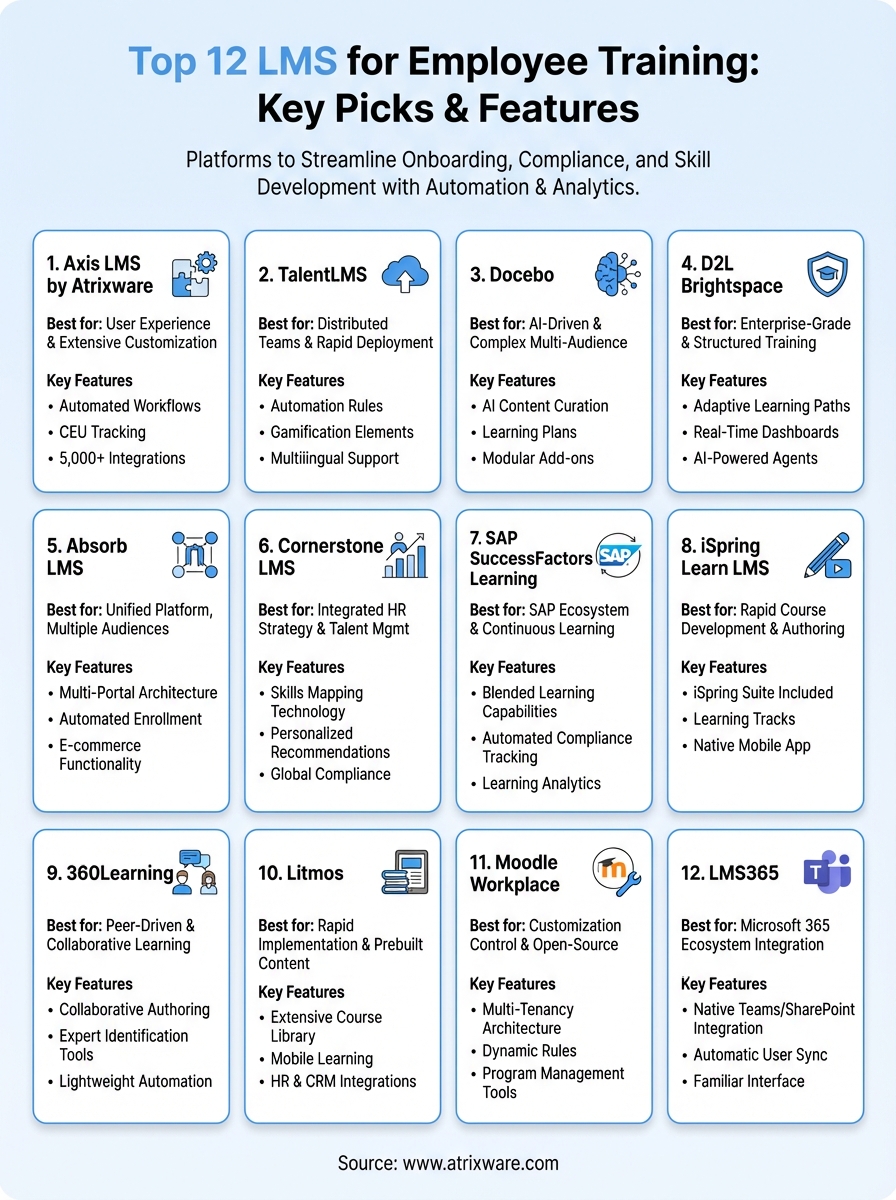
You now understand the core capabilities, pricing structures, and ideal use cases for twelve leading LMS platforms built specifically for employee training. Each system addresses different organizational needs, from Axis LMS’s exceptional customization and integration flexibility to TalentLMS’s rapid deployment model. The right platform depends on your specific requirements for automation depth, audience complexity, compliance tracking, and budget constraints.
Start by defining your training priorities and technical requirements before requesting demos. Identify which features directly support your employee development goals rather than choosing based on feature lists alone. Test each platform’s interface with actual team members who will use it daily. For organizations seeking a scalable lms for employee training with strong branding control and comprehensive integration capabilities, explore Axis LMS by Atrixware to see how it fits your specific training requirements and organizational structure.
