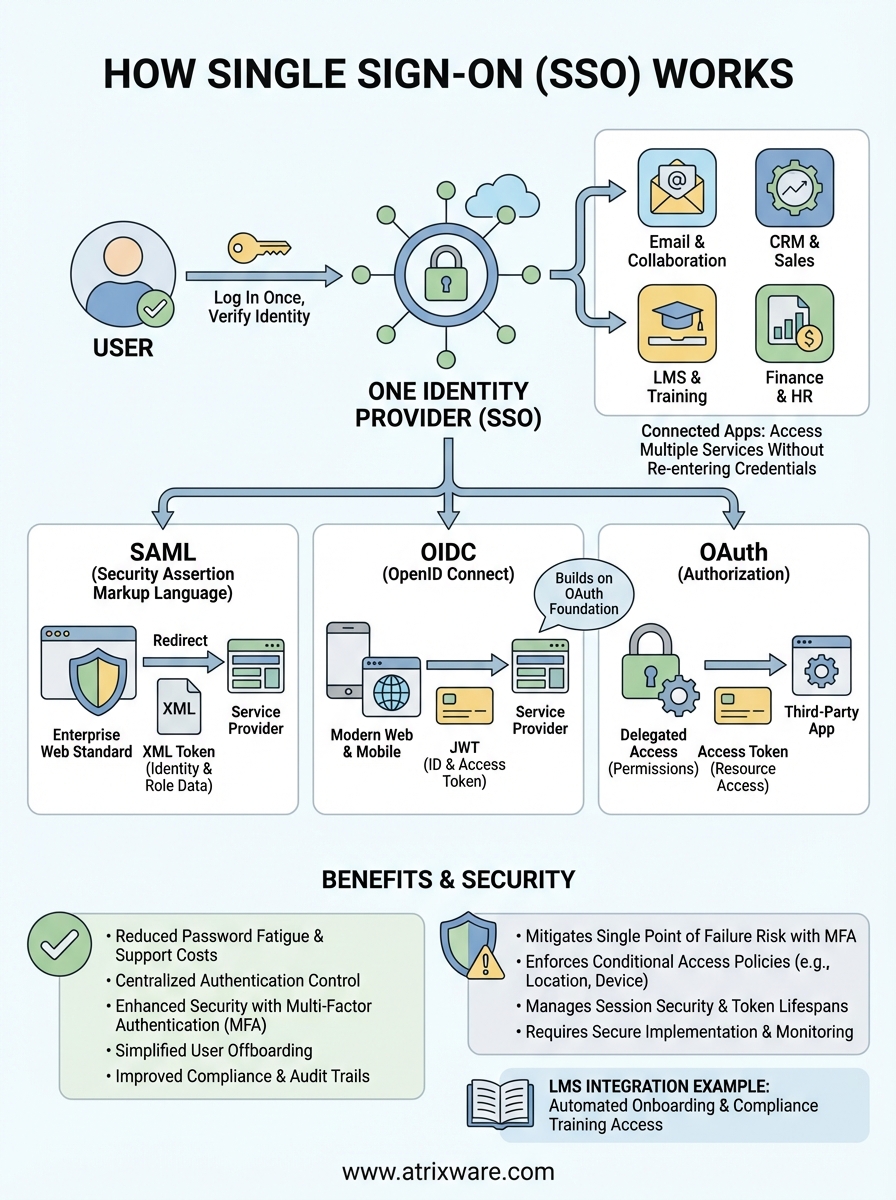
Single sign-on lets you log in once and access multiple applications without entering credentials again. When you sign into your company portal in the morning, SSO authenticates your identity and passes that verification to every connected app you need throughout the day. No more juggling dozens of passwords or clicking through repeated login screens.
This article breaks down exactly how SSO authentication works behind the scenes. You’ll learn the technical flow between identity providers and service providers, understand the three main protocols that power SSO systems (SAML, OIDC, and OAuth), and see practical examples of SSO in learning management systems. We’ll also cover real security considerations and implementation steps so you can evaluate whether SSO makes sense for your organization. By the end, you’ll understand not just what SSO does but how it accomplishes secure authentication across your entire tech stack.
Why single sign on matters for modern businesses
Your employees juggle an average of 36 cloud services according to recent enterprise surveys, and each application demands its own login credentials. This password overload creates security vulnerabilities as users resort to weak passwords or write credentials on sticky notes. SSO eliminates this friction by centralizing authentication, so your team spends less time logging in and more time working.

Reducing password fatigue and support costs
Password resets consume 20 to 50 percent of help desk tickets in most organizations. When you implement SSO, users remember just one strong password instead of dozens of weak ones. Your IT team stops fielding constant "forgot password" requests, freeing them to focus on strategic projects rather than routine account recovery. The reduction in support tickets directly translates to measurable cost savings and improved employee satisfaction.
Single sign-on reduces the attack surface by limiting password storage across multiple systems.
Improving security posture
Understanding how single sign on works reveals why it strengthens your security framework. SSO centralizes authentication control, letting you enforce multi-factor authentication and password complexity rules in one place rather than across every application. You gain visibility into who accesses which systems and when, creating comprehensive audit trails for compliance requirements. When an employee leaves, you revoke access to all connected applications with a single action instead of hunting down individual accounts across your entire software stack.
How to implement single sign on in your stack
Implementing SSO requires careful planning across your technical infrastructure and business requirements. You start by selecting an identity provider that integrates with your existing applications, then configure each service to trust that provider’s authentication decisions. The process typically takes a few weeks for initial setup, though adding new applications becomes faster once your foundation is established.
Choose your identity provider
Your identity provider acts as the central authentication hub that verifies user identities and issues access tokens. You need to evaluate providers based on their integration catalog, protocol support (SAML, OIDC, OAuth), and administrative features. Popular enterprise options include Okta, Microsoft Entra ID (formerly Azure AD), and Google Workspace, each offering thousands of pre-built connectors to common business applications.

Consider your organization’s specific requirements before committing to a provider. Do you need advanced conditional access policies? Will you require API access for custom integrations? Does the provider support the geographic compliance standards your industry demands? The right choice depends on your existing tech stack, budget constraints, and the technical expertise of your IT team.
Selecting an identity provider that matches your technical capabilities and integration needs prevents costly migrations later.
Configure service provider connections
Each application in your stack becomes a service provider that trusts your identity provider’s authentication decisions. You establish this trust by exchanging security certificates and configuring metadata URLs between systems. When you add a new application, you typically access its SSO settings, upload your identity provider’s metadata file, and map user attributes like email addresses and department codes.
Most modern SaaS applications include built-in SSO support with step-by-step configuration guides. Your identity provider’s admin console usually offers templates for popular applications, reducing setup time from hours to minutes. Testing each connection thoroughly before rolling out to users prevents access issues and helps you identify attribute mapping problems early in the deployment process.
Set up authentication policies
Understanding how single sign on works helps you configure smart authentication rules that balance security and convenience. You define policies that determine when users must re-authenticate, which applications require additional verification factors, and what access restrictions apply to different user groups. Setting stricter policies for sensitive applications like financial systems while keeping standard tools easily accessible creates a layered security approach.
Your policies should include session timeout rules, multi-factor authentication triggers, and network-based restrictions. You might require MFA only when users access applications from outside your corporate network, or mandate re-authentication every few hours for applications containing sensitive data. Regular policy reviews ensure your SSO configuration adapts as your security needs evolve and new threats emerge.
Understanding SAML OIDC and OAuth in SSO flows
Three core protocols power how single sign on works in modern applications: SAML, OIDC (OpenID Connect), and OAuth. Each protocol handles the authentication handshake differently, but all achieve the same goal of verifying your identity once and sharing that verification across multiple systems. SAML dominated enterprise SSO for years, while OIDC and OAuth emerged to address mobile and API-driven authentication needs. Understanding when to use each protocol helps you build an SSO implementation that matches your technical requirements and user experience goals.
SAML for enterprise authentication
Security Assertion Markup Language (SAML) remains the industry standard for web-based SSO in enterprise environments. When you log into your identity provider, it generates an XML-based token containing your identity attributes and digitally signs it with a certificate. Your browser carries this token to the service provider, which validates the signature and grants access based on the information inside. This process happens automatically through browser redirects, making it invisible to users.

SAML tokens include detailed user attributes like department, job title, and group memberships, letting applications customize access based on your organizational role. The protocol supports encrypted assertions that protect sensitive identity data as it travels between systems. SAML works particularly well for applications accessed through web browsers, though it struggles with mobile apps and API integrations due to its XML structure and browser-dependent redirects.
OIDC builds on OAuth foundation
OpenID Connect adds an identity layer on top of OAuth 2.0, creating a modern protocol designed for both web and mobile applications. OIDC uses JSON Web Tokens (JWT) instead of XML, making tokens smaller and easier for developers to parse. When you authenticate, the identity provider returns an ID token containing your identity claims and an access token for calling APIs. This dual-token approach separates proving who you are from granting permission to access resources.
OAuth 2.0 itself handles authorization rather than authentication, defining how applications request permission to access your data. You see OAuth in action when a mobile app asks to "Sign in with Google" or when you grant a scheduling tool access to your calendar. OAuth focuses on delegated access, letting you authorize third-party applications to act on your behalf without sharing your password.
OIDC combines the authorization strength of OAuth with true authentication capabilities, making it the preferred choice for modern applications.
Choosing the right protocol
Your protocol choice depends on application types and existing infrastructure. SAML fits organizations with established enterprise applications and on-premises identity systems like Active Directory. You choose SAML when integrating with legacy business software or when compliance requirements demand specific security features built into the protocol. Most learning management systems and enterprise resource planning tools support SAML because of its widespread adoption.
OIDC works better for mobile-first environments, API-driven architectures, and modern SaaS applications. You pick OIDC when building custom applications, integrating with social identity providers, or creating seamless authentication across web and mobile platforms. Many organizations implement both protocols, using SAML for traditional enterprise apps while deploying OIDC for newer cloud services and mobile experiences. This hybrid approach lets you support your entire application portfolio without forcing migrations that disrupt users.
Real world SSO examples in LMS and training
Learning management systems benefit directly from SSO integration by removing login barriers between your training content and daily work applications. When employees access training from their corporate portal, SSO authenticates them automatically and tracks their progress without requiring separate credentials. Understanding how single sign on works in LMS environments shows you practical ways to increase course completion rates and reduce administrative overhead in your training programs.
Employee onboarding and compliance training
Your new hires sign into their company email account on day one, and SSO grants immediate access to all required onboarding modules in your LMS. The system pulls their department, role, and manager information from your identity provider, automatically enrolling them in relevant training tracks. When compliance certifications expire, your LMS triggers renewal courses that employees access through the same unified login experience they use for all other tools.
SSO integration eliminates the friction that causes employees to delay required training.
Manufacturing companies use SSO to connect safety training systems with facility access controls, ensuring workers complete certifications before entering restricted areas. Healthcare organizations link their LMS to credentialing databases, automatically updating staff training records when protocols change. These integrations happen seamlessly because SSO shares verified identity data across systems.
Customer education portals
You create training programs for customers who already authenticate through your main product. SSO lets them access certification courses, product documentation, and support resources without managing additional passwords. SaaS companies connect their customer success platforms to training portals, tracking which features customers understand and targeting education efforts accordingly. This connected experience increases product adoption while reducing support ticket volume from users who need training rather than technical assistance.
SSO security risks and best practice tips
SSO creates a central authentication point that simultaneously simplifies access and concentrates risk. When you implement SSO correctly, it strengthens your security posture by reducing password sprawl and enabling consistent policy enforcement. Poor implementation, however, turns your SSO system into a single point of failure that grants attackers access to every connected application. Understanding how single sign on works helps you identify vulnerabilities before they become breaches and deploy protective measures that balance security with user convenience.
Single point of failure concerns
Your SSO system becomes a high-value target because compromising one set of credentials unlocks your entire application stack. Attackers who steal SSO credentials gain immediate access to email, financial systems, customer data, and internal tools simultaneously. You mitigate this risk by mandating multi-factor authentication for all SSO logins, requiring something users know (password), something they have (mobile device), and optionally something they are (biometric verification).

Mandatory MFA on your identity provider prevents credential theft from becoming a complete security failure.
Implement conditional access policies that require additional authentication when users connect from unfamiliar locations or unmanaged devices. Regular security audits of your identity provider configuration catch misconfigurations before attackers exploit them. You should also maintain an emergency access account with strong credentials stored securely offline, letting administrators recover access if your primary SSO system fails.
Token interception and session management
Authentication tokens traveling between your identity provider and service providers create interception opportunities for attackers on compromised networks. You protect token transmission by enforcing HTTPS connections across all SSO endpoints and validating SSL certificates properly. Configure short token lifespans that expire after minutes rather than hours, forcing periodic re-authentication without disrupting normal workflows.
Session hijacking becomes possible when attackers steal active session cookies from user browsers. You prevent this by implementing secure cookie flags (HttpOnly, Secure, SameSite) and binding sessions to specific IP addresses or device fingerprints. Monitor for suspicious session patterns like simultaneous logins from different geographic locations or rapid application switching that suggests automated access rather than human behavior.
Implementation best practices
You start with least privilege access, granting users only the applications their roles require rather than connecting everyone to everything. Regular access reviews identify orphaned accounts and excessive permissions that accumulate as employees change roles. Document your SSO architecture thoroughly, including trust relationships between providers, certificate expiration dates, and disaster recovery procedures that your team can execute during security incidents.
Test your SSO implementation against common attack vectors like SAML response tampering, token replay attacks, and man-in-the-middle interception. Deploy security information and event management (SIEM) tools that aggregate logs from your identity provider and connected applications, creating visibility into authentication patterns and potential compromises. Your security strategy should treat SSO as critical infrastructure that requires the same protection level as your core business systems.
Key takeaways on single sign on
Understanding how single sign on works gives you the foundation to secure your application stack while dramatically improving user experience across your organization. You reduce password fatigue and help desk costs by centralizing authentication through one trusted identity provider, letting your team access dozens of connected applications with a single login session. The three main protocols (SAML, OIDC, OAuth) each serve different technical requirements, with SAML dominating enterprise web applications and OIDC powering modern mobile and API-driven systems.
Your SSO implementation requires careful planning around security policies and multi-factor authentication to prevent your centralized access point from becoming a vulnerability. When you integrate SSO with your learning management system, you remove the login barriers that delay training completion and create seamless access experiences for both employees and customers navigating your educational content. This integration becomes particularly powerful in compliance training scenarios where automatic enrollment and credential verification streamline regulatory requirements.
Ready to see SSO integration in action? Explore our Axis LMS admin demo to experience firsthand how single sign-on simplifies user management, eliminates password headaches, and streamlines access to your training programs.
