The best employee onboarding training solution is the one that closes your biggest gap: course delivery, HR paperwork, or compliant content. If you need a learning platform that trains, tracks, and reports, Axis LMS is the strongest pick. If you want paperwork and payroll in one system, an HR suite like BambooHR fits. If your people work on phones instead of desks, look at Connecteam. If you have no one to build the content, a custom training service does that for you.
Most companies feel this gap the same way. New hires get a stack of forms on day one, a few slide decks, and a vague promise that a coworker will show them the ropes. Nobody tracks what they completed, and nobody can prove required training happened. Dozens of tools claim to "streamline onboarding," which makes the choice harder, not easier.
This article compares seven options across LMS platforms, HR suites, and services. Each gets the same three checks: how it handles onboarding, who it suits, and what it costs and where it falls short. A short buying guide follows. We build Axis LMS at Atrixware, so it is listed first, and we say plainly where it fits and where it does not.
1. Axis LMS by Atrixware
Axis LMS is a learning management system built to deliver, track, and report on training from one place. It is the strongest pick here when the hard part of your onboarding is the training itself. As an employee onboarding training solution, it works as the training engine beside your HR system, not as a replacement for it.

How it handles onboarding
You build courses in a drag-and-drop interface and mix online lessons with virtual classroom sessions. A first-week program can pair self-paced modules on tools and policies with a live session led by the hiring manager. Automated and on-demand reports show who finished what, and automated communications remind people who fall behind.
Integration is where Axis LMS earns its place in an HR stack. It syncs user data with systems such as ADP, Salesforce, BambooHR, and Zoho, so a hire is not keyed in twice. It supports SAML single sign-on through providers like Okta, Azure, and Ping Identity. A REST API, webhooks, and an integration builder reaching over 5,000 systems cover custom work.
Enter each hire once in your HR system and let integration carry the record to your training system.
Who it suits
Axis LMS fits teams whose onboarding carries regulatory weight or reaches beyond employees:
- Compliance-heavy employers that need GDPR or FDA 21 CFR Part 11 features, CEU tracking, and re-certification management.
- Companies that train customers or channel partners on the same platform, or sell training through built-in e-commerce.
- Organizations that want the learner interface to match their brand.
You can see both sides before talking to anyone. The Axis LMS user demo shows what a new hire sees, and the admin demo shows how you build courses and pull reports.
Pricing and limits
Atrixware quotes pricing based on your user count and requirements, so the admin demo is the fastest way to get a number. The main limit is scope. Axis LMS is a learning platform, not an HRIS, so it does not replace payroll, benefits, or new-hire paperwork tools. Plan time to build your course content as well.
2. TalentLMS
TalentLMS is a cloud LMS known for fast course building at a modest price. It is a practical employee onboarding training solution for small teams that mainly need to deliver courses and do not need an HR suite attached.
How it handles onboarding
Course customization is its real strength. A drag-and-drop builder, custom branding, and interactive content let you assemble a training path for a new role in an afternoon. You assign the path, learners work through it, and you see completions.
The HR side is where it stops. TalentLMS does not manage e-signatures or task checklists for paperwork, so most teams pair it with a separate e-signature app and a task tool. That works, but it means three tools instead of one.
TalentLMS gives you good courses and leaves the paperwork to someone else.
Who it suits
It suits businesses that want a standalone, cost-conscious course system:
- Small and mid-size companies with no learning administrator on staff.
- Teams that already run HR paperwork elsewhere and only need training delivery.
- Buyers who want to start small and add users as they hire.
Pricing and limits
Plans are tiered by active users, and the entry plan has started around $119 a month billed annually for up to 40 users. Confirm current rates on the vendor’s site. The limit is the missing HR workflow, so check that reporting and integrations cover your needs before you commit, especially if recertification tracking matters to you.
3. BambooHR
BambooHR is an all-in-one HR platform that bundles onboarding with core HR and payroll. It is the right employee onboarding training solution when your biggest pain is paperwork and task coordination, not course content.
How it handles onboarding
New hires get automated checklists, e-signature collection, and I-9 and E-Verify processing, so HR stops chasing documents by email. Managers get their own tasks, which keeps the first week from depending on one person’s memory.
Training content is not its core. The compliance course libraries inside BambooHR come from a third-party partner, ranging from a single course to over 300 depending on plan. They are not a native authoring tool. Teams that want custom courses usually connect a dedicated LMS. Axis LMS syncs with BambooHR for exactly that reason.
An HR suite moves the paperwork, and an LMS teaches the job. Most growing companies end up with both.
Who it suits
BambooHR suits small and mid-size businesses that want one system from offer letter to payroll. It works best when:
- HR is a small team handling hiring, onboarding, and time off.
- You want e-signatures built in instead of paid separately.
- Your training needs are mostly standard compliance courses.
Pricing and limits
Pricing is not fully public. The Core plan has been listed from $10 per employee per month, and a flat monthly minimum, reported at about $250, applies to teams of 25 or fewer. The limit is training depth. Expect to add a learning platform if you build your own courses.
4. Trainual
Trainual turns tribal knowledge into structured, trackable training. As an employee onboarding training solution, it fits companies where how we do things lives in people’s heads and needs to be written down.
How it handles onboarding
You document processes, policies, and roles, then group them into role-based training paths. Embedded video and e-signatures let a new hire read the procedure, watch the walkthrough, and sign off that they understand it. The documentation you write for onboarding doubles as a reference library afterward.
This is the tool for the company where one veteran employee is the entire onboarding program. It forces you to capture what that person knows, which is often the most valuable part of the exercise.
Trainual’s real product is the written-down process, and the training comes out of it.
Who it suits
Trainual suits growing companies that need to scale consistency:
- Businesses with undocumented processes and a few overloaded senior people.
- Franchise-style or multi-site operations that want everyone doing the job the same way.
- Teams that value SOP documentation as much as course completion.
Pricing and limits
Trainual uses custom subscription pricing and charges a $1,000 one-time implementation fee. The pricing is not fully transparent, so ask for a written quote. It has no built-in HR document collection, so you will still need a place for tax forms and agreements. Heavy compliance tracking is better served by a full LMS.
5. Connecteam
Connecteam is a mobile-first workforce app built for teams that rarely sit at a desk. It is the best employee onboarding training solution here for frontline and deskless staff in retail, hospitality, and field services.

How it handles onboarding
New hires finish training modules from a phone on day one, with no company laptop needed. Role-specific onboarding packets walk them through what is required before payroll, including contracts and tax forms signed in the app. A shared progress view lets you and the new hire see how far along they are.
Training comes through Courses, where you assign role-specific lessons with quizzes, and an AI course creator helps you draft them quickly. For multi-location employers, the phone-first approach removes the biggest barrier, which is getting everyone in front of a computer.
If your employees do not have desks, your onboarding cannot depend on them.
Who it suits
Connecteam suits teams where mobile access decides whether training happens:
- Retail, restaurant, and hospitality employers with high turnover.
- Field service and multi-location businesses.
- Small companies that want a free starting point.
Pricing and limits
The free plan covers up to 10 team members with features intact. At 11 or more, the onboarding features drop out of the free plan, and paid plans start around $35 a month for one hub of up to 30 members. E-signature allowances are capped by plan, which may not suit paperwork-heavy hiring. Deep compliance reporting is not its focus.
6. Innform
Innform is a learning platform that adds gamification and blended learning to onboarding. It suits hybrid teams that mix online modules with in-person sessions and want new hires to take ownership of their progress.
How it handles onboarding
You create learning journeys and assign them to individual hires or to groups based on a property such as role or department. The blended learning feature lets one journey schedule online modules, virtual calls, and in-person meetings together, with details attached. That keeps a hybrid first week in one place instead of scattered across calendars.
Gamification is the signature feature. Learners earn points and levels and climb a leaderboard visible to everyone. Done well, it nudges people to finish modules. Done badly in a shy or small team, it can feel forced, so decide whether it matches your culture. Apps are available on web, iOS, and Android.
Gamification works when your culture likes friendly competition and backfires when it does not.
Who it suits
Innform suits teams that want an approachable employee onboarding training solution without a big budget:
- Companies running hybrid onboarding with both remote and on-site elements.
- Small teams that want a free plan to start.
- Managers who want new hires to self-serve from a clear dashboard.
Pricing and limits
There is a free plan for up to 15 users, and paid plans have started from about $1.40 per user per month. Customization of user profiles and bios is limited. Like the other learning-first tools, it does not handle HR paperwork or payroll.
7. Custom onboarding training services
Custom training services are outside firms that design and build your program for you. They are the right employee onboarding training solution when content, not software, is your bottleneck, or when you need someone to confirm the content meets legal requirements.
How it handles onboarding
A typical engagement produces role-based learning paths, 30-60-90 day plans, facilitator guides, eLearning modules, and job aids tailored to your roles. HR consulting firms add compliance audits. They review your existing policies and training against current requirements and deliver a gap analysis.
That last part matters because software cannot judge it. A platform can show 100% completion on a harassment-prevention module that still misses your state’s rules. Training requirements vary by state and industry, so a human review catches what a completion tracker never will.
Software proves people finished the training, and an expert proves the training was the right training.
Who it suits
Custom services fit organizations with specific needs:
- Regulated industries such as healthcare, where site-specific training is expected.
- Companies launching a large hiring wave with no internal learning team.
- Employers that already own a platform but lack the content to put in it.
Pricing and limits
Pricing is scoped per project or per retainer, so expect a quote after a discovery call. The cost is higher than software alone, and content goes stale unless someone maintains it. Ask for editable source files so you can update modules yourself. Most teams host the finished content in an LMS such as Axis LMS to track completion.
How to choose an onboarding training solution
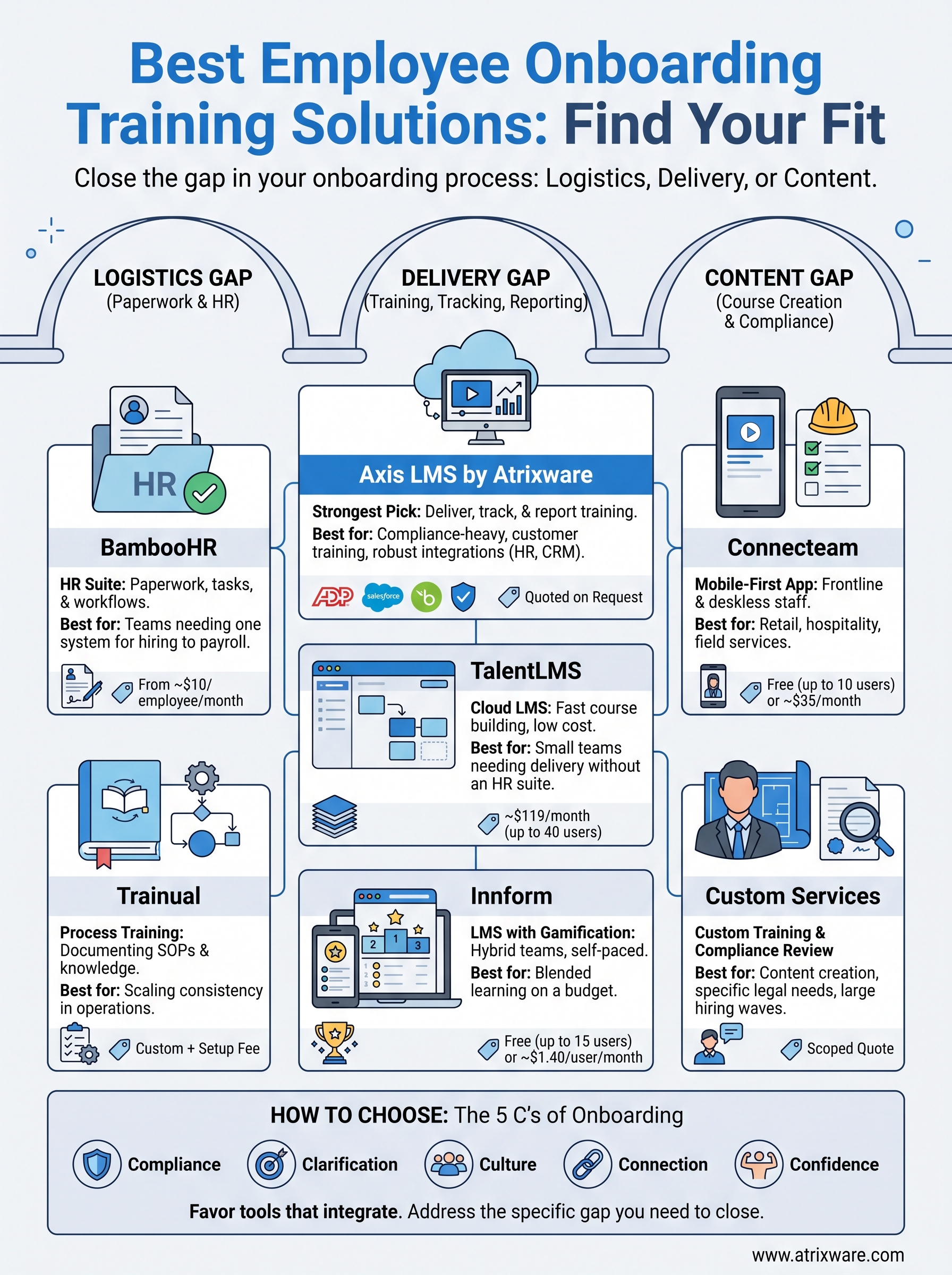
Choose by the gap you need to close, not by the longest feature list. If your problem is paperwork, buy an HR suite. If it is training delivery and proof, buy an LMS. If it is content or compliance judgment, bring in help. Every employee onboarding training solution above does one of those jobs well and the others only partly.
Start with the gap you need to close
Name your gap before you open a single demo. Most onboarding problems fall into one of three types, and each points to a different tool:
- Logistics gap: forms arrive late, checklists live in email, and managers forget tasks. An HR suite fits.
- Delivery gap: you have training, but no way to assign it, track it, or report on it. An LMS fits.
- Content gap: you do not have the training, or you doubt it meets legal requirements. A custom service fits.
Many companies have more than one gap, which is why combinations are common, such as an HR suite plus an LMS.
Compare the seven side by side
The table below sets the options next to each other. Published prices change, so confirm them with each vendor before you budget.
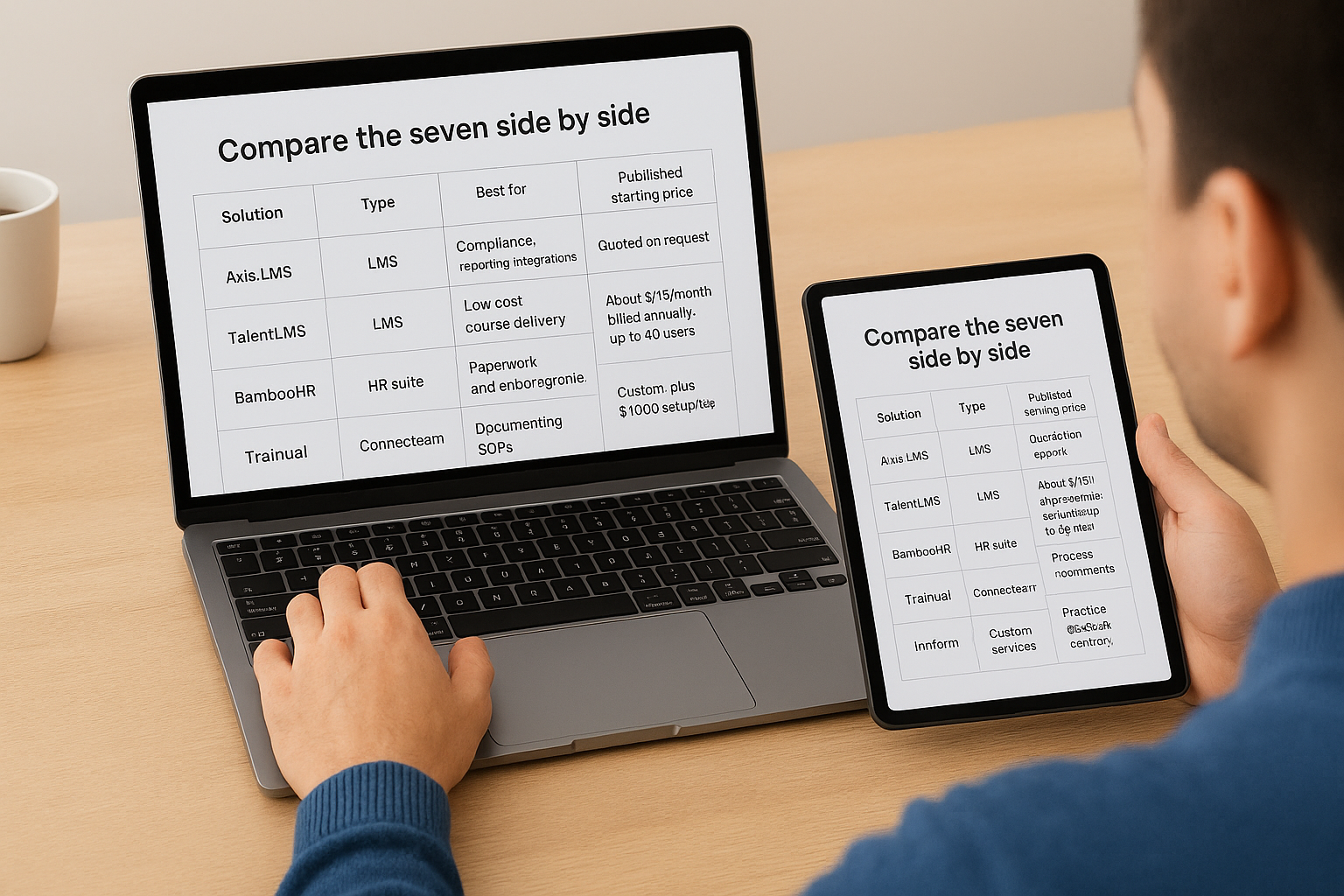
| Solution | Type | Best for | Published starting price |
|---|---|---|---|
| Axis LMS | LMS | Compliance, reporting, integrations | Quoted on request |
| TalentLMS | LMS | Low-cost course delivery | About $119/month billed annually, up to 40 users |
| BambooHR | HR suite | Paperwork and onboarding workflows | From $10/employee/month |
| Trainual | Process training | Documenting SOPs | Custom, plus $1,000 setup fee |
| Connecteam | Mobile workforce app | Frontline and deskless teams | Free up to 10 users, paid from about $35/month |
| Innform | LMS with gamification | Hybrid teams on a budget | Free up to 15 users, from $1.40/user/month |
| Custom services | Services | Custom content, compliance review | Scoped quote |
If you are searching for a free option, Connecteam and Innform are the two with real free tiers here. Both have user caps, so check what happens when you grow past them.
What your onboarding training should cover
Whatever you buy, fill it with the right content. A useful checklist is the five C’s of onboarding:
- Compliance: required legal, safety, and security training.
- Clarification: what the role is, what good looks like, and how success is measured.
- Culture: values, norms, and how decisions get made.
- Connection: introductions, a buddy or mentor, and team rituals.
- Confidence: practice and feedback so the hire can work independently.
Spread this over the first 30, 60, and 90 days instead of the first week. A hire who gets everything on day one remembers little of it.
Questions to ask before you buy
Put these to every vendor, including us:
- Does it connect to our HR system, and what data does it sync?
- How does it prove training was completed, and can we export the records for an audit?
- Who builds and updates the course content?
- What happens to price and features when we double our headcount?
- Can a new hire use it on the device they actually have?
Picking the right fit
There is no single best employee onboarding training solution, only the best match for your gap, your headcount, and your regulatory exposure. Paperwork problems call for an HR suite, delivery and proof call for an LMS, and content and compliance judgment call for an expert. Most growing companies end up combining two of these, so favor tools that integrate over tools that promise to do everything.
Before you commit, see the platform from the learner’s seat and the admin’s seat. If you are not sure how far along your search is, take the LMS readiness quiz to see which stage of the buying process you are in and what to tackle next.
