
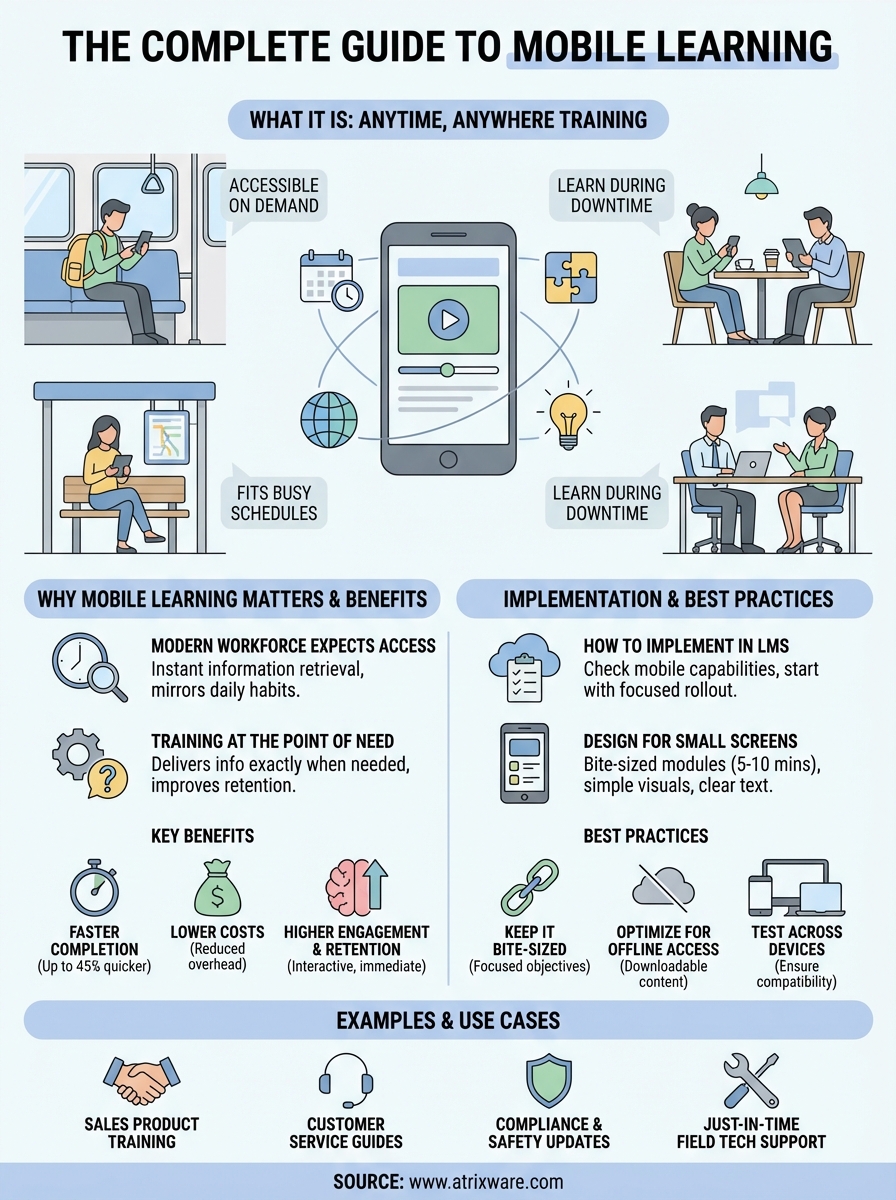
Mobile learning lets your employees access training content anytime through their smartphones or tablets. Instead of scheduling formal training sessions or requiring computers, your team can learn during their commute, between meetings, or while waiting for an appointment. This flexibility makes training more accessible and fits naturally into busy work schedules.
This guide walks you through everything you need to know about mobile learning for business training. You’ll discover why mobile learning has become essential for modern organizations, how to add it to your existing Learning Management System, and the concrete benefits it delivers. We’ll share real examples of companies using mobile learning successfully, plus practical tips to make your mobile training programs more effective. Whether you’re exploring mobile learning for the first time or looking to improve your current approach, you’ll find actionable strategies to boost engagement and drive better training results.
Why mobile learning matters for training
Your employees already spend hours each day on their mobile devices for work and personal tasks. They check emails, join video calls, and access company systems from their phones. When you offer training that works the same way, you remove friction and meet your team where they already are. Mobile learning aligns with how people naturally work today, making training feel less like an interruption and more like a seamless part of their daily routine.
The modern workforce expects mobile access
Your team has grown accustomed to instant access to information through their smartphones. They look up answers on Google, watch tutorial videos, and solve problems without waiting for their next computer session. Training that requires desktop access feels outdated and creates unnecessary barriers. When you understand what is mobile learning and apply it to your training strategy, you match the expectations your employees already have for accessing information quickly and conveniently.

Mobile devices have become the primary way people consume content, and your training should reflect this reality.
Training needs to happen at the point of need
Your employees face questions and challenges throughout their workday, not just during scheduled training sessions. A salesperson needs product details before a client call. A customer service rep requires troubleshooting steps while helping a frustrated customer. Mobile learning delivers information exactly when your team needs it, transforming training from a one-time event into an ongoing resource. This approach improves knowledge retention because employees apply what they learn immediately, reinforcing the training through practical use rather than hoping they remember it weeks later.
How to implement mobile learning in your LMS
Adding mobile learning to your LMS requires a strategic approach that balances technical requirements with learner needs. You don’t need to rebuild your entire training program overnight. Instead, you can start with a focused rollout that tests mobile capabilities with specific courses before expanding to your full curriculum. This measured approach lets you identify issues early and refine your strategy based on real feedback from your team.
Check your LMS mobile capabilities
Your first step involves assessing whether your current LMS supports mobile-responsive design. Modern Learning Management Systems like Axis LMS automatically adjust content to fit any screen size, but older systems might require updates or plugins. Test your existing courses on actual smartphones and tablets to see how they display. Check if videos play smoothly, if quizzes function properly, and if navigation makes sense on a smaller touchscreen. You need to confirm that learners can access, complete, and track their progress without frustration before promoting mobile access to your entire organization.
A mobile-responsive LMS adapts content automatically, but you still need to verify that everything works as intended on actual devices.
Design content for smaller screens
Once you understand what is mobile learning and how your LMS handles it, you can optimize your content for mobile viewing. Break long courses into shorter modules that take five to ten minutes to complete. This chunking strategy works better for mobile learners who often access training during brief windows throughout their day. Replace dense paragraphs with bullet points, swap complex diagrams for simple visuals, and use larger buttons that work well with touch navigation. Videos should load quickly and include captions since many mobile learners watch without sound in shared spaces.
Start with high-impact training first
Launch your mobile learning initiative with training that delivers immediate value. Product updates, safety procedures, and quick reference guides work exceptionally well on mobile devices because employees need this information right when they’re doing the work. Choose content that your team already accesses frequently on their phones, like pricing sheets or troubleshooting steps. This targeted approach builds confidence in mobile learning and demonstrates clear benefits before you invest time converting your entire training library.
Test across different devices
Your employees use various smartphones and tablets with different operating systems, screen sizes, and browser versions. What works perfectly on an iPhone might display incorrectly on an Android device. Set up a testing protocol that checks your mobile courses on both major platforms before releasing them. Ask a small group of employees to try the training on their personal devices and report any issues they encounter. This real-world testing catches problems that you might miss when reviewing courses only on your own phone.
Key benefits of mobile learning for business
Understanding what is mobile learning reveals why organizations across industries have embraced this training approach. The advantages extend beyond simple convenience, delivering measurable improvements in training effectiveness, employee performance, and your bottom line. These benefits make mobile learning a strategic investment rather than just a technological upgrade, giving your organization a competitive edge in developing skilled, knowledgeable teams.
Faster employee onboarding and training completion
Mobile learning dramatically reduces the time your employees need to complete training programs. Your team can finish courses up to 45% faster compared to traditional desktop-based training because they learn during previously unproductive moments throughout their day. New hires complete onboarding modules during their commute or lunch breaks, reaching full productivity weeks earlier than with scheduled training sessions. This accelerated learning helps your organization respond quickly to market changes, roll out new products faster, and adapt to regulatory updates without lengthy training delays.
Lower training costs and overhead
Your organization saves money when you eliminate the expenses associated with traditional training methods. You no longer need to rent training facilities, print course materials, or cover travel expenses for in-person sessions. Instructors can reach thousands of employees simultaneously through mobile courses instead of repeating the same presentation across multiple locations. These cost reductions become especially significant for organizations with distributed teams or high employee turnover, where training expenses can quickly spiral. Mobile learning also reduces the indirect costs of pulling employees away from their regular work for extended training sessions.
Mobile learning transforms training from a costly event into an efficient, ongoing process that fits seamlessly into daily workflows.
Higher engagement and knowledge retention
Your employees stay more engaged with mobile learning content because it matches their natural media consumption habits. Interactive elements like quizzes, videos, and gamification work particularly well on mobile devices, maintaining attention better than lengthy text-based courses. Learners retain information more effectively when they can access training repeatedly at the point of need rather than trying to remember everything from a single session. This improved retention translates directly into better job performance and fewer costly mistakes.
Mobile learning examples and use cases
Your organization can apply mobile learning across countless scenarios, but certain use cases deliver exceptional results that justify the investment. These real-world examples show how different industries and departments leverage mobile training to solve specific business challenges. Understanding these applications helps you identify where mobile learning will have the greatest impact on your organization’s training effectiveness and business outcomes.
Sales team product training
Your sales representatives need instant access to product information during client conversations. Mobile learning delivers detailed specifications, pricing updates, and competitive comparisons directly to their smartphones while they’re in the field. Sales teams can review a quick refresher module before walking into a pitch meeting, ensuring they present the most current information without waiting to return to their desks. This immediate access helps close deals faster and prevents embarrassing mistakes that damage client relationships.
Customer service troubleshooting guides
Your support staff handles diverse customer issues throughout their shifts, often needing technical solutions they don’t encounter frequently enough to memorize. Mobile learning provides searchable troubleshooting guides, video tutorials, and step-by-step instructions that service representatives can access while actively helping customers. Representatives solve problems faster and with greater accuracy, reducing call times and improving customer satisfaction scores without putting callers on hold to ask supervisors.
Mobile learning transforms your phone into a performance support tool that delivers answers exactly when your team needs them most.
Compliance and safety training updates
Your organization must keep employees current on regulatory requirements that change frequently across different regions. Mobile learning sends push notifications about new compliance rules, delivers brief update modules that take minutes to complete, and tracks certification status automatically. Employees complete mandatory safety training during natural downtime rather than scheduling dedicated sessions, making compliance less disruptive to operations. This approach particularly benefits organizations with remote workers or multiple locations where coordinating in-person training becomes logistically complex.
Just-in-time learning for field technicians
Your field service teams face unique repair scenarios that require specialized knowledge they might not use daily. Mobile learning gives technicians access to equipment manuals, repair videos, and expert guidance while they’re physically at the job site. Technicians can watch a demonstration of what is mobile learning in action as they follow along with actual equipment, applying training immediately to complete repairs correctly the first time. This point-of-need access reduces costly return visits and improves first-time fix rates.

Best practices for effective mobile learning
Your mobile learning program succeeds when you apply proven strategies that maximize engagement and learning outcomes. Once you understand what is mobile learning and start implementing it, these best practices ensure your team gets the most value while avoiding common pitfalls that undermine effectiveness. These guidelines work regardless of your industry or the specific content you’re delivering.
Keep courses bite-sized
Your mobile courses should take five to ten minutes to complete, matching the brief windows your employees have throughout their day. Break complex topics into multiple short modules rather than cramming everything into one lengthy course. Each module needs a single learning objective that employees can understand and apply immediately. This approach works because mobile learners rarely have thirty uninterrupted minutes, but they frequently find five-minute gaps between meetings or tasks.
Short, focused modules fit naturally into daily workflows and significantly improve completion rates compared to lengthy courses.
Optimize for offline access
Your employees often encounter situations with unreliable internet connections or no connectivity at all. Enable offline access so learners can download courses in advance and complete training without depending on constant network availability. This capability becomes especially critical for field workers, travelers, and anyone working in remote locations. Your LMS should automatically sync progress once devices reconnect, ensuring no completed work gets lost.
Test on multiple devices
Your training content needs to work flawlessly across different screen sizes, operating systems, and browsers. Establish a testing protocol that checks every course on both iOS and Android devices before launch. Pay attention to button sizes, text readability, and video playback quality on smaller screens. Regular testing prevents frustrating user experiences that discourage employees from using mobile learning resources.
Final thoughts on mobile learning
Your organization gains a competitive advantage when you embrace mobile learning as part of your comprehensive training strategy. Understanding what is mobile learning means recognizing that effective training must meet employees where they work, not force them to adapt to outdated systems that disrupt productivity. Mobile learning delivers measurable improvements in completion rates, knowledge retention, and overall training ROI while reducing costs associated with traditional in-person training methods.
The shift to mobile training represents more than a technological upgrade. You’re creating a training culture that respects employee time and provides immediate access to resources exactly when your team needs them most.
Ready to transform your training program? Take our LMS readiness quiz to determine where you stand and discover the best next steps for implementing mobile learning in your organization.
