Blended learning, combining instructor-led sessions with self-paced online modules, has become the go-to training model for organizations that want flexibility without sacrificing structure. But pulling it off well requires more than scheduling a few Zoom calls alongside an e-learning course. You need a platform built to handle both sides seamlessly. That’s why choosing the best LMS for blended learning matters so much: the right system connects your live training events with on-demand content, tracking, and reporting in one place.
The challenge is that not every LMS treats blended learning as a core capability. Some bolt it on as an afterthought. Others nail the virtual classroom piece but fall short on course authoring or compliance tracking. Feature gaps like these show up fast once you start rolling out training at scale, and switching platforms mid-program is a headache nobody wants to deal with.
At Atrixware, we build Axis LMS, a platform designed to support online, virtual, and blended training workflows for businesses of all sizes. We know this space well, which is why we put together this comparison. In this guide, we review 10 LMS platforms that genuinely support blended learning, breaking down their strengths, limitations, and ideal use cases so you can make a confident decision for your organization.
1. Axis LMS
Axis LMS by Atrixware is built specifically for businesses that need to deliver online, virtual, and in-person training from a single platform. If you’re looking for the best LMS for blended learning that handles both the learner-facing experience and the administrative workload without requiring a dedicated IT team, Axis LMS is worth a close look.
Blended learning features
The platform supports both self-paced online courses and instructor-led training (ILT) in a unified environment. You can build courses using the drag-and-drop course builder, schedule virtual classroom sessions, and combine them into structured learning paths that guide learners through a defined sequence.
Axis LMS treats ILT and online learning as equal parts of a training program, not as separate systems stitched together.
Axis LMS also supports SCORM and other common content standards, so you can bring in externally authored content alongside natively built modules. That flexibility matters when you’re managing a mix of vendor-supplied compliance courses and internally developed material within the same blended program.
Automation, reporting, and compliance fit
One area where Axis LMS stands out is automated workflow management. You can set up automatic enrollment triggers, send reminder notifications before live sessions, and issue completion certificates without manual intervention. The reporting suite covers learner progress, course completion rates, and CEU tracking, and you can schedule reports to run and deliver automatically to the right stakeholders. For organizations with compliance requirements tied to FDA 21 CFR Part 11 or GDPR, the platform includes features built specifically to support those frameworks rather than requiring workarounds.

Integrations, SSO, and data sync
Axis LMS connects with HR systems like ADP and BambooHR and CRM platforms like Salesforce and Zoho, keeping user data synchronized across your tech stack. The Integration Builder gives you access to over 5,000 system connections covering CRM, HR, email, and e-commerce tools. For enterprise environments, Axis LMS supports SAML-based SSO with providers including Okta, Azure, and Ping Identity. The REST API and webhooks let your development team build custom integrations when the out-of-the-box options do not cover a specific use case.
Pricing approach
The pricing structure for Axis LMS is designed to scale with your organization rather than lock you into a fixed tier loaded with features you will not use. Costs adjust based on your user count and feature requirements, which keeps the investment proportional to your actual training operation. You can request a demo and get a direct quote from the Atrixware team to find the configuration that fits your program size and goals.
2. TalentLMS
TalentLMS is a cloud-based platform popular with small to mid-sized businesses that want a straightforward setup and a clean learner interface. It supports blended learning but operates closer to the mid-range of the market in terms of depth and configurability compared to more specialized platforms for complex training programs.
Blended learning features
TalentLMS lets you combine self-paced online courses with instructor-led training sessions in a single learning path. You can schedule live sessions, set up branch-based training structures, and organize content into courses that mix video, SCORM modules, and ILT events. If you’re searching for the best LMS for blended learning at a smaller scale without heavy configuration demands, TalentLMS covers the fundamentals well.
The platform works best when your blended learning program does not require deep customization or advanced compliance tracking.
Setup and admin experience
The admin interface is clean and approachable, which shortens the time it takes to get a new training program off the ground. Most administrators find they can build and publish a course without extensive technical knowledge. That said, more complex automation workflows and granular permission controls can feel limited compared to enterprise-focused systems.
Integrations and content standards support
TalentLMS supports SCORM, xAPI, and AICC content standards, so you can import externally authored courses without compatibility issues. It connects with tools like Salesforce, BambooHR, and Zapier for basic data sync and workflow automation, though the integration depth is not on par with platforms built around enterprise HR ecosystems.
Pricing approach
TalentLMS offers tiered subscription plans based on active user counts, with a free tier available for very small teams. Paid plans increase in price as your user base and feature needs grow, making it accessible for organizations starting out but potentially limiting for rapidly scaling programs.
3. Docebo
Docebo is an enterprise-grade LMS built for large organizations that need to combine formal training, social learning, and AI-driven personalization in one platform. It handles blended learning well but suits complex, multi-audience deployments more than straightforward small-team setups.
Blended learning features
Docebo supports both self-paced e-learning and instructor-led training sessions, letting you build structured programs that mix live events with online content. You can organize courses into learning plans and assign them based on role, department, or custom rules. If you’re evaluating the best LMS for blended learning at enterprise scale, Docebo covers the core requirements and adds depth on top.
The platform works best when you have dedicated L&D staff managing it, since its feature depth comes with a steeper admin learning curve.
Learning paths, social learning, and AI options
Docebo’s AI-powered recommendation engine surfaces relevant content to learners based on their activity and role history. The platform also includes social learning tools like channels and user-generated content spaces, which let peers share knowledge alongside structured blended programs rather than keeping formal and informal learning siloed from each other.

Integrations and enterprise controls
Docebo connects with major HR and CRM platforms including Salesforce, Workday, and BambooHR. It supports SSO for enterprise authentication, and its API infrastructure gives your IT team the flexibility to build custom data flows between Docebo and your existing business systems when standard connectors do not cover a specific requirement.
Pricing approach
Docebo does not publish standard pricing on its website. Costs depend on user volume and the feature tier you select, so you need to contact their sales team for a quote. That makes it harder to evaluate budget fit without committing to a discovery call upfront.
4. 360Learning
360Learning takes a different angle on blended learning by putting collaborative content creation at the center of the platform. It works well for organizations where subject matter experts inside the business regularly contribute to training programs rather than relying entirely on a central L&D team to build and own all content.
Blended learning features
360Learning supports self-paced courses alongside instructor-led sessions, letting you combine both formats within structured learning paths. You can mix video, quizzes, and live events in a single program so learners move through blended content in a defined sequence. If you’re evaluating the best LMS for blended learning with a focus on internal knowledge sharing alongside formal training, 360Learning covers that use case with more depth than most platforms.
The platform suits organizations where employees frequently teach each other, not just organizations where L&D teams push content down to learners.
Collaborative learning and content creation workflow
The platform makes it fast for non-L&D authors to build and publish courses directly. Subject matter experts can draft modules, gather peer feedback within the platform, and iterate without routing everything through a central team. Reaction tools and discussion threads inside courses keep learners actively engaged with the material rather than passively consuming it.
Scheduling, attendance, and reporting
360Learning lets you schedule live sessions and virtual classroom events within learning paths and track attendance at the session level. Reporting covers completion rates, learner engagement scores, and course reaction data, giving managers a clear view of how blended programs are landing across teams.
Pricing approach
360Learning prices on a per-user, per-month basis, with costs scaling as your active learner count grows. You need to contact their team directly for enterprise-level pricing if your organization requires advanced controls or custom configurations.
5. Adobe Learning Manager
Adobe Learning Manager (formerly Adobe Captivate Prime) is Adobe’s enterprise LMS, built for organizations that already operate within the Adobe ecosystem or need a platform that handles complex, multi-audience training delivery at scale. It sits on the higher end of the market and works best when your training program requires sophisticated personalization alongside structured blended learning workflows.
Blended learning features
Adobe Learning Manager supports both self-paced online modules and instructor-led training sessions, letting you build blended programs that combine live classroom events with digital content in a single learning path. If you’re looking for the best LMS for blended learning that handles large learner populations across different roles and regions, Adobe Learning Manager covers the structural requirements with real depth.
The platform handles blended learning well at scale, but its complexity means smaller teams without dedicated L&D staff may find the setup time significant.
Personalization and multi-audience delivery
The platform uses AI-driven recommendations to surface relevant content for each learner based on their role, progress, and behavior patterns. You can configure separate learning portals for different audiences, such as employees, partners, and customers, within the same platform instance without spinning up multiple systems to manage.
Integrations, security, and administration
Adobe Learning Manager connects with Salesforce, Microsoft Teams, and other enterprise tools through standard connectors. It supports SSO and meets enterprise-grade security standards, which matters when your organization has strict data governance requirements tied to compliance frameworks.
Pricing approach
Adobe Learning Manager prices on a per-user, per-month basis for registered users, with separate pricing available for external audiences like customers or partners. You need to contact Adobe directly for custom enterprise quotes based on your specific user volume and feature requirements.
6. iSpring Learn
iSpring Learn is a cloud-based LMS that pairs tightly with iSpring Suite, the company’s PowerPoint-based course authoring tool. It targets small to mid-sized businesses that need a fast path from content creation to course delivery, particularly teams where training managers build their own materials rather than sourcing them from specialized instructional designers.
Blended learning features
iSpring Learn supports both self-paced online courses and instructor-led training sessions, letting you schedule live events and combine them with digital content in structured learning tracks. If you’re searching for the best LMS for blended learning where your team needs to author and publish content quickly without a steep tool-learning curve, iSpring Learn fits that profile well.
The platform’s strength lies in its tight authoring-to-delivery loop, which makes it a practical choice when speed of course production matters more than deep configurability.
Course creation and content management fit
The integration with iSpring Suite lets you convert PowerPoint presentations into interactive courses complete with quizzes and simulations, without switching between multiple tools. The platform supports SCORM and xAPI standards, so you can also import externally authored content alongside materials built natively in iSpring Suite without running into compatibility issues.
Reporting, mobile access, and admin workflow
iSpring Learn provides detailed reporting on learner progress, quiz scores, and course completion, giving training managers a clear view of how blended programs are performing across their teams. The platform includes a mobile app that lets learners access content offline, which matters when your workforce is distributed or frequently away from a desk. Admin tools stay clean and navigable even as your course library expands over time.
Pricing approach
iSpring Learn prices on a per-user, per-month basis, with costs scaling based on your active user count. You contact the iSpring team directly for larger team configurations or to bundle the LMS with iSpring Suite authoring licenses.
7. Absorb LMS
Absorb LMS is a cloud-based platform built for mid-to-large organizations that prioritize a clean learner experience alongside solid administrative controls. It handles blended learning as a standard part of its feature set rather than an add-on, which makes it a reliable option when your training program needs to scale without adding significant admin overhead.
Blended learning features
The platform supports self-paced online courses and instructor-led training sessions within a single system, letting you combine both formats into structured learning paths. If you’re evaluating the best LMS for blended learning at a mid-to-enterprise level, Absorb covers the scheduling, content delivery, and sequencing requirements your program needs without requiring heavy customization to get started.
The platform handles blended program delivery well out of the box, which reduces setup time compared to more complex enterprise systems.
Learner experience and management capabilities
Your learners benefit from a polished and intuitive interface, which keeps engagement rates higher when you’re rolling out blended programs across a large workforce. Managers can assign training, set deadlines, and track individual progress through a clean admin dashboard without needing technical support to navigate the tools.
Reporting, compliance support, and integrations
Absorb LMS provides detailed reporting on course completions, learner progress, and assessment scores. The platform includes compliance tracking features for organizations managing regulatory training requirements, and it integrates with HR and CRM platforms through standard connectors while supporting SSO for enterprise authentication workflows.
Pricing approach
Standard pricing is not listed publicly for Absorb LMS. You need to contact their sales team for a quote based on your user volume and feature requirements, which is typical for platforms targeting mid-to-enterprise buyers.
8. Cornerstone LMS
Cornerstone LMS is an enterprise-grade platform built for large organizations that manage talent development and formal learning within a unified system. It suits companies where blended learning is one component of a broader workforce development strategy rather than the primary purpose of the tool.
Blended learning features
Cornerstone supports self-paced online courses alongside instructor-led training sessions, letting you structure blended programs that combine live classroom events with digital content in a single environment. If you need the best LMS for blended learning inside a large enterprise with complex, role-based training requirements, Cornerstone covers the structural fundamentals with real depth.
The platform works best for organizations that need blended learning as part of a larger talent and performance management ecosystem, not as a standalone training tool.
Enterprise talent and L&D ecosystem fit
Cornerstone extends beyond pure LMS functionality by connecting learning directly to performance management, skills tracking, and succession planning. Your L&D team can align blended training programs with workforce development goals at the organizational level, which makes it more relevant to HR leadership than to training managers focused narrowly on course delivery logistics.
ILT management, analytics, and integrations
The platform includes ILT scheduling and attendance tracking tools that let you manage live sessions at scale across large learner populations. Reporting covers learner progress, completion data, and skills gap analysis, giving leadership a clear picture of training impact across departments. Cornerstone integrates with major HR platforms and supports SSO for enterprise authentication workflows.
Pricing approach
Cornerstone does not publish standard pricing on its website. You need to contact their sales team directly for a quote based on your user volume and configuration requirements, which is typical for enterprise platforms operating at this tier.
9. LearnUpon
LearnUpon is a cloud-based LMS built for organizations that need to deliver training across multiple distinct audiences, such as employees, customers, and channel partners, from a single platform. It handles blended learning as a core capability and suits mid-to-large businesses that run training programs across more than one learner group simultaneously.
Blended learning features
LearnUpon lets you combine self-paced online courses with instructor-led training sessions inside structured learning paths. You can schedule live events, set prerequisites, and sequence blended content so learners move through both online and in-person components in the right order. If you need the best LMS for blended learning that manages multiple training audiences without spinning up separate systems, LearnUpon handles that requirement cleanly.
The platform’s multi-portal architecture is its clearest differentiator, letting you run distinct blended programs for different audience types under one admin account.
External training and multi-portal delivery fit
Each portal in LearnUpon operates with its own branding, content library, and user management settings, which makes it straightforward to run customer training and employee training as separate programs without mixing learner data or course catalogs. Your admin team manages everything from one central account rather than juggling unrelated systems for each audience type.
Admin tools, integrations, and reporting
LearnUpon integrates with Salesforce, BambooHR, and other standard HR and CRM tools through built-in connectors, keeping user data synchronized across your tech stack. The reporting suite tracks learner progress, course completions, and ILT attendance, giving you visibility into how your blended programs perform across each portal and audience group.
Pricing approach
LearnUpon prices based on active user volume and the number of portals your organization requires. You contact their sales team directly for a custom quote that reflects your specific training configuration and audience size.
10. Moodle Workplace
Moodle Workplace is the commercial, enterprise-oriented edition of the widely used open-source Moodle platform, built for organizations that want full control over their learning environment. It suits technical teams comfortable managing infrastructure, and it works best when customization depth matters more than out-of-the-box speed.
Blended learning features
Moodle Workplace supports self-paced online courses alongside instructor-led training sessions, letting you build structured programs that combine both formats within a single learning path. You can schedule live events, manage enrollment, and sequence blended content so learners complete prerequisites before accessing the next stage. If you’re weighing the best LMS for blended learning on a flexible, configurable foundation, Moodle Workplace gives you the structural tools to build complex programs, provided your team has the technical resources to set them up.
The platform rewards organizations willing to invest in configuration, but it is not the fastest path to a running blended program for teams without technical support.
Customization, hosting, and maintenance considerations
Your organization can host Moodle Workplace on its own servers or through a Moodle-certified partner, which gives you more control over data residency and security policies than SaaS-only platforms allow. That flexibility comes with a cost: ongoing maintenance, updates, and infrastructure management fall on your team or your hosting partner rather than a vendor handling everything automatically.
Integrations, plugins, and reporting approach
Moodle Workplace connects with a wide range of tools through its plugin ecosystem, covering HR systems, video conferencing platforms, and content standards like SCORM and xAPI. Reporting covers learner progress, completion rates, and competency tracking, and you can extend the native reporting tools through additional plugins when the defaults do not meet your specific data requirements.
Pricing approach
Moodle Workplace pricing depends on your hosting setup and the partner you work with. You contact a Moodle-certified partner directly for a quote, and costs vary based on user volume, hosting configuration, and the level of support your organization requires.
Next Steps
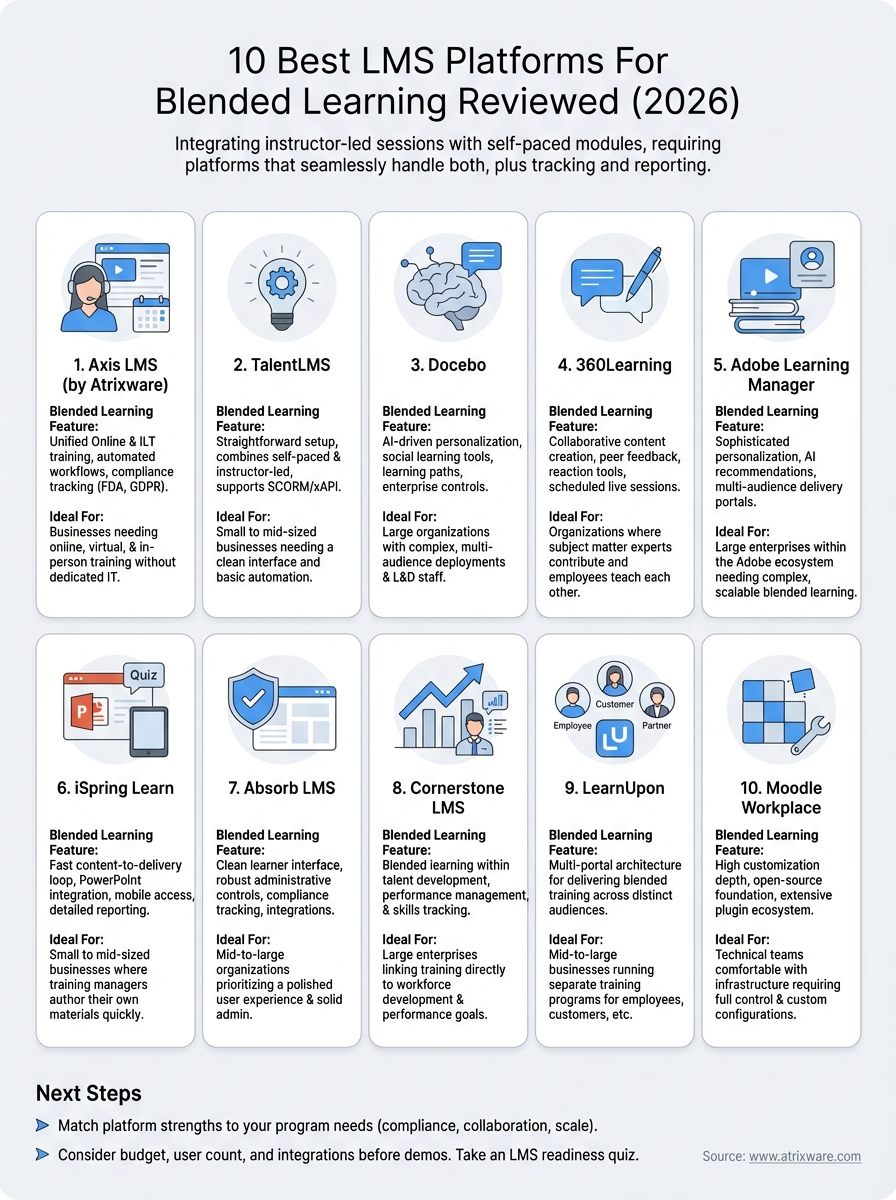
Finding the best LMS for blended learning comes down to matching the platform’s strengths to your specific training program. If you need deep compliance features and automation, Axis LMS or Absorb LMS are worth prioritizing. If your team values collaborative content creation, 360Learning stands out from the rest of the list.
Before committing to a platform, it helps to know where you stand in the buying process. Your budget, user count, and integration requirements all shape which option makes the most sense for your organization. If you’re not sure where to start, take the LMS readiness quiz to clarify your position before booking demos. Or, if Axis LMS caught your attention, you can sign up for an Axis LMS admin demo today and see directly how it handles your blended training requirements.
