You built a great product. Customers signed up. But if they don’t understand how to use it, they won’t stick around. That’s where customer training best practices come in, they bridge the gap between a new user’s first login and the moment they actually get value from what you offer. Without a structured approach, you’re leaving product adoption and retention to chance.
The reality is that most churn doesn’t happen because your product is bad. It happens because customers never learned how to use it well. A strong training program removes that friction, turning confused new users into confident ones who see results faster. Shorter time-to-value means higher satisfaction, and satisfied customers renew, expand, and refer others. The ROI isn’t theoretical, it shows up in reduced support tickets, lower churn rates, and increased lifetime value.
At Atrixware, we’ve spent years helping organizations build and deliver effective training through Axis LMS, our learning management system built for businesses that take training seriously. We’ve seen firsthand what separates programs that actually move adoption metrics from ones that collect dust. Below, we’re sharing five practices that consistently drive results, whether you’re launching your first customer training program or looking to sharpen one that’s already in place.
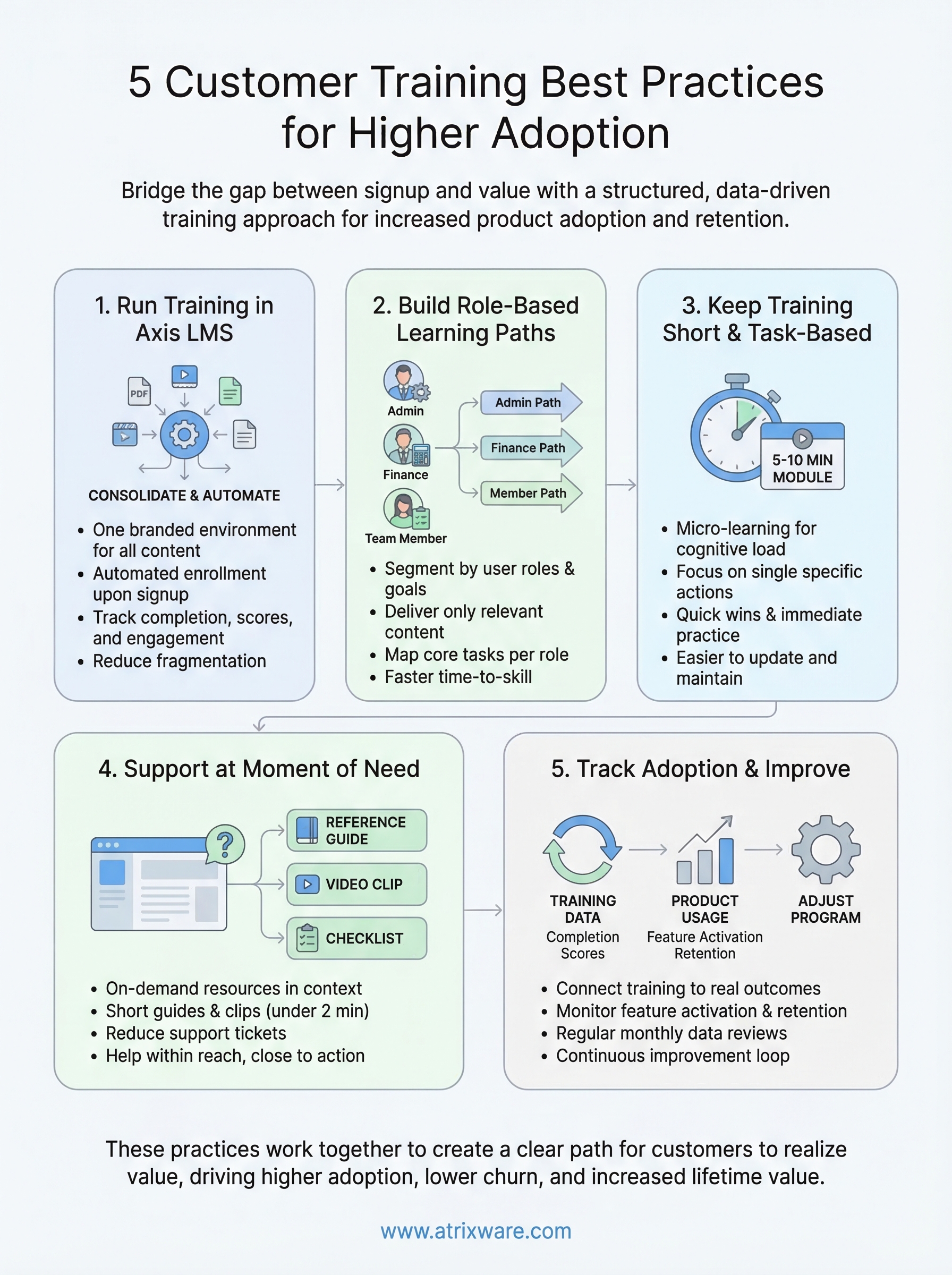
1. Run customer training in Axis LMS
When customers train in a scattered environment, PDFs here, videos there, a help doc somewhere else, nothing sticks. Axis LMS gives you one place to build, deliver, and track every part of your customer training program, so learners always know where to go and you always know what’s working.
What it solves
The biggest obstacle to consistent customer training is fragmentation. When your training materials live across multiple platforms, customers miss steps, skip modules, or simply give up. Axis LMS consolidates your content into a single, branded experience that your customers log into, progress through, and return to when they need a refresher. This is one of the core customer training best practices: give learners a predictable, professional environment and they engage more.
How to apply it
Start by migrating your existing training content into Axis LMS, whether that’s video walkthroughs, SCORM courses, or simple knowledge checks. Use the drag-and-drop course builder to organize that content into a clear sequence. From there, set up automated enrollment so new customers get access to their training immediately after signing up, removing any delay between purchase and first lesson.
The faster you get customers into structured training, the shorter your time-to-value window becomes.
What to measure
Once your training runs in Axis LMS, you have access to completion rates, quiz scores, and time-on-module data through the built-in reporting tools. Track which modules customers finish and which ones they abandon. These numbers show you exactly where your program loses people and where it holds learner attention.
Pitfalls to avoid
Avoid dumping all your existing content into the LMS without restructuring it first. Pasting unorganized material into a new platform does not fix the underlying problem; it just relocates it. Also, do not skip the branding setup. Customers who see a generic, unbranded training portal are less likely to trust it or engage consistently, so take the time to configure your logo, colors, and custom domain before you launch.
2. Build role-based learning paths
Not every customer uses your product the same way. A finance team member has completely different goals than a system administrator, and sending both through identical training wastes their time and dilutes the impact of your program.

What it solves
Generic, one-size-fits-all training forces every learner through content that may be irrelevant to their role. This creates friction, lowers completion rates, and frustrates users who just want to learn what applies to them. Role-based learning paths remove that noise and get each customer to the right skills faster.
How to apply it
In Axis LMS, you can segment customers by role and assign them distinct learning paths from the moment they enroll. Map out the core tasks each role needs to complete in your product, then build a path that covers only those tasks:
- Identify two or three primary customer roles
- Map the key tasks each role performs in your product
- Build a separate path per role with only the relevant modules
- Automate enrollment into the correct path based on role data
The more relevant your training feels to a specific learner, the more likely they are to finish it.
What to measure
Track path completion rates by role to see which segments finish training and which drop off. Compare product adoption metrics between customers who completed role-specific paths versus those who did not.
Pitfalls to avoid
One of the common mistakes that works against customer training best practices is creating too many paths upfront. Start with your two or three highest-volume roles, confirm the structure works, then expand from there.
3. Keep training short and task-based
Long, dense courses overwhelm your customers before they ever reach the part that helps them. Short, task-based modules keep learners focused on one specific action at a time, which directly improves completion rates and accelerates product adoption.
What it solves
When training asks customers to sit through 45-minute courses before doing anything useful, most of them quit. Micro-learning reduces cognitive load by breaking content into focused, single-task lessons. Each module should answer one question: how do I complete this specific action in the product?
Keeping lessons short also makes your program easier to maintain. When a feature changes, you update one small module instead of reworking a sprawling course.
How to apply it
Limit each module to five to ten minutes and anchor it to a single task the learner will actually perform. Use this structure for each task-based module:
- State the one thing the learner can do after finishing
- Show the task being completed in the product
- Let the learner practice it immediately
The goal is not to teach everything at once, it is to give customers one win at a time.
What to measure
Monitor average time-to-completion per module and track whether customers apply what they learned inside the product after finishing a lesson. High drop-off rates on specific modules often signal that the content is still too broad or too long.
Pitfalls to avoid
One of the most common violations of customer training best practices is confusing short with incomplete. Cutting a module down does not mean removing critical steps. Every module still needs a clear objective, a demonstration, and a check for understanding, just delivered concisely.
4. Support learners at the moment of need
Even the best training program cannot anticipate every question a customer will have while working inside your product. On-demand support resources fill that gap by giving learners a place to find answers without waiting on your support team or digging through unrelated documentation.

What it solves
Customers often get stuck between training sessions, right when they’re trying to apply what they learned. Without quick-access resources, they either submit a support ticket or abandon the task entirely. Both outcomes slow adoption and increase the cost of serving that customer. Keeping help within reach reduces that friction significantly.
How to apply it
In Axis LMS, you can attach supplemental resources directly to course modules so learners see them in context. Think about what customers actually need at the point of action, then build accordingly:
- Short reference guides for multi-step workflows
- Video clips under two minutes for visual tasks
- Downloadable checklists customers can use while working in the product
The closer your support resource is to the task, the more likely a customer will use it and move forward instead of stopping.
What to measure
Track resource download rates and module revisit frequency to understand which reference materials customers rely on most. High revisit rates on a specific module often mean the original training did not fully answer the question, which is a signal to improve that content.
Pitfalls to avoid
One of the overlooked customer training best practices is keeping supplemental content current. If your reference guides describe an outdated workflow, customers lose trust in your training program fast. Review support materials every time your product changes.
5. Track adoption and improve the program
Launching a training program is only the beginning. Real improvement comes from reviewing what your data shows and making targeted changes based on actual learner behavior inside your product.
What it solves
Most programs stop at completion rates and consider the job done. Finishing a course does not guarantee a customer is using your product correctly. Connecting training outcomes to product adoption data shows whether training actually changes what customers do after they log off.
How to apply it
Pull completion reports and quiz scores from Axis LMS, then compare that data against product usage metrics from your analytics platform. Look for gaps between customers who finished training and those who activated key features. Use those gaps to update specific modules rather than rebuilding the entire program.
The goal is a feedback loop where training data drives adoption improvements on a continuous basis.
What to measure
Connect training data directly to product usage to confirm your program is working. Track these three metrics:
- Feature activation rate for customers who completed training
- Support ticket volume per training cohort
- Retention at 90 days compared to customers who skipped training
Pitfalls to avoid
One of the most common failures in customer training best practices is reviewing data too infrequently. Set a monthly review cadence so you catch problems early before they turn into churn.
Waiting until a renewal conversation to analyze training performance gives you no time to act. Small, regular adjustments keep your program accurate and your customers on track.
Next steps
These five customer training best practices work together to close the gap between signup and confident product use. When you consolidate training in a dedicated LMS, build role-based paths, keep modules short, provide on-demand support, and continuously improve based on data, you give customers a clear road to getting real value from your product.
The difference between programs that drive adoption and ones that stall comes down to execution. You need the right tools and structure, plus a clear way to measure what’s working. Axis LMS gives you all three in one platform, so you spend less time managing logistics and more time improving the training that matters.
Ready to see what a structured customer training program looks like in practice? Start a free Axis LMS admin demo and explore the platform on your own terms before you commit to anything.
