Learners retain more when content comes in focused, digestible chunks, and that’s exactly why moodle microlearning has become a go-to approach for training teams building courses on the platform. Instead of hour-long modules that overwhelm, bite-sized lessons keep engagement high and completion rates even higher.
But here’s the thing: Moodle wasn’t originally designed with microlearning in mind. You’ll need the right setup, plugins, and content structure to make it work. Without a clear strategy, your "quick" courses can easily turn into a scattered mess of activities that frustrate learners instead of helping them.
At Atrixware, we’ve spent years helping organizations build effective training programs through our Axis LMS. That experience has given us a front-row seat to what works, and what doesn’t, when it comes to microlearning. In this guide, we’ll walk you through exactly how to build bite-sized courses in Moodle, from planning your content to choosing the right tools for delivery.
What microlearning looks like in Moodle
Microlearning in Moodle typically means short, focused lessons that learners can complete in 5 to 10 minutes. You’ll break down complex topics into standalone learning objects that each cover one specific skill or concept. Instead of cramming everything into a single course page, you create multiple activities that learners can access on demand.

The platform gives you several activity types to work with. Quiz modules work well for quick knowledge checks, while H5P interactive content lets you build engaging scenarios and simulations. You can also use page resources for text-based lessons or embed short videos directly into the course structure. The key is choosing activities that learners can start and finish in one sitting without feeling overwhelmed.
"The most effective microlearning modules focus on one learning objective and deliver it through a single, streamlined activity."
Core components you’ll use
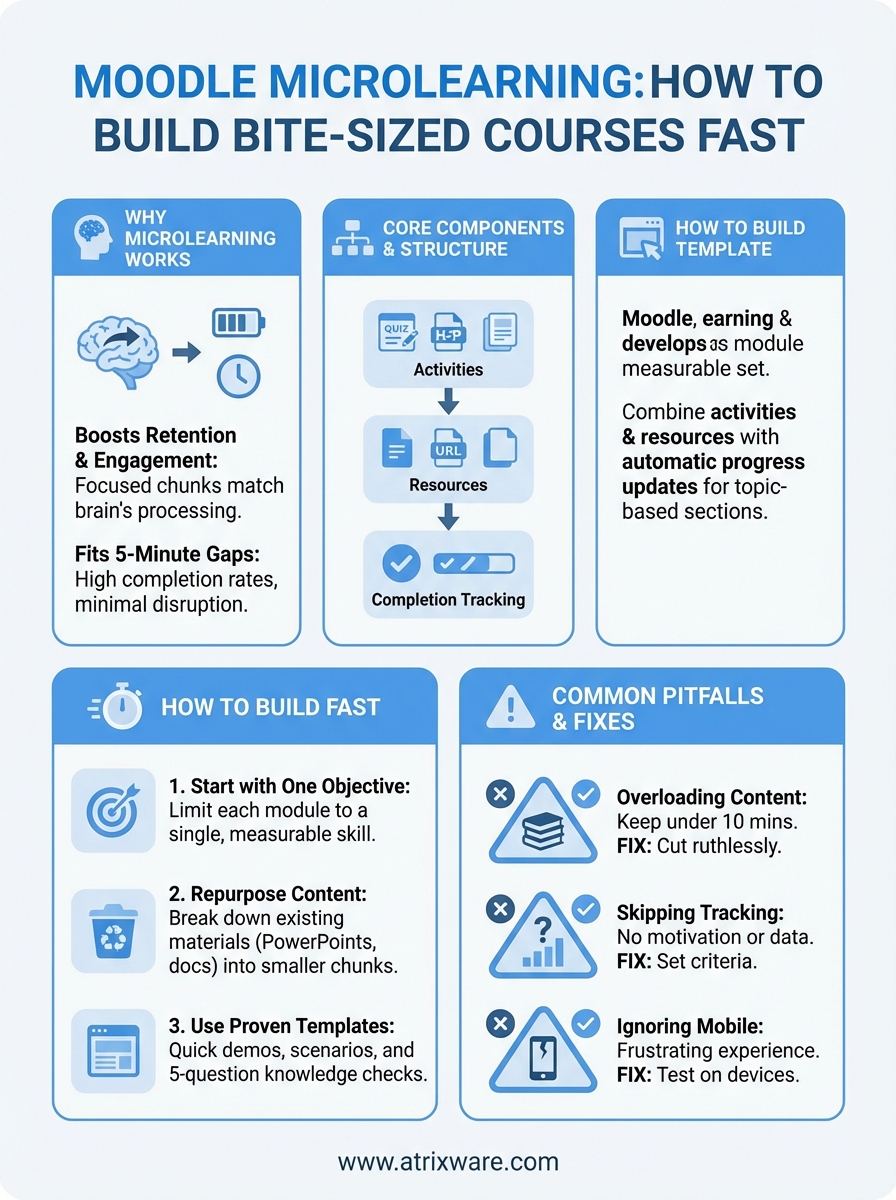
Your moodle microlearning setup relies on three primary building blocks: activities, resources, and completion tracking. Activities like quizzes, forums, and assignments require learner interaction, while resources such as files, URLs, and pages deliver static content. Completion tracking lets you monitor which modules learners have finished and triggers automatic progress updates.
Most training teams combine these elements into topic-based sections within a single course shell. Each section represents one microlearning module with its own title, brief description, and self-contained activities. This structure keeps navigation simple and prevents learners from getting lost in nested folders or complicated course hierarchies.
Content length and format
You’ll want to aim for 300 to 500 words per text-based module or 3 to 5 minutes for video content. Anything longer starts to defeat the purpose of microlearning. Short-form content forces you to prioritize what truly matters and cut out the filler that bogs down traditional courses.
Format variety matters just as much as length. Mix quick-reference job aids with interactive scenarios, then add knowledge checks to reinforce retention. Some learners prefer reading while others respond better to visual demonstrations, so alternating between formats keeps your training accessible to different learning styles without requiring you to duplicate every single module.
Why microlearning works for workplace training
Your employees forget up to 70% of training content within 24 hours when you deliver it through traditional long-form courses. Microlearning flips that script by delivering information in short bursts that match how the brain actually processes and stores knowledge. When learners can complete a module in one sitting without switching contexts, retention rates jump significantly because they’re not fighting cognitive overload.
"Shorter training sessions reduce the mental fatigue that causes learners to tune out halfway through hour-long modules."
Modern workplace demands make long training blocks nearly impossible to schedule. Your team members juggle meetings, deadlines, and daily fires that leave little room for dedicated learning time. Moodle microlearning fits into those 5-minute gaps between tasks, which means completion rates stay high and training doesn’t feel like an interruption to productivity.
Measurable business impact
You’ll see faster onboarding when new hires can access just-in-time training modules instead of waiting for scheduled sessions. Your existing employees stay current on policy changes and product updates without spending hours away from their core responsibilities. Performance support becomes immediate because learners can quickly reference specific modules when they need to apply a skill on the job, rather than searching through lengthy course materials they took weeks ago.
Training costs drop when you eliminate travel expenses and reduce instructor-led session time. Course updates take minutes instead of days since you only need to revise individual modules rather than rebuilding entire programs from scratch.
How to build Moodle microlearning courses fast
You’ll cut development time in half when you stop trying to perfect every detail and focus on getting functional modules live. The fastest path to building moodle microlearning starts with outlining your learning objectives first, then matching each objective to the simplest activity type that will deliver results. Skip the elaborate course designs and multimedia productions that eat up weeks of development time without improving outcomes.
Start with one objective per module
Your course build accelerates when you limit each module to a single, measurable learning objective. Write it down before creating any content: "By the end of this module, learners will be able to [specific action]." This constraint forces you to cut unnecessary information and keeps your content tightly focused. You’ll avoid scope creep and deliver modules learners can actually complete in one sitting.
"The tighter your learning objective, the faster you’ll build and the better your learners will retain."
Templates save hours of setup time once you create your first few modules. Build a standard structure with placeholders for content, assessment, and completion criteria, then duplicate it for new topics. You’ll maintain consistency across your training program while slashing the time spent on formatting and configuration.
Repurpose what you already have
Your existing training materials provide ready-made content you can break into smaller chunks. Take that 60-slide PowerPoint deck and split it into six separate Moodle page resources, each covering one concept. Convert policy documents into quick-reference PDFs and upload them as downloadable resources. This approach gets content deployed immediately while you gradually enhance modules with interactive elements.
Microlearning activity ideas you can copy
You can deploy effective moodle microlearning modules without starting from scratch every time. These proven activity templates work across different topics and industries, giving you ready-to-implement frameworks that reduce your development time while maintaining high engagement levels.

Quick skill demonstrations
Your learners master procedures faster when you show them step-by-step video walkthroughs under three minutes. Record your screen while performing a task, add voice narration, and upload the video directly to a Moodle page resource. Follow each demonstration with a single practice question that requires learners to apply what they just watched. This format works especially well for software training, equipment operation, or any process that benefits from visual instruction.
"Short video demonstrations paired with immediate practice questions create muscle memory faster than text-based instructions alone."
Scenario-based decision trees
Build branching scenarios using Moodle’s conditional activities to create realistic workplace situations. Present learners with a customer complaint, policy violation, or safety hazard, then give them three response options that lead to different outcomes. Each choice triggers feedback explaining why it works or fails, then loops back to the original scenario until learners select the correct approach. You’ll assess critical thinking skills while keeping modules under five minutes.
Rapid knowledge checks
Deploy five-question quizzes that learners complete in two minutes or less. Use multiple choice, true/false, or matching formats to test recall of key concepts from training materials. Set passing scores at 80% and allow unlimited attempts so learners can reinforce knowledge through repetition rather than feeling punished for mistakes.
Common pitfalls and how to avoid them
Your moodle microlearning rollout will fail if you repeat the mistakes that sink most training programs. These common errors derail engagement and waste development time, but you can sidestep every one by knowing what to watch for before you build.
Overloading modules with too much content
Training teams frequently cram multiple learning objectives into a single module because they worry about creating too many separate activities. This defeats the entire purpose of microlearning and leaves learners overwhelmed. You’ll recognize this problem when completion times exceed 10 minutes or when learners need to scroll through lengthy pages of text. Fix it by ruthlessly cutting content until each module addresses only one skill or concept.
"If your microlearning module takes longer than a coffee break, you’ve already lost the battle for learner attention."
Skipping completion tracking
You can’t measure what you don’t track, yet many administrators deploy modules without configuring completion criteria. Learners finish activities but receive no confirmation of progress, which kills motivation and makes reporting impossible. Set up automatic completion based on viewing pages, submitting quizzes, or achieving minimum scores so both learners and managers can monitor advancement through the training program.
Ignoring mobile optimization
Your learners access training from phones and tablets, but complex H5P activities and oversized files create frustrating experiences on small screens. Test every module on mobile devices before publishing and simplify any content that requires pinching, zooming, or horizontal scrolling to navigate properly.
Next steps for your microlearning rollout
Start with three pilot modules that address your most urgent training needs rather than attempting to convert your entire course catalog overnight. Launch these modules to a small test group, collect their feedback, and refine your approach before scaling up. This iterative process helps you identify technical issues and content gaps without affecting your broader learner population.
Build a content production schedule that maps out which topics you’ll convert to moodle microlearning format each month. Assign clear ownership for development, review, and maintenance so modules don’t become outdated. Your rollout succeeds when you maintain consistent quality across all modules rather than rushing to publish everything at once.
Consider whether your current platform truly supports your microlearning goals. If you’re spending more time fighting with plugins and workarounds than actually developing content, take our LMS readiness quiz to see if a purpose-built system might better serve your training program. The right tools eliminate technical friction and let you focus on creating content that drives results.
