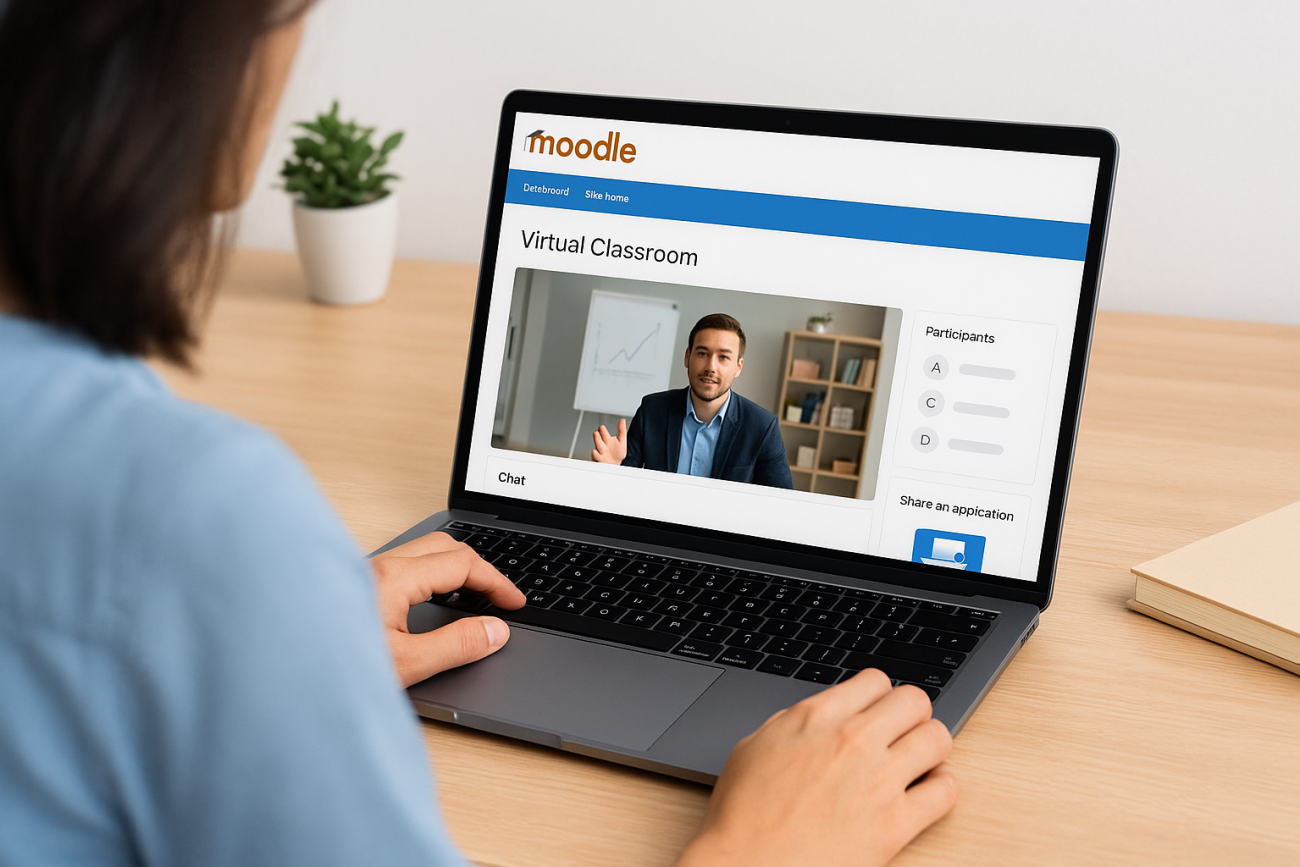
Running live, synchronous classes through Moodle requires the right tools, and out of the box, Moodle doesn’t include built-in video conferencing. That’s where a Moodle virtual classroom plugin comes in. These integrations connect your LMS to platforms that support real-time video, screen sharing, breakout rooms, and interactive whiteboards, giving instructors the ability to teach live without leaving the Moodle environment.
Finding the right plugin depends on your specific needs: class size, budget, recording requirements, and how seamlessly you want the experience to work for learners. Some options are free and open-source, while others offer enterprise-grade features with corresponding price tags. The good news is that Moodle’s flexibility means you have choices.
This guide breaks down five virtual classroom plugins worth considering for live classes. At Atrixware, we build Axis LMS with built-in virtual classroom support and deep integration capabilities, so we understand what makes online training tools effective. Whether you’re committed to Moodle or exploring alternatives, this list will help you evaluate your options.
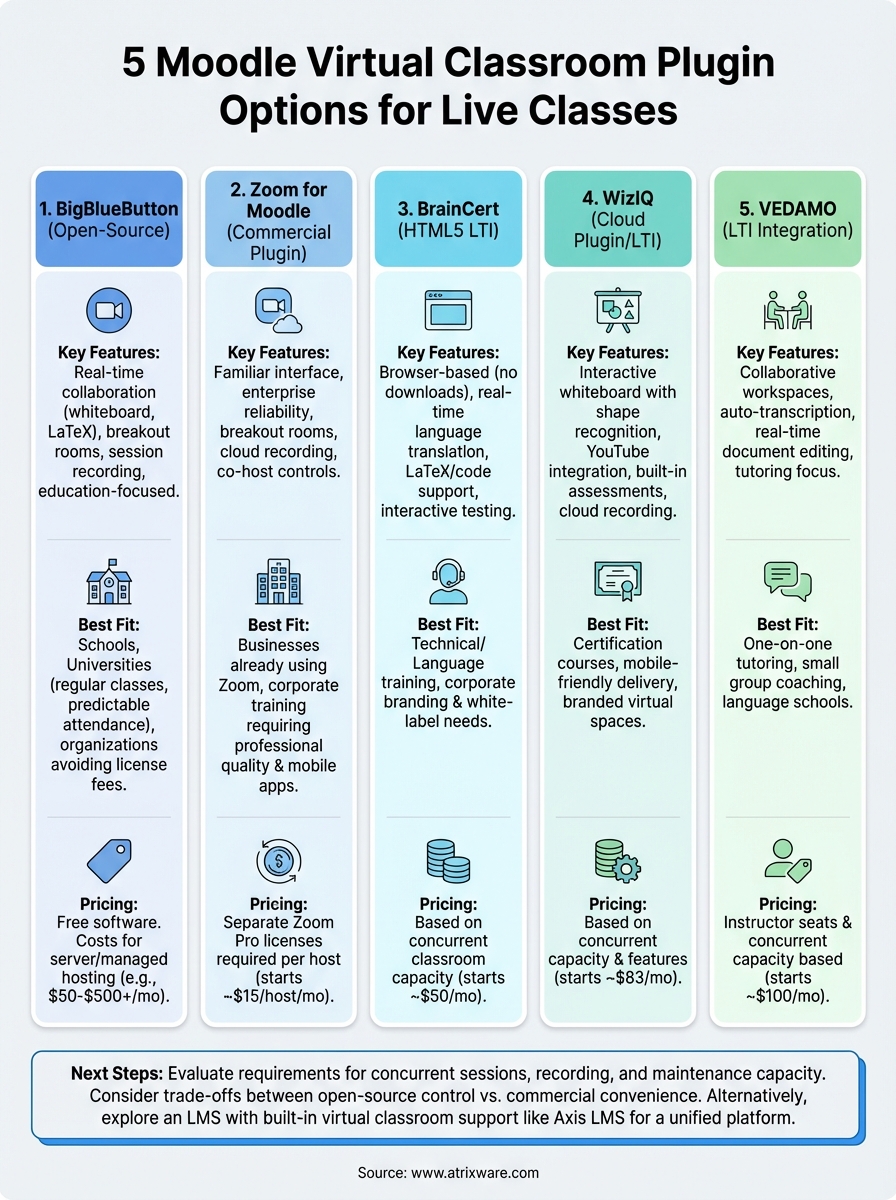
1. BigBlueButton
BigBlueButton stands out as the most popular open-source virtual classroom option for Moodle. This free plugin integrates directly with your LMS and gives you full control over hosting, making it a favorite among schools, universities, and nonprofits that need live teaching without licensing fees. You can deploy BigBlueButton on your own infrastructure or use a managed hosting provider if you want to skip the server management work.
What BigBlueButton adds to Moodle
BigBlueButton brings video conferencing, screen sharing, and multi-user whiteboards into your Moodle courses without sending learners to external platforms. Instructors schedule sessions through standard Moodle activities, and students join with a single click. The integration supports session recording, breakout rooms, shared notes, and polling, giving you the core tools needed for interactive synchronous instruction.

Standout live-teaching features
You get real-time collaboration tools designed specifically for education rather than generic business meetings. The whiteboard supports LaTeX equations, making it useful for STEM courses. Breakout rooms let you split large classes into smaller discussion groups, and the shared notes feature allows collaborative document editing during sessions. Multi-presenter mode gives teaching assistants or guest speakers control when needed.
Setup and admin considerations
Installing BigBlueButton requires server resources and technical knowledge. You’ll need a Linux server with sufficient bandwidth to handle concurrent video streams. Managed hosting services handle infrastructure for you but charge based on usage. Configuration happens through Moodle’s site administration panel once your BigBlueButton server connects, and you control recording storage, session limits, and access permissions from there.
Self-hosting gives you complete control over data privacy and eliminates per-seat licensing, but it requires ongoing server maintenance and monitoring.
Best fit use cases
BigBlueButton works best for educational institutions running regular live classes with predictable attendance. Universities use it for lecture capture and virtual office hours. K-12 schools deploy it for remote learning programs. Training organizations choose it when they need recording capabilities and want to avoid monthly subscription costs.
Pricing and hosting options
The software itself costs nothing because it’s open-source. Your expenses come from server hosting (typically $50 to $500 monthly depending on scale) or managed hosting providers that charge per attendee-hour. Some hosts offer flat-rate plans starting around $100 monthly for smaller operations.
Limitations and common gotchas
Performance depends entirely on your server capacity and network bandwidth. Large classes require substantial resources, and poor configurations lead to choppy video or connection drops. Mobile app support lags behind desktop browsers. You’re responsible for security patches, backup strategies, and troubleshooting technical issues unless you pay for managed hosting.
2. Zoom for Moodle
Zoom brings a widely recognized platform directly into Moodle through an official plugin. Your learners access familiar video conferencing tools without leaving their courses, and instructors schedule meetings from Moodle’s standard activity interface. Brand recognition cuts training time because most users already know Zoom’s controls from business meetings or personal use.
What the Zoom integration supports in Moodle
The plugin connects courses to Zoom meetings and webinars through a direct activity module. Students join without separate Zoom accounts, attendance tracking syncs to Moodle gradebooks, and cloud recording links populate automatically once sessions end.
Standout live-teaching features
Zoom delivers enterprise-level reliability with minimal technical setup compared to self-hosted options. Breakout rooms, polling, and screen sharing work seamlessly across devices. Waiting room controls let you manage session entry, and co-host permissions allow teaching assistants to help manage large classes.
Setup and admin considerations
Installation requires a Zoom Pro account or higher plus API credentials from your admin console. Configuration happens through Moodle’s plugin settings where you enter API details. Server requirements stay minimal because Zoom handles video processing on their infrastructure.
Zoom’s cloud infrastructure means you skip server management entirely, but you trade that convenience for ongoing subscription costs.
Best fit use cases
Organizations already using Zoom for business meetings benefit from unified billing and familiar workflows. Corporate training departments choose it when learners expect professional video quality and reliable mobile apps. Large enterprises appreciate admin controls and integration with existing Zoom deployments.
Pricing and licensing basics
Zoom requires separate licensing from Moodle. Pro plans start around $15 per host monthly with 100-participant capacity. Education accounts receive discounted rates. You need enough licensed hosts to cover concurrent instructors, not total enrollment.
Limitations and common gotchas
Every instructor running live sessions needs their own Zoom license, which adds up for organizations with many teachers. Recording storage counts against Zoom cloud limits, requiring additional purchases as your library grows.
3. BrainCert HTML5 virtual classroom
BrainCert delivers a browser-based virtual classroom built specifically for online education and training. This Moodle virtual classroom plugin connects through standard LTI integration, meaning you avoid complex server installations while gaining access to a feature-rich live teaching environment. The HTML5 platform works across devices without requiring downloads or plugins from your learners.
What BrainCert adds to Moodle
You connect BrainCert sessions to Moodle courses through LTI activity modules that launch directly into live classrooms. The integration passes user authentication and course context automatically, so students access sessions without separate logins. Recording management, attendance tracking, and session scheduling all happen within your existing Moodle workflow.

Standout live-teaching features
BrainCert includes multi-language audio translation that converts speech in real time across 50+ languages. The platform supports LaTeX math rendering, code syntax highlighting for programming courses, and unlimited breakout rooms. You get session recording with searchable transcripts and built-in test creation tools for pop quizzes during live classes.
Setup and admin considerations
Configuration requires LTI credentials from your BrainCert account entered into Moodle’s external tool settings. Technical setup takes minutes rather than hours because BrainCert handles all server infrastructure and updates. Your IT team manages access permissions through standard Moodle enrollment controls.
Best fit use cases
Organizations running technical training or language instruction benefit most from BrainCert’s specialized features. Corporate training departments choose it when they need professional branding and white-label options. The platform works well for businesses selling courses because it supports branded virtual classroom experiences.
Pricing and packaging basics
BrainCert charges based on concurrent classroom capacity rather than total users. Pricing starts around $50 monthly for small operations and scales based on simultaneous session requirements. Enterprise plans include custom branding and dedicated support resources.
Capacity-based pricing means your costs scale with actual usage rather than enrolled user counts, making budgeting more predictable.
Limitations and common gotchas
The platform requires stable internet connections for optimal performance, particularly with real-time translation features enabled. Advanced capabilities like custom integrations require higher-tier plans. Mobile browser support works but lacks some desktop features like whiteboard complexity.
4. WizIQ virtual classroom plugin
WizIQ delivers a cloud-based virtual classroom that connects to Moodle through plugin installation or LTI integration. This platform focuses on educational institutions and training providers that need reliable live teaching tools without managing complex infrastructure. The service handles video streaming, recording storage, and bandwidth requirements while you control scheduling and access through your existing Moodle course structure.
What WizIQ adds to Moodle
The plugin creates activity modules within courses that launch students directly into live sessions. Attendance data syncs back to Moodle gradebooks, and session recordings become available through course resources automatically. You schedule classes through familiar Moodle interfaces while WizIQ manages the backend video infrastructure.
Standout live-teaching features
WizIQ includes interactive whiteboards with shape recognition that converts rough drawings into clean diagrams. The platform supports screen sharing, document uploads, and YouTube video integration during live sessions. Built-in assessment tools let you run polls and quizzes without switching applications.
Setup and admin considerations
Installation requires API credentials from your WizIQ account entered through Moodle’s plugin configuration panel. Your organization needs a WizIQ subscription before the Moodle virtual classroom plugin functions. Technical requirements stay minimal because WizIQ hosts all infrastructure on their servers.
Cloud hosting eliminates server maintenance concerns, but you depend entirely on WizIQ’s platform availability and pricing structure.
Best fit use cases
Training companies selling certification courses benefit from WizIQ’s professional appearance and reliable recording delivery. Organizations needing mobile-friendly classrooms choose it for cross-device consistency. The platform works well when you want branded virtual spaces without building custom solutions.
Pricing and packaging basics
WizIQ charges based on concurrent classroom capacity and feature tiers. Pricing typically starts around $83 monthly for basic plans. Enterprise options include white-label branding and custom integration support with annual contracts.
Limitations and common gotchas
Pricing increases significantly as you add simultaneous sessions or advanced features. Recording storage counts against plan limits, requiring upgrades as your content library grows. Some educators report limited customization options compared to open-source alternatives.
5. VEDAMO virtual classroom via LTI
VEDAMO connects to Moodle through LTI integration, providing a specialized virtual classroom designed specifically for tutoring and small group instruction. This platform targets language schools, corporate training, and educational institutions that focus on interactive, personalized learning experiences. You access VEDAMO sessions directly from Moodle course activities while the platform manages video infrastructure and recording storage.
What VEDAMO adds to Moodle via LTI
Your courses gain access to collaborative workspaces where students and instructors interact through video, whiteboards, and shared documents. The LTI connection passes user credentials automatically, eliminating separate login requirements. Session data and attendance records sync back to your Moodle gradebook after classes complete.
Standout live-teaching features
VEDAMO includes video recording with automatic transcription and searchable archives. The platform supports screen sharing, document annotation, and real-time collaborative editing on shared files. Built-in assessment tools let you conduct quizzes and gather feedback without external applications.
Setup and admin considerations
Configuration requires LTI credentials from your VEDAMO account entered through Moodle’s external tool settings. You control session scheduling and user permissions through standard Moodle enrollment workflows. VEDAMO handles all technical infrastructure and software updates.
Best fit use cases
Organizations delivering one-on-one tutoring or small group coaching benefit most from VEDAMO’s intimate classroom design. Language schools choose it for conversation practice sessions. Professional development programs use it when personalized instruction matters more than lecture-style delivery.
Pricing and packaging basics
VEDAMO charges based on instructor seats and concurrent capacity rather than total student counts. Pricing typically starts around $100 monthly for small operations. Enterprise packages include white-label options and custom integration support.
Seat-based pricing means you pay for active instructors rather than enrolled learners, making costs predictable for training organizations.
Limitations and common gotchas
The platform optimizes for smaller class sizes rather than large lectures with hundreds of participants. Advanced branding customization requires enterprise-tier subscriptions. Recording storage counts against account limits, requiring upgrades as your content library expands.
Next steps
Choosing the right Moodle virtual classroom plugin depends on your technical resources, budget constraints, and how much control you need over your infrastructure. Open-source options like BigBlueButton give you flexibility but require server management. Commercial solutions like Zoom and WizIQ eliminate technical overhead but add recurring costs. Each plugin balances different trade-offs between features, pricing, and administrative complexity.
Before committing to any plugin, evaluate your actual requirements for concurrent sessions, recording storage, and integration depth. Consider whether your team has capacity for ongoing maintenance or if managed solutions make more sense. If you find yourself weighing these trade-offs heavily, an LMS with built-in virtual classroom support might simplify your decision.
Axis LMS includes integrated virtual classroom capabilities without requiring separate plugins or third-party subscriptions. You get live teaching tools, recording management, and seamless course integration from day one. Take our LMS readiness quiz to see if a unified platform matches your training goals better than piecing together multiple solutions.
