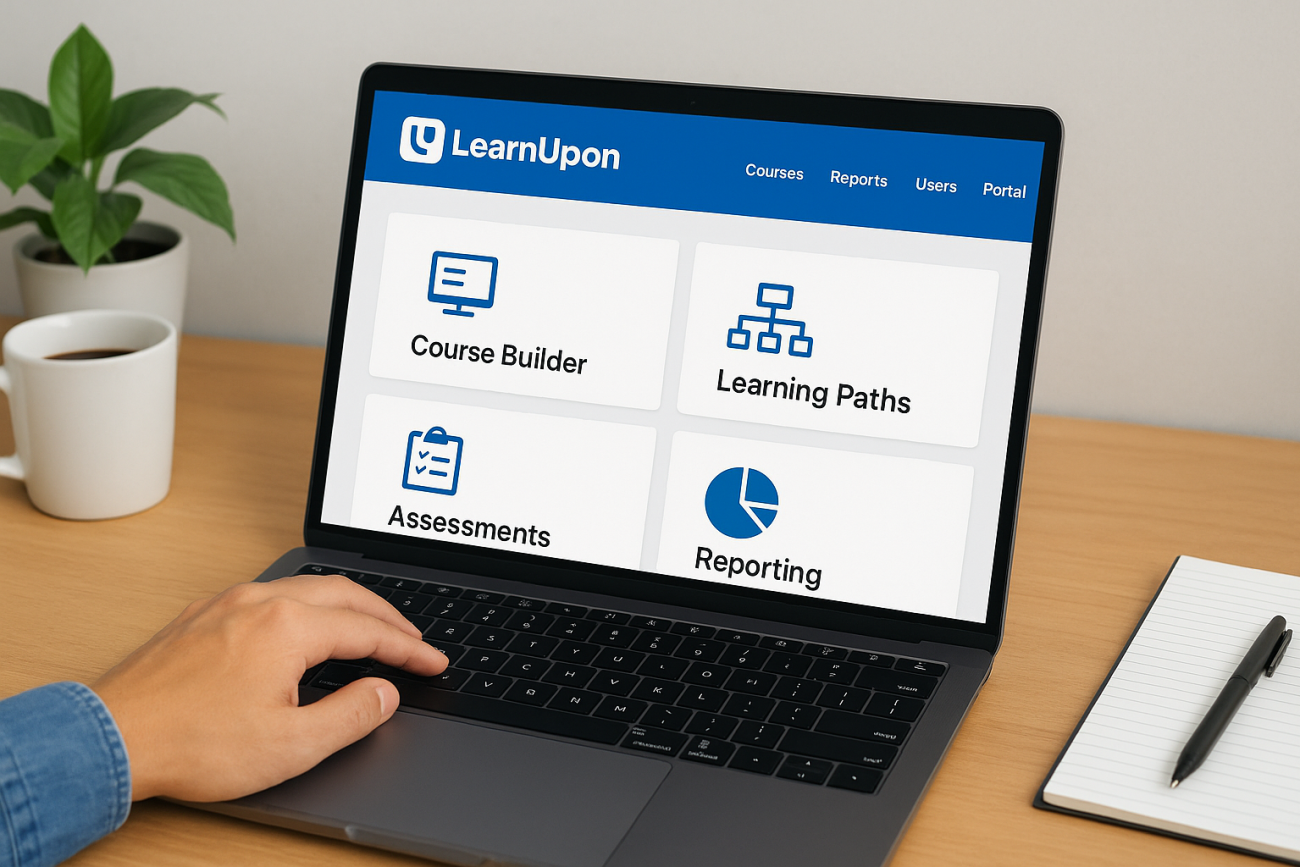
Choosing the right learning management system can make or break your corporate training program. LearnUpon LMS has positioned itself as a popular option for businesses looking to streamline employee, customer, and partner training. But does it actually deliver on its promises? And more importantly, is it the right fit for your organization’s specific needs?
At Atrixware, we’ve spent years developing and refining Axis LMS, giving us deep insight into what makes an LMS truly effective. That expertise allows us to offer an objective breakdown of LearnUpon’s capabilities, where it excels, where it falls short, and how it stacks up against other solutions in the market.
This guide covers everything you need to evaluate LearnUpon: its core features, pricing structure, real user feedback, and alternatives worth considering. Whether you’re shopping for your first LMS or thinking about switching platforms, you’ll walk away with the clarity needed to make a confident decision.
What LearnUpon LMS is and how it works
LearnUpon LMS is a cloud-based learning management system designed to help businesses deliver training to employees, customers, and partners from a single platform. The system focuses on corporate training programs rather than academic education, targeting companies that need to manage multiple training audiences without maintaining separate systems. You access everything through a web browser, which means your team can build courses, assign training, and track progress without installing software or managing servers.
The core platform structure
The platform operates through a centralized admin interface where you control all aspects of your training program. Your administrators create and organize courses, manage user accounts, set up learning paths, and monitor completion rates through built-in dashboards. LearnUpon stores all your training content in a central library, allowing you to reuse materials across different courses and audiences without duplicating files.
Learners access their assigned training through a dedicated learner portal that displays available courses, tracks their progress, and stores certificates they’ve earned. You can customize this portal’s appearance to match your brand, though the degree of customization varies depending on your subscription tier. The system automatically sends email notifications when you assign new training, deadlines approach, or learners complete requirements.
How training delivery actually works
You build courses by uploading various content types into LearnUpon’s course builder. The platform supports standard e-learning formats like SCORM and xAPI, along with videos, PDFs, presentations, and quizzes. Your content plays directly in the learner’s browser without requiring them to download anything. LearnUpon tracks every interaction automatically, recording when learners start modules, how long they spend on each section, quiz scores, and final completion status.
When you assign training to learners, you set rules that determine how they progress through the material. You can require them to complete modules in a specific order, pass quizzes before moving forward, or simply allow self-paced exploration. The system enforces these rules automatically and prevents learners from marking courses complete until they meet all requirements. For instructor-led training, you schedule sessions within the platform and manage attendance, though this requires integration with video conferencing tools for the actual delivery.
LearnUpon’s strength lies in its ability to separate different training audiences while keeping everything under one administrative roof.
Multi-portal architecture for different audiences
One of LearnUpon’s defining features is its multi-portal capability, which lets you create separate branded training environments for different groups. You might run one portal for employee onboarding, another for customer product training, and a third for partner certification programs. Each portal operates independently with its own branding, course catalog, and user base, yet you manage everything from the same back-end system.
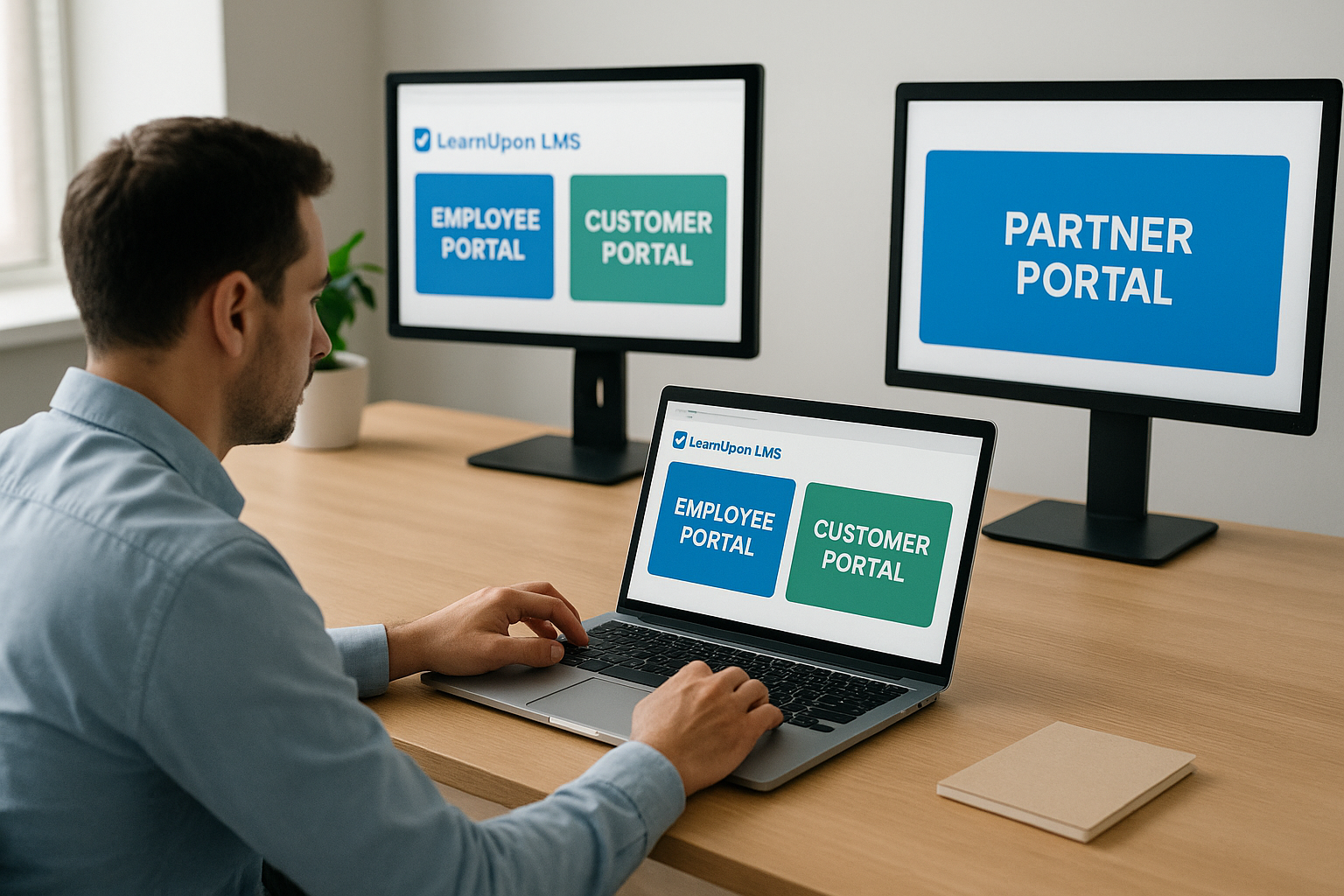
This architecture matters because it prevents employees from seeing customer training content and vice versa. You control exactly what each audience can access without building complicated permission systems or maintaining separate platforms. However, sharing content across portals requires manual duplication in some cases, and reporting across all portals simultaneously can become cumbersome as your training program grows. The number of portals you can create depends on your pricing tier, which we’ll cover later in this guide.
Why companies use LearnUpon LMS
Companies choose LearnUpon LMS primarily because it solves a specific problem: managing training for multiple distinct audiences without maintaining separate systems. If you’re currently juggling employee onboarding, customer education, and partner certification programs across different platforms, LearnUpon promises to consolidate everything into a single solution. This consolidation appeals to organizations that have outgrown basic training tools but aren’t ready to invest in complex enterprise systems that require dedicated IT teams.
Consolidating multiple training audiences
The multi-portal architecture attracts companies running diverse training programs. You might need to train sales teams on product knowledge while simultaneously educating customers on implementation best practices and certifying reseller partners on advanced configurations. LearnUpon lets you manage these three audiences from one admin dashboard while keeping their training experiences completely separate. Each group sees only their relevant content, maintains their own completion records, and receives branded certificates specific to their portal.
This matters more than it might seem initially. Managing separate platforms means duplicate administrative work, inconsistent reporting formats, and separate vendor relationships with different renewal dates. You also face the challenge of training your team on multiple systems, each with its own quirks and limitations. LearnUpon eliminates these headaches by providing a unified backend where you control everything, though you’ll still spend time setting up and maintaining the individual portals.
Reducing training delivery costs
Organizations adopt LearnUpon to cut costs associated with traditional training methods. Instructor-led sessions require travel expenses, venue rentals, and instructor time that scales linearly with audience size. When you move this training online through LearnUpon, you record content once and deliver it to unlimited learners without incremental costs. Companies report saving thousands of dollars per quarter by converting just a portion of their in-person training to self-paced online courses.
Companies switching from live training to LearnUpon’s platform typically see immediate cost reductions in travel, venue, and instructor scheduling overhead.
Scaling training operations efficiently
Fast-growing companies choose LearnUpon because it scales without requiring proportional increases in training staff. Your current team might handle training for 500 employees effectively, but what happens when you hire another 500 next quarter? LearnUpon automates enrollment, tracks completions, and sends reminders without human intervention, allowing your training team to support larger audiences using the same resources. This automation becomes particularly valuable during rapid hiring phases or when launching new products that require immediate customer education across your entire base.
Who LearnUpon fits and who should look elsewhere
LearnUpon LMS works best for specific types of organizations with particular training needs, while other companies will find better value elsewhere. Understanding where you fall on this spectrum saves you from investing time and money in a platform that doesn’t match your requirements. Your company’s size, training complexity, and technical capabilities determine whether LearnUpon’s feature set aligns with your needs or if you should explore alternative solutions that better serve your specific use case.
Organizations that benefit most from LearnUpon
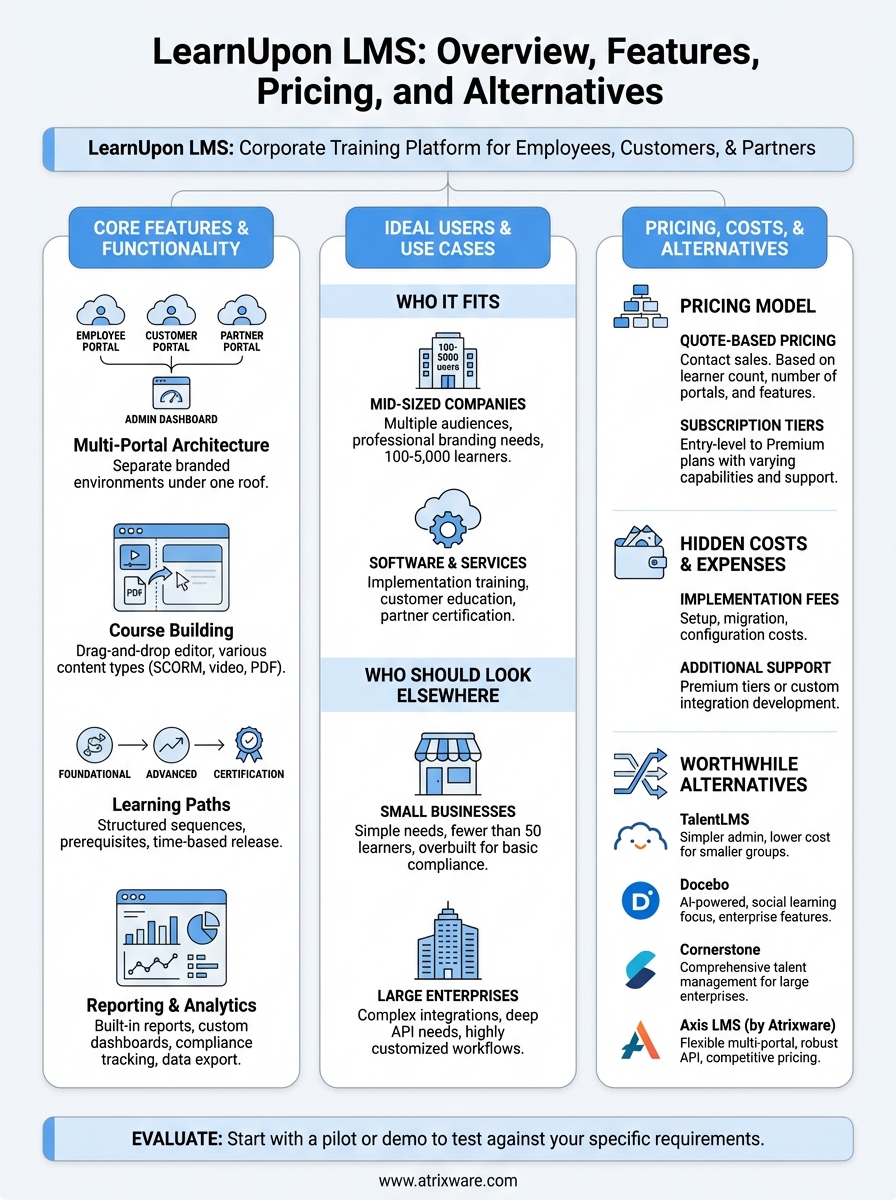
Mid-sized companies with multiple training audiences get the most value from LearnUpon. If you currently manage separate programs for employees, customers, and partners, the multi-portal architecture solves a real problem without forcing you into enterprise-level complexity. Companies in this category typically have 100 to 5,000 total learners across all audiences and need professional branding options that basic LMS platforms don’t provide.
Software companies, professional services firms, and organizations with strong customer education requirements fit LearnUpon’s sweet spot. You might sell software that requires implementation training and ongoing education, or you might provide services where customer success depends on proper training. These scenarios benefit from LearnUpon’s ability to separate internal training from customer-facing programs while maintaining centralized administrative control.
Companies running distinct training programs for three or more audience types typically see immediate operational benefits from LearnUpon’s portal structure.
When to consider other options
Small businesses with simple training needs often find LearnUpon LMS overbuilt for their requirements. If you only train employees on basic compliance topics and don’t need separate portals, advanced branding, or complex reporting, you’re paying for capabilities you won’t use. Organizations with fewer than 50 learners and straightforward training programs typically benefit from simpler, more affordable platforms that focus on core functionality rather than multi-audience management.
Enterprise organizations with complex integration requirements or highly customized workflows should evaluate whether LearnUpon provides sufficient flexibility. If you need deep API customization, complex automation workflows, or integration with proprietary internal systems, you might outgrow LearnUpon’s capabilities quickly. Large organizations with dedicated IT teams and specific compliance requirements in regulated industries often require more robust enterprise platforms that offer greater control over security configurations and data management.
Budget-constrained organizations should also look elsewhere if LearnUpon’s pricing exceeds their training budget. The platform targets mid-market companies willing to invest in quality training infrastructure, which means it costs more than basic solutions while offering fewer features than top-tier enterprise systems.
Key LearnUpon features for training delivery
LearnUpon LMS provides a comprehensive toolkit for building and delivering training across various formats and learning styles. The platform focuses on practical functionality rather than flashy features, giving you tools that directly impact how effectively your learners absorb and retain information. You’ll find everything needed to create engaging courses, guide learners through structured programs, and verify knowledge retention through assessments. Understanding these core capabilities helps you determine whether the platform matches your training delivery requirements.
Course building and content management
You build courses through LearnUpon’s drag-and-drop course editor, which organizes content into modules and lessons without requiring technical expertise. The system accepts multiple content types including videos, PDFs, presentations, HTML packages, and SCORM files. Your content automatically adapts to different screen sizes, allowing learners to access training on desktop computers, tablets, or smartphones without compromising functionality.

LearnUpon stores all uploaded materials in a central content library where you manage and reuse assets across multiple courses. This prevents duplicate uploads and ensures you update content in one location rather than editing multiple course instances. You can also embed external content directly into courses through iframe embedding or by linking to YouTube videos, though this requires learners to have internet access during training sessions.
Learning paths and structured training
Learning paths allow you to combine multiple courses into sequential training programs that guide learners through progressive skill development. You set prerequisites that prevent learners from jumping ahead, ensuring they complete foundational courses before accessing advanced material. The platform automatically unlocks subsequent courses when learners meet completion requirements, eliminating manual tracking and enrollment.
Learning paths transform disconnected courses into cohesive training programs that build expertise systematically rather than haphazardly.
Your learning paths can include time-based release schedules that space out content delivery over weeks or months. This prevents overwhelming learners with too much information at once and supports retention through spaced repetition. You also gain flexibility to mix self-paced courses with scheduled instructor-led sessions within a single learning path, creating blended learning experiences that combine the convenience of online training with the engagement of live instruction.
Assessment and quiz capabilities
LearnUpon includes a built-in quiz builder that supports multiple question types including multiple choice, true/false, short answer, and essay questions. You configure passing scores, set time limits, and determine whether learners can retry failed assessments. The platform automatically grades objective questions and flags subjective responses for manual review, reducing administrative burden while maintaining assessment integrity.
You can place quizzes at the end of courses or embed them throughout modules to verify comprehension before learners progress. Randomized question pools prevent memorization by displaying different questions to each learner or changing question order on retake attempts. The system records all quiz attempts with timestamps and scores, creating an audit trail that demonstrates knowledge verification for compliance purposes.
Reporting, analytics, and compliance tracking
LearnUpon LMS provides reporting and analytics tools that help you monitor training effectiveness and demonstrate compliance across your organization. The platform tracks learner activity automatically and presents data through pre-built reports and customizable dashboards. You can view completion rates, assess knowledge retention through quiz scores, and identify learners who fall behind on required training. Understanding these reporting capabilities determines whether the system provides sufficient visibility into your training program’s performance and meets your regulatory documentation requirements.
Built-in reporting capabilities
The platform includes over 40 pre-configured reports that cover common training metrics without requiring custom development. You access reports showing enrollment status, course completions, time spent learning, and assessment scores across your entire learner base or filtered by specific groups. These reports display data in tables that you sort and filter directly within the interface, allowing you to drill down from high-level overviews to individual learner details.

LearnUpon generates automated reports on customizable schedules, delivering them to your inbox daily, weekly, or monthly without manual intervention. This automation ensures stakeholders receive consistent training updates even when your team focuses on other priorities. You can also export report data to CSV or Excel formats for further analysis in external tools, though the platform lacks native integration with business intelligence systems that larger organizations typically use.
LearnUpon’s automated reporting eliminates manual data gathering, saving training administrators hours each week while ensuring consistent stakeholder communication.
Compliance and certification tracking
Your compliance training requirements get specific attention through dedicated tracking features that monitor mandatory training completion. You set expiration dates on courses and certifications, and the system automatically notifies learners when their credentials need renewal. This prevents compliance lapses by flagging upcoming expirations before they become problems, giving you time to schedule refresher training.
Certificate templates within LearnUpon LMS allow you to issue professional credentials automatically when learners complete training requirements. You customize these certificates with your branding, include specific completion details, and configure automatic delivery via email. The platform maintains a permanent record of all issued certificates, creating an audit trail that demonstrates compliance during regulatory inspections or internal reviews.
Data export and custom reporting
Organizations with specific reporting needs can export raw data for external analysis when pre-built reports don’t meet their requirements. You download user data, course information, and activity logs that you then manipulate in spreadsheet applications or import into other analytics tools. This flexibility matters when you need to combine training data with information from other business systems or create specialized reports that LearnUpon’s standard options don’t support.
The platform’s API provides programmatic access to reporting data, allowing technical teams to build custom integrations that pull training metrics into existing dashboards or business intelligence platforms. However, this requires development resources and technical expertise that smaller organizations might not have available.
Integrations, SSO, and APIs
LearnUpon LMS connects with your existing business systems to eliminate duplicate data entry and create automated workflows between platforms. The system provides pre-built integrations with common enterprise tools alongside technical options for custom connections through APIs and webhooks. Your ability to sync user data, trigger actions based on training events, and maintain single sign-on access determines how smoothly LearnUpon fits into your current technology stack. Understanding these integration capabilities helps you evaluate whether the platform will operate independently or integrate seamlessly with your HR systems, CRM platforms, and other critical business tools.
Pre-built integrations with business systems
LearnUpon offers native connections to popular HR and CRM platforms including Salesforce, BambooHR, ADP, and similar enterprise systems. These integrations automatically sync user information between platforms, creating new learner accounts when you hire employees and updating profile data when information changes in your source system. You avoid manual data entry and reduce errors that occur when managing user information across multiple platforms.
The platform also connects with video conferencing tools like Zoom and Microsoft Teams for instructor-led training sessions. Your instructors schedule virtual classroom sessions directly within LearnUpon, and the system automatically generates meeting links and sends them to enrolled learners. Attendance tracking flows back into LearnUpon automatically, maintaining complete training records without requiring manual updates after each session.
Single Sign-On for simplified access
Your learners access their training through SSO integration with identity providers including Okta, Azure Active Directory, and OneLogin. This eliminates separate login credentials for LearnUpon LMS and reduces password-related support tickets that consume IT resources. Learners click through from your company portal or directory and land directly in their training environment without additional authentication steps.
Single Sign-On reduces login friction while strengthening security through centralized access management that your IT team controls.
SSO also improves security by allowing you to enforce company-wide authentication policies across all systems including your LMS. When employees leave your organization, you disable their access once in your identity provider rather than manually removing accounts from each individual platform.
API and custom integration options
Technical teams access LearnUpon’s REST API to build custom integrations that pre-built connectors don’t cover. You pull training data into custom dashboards, trigger enrollment based on events in other systems, and automate workflows that span multiple platforms. The API documentation provides endpoints for managing users, courses, enrollments, and retrieving completion data programmatically.
Webhooks notify your systems in real-time when specific training events occur, such as course completions or certificate expirations. You configure these webhooks to trigger actions in external systems without constantly polling LearnUpon for updates. However, building and maintaining custom integrations requires dedicated development resources that smaller organizations might lack.
Branding, portals, and multi-audience training
LearnUpon LMS separates itself from basic training platforms through robust multi-portal functionality that allows you to maintain distinct branded training environments for different audiences. You control how each portal looks, what content it contains, and who can access it while managing everything from a single administrative dashboard. This capability matters most when you train employees on internal processes while simultaneously educating customers on product usage and certifying partners on advanced implementations. Each audience receives a tailored experience that matches their relationship with your organization without exposing them to irrelevant training materials or creating confusion about their role.
Customizing portal appearance and branding
Your training portals reflect your brand identity through customizable themes that control colors, logos, and layout elements across the learner interface. You upload your company logo, select brand colors for buttons and navigation elements, and add custom imagery to landing pages. LearnUpon LMS applies these branding changes automatically across all pages within that specific portal, maintaining visual consistency throughout the learner experience.
Custom domain mapping allows you to host training portals on your own subdomain rather than LearnUpon’s default URLs. Your employees access training at learn.yourcompany.com instead of yourcompany.learnupon.com, reinforcing brand identity and building trust with external audiences. You can also inject custom CSS for advanced styling modifications, though this requires web development skills and may break when LearnUpon updates their platform interface.
Managing multiple training audiences separately
Each portal you create operates as an independent training environment with its own user base, course catalog, and completion tracking. Your employee portal might contain onboarding courses and compliance training while your customer portal focuses on product implementation and best practices. Partners accessing their dedicated portal see only certification programs and sales enablement materials relevant to reselling your products.
Separate portals eliminate the risk of employees accidentally accessing customer training content or customers viewing internal company materials.
You assign learners to specific portals during account creation, and they cannot view or access content from other portals without explicit permission. Administrators manage all portals from a unified backend interface, switching between environments to upload content, enroll users, or review completion reports. This centralized management reduces the complexity of running multiple training programs compared to maintaining separate LMS platforms for each audience.
Content organization across portals
Your training content lives in a shared library that you selectively publish to specific portals based on audience needs. You create a product overview course once and deploy it to both customer and partner portals while keeping employee-specific compliance training exclusively in your internal portal. This approach reduces duplicate content creation while maintaining appropriate access controls.
Cross-portal reporting requires manual effort since LearnUpon treats each portal as a separate entity. You need to export data from individual portals and combine it externally when you want unified metrics across all training audiences.
LearnUpon pricing and what affects total cost
LearnUpon LMS uses quote-based pricing rather than publishing fixed rates on their website, which means you need to contact their sales team to receive specific numbers. The company calculates costs based on your total learner count, number of portals required, and specific features you need access to. This custom pricing approach allows them to scale costs with your organization’s size while making it difficult to estimate expenses before entering sales conversations. Your final investment depends on several variables that extend beyond the base subscription fee, including implementation costs, integration requirements, and ongoing support needs.
Base subscription model and tier structure
LearnUpon organizes pricing into multiple subscription tiers that unlock different capabilities as you move up the pricing ladder. Entry-level plans provide core training delivery features including course creation, basic reporting, and limited portal options. Higher tiers add advanced functionality like custom branding controls, extensive integration capabilities, and priority support with faster response times from their team.

Your learner count directly impacts monthly or annual fees, with pricing typically structured in bands rather than per-user rates. You might pay one rate for 100 to 500 learners and jump to a higher rate when you cross 500 users, even if you only have 501 people enrolled. Organizations planning significant growth should negotiate rates that accommodate expansion without triggering immediate price increases at arbitrary thresholds.
Understanding your projected learner growth over the next 12 to 24 months helps you negotiate pricing that accommodates expansion without unexpected cost spikes.
Hidden costs and additional expenses
Implementation fees add thousands of dollars to your initial investment depending on how much assistance you need setting up portals, migrating existing content, and configuring integrations with your business systems. LearnUpon offers implementation packages ranging from basic setup guidance to comprehensive white-glove service that handles technical configuration and content migration. Organizations without dedicated training teams often underestimate the time required to launch their platform and end up purchasing additional implementation support.
Support costs vary by tier, with basic plans limiting you to email support while premium tiers include phone access and dedicated customer success managers. You also face potential costs for custom integrations that pre-built connectors don’t cover, requiring either internal development resources or paying LearnUpon’s professional services team. Training your administrators and course creators on the platform consumes time and potentially budget if you purchase their training services rather than learning through self-paced resources.
How to evaluate LearnUpon for your use case
Evaluating LearnUpon LMS requires moving beyond marketing materials and sales presentations to test the platform against your specific training requirements. You need to examine how the system handles your actual content, supports your learner base, and integrates with your existing technology infrastructure. A structured evaluation process reveals whether the platform’s capabilities align with your organization’s needs before you commit to a multi-year contract and invest resources in implementation.
Start with a pilot program or demo
Your evaluation should begin with hands-on experience using the actual platform rather than relying solely on recorded demonstrations or sales presentations. Request access to a trial environment where you upload sample content, configure portal settings, and navigate the learner interface. Testing with real courses exposes limitations that generic demos never reveal, such as how the system handles your specific file formats or whether course navigation matches your learners’ expectations.
Involve your actual training team during this evaluation phase so they assess the administrative interface from a practitioner perspective. Your team members need to create courses, enroll users, and generate reports using the same workflows they’ll follow after purchase. This hands-on testing uncovers usability issues that impact daily operations and helps you estimate the learning curve your team faces during implementation.
Assess technical requirements and integration needs
You must evaluate whether LearnUpon LMS connects effectively with your existing HR systems, CRM platforms, and authentication services. List every system that needs to exchange data with your LMS and verify that LearnUpon provides integration options that match your technical capabilities. Organizations lacking development resources should confirm that pre-built integrations exist for their critical systems rather than assuming they can build custom connections later.
Testing integrations during evaluation prevents discovering incompatibilities after you’ve already signed contracts and begun implementation.
Calculate total cost of ownership
Your evaluation needs to account for every expense beyond the base subscription fee including implementation costs, integration development, content migration, and ongoing support requirements. Request detailed pricing for different learner count scenarios that reflect your growth projections over the next two to three years. Compare these total costs against your training budget and alternative platforms to determine whether LearnUpon delivers sufficient value for the investment required.
LearnUpon alternatives worth comparing
Several platforms compete directly with LearnUpon LMS in the corporate training space, each offering distinct advantages depending on your specific requirements. Your choice between alternatives depends on organizational size, technical capabilities, and budget constraints rather than simply selecting the most popular option. Evaluating multiple platforms against your actual use cases reveals which system delivers the best combination of features, usability, and cost for your training program.
Mid-market platforms with similar capabilities
TalentLMS targets organizations seeking simpler administration than LearnUpon LMS provides while maintaining essential multi-audience training capabilities. You get straightforward course creation tools and basic portal separation without the complexity that comes with enterprise-focused platforms. TalentLMS costs less than LearnUpon for smaller learner populations but lacks some advanced branding and compliance features that regulated industries require.
Docebo positions itself as a learning experience platform rather than a traditional LMS, emphasizing AI-powered content recommendations and social learning features. Organizations prioritizing learner engagement over administrative control often prefer Docebo’s approach, though you face higher costs and longer implementation timelines. The platform includes robust integration capabilities and extensive API options that support complex enterprise workflows.
Enterprise solutions for larger organizations
Cornerstone OnDemand serves large enterprises requiring comprehensive talent management beyond basic training delivery. You get performance management, succession planning, and recruiting tools integrated with learning management, though this breadth increases both cost and complexity significantly. Organizations with thousands of learners across global operations benefit from Cornerstone’s scalability and compliance features, while smaller companies find the platform overwhelming for straightforward training needs.
Larger platforms like Cornerstone deliver extensive functionality that smaller organizations rarely use, making them expensive solutions for simple training requirements.
Axis LMS as a flexible alternative
Axis LMS from Atrixware delivers comparable multi-portal functionality with greater customization flexibility than LearnUpon provides at competitive pricing. You access extensive branding controls, robust API integration options, and dedicated support without the limitations that constrain mid-market platforms. The system supports employee training, customer education, compliance tracking, and partner certification through separate branded portals you manage from a unified interface.
Your organization gains particular advantages when you need custom integrations with proprietary systems or specific workflow automation that pre-built connectors don’t address. Axis LMS provides over 5,000 integration options through the Integration Builder alongside direct API access for custom development. You also benefit from transparent pricing models that accommodate growth without triggering sudden cost increases at arbitrary learner count thresholds.
Where to go from here
You now have a complete picture of LearnUpon LMS including its features, pricing structure, and how it compares to alternative platforms. The decision ahead requires matching these capabilities against your organization’s specific training requirements and budget constraints. Your next move depends on whether you need basic multi-audience training or more advanced customization options that support complex workflows and integrations.
Start by assessing your readiness to purchase an LMS through our LMS readiness quiz, which identifies what stage you’re at in the evaluation process and what information you still need to gather. If you’re ready to compare platforms directly, request demonstrations from both LearnUpon LMS and alternatives like Axis LMS to see how each system handles your actual content and use cases. Testing with real scenarios reveals practical differences that sales presentations never show, helping you avoid expensive mistakes that become apparent only after implementation begins.
