Your employees juggle dozens of applications daily, from email to your LMS to your CRM. Each one demands a separate login, which means more passwords to remember, more reset requests to handle, and more security vulnerabilities to manage. Single sign on explained simply: it’s the technology that lets users access multiple applications with one set of credentials. For organizations running training platforms like Axis LMS, understanding SSO isn’t just a technical curiosity, it’s essential for streamlining secure access to learning content and protecting sensitive data.
SSO has become a cornerstone of modern enterprise security and user experience. When your team can log in once and access everything they need, productivity increases while IT support tickets decrease. For training and compliance programs, where learners need quick, reliable access to courses and materials, friction-free authentication can mean the difference between engaged participants and frustrated ones who abandon training altogether.
This guide breaks down how SSO actually works, from the initial authentication request to the secure token exchange that happens behind the scenes. You’ll learn the key benefits that make SSO worth implementing and understand why organizations across industries are adopting it as standard practice for managing user access.
Why single sign-on matters for businesses
Your IT team faces constant pressure to balance security requirements with user convenience, and single sign-on directly addresses this challenge. When employees manage multiple passwords across different systems, they often resort to unsafe practices like password reuse or writing credentials down. SSO eliminates this problem by reducing the authentication burden to a single, secure credential set. For organizations running learning management systems, this means your learners spend less time fighting login screens and more time actually completing their training assignments.
Security benefits that reduce vulnerability
Password-related breaches account for 81% of hacking incidents, according to security researchers. When you implement SSO, you create a centralized authentication point that your security team can monitor and protect more effectively than dozens of scattered login systems. Your IT department can enforce strong password policies, multi-factor authentication, and automated access reviews at one checkpoint instead of configuring these protections across every individual application.
SSO reduces your organization’s attack surface by limiting the number of credentials that need protection.
Single sign on explained from a security perspective means fewer credentials to steal and faster response times when you need to revoke access. If an employee leaves your company, you disable one account and immediately cut off their access to all connected systems. Compare this to the traditional approach where IT must track down and deactivate accounts in every application individually, leaving security gaps that former employees could exploit.
Cost savings from reduced IT overhead
Your help desk probably spends significant time resetting forgotten passwords. Studies show that password reset requests can cost organizations $70 per incident when you factor in help desk time and lost productivity. SSO reduces these requests by up to 50%, freeing your IT team to focus on strategic initiatives rather than routine password management.
Beyond direct support costs, you also reduce the licensing and maintenance expenses associated with managing authentication across multiple systems. Instead of paying for password management tools for each application, you maintain one robust authentication system that serves your entire technology stack.
User experience improvements that drive adoption
Your employees waste an average of 11 hours per year just logging into applications. When you remove this friction, you see immediate improvements in system adoption rates and overall productivity. For training programs, this matters significantly because learners who encounter login barriers are more likely to abandon courses before completion.
SSO also enables your team to work more seamlessly across platforms. An employee can move from your email system to your LMS to your project management tool without interruption, maintaining their workflow momentum throughout the day. This seamless experience becomes especially valuable for remote workers who rely on multiple cloud applications to perform their jobs effectively.
How SSO works step by step
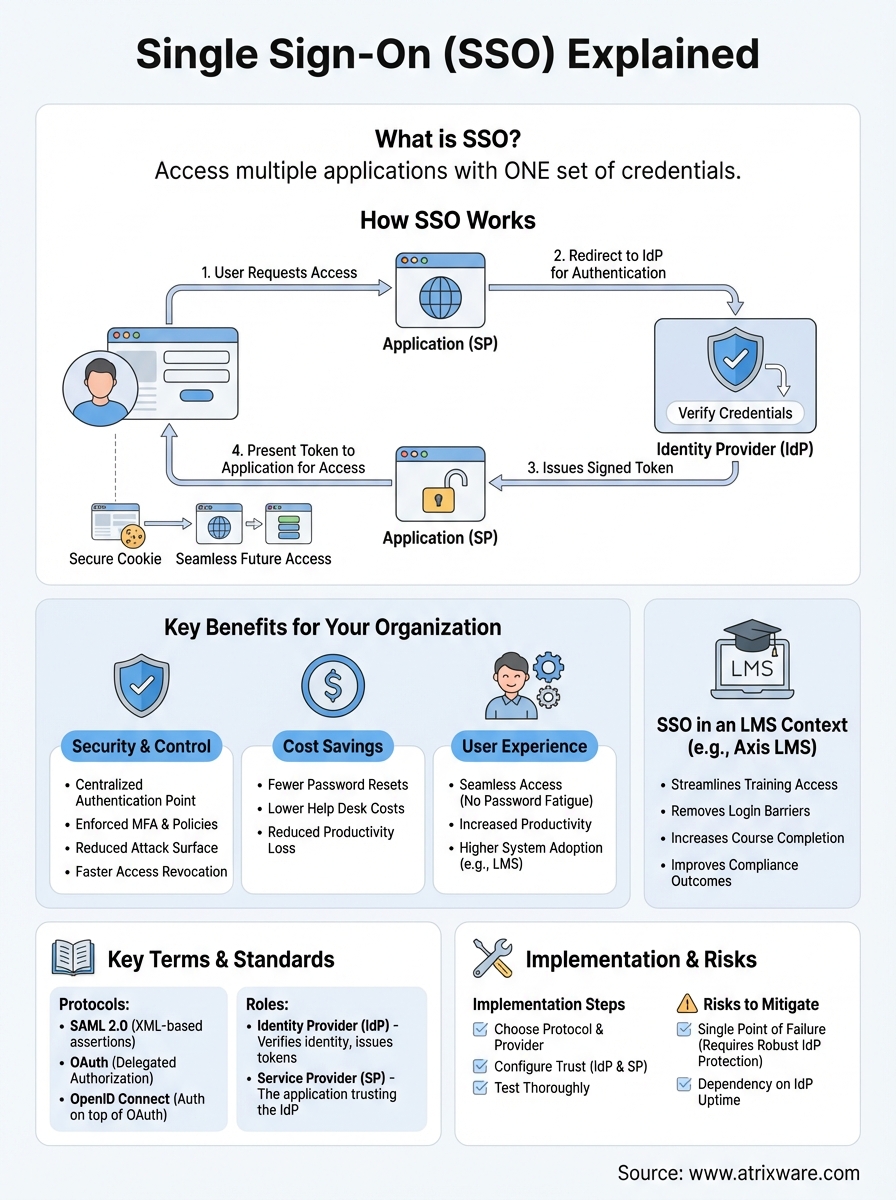
Single sign on explained through its technical process reveals a surprisingly straightforward authentication flow. When you try to access an application, your browser initiates a secure handshake between three parties: you as the user, the application you want to access, and the identity provider that verifies your credentials. This process happens in milliseconds and repeats seamlessly across all your connected systems without requiring repeated logins.
The authentication request
Your journey starts when you click on an application that requires authentication. The application recognizes it needs to verify your identity and redirects your browser to a centralized identity provider. This provider might be your organization’s directory service or a third-party authentication system. The application sends along a security token request that includes information about which system needs access and what permissions it requires.
SSO authentication happens through secure redirects and token exchanges, not by sharing your password across multiple systems.
Token validation and exchange
Once the identity provider receives your authentication request, it checks if you’ve already logged in recently. If you have an active session, the provider immediately generates an authentication token without asking for credentials again. This token contains encrypted information about your identity and access rights. The provider sends this signed token back to your browser, which then presents it to the original application you wanted to access. The application validates the token’s signature to confirm it came from a trusted source and hasn’t been tampered with during transmission.

Access across multiple systems
After successful authentication, your browser stores the session information in a secure cookie that persists across your connected applications. When you access a second application, it follows the same redirect process to the identity provider. Because you already have an active session, the provider instantly issues another application-specific token without interrupting your workflow. Each application receives only the access information it needs, maintaining security boundaries while delivering the seamless experience SSO promises.
Key SSO terms and standards you should know
When you explore single sign on explained in technical documentation, you’ll encounter specific terminology that describes how the system operates. Understanding these fundamental terms helps you communicate effectively with IT teams and make informed decisions about authentication strategies for your organization. The standards that power SSO have evolved over decades, creating a mature ecosystem of protocols and practices that keep your systems secure while maintaining seamless access.
SAML and OAuth protocols
Your SSO implementation likely relies on Security Assertion Markup Language (SAML) or OAuth, two dominant protocols that handle authentication differently but serve similar purposes. SAML uses XML-based messages to exchange authentication and authorization data between your identity provider and applications. When you log into enterprise systems, SAML typically handles the authentication flow by passing digitally signed assertions that confirm your identity and permissions.
OAuth takes a different approach by providing delegated authorization rather than authentication. You see OAuth in action when an application asks for permission to access your account data from another service. Modern implementations often combine OAuth with OpenID Connect, which adds an authentication layer on top of OAuth’s authorization framework. This combination gives you both secure identity verification and controlled access to resources.
The protocol you choose depends on whether you need authentication, authorization, or both for your specific use case.
Identity providers and service providers
Your identity provider (IdP) acts as the central authority that stores and verifies user credentials. Microsoft Azure Active Directory, Okta, and Google Workspace all function as identity providers that manage authentication requests from multiple applications. The IdP maintains your user directory, enforces security policies, and issues the tokens that grant access to connected systems.
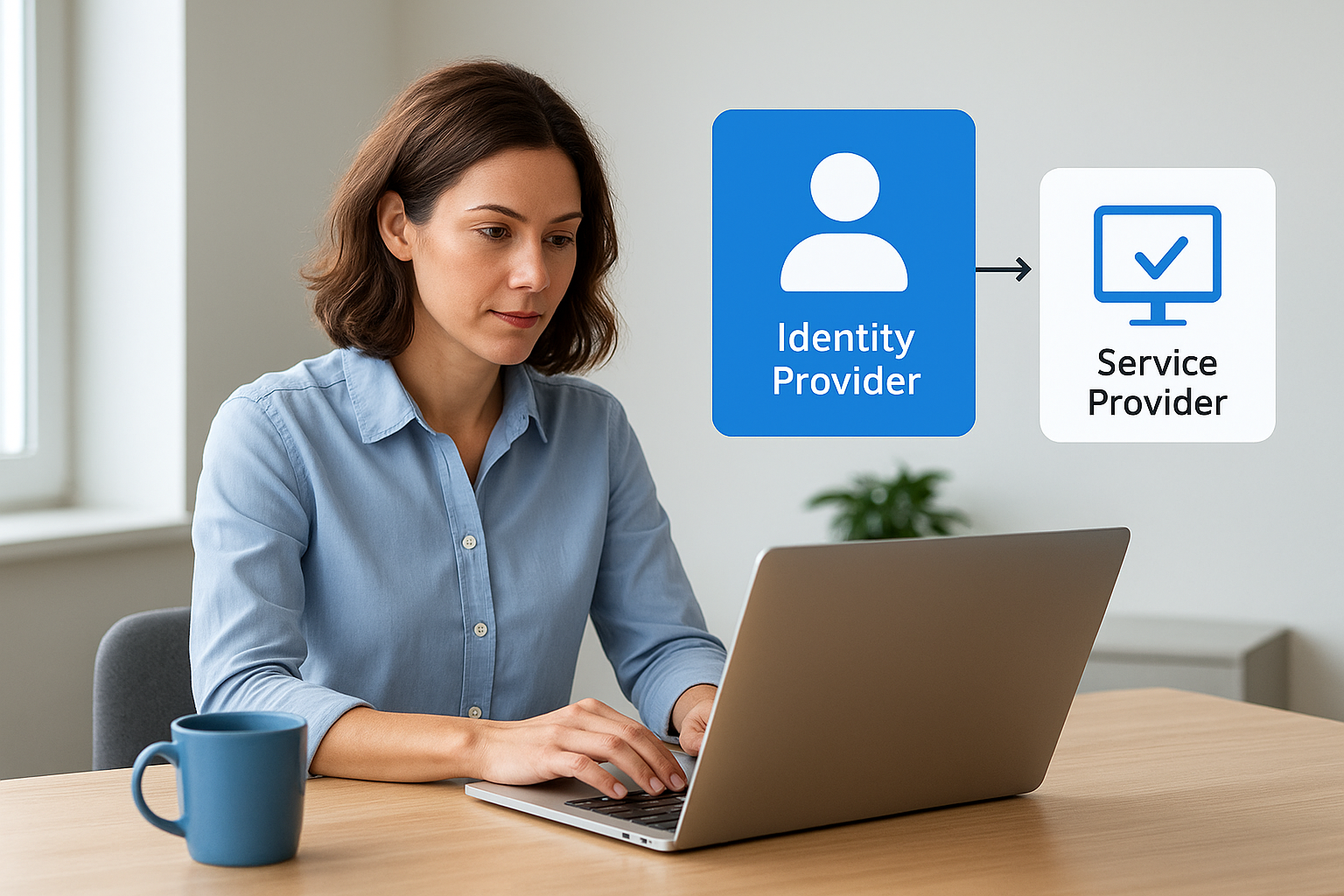
Service providers (SPs) are the applications that rely on your identity provider for authentication. Your LMS, email system, and project management tools all act as service providers that trust the IdP to verify user identities. This trust relationship between IdPs and SPs forms the foundation of your SSO ecosystem, allowing secure communication without sharing passwords across systems.
Benefits and risks of using SSO
Single sign on explained through a balanced lens means understanding both its powerful advantages and potential vulnerabilities. Your organization gains significant benefits from consolidated authentication, but you also need to recognize where SSO creates new security considerations. Making an informed decision about SSO requires weighing these factors against your specific security requirements and organizational needs.
Key advantages for your organization
You reduce password fatigue when employees access all systems through one set of credentials. This streamlined authentication leads to fewer help desk tickets and improved productivity across your workforce. Your IT team gains centralized control over access management, making it faster to onboard new users and revoke access when employees leave. For learning management systems, SSO removes barriers that prevent learners from engaging with training content, directly improving course completion rates and compliance outcomes.
Your security posture strengthens when you enforce multi-factor authentication at a single checkpoint rather than implementing it across dozens of applications. You also gain better audit capabilities because all authentication events flow through one system, making it easier to detect unusual access patterns and respond to potential security incidents.
Centralized authentication creates both your greatest security strength and your most critical point of vulnerability.
Security vulnerabilities to address
Your SSO system becomes a single point of failure that attackers target aggressively. If someone compromises your identity provider credentials, they potentially gain access to every connected application in your environment. This risk demands robust protection at the identity provider level, including strong passwords, multi-factor authentication, and continuous monitoring for suspicious activity.
You face additional risks if your identity provider experiences downtime or technical issues. When your SSO system fails, employees lose access to all connected applications simultaneously, creating widespread productivity loss. Your implementation strategy needs to include backup authentication methods and redundancy planning to maintain business continuity during outages.
How to implement SSO in an LMS
Your implementation process follows a structured approach that connects your identity provider with your learning management system. The technical setup varies based on your chosen protocol and LMS capabilities, but the fundamental steps remain consistent. Understanding these stages helps you plan resources, anticipate challenges, and ensure a smooth transition for your learners and administrators. With single sign on explained through practical implementation, you can execute this process efficiently while maintaining security and minimizing disruption to ongoing training programs.
Choose your SSO protocol and provider
Your first decision involves selecting between SAML 2.0 and OpenID Connect as your authentication protocol. SAML works well for enterprise environments where you already use Microsoft Azure Active Directory, Okta, or similar directory services. OpenID Connect offers better compatibility with modern cloud applications and mobile platforms. Your LMS documentation typically specifies which protocols it supports, narrowing your selection.
You also need to verify that your identity provider integrates with your LMS platform. Most enterprise LMS solutions like Axis LMS support major SSO providers including Azure, Okta, Ping Identity, and Salesforce. Contact your LMS vendor to confirm compatibility and obtain any necessary configuration guides specific to your chosen provider.
Configure your LMS to accept SSO credentials
Your configuration starts in your identity provider’s admin console where you register your LMS as a trusted application. This process requires entering your LMS’s entity ID and callback URLs, which your LMS administrator provides. You then configure attribute mapping to ensure user information like email addresses, names, and group memberships transfer correctly between systems.
Proper attribute mapping ensures your LMS receives the correct user information to assign courses and track progress accurately.
Within your LMS, you enable SSO authentication and enter the metadata URL or certificate from your identity provider. Most platforms let you test the connection before making SSO the primary authentication method.
Test and roll out to users
Your testing phase should include pilot users from different departments who can identify issues before full deployment. Verify that new users can access the system, existing users maintain their learning history, and group assignments work correctly. Plan a communication strategy that explains how users will access the LMS moving forward, and maintain backup authentication options during the initial rollout period.
Key takeaways
Single sign on explained through this guide reveals how consolidated authentication transforms both security and user experience across your organization. Your employees gain seamless access to training content and business applications while your IT team maintains centralized control over security policies and access management. The technology reduces password fatigue, cuts support costs, and eliminates the friction that prevents learners from completing their training assignments.
Implementing SSO requires careful planning around protocol selection, identity provider integration, and thorough testing before deployment. Your success depends on choosing the right combination of authentication standards and ensuring proper configuration between your identity provider and learning management system. When executed correctly, SSO strengthens your security posture while making your training programs more accessible and effective.
Ready to see how SSO integration works with a modern LMS? Explore Axis LMS through our interactive admin demo to experience firsthand how seamless authentication simplifies training management and improves learner engagement across your organization.
