
Single sign-on (SSO) lets you log in once and access multiple applications without entering your credentials again. Think of it as a master key for your digital tools. Instead of remembering passwords for your email, project management software, and company portal, you authenticate once and move freely between systems. This authentication method saves time, reduces password fatigue, and creates a smoother experience for everyone who needs to jump between different platforms throughout their workday.
This guide breaks down how SSO works, the protocols that power it, and real examples you’ll recognize from everyday business operations. You’ll learn why organizations invest in this technology, what security considerations matter, and how different SSO types serve different needs. Whether you’re evaluating authentication options for your team or simply want to understand the technology behind your seamless login experience, you’ll find practical answers here.
Why businesses prioritize single sign-on
Organizations adopt SSO because it directly impacts productivity, security, and operational costs. When you eliminate repeated login prompts, employees spend less time entering credentials and more time completing actual work. IT departments face fewer password-related support tickets, which means technical staff can focus on strategic initiatives instead of resetting forgotten passwords. These benefits scale quickly as your organization grows and adds more cloud applications to its technology stack.
Productivity gains through faster access
Your team members switch between applications constantly throughout the day. Each login interruption breaks concentration and adds friction to workflows. SSO removes these barriers by letting users authenticate once at the start of their session. You’ll notice employees access the tools they need without delays, which translates to measurable time savings across your entire organization. Studies show workers can save up to 15 hours per year just by eliminating redundant logins.
Reduced IT support burden
Password resets consume a significant portion of helpdesk resources. When employees forget credentials for multiple systems, your IT team handles hundreds or thousands of reset requests monthly. SSO consolidates authentication to a single credential set, which dramatically reduces these support tickets. Your IT staff spends less time on routine password issues and gains bandwidth for projects that drive business value.
Single sign-on cuts password-related support costs by up to 70% for many organizations.
Stronger security posture
The single sign on definition emphasizes authentication efficiency, but security benefits often matter most to decision-makers. When you require fewer passwords, employees create stronger ones instead of using weak, repeated credentials across platforms. SSO enables centralized security controls like multi-factor authentication and conditional access policies. You can enforce consistent security standards across all connected applications, monitor authentication events from one location, and quickly revoke access when someone leaves your organization. This centralized approach closes security gaps that appear when each application manages its own authentication independently.
How the single sign-on process works
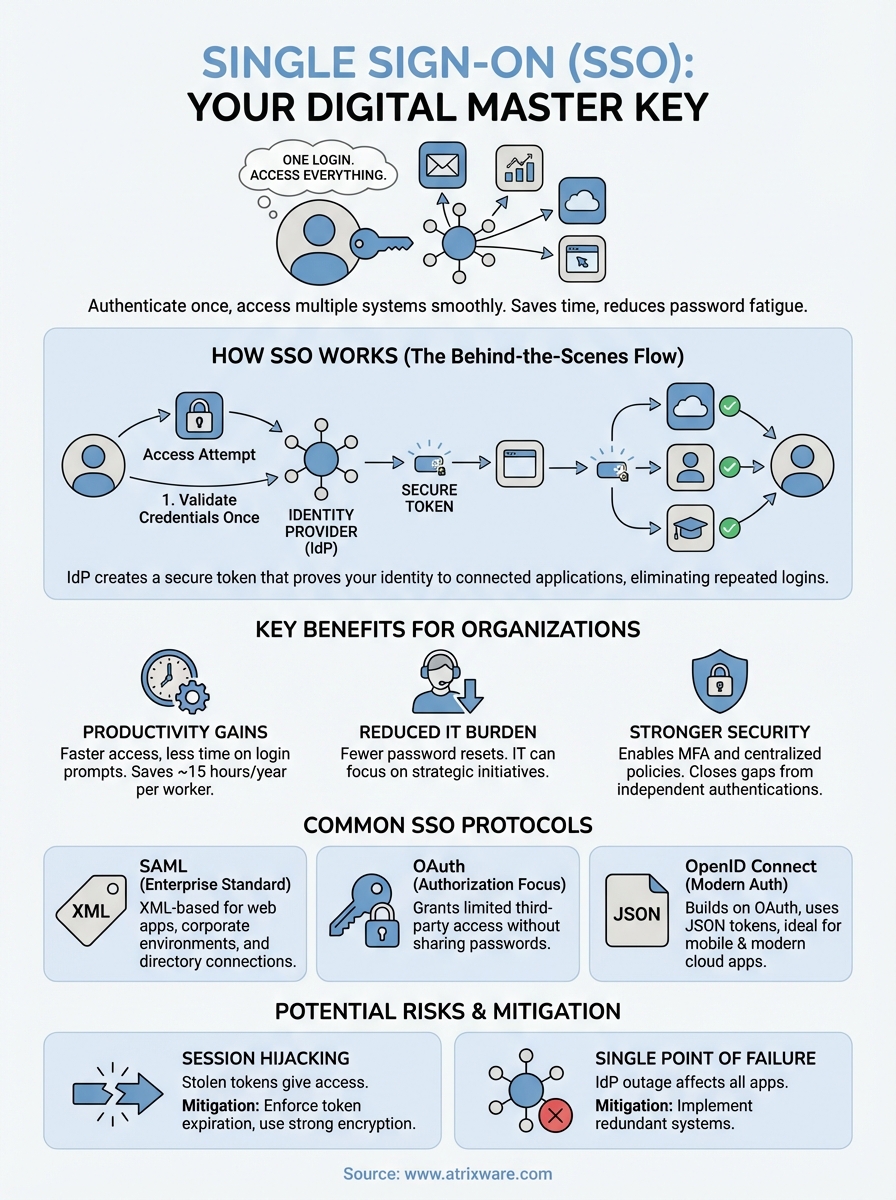
The single sign on definition points to a streamlined authentication flow that happens behind the scenes. When you attempt to access an application, the system first checks whether you’re already authenticated. If you haven’t logged in yet, it redirects you to a central identity provider where you enter your credentials once. After successful authentication, the identity provider creates a secure token that proves your identity to other connected applications. This token travels with you as you access different systems, eliminating the need for repeated logins.
The initial authentication step
Your journey begins when you try to access a protected application or resource. The application recognizes you haven’t authenticated yet and sends you to the identity provider. You enter your username and password at this single location. The identity provider validates your credentials against its user directory and confirms your identity. Some organizations add multi-factor authentication at this stage for extra security.
Token exchange and verification
Once authenticated, the identity provider generates a secure token containing your identity information. This token gets passed back to the original application you wanted to access. The application verifies the token’s authenticity with the identity provider and grants you access. When you navigate to another connected application, the same token confirms your identity without requiring another login.
Your authenticated session remains active until you log out or the token expires based on your organization’s security policies.
Common protocols used for single sign-on
Different technical standards power the single sign on definition you’ve learned about, and each protocol serves specific use cases. These protocols define how identity providers and applications exchange authentication information securely. Understanding these standards helps you make informed decisions when implementing SSO or evaluating how your organization’s authentication system works. The most widely adopted protocols include SAML, OAuth, and OpenID Connect, each with distinct characteristics that suit different scenarios.
SAML (Security Assertion Markup Language)
SAML remains the standard for enterprise SSO implementations, particularly for web-based applications. This XML-based protocol exchanges authentication and authorization data between an identity provider and a service provider. When you log in through SAML, the identity provider creates a digitally signed assertion that confirms your identity to the application. SAML works particularly well for corporate environments where you need to connect multiple cloud applications to a central directory service like Active Directory.
OAuth and OpenID Connect
OAuth focuses on authorization rather than pure authentication. You’ve encountered OAuth when granting third-party applications limited access to your data without sharing passwords. OpenID Connect builds on OAuth 2.0 to add a proper authentication layer, making it suitable for modern SSO scenarios. These protocols use JSON tokens instead of XML, which makes them lighter and faster for mobile and API-driven applications.
Modern applications increasingly favor OpenID Connect for its flexibility and performance advantages in cloud environments.
Real examples of single sign-on in the workplace
You’ve likely used SSO without realizing it if you access Google Workspace or Microsoft 365 at work. These platforms demonstrate how the single sign on definition translates to daily operations. Your morning login grants immediate access to email, calendar, documents, video conferencing, and collaboration tools without entering credentials for each service. This seamless experience extends beyond a single vendor’s ecosystem when organizations connect third-party applications to their central authentication system.

Enterprise cloud application access
Your company probably connects dozens of applications through SSO. When you log into your organization’s identity provider, you gain access to tools like Salesforce, Slack, Zoom, and project management platforms. This integration extends to specialized software like learning management systems, expense reporting tools, and HR portals. Each application trusts your central authentication, so you click through to them directly from a unified dashboard or app launcher.
Organizations typically connect 20 to 50 different applications to their SSO system, creating a unified access point for all business tools.
Internal portal and resource access
Your corporate intranet serves as another practical SSO example. You authenticate once and access internal wikis, policy documents, employee directories, and departmental resources. Many organizations extend this to physical security systems where your digital identity controls building access, printing permissions, and network resources. This convergence of digital and physical access demonstrates how SSO principles scale beyond software applications.
Potential security risks to watch out for
The single sign on definition emphasizes convenience, but this centralized approach creates specific security challenges you need to address. When you grant access to multiple systems through one authentication point, a compromised credential becomes more valuable to attackers. Your organization faces different risks than traditional authentication models where each application maintains separate credentials. Understanding these vulnerabilities helps you implement appropriate safeguards without sacrificing the productivity benefits SSO delivers.
Session hijacking vulnerabilities
Attackers target SSO tokens because stealing one provides access to all connected applications. If someone intercepts your authentication token, they can impersonate you across your entire digital environment. This risk increases when you access systems over unsecured networks or through compromised devices. Your organization should enforce token expiration policies and require re-authentication for sensitive operations. Strong encryption for token transmission and storage adds another defense layer against interception attempts.
Over-reliance on single authentication point
Your identity provider becomes a single point of failure for all connected systems. If this service experiences an outage, you lose access to every application that depends on it for authentication. Attackers recognize this vulnerability and may target your identity provider specifically through denial-of-service attacks or credential stuffing campaigns.
Organizations reduce this risk by implementing redundant identity providers and maintaining offline access procedures for critical systems.
Final thoughts on streamlined access
The single sign on definition centers on removing authentication friction while maintaining strong security across your organization’s applications. You’ve seen how SSO reduces password fatigue, strengthens security postures, and delivers measurable productivity gains through consolidated access management. Organizations that implement SSO properly balance convenience with robust safeguards like multi-factor authentication, conditional access policies, and comprehensive token management strategies.
Your choice of SSO protocol and implementation approach depends on your specific security requirements, compliance needs, and application ecosystem. Modern platforms like learning management systems increasingly include native SSO support to integrate seamlessly with your existing authentication infrastructure. When you centralize authentication for training programs, employees access learning content faster and IT teams manage permissions more efficiently. If you’re evaluating how SSO fits into your training and development tools, explore Axis LMS to see enterprise-grade SSO integration in action and discover how streamlined authentication enhances the learning experience.
