New hires who receive structured training are 50% more productive within their first three months compared to those who don’t. Yet many organizations still rely on scattered processes, informal check-ins, and hope that new employees figure things out. Poor employee onboarding training costs companies thousands in lost productivity and early turnover.
You can change that by building a structured onboarding program that gets results. The key is having clear steps to follow, ready-to-use templates, and the right tools to deliver training consistently. When you systematize your approach, new hires learn faster, managers spend less time answering repetitive questions, and your team becomes productive sooner.
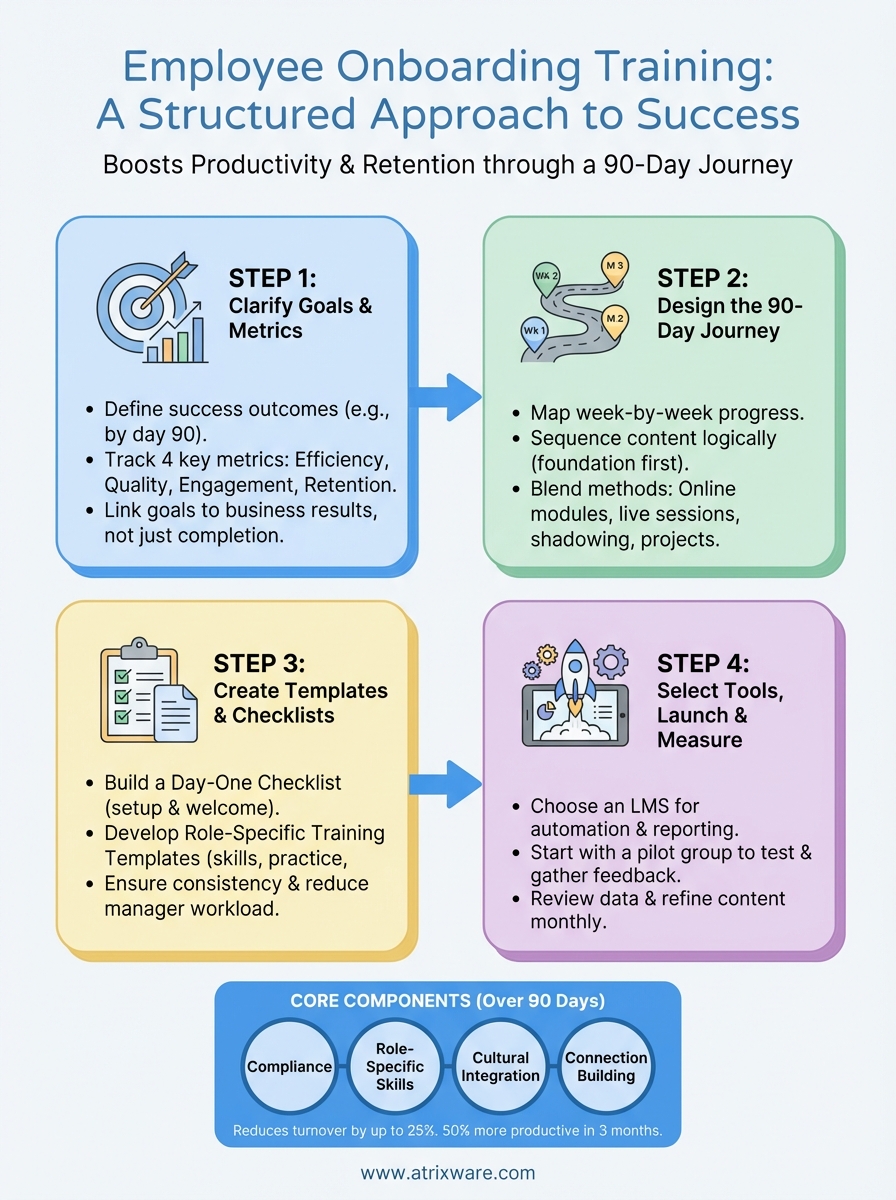
This guide walks you through four essential steps to create effective onboarding training. You’ll learn what successful programs include, how to clarify your goals and metrics, how to design the onboarding journey, and which templates and tools make implementation easier. By the end, you’ll have everything you need to launch a training program that sets both your organization and your new hires up for success.
What effective onboarding training includes
Effective employee onboarding training covers more than a single orientation session. You need to deliver four core components over the first 90 days: compliance fundamentals, role-specific skills, cultural integration, and relationship building. Programs that address all four areas reduce turnover by up to 25% and cut the time it takes new hires to reach full productivity.
The four core components
Compliance training ensures every new hire understands company policies, security protocols, and legal requirements. This includes workplace safety rules, data privacy standards, anti-harassment policies, and any industry-specific regulations that apply to your business. You should deliver this content in the first week before employees access sensitive systems or customer data.

Role-specific training teaches the technical skills and processes each person needs to perform their job. Sales representatives learn your CRM system and sales methodology. Customer service teams master your support software and escalation procedures. Engineers get access to code repositories and development workflows. Tailor this content to each department and position rather than creating one-size-fits-all material.
Cultural integration helps new employees understand how your organization operates. You’ll introduce your mission, values, communication norms, and decision-making processes. Share stories about company history and examples of behaviors that exemplify your culture. This component answers questions like "How do teams collaborate here?" and "What does success look like?"
Connection building creates relationships between new hires and their colleagues. Assign a buddy or mentor for informal questions. Schedule introductions with key stakeholders across departments. Set up team lunches or virtual coffee chats to break down barriers. Strong relationships in the first month predict higher engagement six months later.
The most successful onboarding programs treat training as a journey, not an event.
Timeline and delivery methods
Your onboarding should span at least 90 days, not just the first week. Break content into digestible chunks delivered over time. Week one focuses on compliance and basic setup. Weeks two through four introduce role-specific skills through a mix of self-paced modules, shadowing sessions, and hands-on practice. Months two and three deepen expertise and expand connections across the organization.
Blend multiple delivery methods to maintain engagement. Use online modules for compliance training that employees complete at their own pace. Schedule live sessions for complex topics that benefit from discussion. Provide job aids and quick reference guides for procedures they’ll use daily. This variety keeps training interesting while accommodating different learning preferences.
Step 1. Clarify goals and success metrics
You can’t improve what you don’t measure. Before building your employee onboarding training, define what success looks like for your organization and how you’ll track progress. Clear goals keep your program focused on outcomes that matter, and specific metrics help you prove ROI to leadership while identifying areas that need adjustment.
Define what success looks like
Start by asking what changes you want to see in new hires after 90 days. Do you want them closing deals independently? Handling customer inquiries without escalation? Contributing code to production? Your goals should connect directly to business outcomes rather than focusing solely on training completion rates.
Write down three to five specific objectives. For example: "New sales reps generate $50,000 in qualified pipeline by day 90" or "Customer service agents resolve 80% of tickets without supervisor intervention within 60 days." Make each goal measurable and tied to a timeframe. Involve hiring managers and team leads in this process since they understand what performance levels separate productive employees from those still ramping up.
The best onboarding goals translate training activities into business results that executives care about.
Choose metrics to track
Select four categories of metrics to monitor your program’s effectiveness. Tracking multiple dimensions gives you a complete picture of how well onboarding works and where problems emerge.

Efficiency metrics measure how quickly new hires become productive. Track time to first sale, days until independent work, or weeks until full task completion. Compare these numbers across cohorts to spot trends and improvements.
Quality metrics assess how well new employees perform. Monitor error rates, customer satisfaction scores for their interactions, or percentage of work requiring revision. High productivity means nothing if quality suffers.
Engagement metrics reveal how connected new hires feel. Use pulse surveys at 30, 60, and 90 days asking about clarity of expectations, relationship quality with managers, and confidence in their role. Track attendance in optional learning sessions and participation in team activities.
Retention metrics show long-term program success. Calculate 90-day turnover rates, first-year retention, and reasons people leave during onboarding. Compare retention between employees who completed full training versus those who didn’t.
Create a simple tracking template:
| Metric | Target | Current | Trend |
|---|---|---|---|
| Days to first sale | 45 | 52 | ↑ |
| 90-day retention | 95% | 88% | ↓ |
| Quality score (avg) | 4.2/5 | 3.9/5 | ↔ |
| Confidence rating | 4.0/5 | 4.3/5 | ↑ |
Review these metrics monthly with stakeholders and adjust your training content based on patterns you discover.
Step 2. Design the onboarding journey
Designing your employee onboarding training journey means mapping exactly what happens each day, week, and month. You need to sequence content in a logical order that builds confidence without overwhelming new hires. The right structure balances information delivery with hands-on practice, moving from foundational concepts to advanced skills as employees gain competence.
Map the first 90 days
Create a week-by-week roadmap that shows what new hires will learn and accomplish at each stage. Week one should focus on essentials: system access, workspace setup, compliance training, and meeting immediate team members. Employees need these basics before they can do any real work.
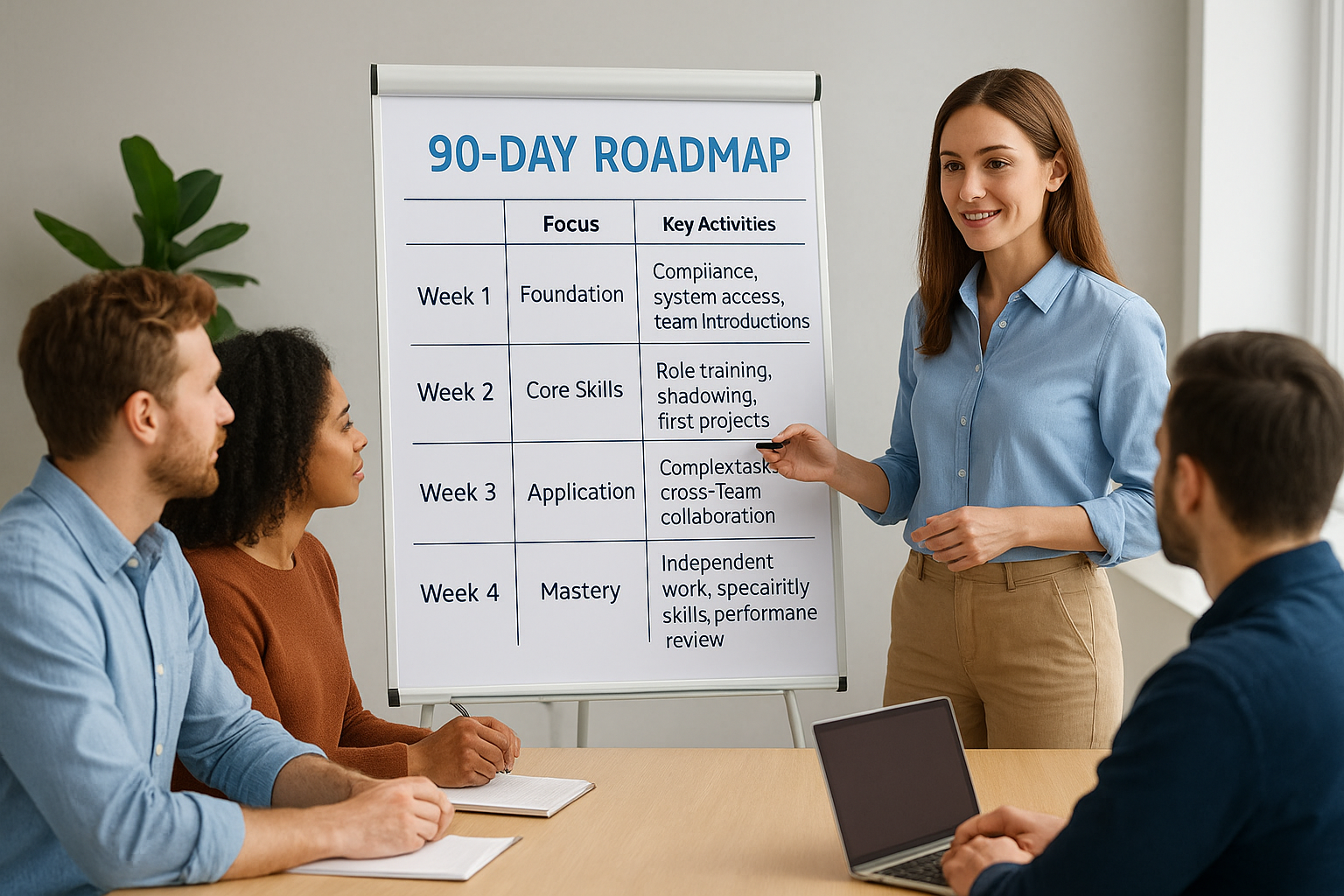
Weeks two through four shift to role-specific training where new hires learn core tasks through a mix of observation, guided practice, and independent attempts with feedback. Assign simple projects they can complete successfully to build momentum. Sales reps might shadow calls in week two, co-present in week three, and lead their first solo demo in week four.
Month two deepens technical expertise and expands exposure to other departments. New hires should handle increasingly complex work while learning how their role connects to broader company operations. Schedule meetings with cross-functional partners they’ll work with regularly.
Month three focuses on independence and refinement. Employees should operate with minimal supervision while developing specialized skills for their specific responsibilities. Use this period to address knowledge gaps identified in the first two months.
Here’s a sample timeline structure:
| Timeframe | Focus Area | Key Activities |
|---|---|---|
| Days 1-5 | Foundation | Compliance, systems access, team introductions |
| Days 6-30 | Core Skills | Role training, shadowing, first projects |
| Days 31-60 | Application | Complex tasks, cross-team collaboration |
| Days 61-90 | Mastery | Independent work, specialty skills, performance review |
Sequence content strategically
Start with information new hires need immediately and delay advanced topics until they have context to understand them. Teaching your CRM’s advanced reporting features on day one wastes time because employees can’t appreciate their value yet. Wait until week three when they’ve used basic functions and encountered limitations.
Layer concepts in dependency order where each skill builds on the previous one. Customer service reps should learn your product features before troubleshooting techniques. Engineers need access to documentation before they review code. Map prerequisites for each learning module and sequence them accordingly.
The best onboarding journeys feel like a natural progression rather than random information dumps.
Group related topics into themed weeks that give new hires clear focus areas. Dedicate week two entirely to product knowledge. Spend week three on customer interaction skills. This clustering helps employees retain information better than jumping between unrelated subjects daily.
Balance delivery methods
Mix self-paced online modules, live training sessions, shadowing opportunities, and hands-on projects throughout the journey. Self-paced content works well for compliance requirements and foundational knowledge that employees can complete on their own schedule. Use these modules for the first few days when new hires have time to focus.
Schedule live sessions for complex topics that require discussion or immediate answers to questions. Product demonstrations, sales methodology training, and technical architecture overviews benefit from real-time interaction. Record these sessions so new hires can review them later.
Pair new employees with experienced team members for shadowing periods where they observe real work before attempting it themselves. Sales reps should listen to at least ten customer calls before making their own. Support agents need to watch ticket resolution before handling inquiries independently. Build specific shadowing assignments into your roadmap with clear observation goals for each session.
Step 3. Create templates and checklists
Templates and checklists remove guesswork from your employee onboarding training process. They ensure consistency across all new hires while reducing the time managers spend planning each person’s first weeks. When you document every step, task, and resource in reusable formats, you create a system that works whether you’re onboarding one person or twenty.
Standardized documents also make it easier to spot gaps in your program. If you can’t check off a specific learning outcome on your template, that signals missing content. Templates turn your onboarding design into executable action items that managers and new hires can follow without constant guidance.
Build a day-one checklist
Your day-one checklist should cover every task a new hire completes during their first eight hours. Include both administrative items and welcome activities that make employees feel prepared and valued. This document serves as a roadmap that eliminates confusion about what happens when.

Start with pre-arrival setup tasks for managers: order equipment, create system accounts, schedule meetings, and assign a buddy. Then list what new hires will complete hour by hour. Here’s a template structure:
New Hire Day One Checklist
Manager Preparation (Complete by 9am):
- Workstation set up with equipment
- System accounts created (email, Slack, LMS)
- First-week calendar populated
- Buddy assigned and notified
New Hire Tasks (9am-5pm):
- 9:00am – Meet manager, office tour
- 9:30am – IT setup and system access
- 10:30am – Complete compliance modules
- 12:00pm – Team lunch
- 1:00pm – Review role expectations document
- 2:00pm – Meet buddy for informal Q&A
- 3:00pm – Begin product overview training
- 4:30pm – Day one reflection survey
Design role-specific training templates
Create a separate training template for each role that outlines every skill, process, and knowledge area new hires must master. These templates break down complex jobs into learnable chunks with clear completion criteria for each component.
Your template should list learning objectives, delivery methods, practice opportunities, and assessment criteria. Each line item needs an owner (who teaches it) and a deadline (when it’s completed). This structure keeps everyone accountable while giving new hires visibility into their progress.
Templates transform vague onboarding expectations into concrete learning plans that managers and new hires can execute together.
Here’s a sample format:
| Skill/Knowledge | Method | Practice Activity | Assessment | Owner | Deadline |
|---|---|---|---|---|---|
| CRM navigation | Self-paced module + live demo | Enter 10 test accounts | Quiz (80% pass) | Sales Ops | Day 5 |
| Discovery calls | Shadowing (5 calls) | Co-lead 2 calls | Manager observation | Sales Manager | Day 15 |
| Objection handling | Workshop + roleplay | Practice scenarios | Roleplay assessment | Sales Manager | Day 20 |
Build these templates by interviewing top performers and managers in each role to identify the skills that separate successful employees from those who struggle.
Step 4. Select tools, launch and measure
Your employee onboarding training needs the right technology platform to deliver content, track progress, and measure results. You could use email and spreadsheets, but that approach creates administrative burden and makes it impossible to see what’s working. Instead, select a Learning Management System (LMS) that automates delivery, captures completion data, and generates reports without manual effort.
Choose your delivery platform
Look for an LMS that handles the core onboarding functions you’ve designed in previous steps. Your platform should deliver self-paced modules, schedule automated reminders, assign role-specific content, and produce reports on completion rates and assessment scores. It should integrate with your HR systems to automatically enroll new hires when they’re added to your employee database.
Prioritize ease of use for both administrators and learners. You need a system where managers can quickly assign training without calling IT support, and where new hires can access content from any device without extensive instructions. Test the interface before committing by requesting demos or trial periods that let your team evaluate navigation, mobile experience, and administrative workflows.
Consider these essential features:
- Automated enrollment based on hire date and role
- Branching logic to assign department-specific content
- Progress tracking and completion reporting
- Calendar integration for live session scheduling
- Mobile access for remote or field employees
- Certification tracking for compliance requirements
Launch with a pilot group
Start with a small cohort of 3-5 new hires before rolling out your program company-wide. This pilot phase reveals problems you didn’t anticipate during the design process, from confusing instructions to missing resources. Watch how your test group navigates the training and note where they get stuck or ask for clarification.
Schedule check-ins at day 5, day 15, and day 30 with pilot participants. Ask specific questions about content clarity, pacing, workload balance, and technical issues. Use their feedback to revise modules, adjust timelines, and fix broken links before expanding to all employees.
Pilot groups surface the gap between how you think onboarding works and how new hires actually experience it.
Track the same metrics you defined in Step 1 with your pilot cohort. Compare their performance data against historical averages for new hires who went through your old process. This comparison provides early evidence of whether your structured approach delivers better outcomes.
Measure and refine monthly
Review your dashboard data every 30 days to spot patterns in completion rates, assessment scores, and engagement metrics. Look for modules where drop-off rates spike or where employees consistently score below passing thresholds. These signals indicate content that’s too difficult, too long, or poorly explained.
Survey new hires at 90 days asking what helped most and what could improve. Compare responses across cohorts to identify systemic issues versus individual preferences. Update your training materials quarterly based on feedback patterns and business changes. Your onboarding program should evolve as your company grows and your products change.
Put your onboarding plan into action
You now have a complete framework for building structured employee onboarding training that delivers measurable results. The difference between companies with high retention and those losing new hires in 90 days often comes down to having documented processes rather than winging it. Your templates, timelines, and metrics give you everything needed to create consistency across every new hire.
Start implementation by selecting your pilot group and launching within the next 30 days. Review your month-one data to identify what’s working and what needs adjustment. The sooner you begin, the sooner you’ll see improvements in time-to-productivity and retention rates.
Technology makes scaling your program easier once you’ve validated the approach. Take the LMS readiness quiz to determine which platform features matter most for your onboarding needs. The right system automates delivery, tracks completion, and frees your team to focus on supporting new hires instead of managing spreadsheets.
