Your CRM holds valuable customer data, but it often sits isolated from the other systems your team uses every day. CRM integration connects your customer relationship management software with other business applications like email platforms, marketing automation tools, HR systems, e-commerce platforms, and learning management systems. This connection creates automatic data flow between systems so your teams can work with complete, up-to-date information without manual data entry or switching between multiple logins.
This guide walks you through everything you need to know about CRM integration. You’ll learn why it matters for your business operations, how to plan and implement integrations successfully, the most common types of CRM connections you should consider, available tools and methods for connecting systems, and best practices to avoid expensive mistakes along the way. Whether you’re looking to streamline employee training, improve customer education, enhance sales processes, or simply eliminate time-consuming manual work, understanding CRM integration will help you make smarter decisions about your technology stack and drive better business results.
Why CRM integration matters for your business
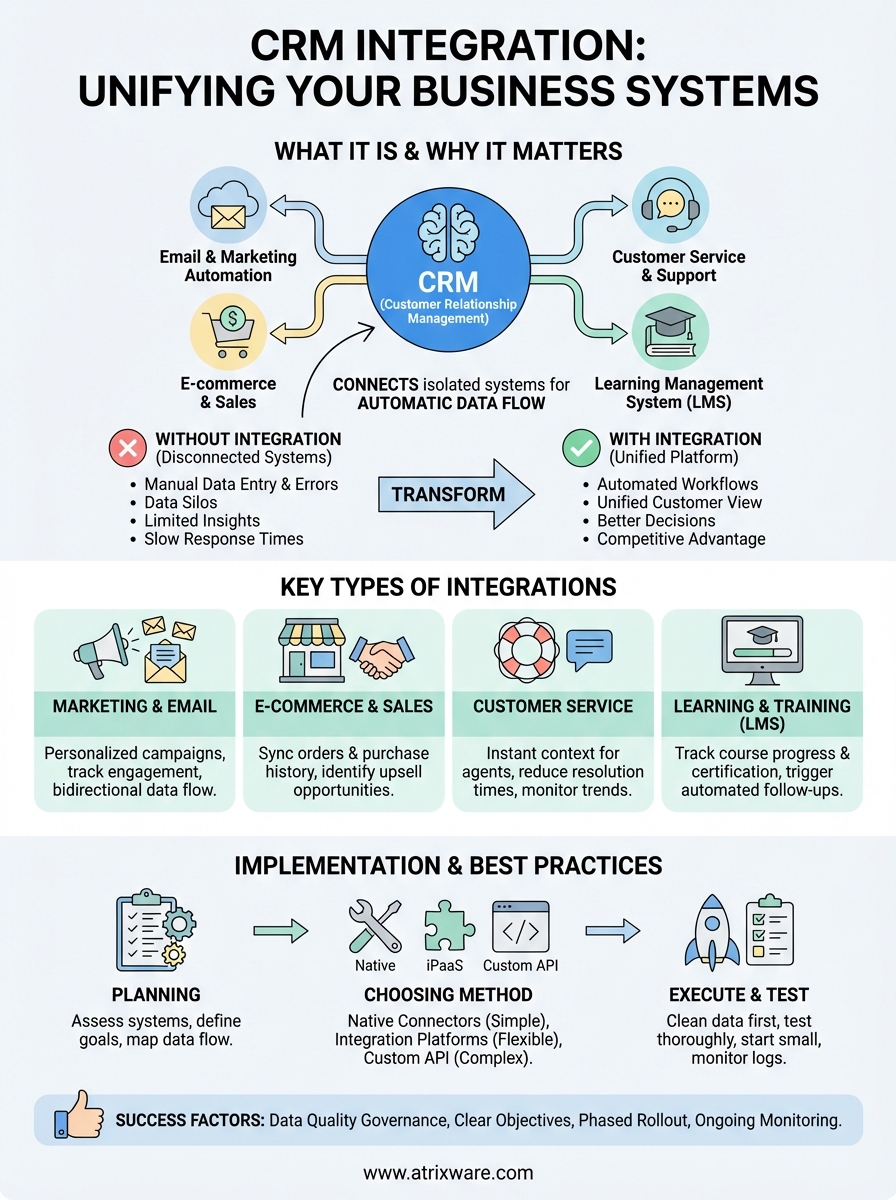
Your business already uses multiple software systems to manage different operations, and each one creates its own data silo. When your CRM operates independently from your email platform, marketing automation, learning management system, or accounting software, your team wastes countless hours copying data between systems. This manual work slows down response times, creates errors, and prevents you from seeing the complete picture of your customer relationships. Understanding what is CRM integration becomes critical when you realize that every disconnected system costs you time, money, and opportunities.
The real cost of disconnected systems
Manual data entry between systems introduces human error at every step. Your sales team updates contact information in the CRM, but the support team still sees outdated details because the information never flows to the help desk software. Your training department sends course completion certificates manually because the LMS doesn’t communicate with the CRM, missing opportunities to trigger automated follow-ups or upsell campaigns based on what customers learned. These disconnects create frustration for both your team and your customers.

Beyond errors and inefficiency, disconnected systems limit your ability to make informed decisions. You can’t accurately forecast sales when your e-commerce orders don’t sync with your CRM. Your marketing team can’t personalize campaigns effectively when they lack visibility into customer support interactions or training progress. Each isolated system holds valuable insights, but the real value emerges only when these insights combine into a unified view.
When your systems work together automatically, your team focuses on strategy and customer relationships instead of data entry.
Strategic advantages that drive growth
CRM integration creates competitive advantages that translate directly into revenue. Your customer success team can identify at-risk accounts faster when they see training engagement data alongside support tickets and product usage patterns in one place. Sales representatives close deals more efficiently when they access complete customer histories without switching between multiple applications. Marketing campaigns achieve higher conversion rates when they trigger based on real-time customer behaviors captured across your entire technology stack. These strategic benefits compound over time, helping you scale operations without proportionally increasing headcount or operational complexity.
How to plan and implement CRM integration
Successful CRM integration requires careful planning before you connect any systems. You need to understand what is crm integration truly meant to accomplish for your specific business context, identify which systems should connect first, map out how data will flow between applications, and establish clear success metrics. Rushing into integration without this groundwork leads to expensive mistakes, data quality problems, and integrations that fail to deliver expected benefits. The planning phase sets the foundation for everything that follows.
Assess your current systems and goals
Start by documenting every software application your team currently uses and how each one relates to customer data or business processes. List your CRM, email platform, marketing automation, learning management system, accounting software, help desk tools, and any other systems that store or process customer information. For each application, identify what data it creates, what information it needs from other systems, and how your team currently transfers data between platforms. This inventory reveals pain points where manual work happens and opportunities where automation would create immediate value.
Define specific business objectives that integration should achieve. You might want to reduce onboarding time for new customers by automatically enrolling them in training courses when deals close. Perhaps you need to trigger targeted campaigns based on learning progress tracked in your LMS. Or maybe your support team needs instant access to customer training history when resolving tickets. Clear objectives help you prioritize which integrations to build first and provide benchmarks to measure success later.
Choose the right integration approach
Evaluate integration methods based on your technical resources and complexity requirements. Native integrations built into your CRM or other applications offer the simplest implementation path when they exist for your specific software combination. These pre-built connectors typically require minimal technical expertise and start working within hours or days. However, they often provide limited customization options and may not support all the data fields or workflows you need.
Integration platforms like Zapier or dedicated iPaaS (Integration Platform as a Service) solutions provide middle-ground flexibility between native connectors and custom development. These platforms connect thousands of applications through visual workflow builders, letting you map data fields and define trigger conditions without writing code. You pay ongoing subscription fees based on usage volume, but you gain the ability to modify integrations quickly as your needs evolve. API-based custom integrations offer maximum flexibility for complex requirements but demand developer expertise and ongoing maintenance investment.
The right integration approach balances your technical capabilities, budget constraints, and customization needs without overengineering the solution.
Execute and test your integration
Map data fields carefully between your CRM and connected systems before activating any integration. Create a detailed spreadsheet showing exactly which field in System A corresponds to which field in System B, noting any data transformation needed (like reformatting dates or converting text to numbers). Pay special attention to unique identifiers that link records across systems, such as email addresses or customer IDs. Inconsistent identifier formats create duplicate records and data chaos.
Test your integration thoroughly with sample data before processing real customer information. Create test records in your CRM and verify they flow correctly to connected systems with all expected data intact. Test various scenarios including new records, updated records, and edge cases like blank fields or special characters. Monitor the integration closely during the first few days of production use, checking for errors, duplicates, or missing data. Build rollback procedures so you can quickly disable problematic integrations without losing data or disrupting operations.
Key types of CRM integrations
Different business functions require specific integration types to maximize efficiency and customer insights. Understanding what is crm integration means recognizing that not every connection serves the same purpose, and your organization will benefit from different integration types depending on your operational priorities. Most businesses start with two or three critical integrations that address their biggest pain points before expanding to more comprehensive connectivity. The following integration categories represent the most common and valuable connections you can establish between your CRM and other business systems.
Marketing automation and email systems
Connecting your CRM with marketing automation platforms creates powerful campaign capabilities based on complete customer data. When your marketing system accesses CRM information about purchase history, deal stages, and customer segments, you can trigger personalized email sequences that respond to specific customer actions or milestones. Your marketing team sees which leads converted into customers, while sales representatives track how prospects engage with marketing content. This bidirectional data flow prevents duplicate outreach and ensures consistent messaging across all customer touchpoints.
Email platform integrations capture every communication between your team and customers directly in CRM records. Your sales representatives never lose track of conversations because emails automatically attach to the correct contact records. Support teams review past correspondence before responding to new inquiries, creating seamless experiences for customers who interact with multiple departments.
E-commerce and sales platforms
Your online store generates critical transaction data that belongs in your CRM alongside customer profiles and communication history. E-commerce integrations automatically create or update CRM records when customers place orders, tracking purchase patterns, product preferences, and lifetime value. Sales teams identify upsell opportunities by seeing what customers already bought, while marketing builds targeted campaigns based on specific product categories or order frequency patterns.
E-commerce integration transforms your CRM from a contact database into a complete revenue intelligence platform.
Point-of-sale systems in retail environments feed transaction data to your CRM the same way online stores do, giving you unified customer views regardless of where purchases happen. You track customer journeys across channels and personalize experiences based on total relationship value rather than isolated transactions.
Customer service and support tools
Help desk and ticketing systems connected to your CRM provide instant context for every customer interaction. Support agents see purchase history, previous tickets, open deals, and account status before answering questions, dramatically reducing resolution times. Your sales and success teams monitor support ticket volumes and sentiment trends, identifying at-risk accounts before customers churn. Customer service data enriches your CRM records, creating complete behavioral profiles that drive retention strategies.
Live chat and messaging platform integrations capture real-time conversations in your CRM, building comprehensive interaction histories. You track response times and customer satisfaction metrics alongside sales performance data, connecting service quality to revenue outcomes.
Learning management and training systems
LMS integrations connect training data with customer and employee records in your CRM, tracking course completions, certification status, and engagement levels. Your customer success team monitors product training progress to predict adoption rates and expansion opportunities. Sales teams know which prospects completed product education courses and tailor conversations based on demonstrated knowledge levels. Employee training records integrated with your CRM help HR departments track skill development and compliance requirements alongside performance data.

Business operations and finance
Accounting and ERP system integrations ensure financial data flows seamlessly between operational systems and customer records. Your sales team sees payment status, outstanding invoices, and credit limits during deal negotiations. Finance departments access complete customer histories when resolving billing questions, while automated workflows trigger collection activities or payment reminders based on CRM data. HR system connections populate employee records in your CRM for businesses that manage internal relationships alongside external customer interactions.
Tools and methods for CRM integration
You have several proven approaches to connect your CRM with other business systems, each offering different balances of cost, complexity, and flexibility. Selecting the right method depends on your technical expertise, budget constraints, and how much customization your specific workflows require. Understanding what is crm integration from a technical perspective helps you evaluate which tools match your organization’s capabilities and integration goals. Most businesses combine multiple methods to build comprehensive connectivity across their entire technology stack.
Native CRM connectors and built-in integrations
Your CRM likely includes prebuilt connectors for popular business applications that you can activate through simple configuration screens. These native integrations require minimal technical knowledge and typically start working within minutes of activation. You authenticate both systems, map a few key fields, and the connection begins syncing data automatically. Major CRM platforms offer dozens or hundreds of these ready-made connectors for common tools like email platforms, marketing automation, accounting software, and customer service systems.
Native integrations work best when you need standard functionality without complex customization requirements. However, they may limit which data fields sync between systems and offer fewer options for triggering specific workflows or applying data transformations during transfer.
Integration platforms and middleware solutions
iPaaS (Integration Platform as a Service) tools provide visual workflow builders that connect your CRM to thousands of other applications without requiring code. You drag and drop components to create integration recipes, defining exactly when data moves between systems and how it transforms during transfer. These platforms handle authentication, error logging, and retry logic automatically, saving you from building infrastructure yourself.

Integration platforms let you modify connections quickly as your business processes evolve without waiting for developer availability.
Popular iPaaS solutions charge subscription fees based on task volume and included applications, making costs predictable as you scale.
Custom API development and webhooks
Businesses with unique requirements or specialized systems often build custom integrations using APIs (Application Programming Interfaces) provided by their CRM and other software. This approach demands developer expertise to write code that authenticates, retrieves, transforms, and sends data between systems. Custom development creates exactly the functionality you need, including complex conditional logic, multi-step workflows, and integration with proprietary internal systems.
Webhooks enable real-time data transfer by notifying your systems instantly when specific events occur in your CRM, such as when deals close or contacts update. Development teams configure webhook listeners that capture these notifications and trigger appropriate actions in connected systems.
Best practices and common pitfalls
Implementing CRM integration successfully requires careful attention to details that separate smooth deployments from expensive failures. You need to establish clear processes before connecting systems, monitor data quality continuously after integration launches, and learn from common mistakes that derail integration projects. Understanding what is crm integration means recognizing that the technical connection represents only half the challenge, while data governance, user adoption, and ongoing maintenance determine long-term success. Your integration strategy should address both the technical implementation and organizational changes required to maximize value from connected systems.
Start with data quality and governance
Clean your CRM data before connecting any external systems because integrations amplify existing data quality problems across every connected application. Duplicate contact records, inconsistent field formats, and incomplete information multiply rapidly when syncing begins, creating cascading errors that damage trust in all your systems. Establish data validation rules that check for required fields, proper formats, and logical consistency before allowing records to sync. Your team needs clear ownership for maintaining data quality in each system, with regular audits to identify and correct problems before they spread.
Strong data governance prevents small issues from becoming system-wide disasters that undermine integration benefits.
Set explicit permissions that control which users can trigger integrations, modify sync settings, or access sensitive data flowing between systems. Document your integration architecture clearly so team members understand how systems connect and where to troubleshoot when issues arise.
Watch for these common mistakes
Many organizations over-integrate immediately, connecting too many systems simultaneously without verifying that each integration works correctly. This approach creates confusion when problems appear because you cannot isolate which connection caused the issue. Start with one or two critical integrations, verify they deliver expected value, and then expand methodically to additional systems.
Neglecting error monitoring and logging leaves you blind to integration failures that silently corrupt data or stop syncing information. Configure alerts that notify your team immediately when sync errors occur, connection issues arise, or data validation rules trigger rejections. Regular review of integration logs helps you spot patterns that indicate underlying problems requiring attention before they escalate into major disruptions.
Final thoughts
You now understand what is CRM integration, why it matters, and how to implement it successfully. CRM integration transforms isolated software systems into a unified platform that eliminates manual data entry, reduces errors, and provides your team with complete visibility into customer relationships. The right integrations between your CRM, marketing tools, support systems, and learning management platform create automated workflows that scale with your growth.
Start with your biggest pain points and build integrations that deliver measurable value before expanding to additional connections. If your organization delivers training to customers or employees, connecting your LMS with your CRM unlocks powerful opportunities to track learning progress, trigger automated campaigns, and enhance support. Explore how Axis LMS integrates with your CRM to streamline training operations and strengthen customer relationships.
