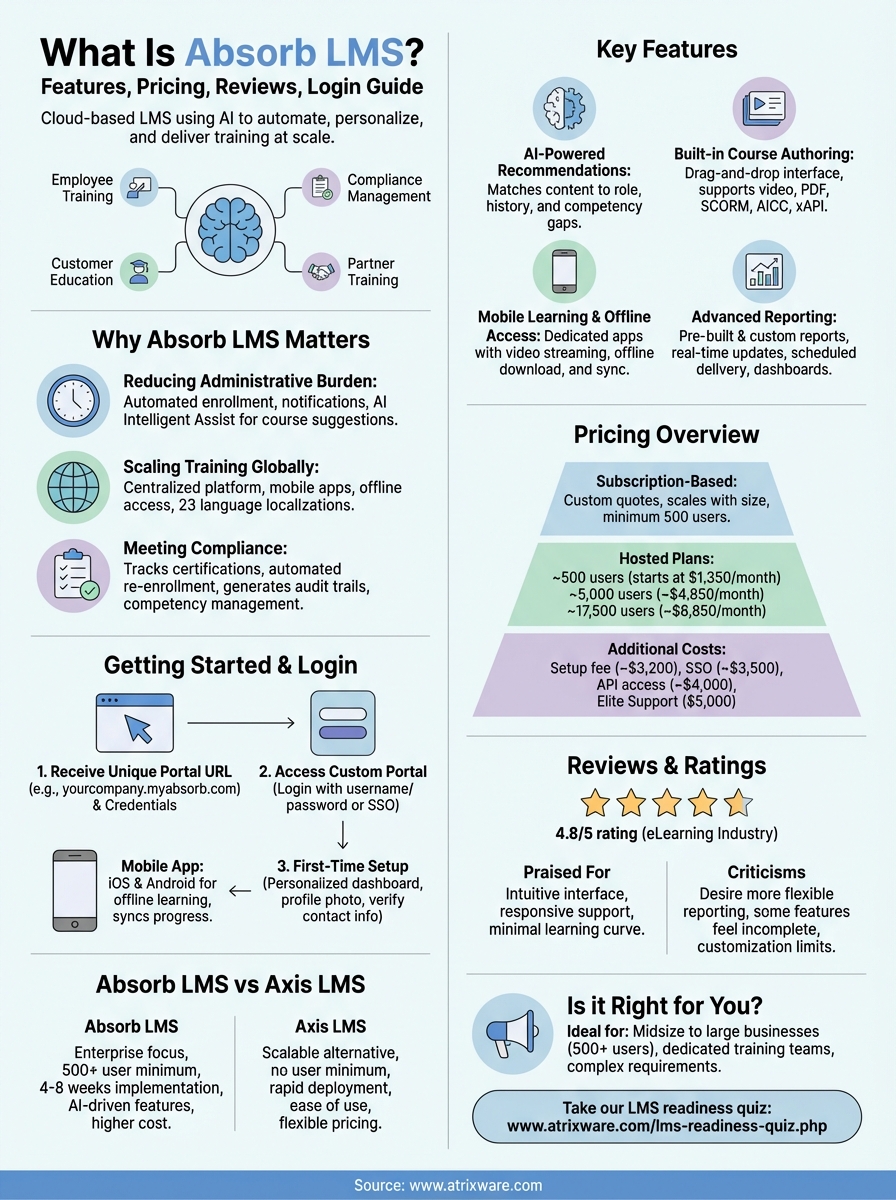
Absorb LMS is a cloud-based learning management system that helps organizations train employees, partners, and customers. The platform uses AI to automate administrative tasks, personalize learning paths, and deliver training at scale. Over 3,500 companies worldwide use Absorb LMS to manage everything from employee onboarding to compliance training and customer education. The system aims to reduce manual work for administrators while keeping learners engaged through mobile apps, gamification, and smart content recommendations.
This guide covers everything you need to know about Absorb LMS. You’ll learn how to access the platform and navigate the login process. We’ll break down the key features, explain the pricing structure, and share what actual users say in their reviews. You’ll also discover which types of businesses benefit most from Absorb LMS, how it handles integrations and security, and how it compares to alternatives like Axis LMS. By the end, you’ll have a clear picture of whether Absorb LMS fits your training needs and budget.
Why Absorb LMS matters for corporate training
Corporate training faces mounting pressure to deliver better results with fewer resources. Traditional training methods struggle to keep pace as companies grow, teams become more distributed, and compliance requirements multiply. You need a system that reduces administrative overhead while keeping learners engaged and tracking outcomes. Absorb LMS addresses these challenges by automating routine tasks, centralizing training delivery, and providing visibility into what’s working. The platform helps training teams focus on creating effective content instead of managing spreadsheets and chasing completion reports.
Reducing administrative burden
Training administrators spend excessive time on manual tasks that don’t improve learning outcomes. Creating user accounts, enrolling learners in courses, sending reminder emails, and generating reports can consume hours each week. Absorb LMS automates these workflows so you can handle larger training programs without increasing headcount. The system automatically enrolls users based on their role, department, or custom rules you define. It sends notifications when courses come due and generates completion certificates without manual intervention.
“With an AI-powered platform, Absorb enhances admin efficiencies across the board. From automating workflow tasks with Absorb’s Intelligent Assist to integrating seamlessly with your HCM for a connected ecosystem.”
The Intelligent Assist feature takes automation further by using AI technology to predict what learners need next and suggest relevant courses based on their history and role. This means less time spent manually assigning training and more time analyzing results. You can also schedule reports to run automatically and deliver to stakeholders via email, eliminating another repetitive task from your workflow.
Scaling training across distributed workforces
Companies with remote teams or multiple locations face unique training challenges. Coordinating in-person sessions across time zones becomes impractical, and maintaining consistent training standards grows difficult as headcount increases. Absorb LMS gives you a centralized platform that delivers the same training experience whether someone works from headquarters or halfway around the world. The mobile apps let learners access content offline and sync progress when they reconnect, which matters for field teams with limited connectivity.
The platform supports 23 language localizations, so international teams can learn in their preferred language. You can also create separate portals for different audiences using the same backend, which helps when you’re training both employees and external partners. This flexibility means you don’t need multiple systems to handle different training scenarios.
Meeting compliance and certification requirements
Compliance training carries serious consequences when employees miss mandatory deadlines. Absorb LMS tracks certifications and sends automated reminders before credentials expire. You can set up recurring enrollment rules that automatically re-enroll users when their certification period ends, ensuring continuous compliance without manual tracking. The system generates audit trails that document who completed what training and when, giving you the evidence regulators require.
Absorb LMS also supports competency management, letting you track skills across your organization and identify gaps. You can require specific courses before employees access certain systems or job functions, creating automatic guardrails that prevent non-compliant work.
How to log in and get started with Absorb LMS
Getting into your Absorb LMS account requires a unique URL that your organization provides during setup. Unlike platforms with a single login page for all users, Absorb LMS creates a custom portal address for each company. You’ll receive this URL along with your username and password from your system administrator. The login page displays your company branding, so you’ll know you’re in the right place when you see familiar logos and colors.
Accessing your Absorb LMS portal
Your organization’s portal follows a standard format, typically something like “yourcompany.myabsorb.com” or a custom domain if your administrator configured one. You can bookmark this URL or save it to your mobile device for quick access. When you reach the login screen, enter your username and password in the designated fields. Most organizations enable single sign-on (SSO) integration, which means you might use the same credentials you use for other company systems.
“Absorb offers turnkey integrations with a broad cross-section of leading solutions like Salesforce, Zoom, Namely, bambooHR, ADP, and more.”
First-time users should check their email for a welcome message containing login instructions. If you don’t receive these credentials within 24 hours of your training assignment, contact your company’s training administrator. Password requirements vary by organization, but Absorb LMS enforces strong password rules that typically require a mix of letters, numbers, and special characters.
First-time setup and navigation
After your first login, Absorb LMS presents a personalized dashboard showing your assigned courses, upcoming deadlines, and recent activity. The main menu appears on the left side of your screen, giving you quick access to your courses, resources, and messages. You might see options to update your profile, change your password, or configure notification preferences. Take a few minutes to upload a profile photo and verify your contact information, as these details appear when you participate in discussions or submit assignments.
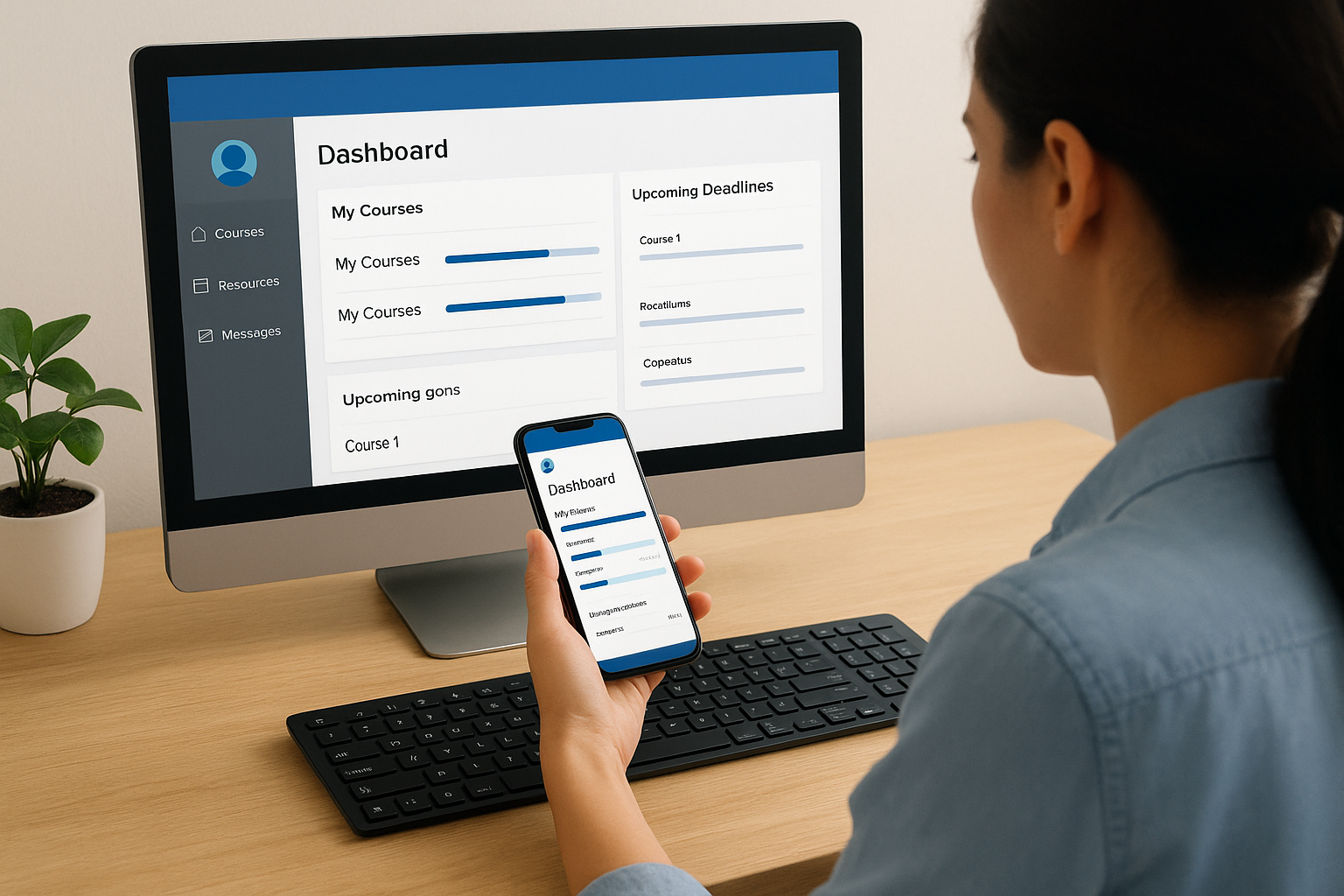
The mobile apps for iOS and Android mirror the web experience but add offline learning capabilities. Download the Absorb LMS app from your device’s app store, then log in using the same credentials. Courses you download remain accessible without internet connectivity, and your progress syncs automatically when you reconnect.
Key features of Absorb LMS
Absorb LMS packs a comprehensive feature set that goes beyond basic course delivery. The platform combines AI-driven automation with practical tools for building courses, engaging learners, and measuring results. You get everything needed to run a complete training program without buying separate authoring tools or analytics packages. The system handles both simple compliance training and complex learning paths, adjusting to your needs as your training programs grow. We’ll break down the features that matter most for day-to-day use and explain what makes each one valuable.
AI-powered learning recommendations
The platform uses artificial intelligence to match learners with relevant content based on their role, learning history, and competency gaps. Instead of forcing administrators to manually assign every course, Absorb LMS suggests training that aligns with each person’s career path and current skill level. This intelligent recommendation engine analyzes patterns across your organization to surface content that similar learners found valuable. You spend less time figuring out who needs what training and more time creating better learning experiences.
“Our advanced AI technology aligns learner wants with organizational needs effortlessly, delivering a unique, engaging experience without burdening administrators.”
Absorb’s AI capabilities extend to content creation through features that generate quiz questions from existing materials and suggest course structures based on learning objectives. The system can also translate content into multiple languages, which reduces the manual effort required to support international teams.
Built-in course authoring tools
You can create engaging courses directly inside Absorb LMS without purchasing separate authoring software. The drag-and-drop interface lets you assemble lessons from videos, documents, presentations, and interactive elements. The platform accepts content in virtually any format, including PowerPoint files, PDFs, and videos up to two hours long. You can reuse existing training materials rather than rebuilding everything from scratch, which speeds up course deployment significantly.

Absorb also supports SCORM, AICC, and xAPI standards, so courses created in external authoring tools import seamlessly. The built-in quiz engine offers multiple question types including multiple choice, written responses, and drag-and-drop interactions. Assessment results feed directly into the reporting system, giving you immediate visibility into learner comprehension.
Mobile learning and offline access
Learners access training through dedicated mobile apps for iOS and Android that deliver the same experience as the web version. The apps support offline learning by letting users download courses to their devices, complete lessons without internet connectivity, and automatically sync progress when they reconnect. This capability matters for field teams, remote workers, and anyone who travels frequently. You don’t lose training time because someone lacks reliable internet access.
The mobile experience includes full video streaming and support for interactive content, not just basic text lessons. Learners receive push notifications about upcoming deadlines, new course assignments, and messages from instructors. Absorb also offers secondary apps like the Instructor Toolbox that lets trainers mark attendance for live sessions and manage class rosters from their mobile devices.
Gamification and engagement tools
Absorb LMS includes leaderboards, badges, and points systems that encourage friendly competition and recognize achievement. You can award badges for completing specific courses, reaching learning milestones, or demonstrating competencies. Points accumulate based on activities you define, whether that’s finishing courses, participating in discussions, or helping other learners. These engagement mechanics increase completion rates by giving learners visible progress markers and goals to work toward.
The Mercury Module add-on expands engagement options with billboards, polls, surveys, and contests. You can feature important announcements on learner dashboards, gather feedback through quick polls, or run competitions that reward top performers. These tools help maintain learner interest between formal training sessions and keep your training program visible in daily workflows.
Advanced reporting and analytics
The reporting system provides pre-built reports for common metrics like course completions, learner progress, and time spent learning. You can also build custom reports using filters that slice data by department, course category, date range, or any custom field you define. Reports update in real time and export to CSV, Excel, or PDF formats for sharing with stakeholders who don’t access the LMS directly. The filter system uses tags that save your selections, so you can rerun complex reports without rebuilding them each time.
Absorb LMS lets you schedule automated reports that deliver via email at intervals you set, whether that’s daily, weekly, or monthly. This automation eliminates the need to manually pull data for regular compliance reviews or board meetings. Dashboard visualizations show trends through charts and graphs, helping you spot patterns that might indicate training gaps or engagement problems across different groups in your organization.
Absorb LMS pricing overview
Absorb LMS uses a subscription-based pricing model that scales with your organization’s size. The company doesn’t publish prices on its website, preferring to create custom quotes based on your specific needs. This approach means you’ll need to contact their sales team to get exact numbers, but available information gives you a general idea of what to expect. Pricing depends on factors like the number of active users, which features you need, and whether you’re training internal employees or external audiences. The system targets midsize to large businesses, and the minimum license pools start at 500 users, which puts it out of reach for very small companies.
Subscription tiers and user limits
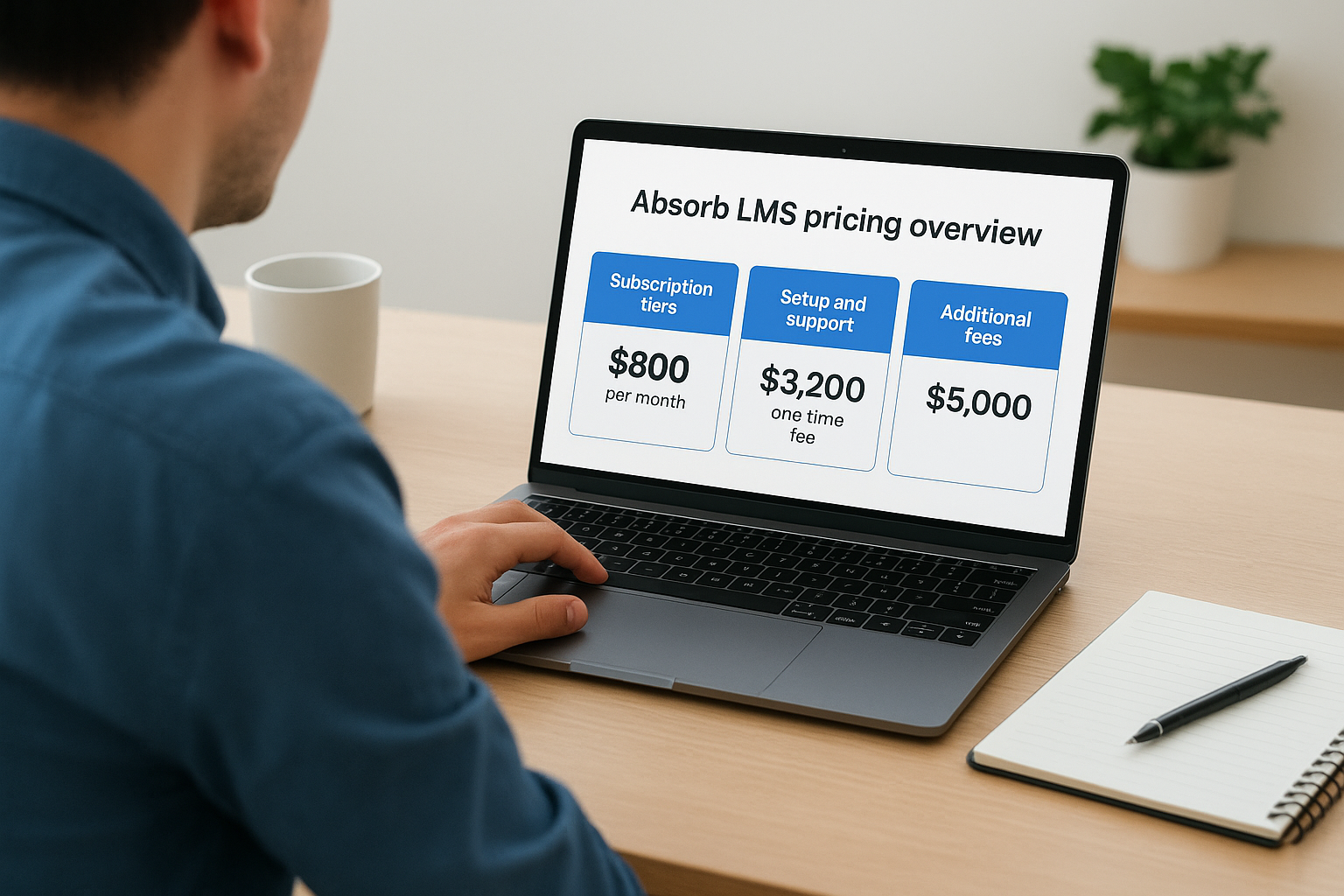
Small businesses can access Absorb LMS through a plan that costs approximately $800 per month plus a usage fee of $16 per active user over a 12-month period. This plan includes hosting on Absorb’s servers and a custom-branded website for your learners. Larger organizations face different pricing brackets based on total user counts. Hosted plans start at $1,350 per month (or $14,500 annually) for organizations with up to 500 users. Companies needing support for 5,000 users pay around $4,850 monthly ($52,380 per year), while those requiring capacity for 17,500 users face costs near $8,850 per month ($95,580 annually). Organizations exceeding these user counts receive custom pricing tailored to their specific requirements.
The user-based pricing model means you pay based on how many people actively use the system during your billing period. This structure differs from per-seat licensing where you pay for accounts whether they’re used or not. Your costs scale naturally as your training programs grow and reach more learners across your organization.
Setup and support costs
Implementation requires a one-time setup fee of approximately $3,200 that covers initial configuration, administrator training, and technical support during launch. This fee includes help from Absorb’s team to import existing users, configure your portal branding, and establish initial course structures. Support plans come in three tiers with different response times and service levels. Premium support comes included with your subscription and provides standard response times. Elite support costs $5,000 and offers faster response times plus dedicated assistance. Enterprise support runs $25,000 and includes priority handling plus access to specialized technical resources for complex integrations or customizations.
Additional fees and add-ons
Several optional features carry separate charges beyond the base subscription. Single sign-on (SSO) integration costs approximately $3,500 to implement and connects Absorb LMS with your existing identity management systems. RESTful API access requires a $4,000 fee if you need custom integrations beyond the standard connectors. The Mercury Module adds engagement features like billboards and contests but requires an additional subscription fee. E-commerce functionality takes a unique approach where you can monetize internal employee training at no extra cost, but selling courses to external learners costs $5 per learner who purchases training through your portal.
Absorb LMS reviews and ratings
Absorb LMS earns strong ratings across multiple review platforms, with users consistently highlighting its intuitive interface and responsive support team. The platform holds a 4.8 out of 5 rating (96%) on eLearning Industry based on 135 verified reviews, and PCMag awarded it a 4.5 rating along with their Editors’ Choice distinction. These scores place Absorb LMS among the top-rated corporate learning management systems available today. The ratings reflect feedback from administrators, instructors, and learners across various industries and company sizes, giving you a comprehensive view of real-world performance.
Overall ratings across platforms
Independent review sites show consistent approval from Absorb LMS customers. eLearning Industry users rate the platform highly for usefulness, usability, customer experience, and likelihood to recommend. The company maintains a 94% customer satisfaction score for support interactions, which matters when you need help troubleshooting issues or configuring new features. PCMag’s testing team specifically praised the system as “the most attractive and functional turnkey LMS” they evaluated, noting that it delivers value for both midsize and large organizations. Review patterns show that satisfaction remains stable across different user roles, from training administrators managing daily operations to end users completing assigned courses.
What users praise most
Reviewers consistently mention ease of use as Absorb LMS’s standout quality. Both administrators and learners report minimal learning curves when navigating the platform, which reduces time spent on training people how to use the system. Customer support receives frequent praise for responsiveness and expertise, with users noting that support teams resolve issues quickly and provide helpful guidance during implementation. The feature set earns positive feedback for supporting diverse training workflows through automated enrollments, integrated content creation tools, and extensive customization options.
“Multiple reviewers explicitly note that Absorb LMS is easy to use for both administrators and learners, with a clear and intuitive interface that minimizes the need for extensive training.”
Performance and reliability also rank high among user priorities, with many reporting stable operation and smooth daily use for training delivery.
Common criticisms and limitations
Some users want more powerful reporting tools with greater flexibility for complex data exports and custom report structures. A segment of reviewers note that certain features feel incomplete or missing, particularly around enrollment workflows and advanced course planning functions. Customization receives mixed feedback, with some users wanting deeper control over design elements and custom coding options beyond what the platform currently offers. The broader feature set can feel overwhelming initially before administrators become fully comfortable with all available options. A minority mention specific functional quirks around hierarchical management, session enrollment processes, or integration gaps that occasionally create friction in their workflows.
Absorb LMS use cases and ideal customers
Absorb LMS serves organizations that need to deliver training at scale across multiple audiences. The platform works best for midsize to large companies with at least 500 employees or learners, though smaller organizations with aggressive growth plans also benefit from its scalability. You’ll find Absorb LMS deployed across diverse industries including healthcare, financial services, manufacturing, retail, and technology companies. The system handles both internal workforce development and external training scenarios where you need to educate customers, partners, or other stakeholders outside your organization. Companies choose Absorb when they’ve outgrown basic training solutions and need advanced automation, robust reporting, and flexible deployment options.
Employee training and onboarding
You can use Absorb LMS to standardize how new hires learn about your company culture, policies, and job-specific skills. The platform automates enrollment based on department or role, ensuring each employee receives relevant training without manual assignment from your HR team. Onboarding programs benefit from learning paths that sequence courses logically, moving employees from general orientation through increasingly specialized content. Your training team can set prerequisites that prevent learners from advancing until they master foundational concepts, which maintains consistent quality across your workforce.
The system tracks completion rates and assessment scores, giving you visibility into which employees might need additional support during their first 90 days. You can also use Absorb LMS for ongoing professional development by creating career-specific learning paths that help employees build skills for advancement within your organization.
Customer education and product training
Companies that sell complex products or services use Absorb LMS to educate buyers on how to maximize value from their purchases. You can create self-paced courses that teach customers product features, troubleshooting techniques, and best practices for implementation. This approach reduces support tickets and increases customer satisfaction by helping users solve problems independently. The e-commerce functionality lets you charge for premium training content while offering basic courses at no cost, creating a revenue stream from your educational materials.
“You can leverage its features to drive payment processes, use international servers, or even manage multiple currencies.”
Separate portals for different customer segments ensure enterprise buyers see different content than individual consumers, maintaining appropriate messaging for each audience.
Compliance and certification programs
Organizations in regulated industries rely on Absorb LMS to document that employees completed mandatory training and maintain current certifications. The platform automatically re-enrolls learners when certifications expire and sends reminders before deadlines pass. You can configure the system to restrict access to specific tools or systems until employees complete required compliance training, creating automatic enforcement of your training policies. Audit trails capture who completed what training and when, providing the documentation regulators require during inspections.
Partner and channel training
Businesses that sell through distributors, resellers, or other channel partners use Absorb LMS to ensure partners understand product lines and sales techniques. You can grant external partners access to training without giving them visibility into your internal company information. The platform tracks which partner organizations show strong engagement with training materials and which might need additional support to sell your products effectively.
Absorb LMS integrations, security, and compliance
Connecting your learning platform with existing business systems eliminates data silos and reduces manual data entry. Absorb LMS offers extensive integration options that link your training platform to HR systems, CRM tools, video conferencing software, and identity management solutions. The platform handles data security through enterprise-grade measures that protect learner information and course content. Compliance certifications demonstrate that the system meets regulatory requirements for organizations in regulated industries. These three capabilities work together to ensure your training platform fits smoothly into your technology ecosystem while protecting sensitive data and meeting legal obligations.
Integration capabilities and options
You can connect Absorb LMS with your existing business tools through pre-built integrations and custom API connections. The platform offers turnkey connectors for popular HR systems including ADP, BambooHR, and Namely, which automatically sync employee data so you don’t maintain user records in multiple places. CRM integrations with Salesforce let you track training completion alongside customer interactions, giving sales teams visibility into which accounts completed product education. Video conferencing tools like Zoom integrate directly, allowing you to schedule and deliver live virtual training sessions without switching between platforms.
Single sign-on (SSO) support works with identity providers including Okta, OneLogin, and Azure Active Directory. Learners access the platform using their existing company credentials instead of remembering separate passwords for each system. The RESTful API gives your development team programmatic access to create custom integrations beyond the standard connectors. You can push enrollment data from other systems, pull completion reports into dashboards, or trigger training assignments based on events in external applications. Webhook support enables real-time notifications when learners complete courses or certificates expire, letting you build automated workflows that respond immediately to training events.
Data security and protection measures
Absorb LMS protects your training data through multiple security layers that prevent unauthorized access and ensure business continuity. The platform uses worldwide AWS servers for hosting, which provides geographic redundancy and meets data residency requirements for international operations. Your data receives automatic backups at regular intervals, and Absorb maintains disaster recovery procedures that restore service quickly if infrastructure problems occur. All data transmissions use encryption protocols that prevent interception during transfer between learners’ devices and Absorb servers.
“Thankfully, everything works fine if you’ve used any of the following formats like SCORM, Tin Can, or AICC.”
You control access at granular levels by creating custom roles with specific permissions for different administrator types. IP blocking lets you restrict platform access to specific network ranges, which helps when you want to limit training access to company networks or approved locations. Strong password policies enforce complexity requirements that reduce the risk of compromised accounts, and you can configure session timeouts that automatically log users out after periods of inactivity.
Compliance standards and certifications
The platform maintains SOC 2 Type 2 certification, which verifies that Absorb follows strict controls for data security, availability, and confidentiality. This certification matters when your organization undergoes audits or needs to demonstrate vendor compliance to customers and regulators. GDPR compliance features help you manage learner data according to European privacy regulations, including tools for data export, deletion requests, and consent management. Organizations in life sciences can leverage FDA 21 CFR Part 11 compliance capabilities that provide the audit trails and electronic signature support required for regulated training.
WCAG 2.0 compliance ensures learners with disabilities can access training content through assistive technologies like screen readers. The platform tracks all administrative actions and learner activities in detailed audit logs that capture who performed what action and when. These logs provide the documentation you need during regulatory inspections or internal compliance reviews, creating a permanent record of training delivery and completion that satisfies legal requirements across various industries.
Absorb LMS vs Axis LMS
Choosing between learning management systems requires understanding how each platform addresses your specific training challenges. Absorb LMS and Axis LMS both offer comprehensive training solutions but take different approaches to pricing, features, and target customers. Absorb positions itself as a premium platform with AI-driven features and targets midsize to large enterprises with large budgets to match. Axis LMS provides a scalable alternative that emphasizes ease of use and rapid deployment at price points accessible to small and midsize businesses. Your choice depends on factors like your organization’s size, budget constraints, technical requirements, and how quickly you need to launch training programs.
Pricing and value comparison
Absorb LMS requires a minimum commitment of 500 user licenses, which immediately excludes smaller organizations from consideration. Monthly fees start at $1,350 for the entry tier, plus setup costs around $3,200 and potential add-on charges for features like SSO integration ($3,500) and API access ($4,000). These costs add up quickly and can strain budgets for growing companies. Axis LMS removes the minimum 500 user requirement and offers flexible pricing that scales from small teams of 25 to enterprise deployments. You pay for the features and capacity you actually need instead of buying into a predetermined tier structure that might include capabilities you’ll never use.
The value equation shifts further when you consider implementation timelines. Absorb LMS implementation typically spans 4 to 8 weeks according to their documentation, which delays your training launch and extends the time before you see returns on your investment. Axis LMS emphasizes rapid deployment with a streamlined setup process that gets your training programs running faster.
Feature differences that matter
Both platforms deliver core LMS functionality including course authoring, assessment tools, and reporting capabilities. Absorb LMS highlights its AI-powered features for content recommendations and automated course generation, which appeal to organizations with sophisticated training needs and technical resources. These AI capabilities can reduce administrative work but require time to train the system and optimize recommendations for your specific environment. Axis LMS also offers AI-powered features, but focuses on practical features that solve immediate training problems without requiring extensive configuration or learning curves.
“Axis LMS is intuitive and easy to use as a cloud-based solution. One that inspires learning and fuels business productivity via its robust UX.”
Integration capabilities differ in approach rather than depth. Absorb offers pre-built connectors to major HR and CRM platforms but charges separately for API access and custom integrations. Axis LMS provides robust integration options including an Integration Builder that connects with over 5,000 systems, REST API and webhook support, and SAML SSO services without additional fees layered on top of your base LMS Enterprise subscriptions.
Best fit for different organizations
Absorb LMS serves large enterprises with dedicated training teams, substantial budgets, and complex requirements spanning multiple departments and external audiences. You benefit from their established market presence and extensive feature set when you have the resources to fully leverage the platform’s capabilities. The system works well for organizations that prioritize cutting-edge technology and accept higher costs as necessary for premium features.
Axis LMS targets organizations that need powerful training capabilities without enterprise-level complexity or pricing. You get faster deployment, intuitive administration, and pricing that accommodates growth without forcing major budget commitments upfront. Small to midsize businesses appreciate the balance between sophisticated features and practical usability that doesn’t require weeks of administrator training to master.
How to decide if Absorb LMS is right for you
Making the right LMS choice requires honest assessment of your organization’s needs, resources, and constraints. You need to evaluate whether Absorb LMS aligns with your training goals and whether your budget supports the investment required. The platform delivers powerful capabilities but demands financial and resource commitments that don’t fit every situation. Your decision should weigh technical requirements, organizational readiness, and expected return on investment. These factors determine whether Absorb LMS becomes a valuable asset or an expensive mismatch for your training programs.
Evaluate your organization’s size and budget
Your organization needs at least 500 active learners to meet Absorb LMS’s minimum licensing requirements. Companies with fewer users should look elsewhere since the platform’s pricing structure doesn’t accommodate smaller deployments. Budget planning requires accounting for monthly subscription fees starting around $1,350 plus setup costs near $3,200 and potential add-on charges for integrations, API access, and enhanced support tiers. You should calculate total first-year costs including implementation, training, and any optional features your team needs before committing.
Organizations with distributed workforces or multiple training audiences benefit most from Absorb’s scalability and multi-portal capabilities. Your training budget should align with enterprise-level investments if you want to fully leverage the platform’s AI features and advanced automation. Small businesses with tight budgets find better value in alternatives designed for their size and resource constraints.
Assess your technical requirements and resources
You need dedicated training administrators who can invest time learning the platform’s extensive feature set during the 4 to 8 week implementation period. Organizations without internal IT resources might struggle with custom integrations despite Absorb’s pre-built connectors for common business systems. Your technical team should evaluate whether existing HR and CRM systems integrate smoothly or require additional development work that increases total cost.
“If you’re into anytime-anywhere learning, then the Absorb LMS Mobile App brings training in your pocket.”
Companies requiring advanced reporting and data analytics find value in Absorb’s comprehensive reporting tools, though some users report wanting more flexibility for complex custom reports. Your organization benefits when you have stakeholders who will actively use analytics to improve training outcomes rather than just tracking basic compliance metrics.
Consider your timeline and urgency
Your training launch schedule needs to accommodate several weeks for platform configuration and administrator training before learners can access courses. Organizations facing immediate compliance deadlines or rapid onboarding needs might find the implementation timeline challenging. You should have existing training content ready to upload or plan time for course development using Absorb’s authoring tools, which adds to your launch timeline.
Planning for long-term growth matters more than immediate deployment when evaluating Absorb LMS. Your organization gains value over time as you build larger course libraries, establish automated workflows, and leverage AI recommendations that improve with usage. Companies expecting steady expansion in learner counts and training complexity find the platform scales effectively without requiring system replacements as needs evolve.
Final thoughts on Absorb LMS
Absorb LMS delivers a comprehensive training platform for midsize to large organizations with budgets that support enterprise pricing. The system combines AI-powered automation with extensive features that handle complex training scenarios across multiple audiences. You get robust reporting, mobile learning, and strong integration capabilities that connect with your existing business systems. The platform requires significant financial investment and time for implementation, which means smaller organizations or those needing rapid deployment should evaluate alternatives carefully.
Your training needs determine whether Absorb LMS represents the right choice. Organizations with 500+ users, dedicated training teams, and resources for ongoing platform management benefit most from what the system offers. If you’re uncertain about your LMS requirements or want to explore options that balance powerful features with accessible pricing, take our LMS readiness quiz to identify which solution matches your current needs and growth plans.
