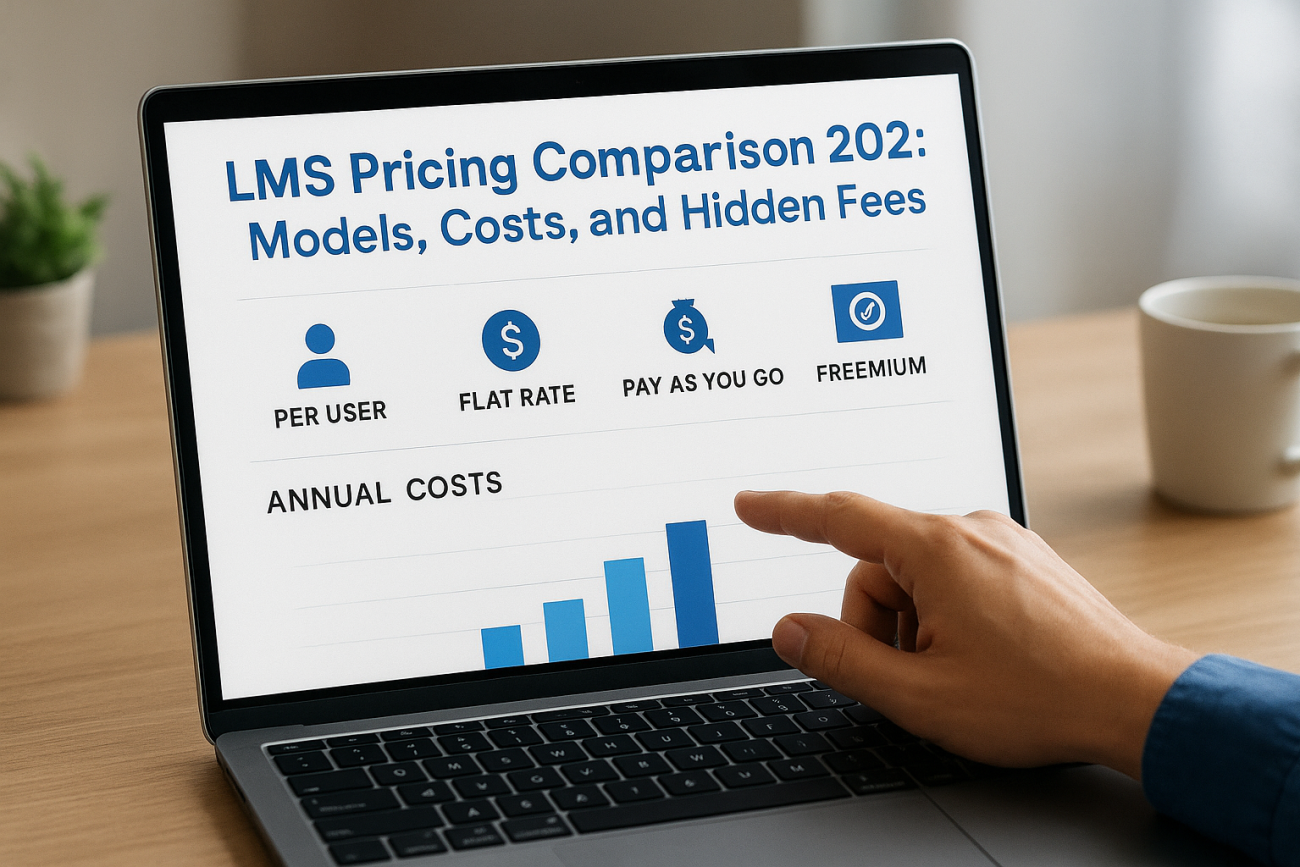
An LMS pricing comparison means evaluating what different Learning Management System vendors charge and how they structure their fees. You compare subscription models, per user costs, setup fees, and any extras that might surprise you later. The goal is finding an LMS that fits your budget while delivering the features your organization needs.
Most companies shopping for an LMS discover that pricing information is deliberately vague. Vendors hide behind "contact us for pricing" forms. Others advertise low monthly rates but pile on charges for essential features. Without a clear framework for comparing costs, you risk overpaying or choosing a system that drains your budget through hidden fees.
This guide breaks down the six major LMS pricing models you will encounter in 2026. We cover typical cost ranges by organization size, reveal the indirect expenses vendors rarely mention upfront, and give you specific questions to ask before signing any contract. You will learn how to build a realistic LMS budget and spot the pricing tricks that catch buyers off guard. By the end, you will know exactly what to expect when evaluating LMS options for your team.
Why LMS pricing comparison matters
You will waste thousands of dollars if you choose an LMS based solely on advertised monthly rates. The sticker price tells only part of the story, and vendors design their pricing pages to look attractive while concealing the true cost of ownership. Most organizations discover the real expense only after signing contracts and attempting to deploy the system across their teams.
Avoiding budget overruns and vendor lock-in
Training budgets rarely stretch as far as stakeholders hope. When you commit to an LMS without conducting a thorough lms pricing comparison, you risk budget overruns that force you to cut training initiatives or scramble for additional funding. Vendors count on this momentum trap. Once you migrate your content and train your administrators, switching platforms becomes expensive and disruptive. Vendor lock-in means you accept price increases and limited features because the cost of leaving exceeds the pain of staying.
The difference between comparing LMS pricing upfront versus discovering hidden costs later can mean the gap between a successful training program and one that drains resources without delivering results.
Understanding total cost of ownership
Your LMS pricing comparison must account for more than monthly subscription fees. Implementation costs include data migration, custom integrations, and administrator training that vendors price separately. Annual expenses grow when you factor in support contracts, storage overages, additional user licenses, and feature upgrades that start as optional but become necessary. Small businesses often assume a $5,000 annual LMS budget covers everything, then face $12,000 in actual costs. Enterprise buyers negotiating six-figure contracts discover that essential compliance features or API access require premium tiers. Comparing pricing models across vendors reveals which costs are unavoidable, which are negotiable, and which signal a vendor trying to maximize revenue at your expense. This knowledge protects your budget and ensures you select an LMS that fits your financial reality, not just your wishlist.

How to compare LMS pricing step by step
Conducting an effective lms pricing comparison requires a systematic approach that goes beyond glancing at vendor websites. You need a consistent framework that lets you evaluate different vendors on equal terms. Most buyers skip critical steps and end up comparing incompatible pricing models, which leads to confusion and poor decisions. Following a structured process ensures you capture all costs and make apples-to-apples comparisons that reveal which LMS truly fits your budget.
Define your must-have features and user count
Start by documenting exactly what you need before contacting any vendors. List your required features such as SCORM compliance, mobile learning, automated reporting, or single sign-on integration. Distinguish these from nice-to-have features that you can sacrifice if budget constraints demand it. Next, calculate your current user count and projected growth over the next three years. Include employees, contractors, partners, or customers who will access the system. Vendors price differently based on active users versus registered users versus total seats, so understanding your numbers prevents you from comparing mismatched tiers. Organizations that skip this step waste hours evaluating systems priced for different user volumes or feature sets.
Request detailed pricing breakdowns from vendors
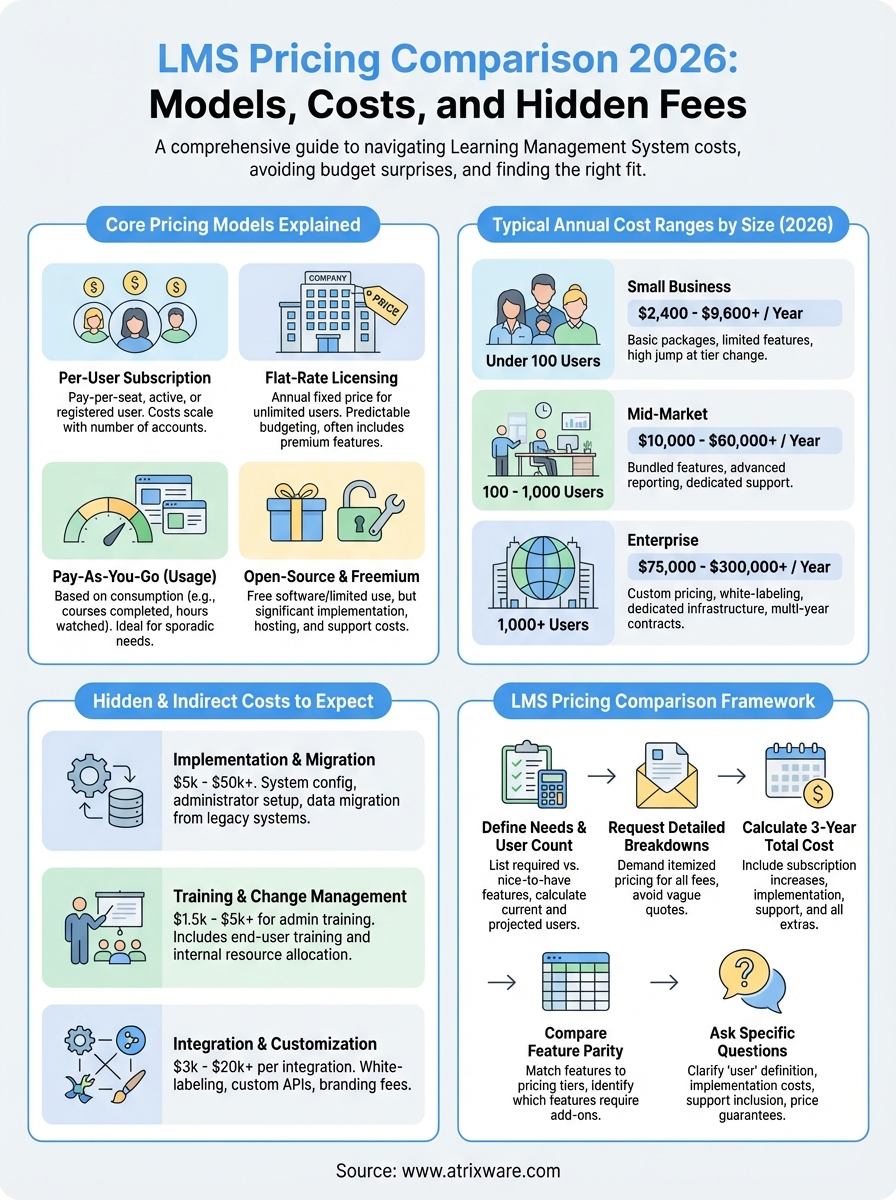
Contact vendors with your feature list and user count, then demand itemized pricing breakdowns instead of accepting vague quotes. Ask for separate line items showing subscription fees, setup costs, implementation services, training, support tiers, and any feature add-ons. Require vendors to specify whether pricing is monthly or annual, whether it includes all updates, and how costs scale when you add users or features. Push back against "contact us for pricing" responses by providing your budget range and user count upfront. This forces vendors to submit realistic proposals rather than starting negotiations from inflated anchor prices. Document everything in a spreadsheet where you can compare vendors side by side using identical categories.
The vendors who refuse to provide transparent, detailed pricing breakdowns are usually hiding costs they plan to reveal only after you have invested time in their sales process.
Calculate total cost of ownership over three years
Move beyond monthly subscription amounts and project your total three-year cost for each LMS option. Add up implementation fees, annual subscription increases (typically 3 to 5 percent), additional user licenses as your team grows, premium support contracts, and any integration or customization work your IT team must perform. Include the cost of content migration from your current system if applicable. Factor in training time for administrators and the productivity loss while your team adjusts to a new platform. Vendors love quoting monthly per-user rates because $15 per user sounds affordable until you multiply it across 500 users for 36 months. Calculating total ownership costs reveals which vendors offer genuine value versus those banking on budget creep and forced upgrades.
Compare pricing against feature parity
Build a comparison matrix that lists each vendor down the left column and your required features across the top. Mark which features each vendor includes in their base pricing tier versus which require upgrades or add-on purchases. This visual comparison exposes vendors who advertise low starting prices but lock essential features behind premium tiers. You might discover that a vendor charging $25 per user includes everything you need, while a competitor at $15 per user forces you into a $40 per user tier to access the same functionality. Compare support levels the same way, since some vendors include phone support and dedicated account managers while others charge extra for anything beyond email tickets. This feature parity analysis ensures you compare what vendors actually deliver for the price, not just their marketing claims.
Core LMS pricing models explained
Understanding the pricing structures vendors use helps you conduct an accurate lms pricing comparison and avoid surprises during contract negotiations. Six primary models dominate the LMS market, each with distinct advantages and traps that affect your total cost. Vendors often blur the lines between models or combine elements to create confusion, so you need to recognize what you are actually paying for. Some models favor organizations with stable user counts while others penalize growth or infrequent usage. Knowing how each structure works lets you match your organization’s training patterns to the most cost-effective option.
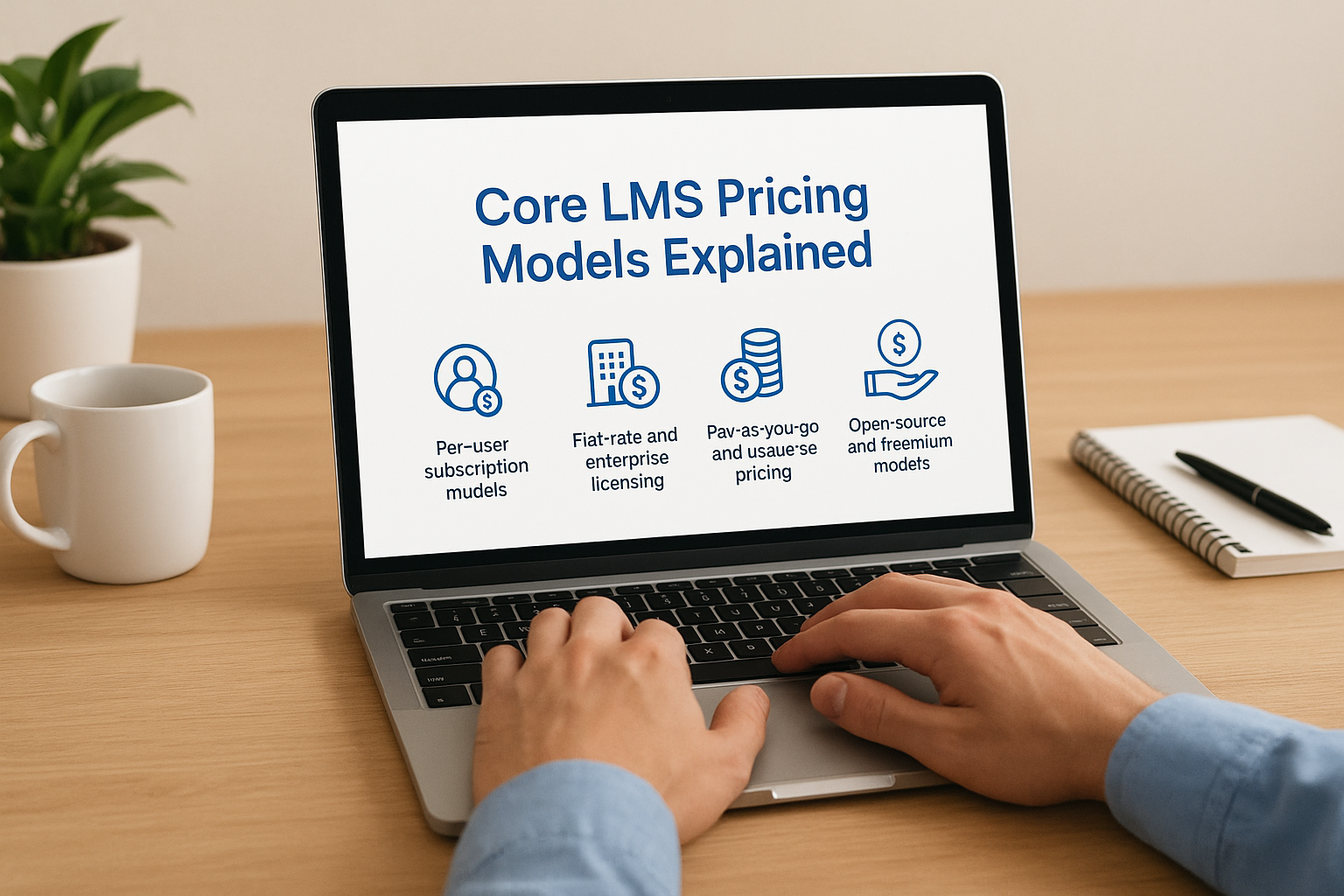
Per-user subscription models
Most LMS vendors charge based on the number of users accessing your system, but they define "user" in three different ways that drastically change your costs. Pay-per-seat models charge for every registered account regardless of activity, which means you pay the full amount even if half your users never log in. This structure works when training is mandatory and you know everyone will participate, but it punishes organizations with voluntary programs or seasonal training needs.
Pay-per-active-user pricing bills you only for users who log in during each billing period, offering flexibility if your training programs have variable participation. You avoid paying for inactive accounts, but you must track usage carefully since costs fluctuate monthly. Some vendors define "active" as any login while others require completing a course or spending minimum time in the system, so verify the exact criteria before committing.
Pay-per-registered-user models sit between these extremes, charging for accounts that exist but potentially offering better rates than pure seat-based pricing. Vendors typically tier these models so your per-user cost drops as volume increases. For example, 100 users might cost $25 each monthly while 500 users drop to $18 each. Calculate your actual user counts across these tiers to find where you land, because moving from 499 to 501 users could trigger a price jump that negates any volume discount.
Flat-rate and enterprise licensing
Organizations with large user bases or unlimited training needs often benefit from flat-rate annual licensing that removes per-user calculations entirely. You pay one fixed price regardless of how many employees access the system, which simplifies budgeting and removes barriers to expanding your training programs. Enterprise licenses typically start around $15,000 annually for smaller businesses and scale to $100,000 or more for corporations needing advanced features, dedicated support, and custom integrations.
Flat-rate pricing eliminates the anxiety of adding new users but often locks essential features behind premium tiers that cost significantly more than base packages.
These models work best when your organization trains hundreds or thousands of users monthly and when you need predictable annual costs for multi-year budget planning. Watch for vendors who advertise flat rates but then charge separately for critical features like SCORM compliance, API access, or white-labeling. The "unlimited users" promise means nothing if you must pay extra for the functionality that makes those users productive. Compare what each tier includes feature-by-feature rather than assuming all flat-rate packages deliver the same value.
Pay-as-you-go and usage-based pricing
Consumption-based pricing charges you for actual usage such as courses completed, hours of video watched, or storage consumed. This model appeals to organizations with sporadic training needs or those selling training externally where costs should scale with revenue. You might pay $2 to $5 per learner per completed course, which keeps upfront costs low but can become expensive if training volume exceeds projections.
Few vendors offer pure pay-as-you-go structures because LMS platforms require significant infrastructure regardless of usage levels. Those who do typically combine base platform fees with variable usage charges, so you still pay monthly minimums even during slow periods. This structure benefits consulting firms, training companies, or seasonal businesses where user counts swing dramatically throughout the year.
Open-source and freemium models
Open-source platforms like Moodle provide free software but require you to cover hosting, customization, security updates, and ongoing maintenance. Organizations with strong IT departments can deploy these systems affordably, but most businesses discover that implementation costs and administrator time exceed what they would pay for commercial solutions. Expect to spend $10,000 to $50,000 initially plus ongoing IT resources to maintain the platform.
Freemium models let you start free with limited users or features, then charge when you exceed those caps. These work for testing LMS functionality or supporting very small teams, but growth quickly forces you into paid tiers. Vendors use freemium offerings as sales tools, so the free version intentionally omits features you will need as your program matures.
Typical LMS cost ranges in 2026
Conducting an lms pricing comparison becomes easier when you understand the baseline costs vendors typically charge across different organization sizes. Prices vary widely based on features, user counts, and vendor positioning, but recognizable patterns emerge when you examine enough quotes. Knowing these ranges helps you spot vendors who inflate prices or those offering genuinely competitive deals. You can also budget more accurately by understanding where your organization falls within industry norms and what feature sets you should expect at each price point.
Small business LMS pricing (under 100 users)
Organizations training fewer than 100 users typically pay between $200 and $800 monthly for cloud-based LMS platforms with standard features. This translates to roughly $2,400 to $9,600 annually when billed yearly, which most vendors require for discounted rates. Basic packages at this level include course creation tools, SCORM compliance, learner tracking, and standard reporting. Vendors often price these tiers on per-user models ranging from $3 to $15 per active user monthly, so your actual cost depends on participation rates and how the vendor defines "active."
Expect to pay toward the higher end if you need mobile apps, advanced analytics, or multiple administrator accounts. Some vendors offer small business packages starting at $99 monthly, but these severely limit users (often 10 to 20) and strip out features like custom branding or API access. Organizations that outgrow these entry tiers face significant price jumps when moving to the next package level, sometimes doubling monthly costs just to add 30 more users.
Mid-market LMS costs (100 to 1,000 users)
Your annual investment climbs to $10,000 through $50,000 when training between 100 and 1,000 users, depending on required functionality and vendor tier. Mid-market packages typically bundle features that small business plans charge extra for, including advanced reporting, custom branding, SSO integration, and dedicated account management. Per-user pricing drops to $8 to $25 monthly as volume increases, though vendors structure tiers so you might pay $12 per user for 200 seats but only $9 per user once you commit to 500.
Organizations in this range discover that feature requirements matter more than user count when determining costs, since a 300-user deployment needing compliance tracking costs more than a 700-user deployment focused on basic skills training.
Many vendors position their mid-market offerings around common business needs like employee onboarding, compliance certification, or customer training programs. Watch for pricing that bundles implementation services, administrator training, and first-year support into the annual fee versus vendors who charge these separately. The difference can add $5,000 to $15,000 to your true first-year cost.
Enterprise LMS pricing (1,000+ users)
Enterprise buyers training over 1,000 users face custom pricing ranging from $50,000 to $200,000 annually or higher for complex deployments. Vendors rarely publish enterprise rates because these deals involve negotiated contracts that include white-labeling, unlimited users, advanced security features, dedicated infrastructure, and strategic consulting services. Per-user costs drop significantly at this scale, often to $3 to $8 per user monthly, but minimum commitments and multi-year contracts become standard.
Large organizations save money by negotiating flat-rate enterprise licenses that eliminate per-user tracking entirely. A $75,000 annual license for unlimited users costs less than per-user pricing once you exceed 800 to 1,000 active monthly users. Enterprise packages also include features smaller buyers cannot access at any price, such as custom API development, dedicated support teams, service-level agreements guaranteeing uptime, and vendor roadmap influence. Budget for implementation costs that match or exceed your first-year subscription, since deploying enterprise LMS platforms across global teams requires significant professional services.
Hidden and indirect LMS costs to expect
Your lms pricing comparison will miss critical expenses if you focus only on monthly subscription rates. Vendors structure contracts to minimize advertised costs while burying additional charges in fine print or revealing them during implementation. Most organizations discover these hidden fees only after signing contracts, when backing out becomes financially painful. Understanding which costs typically hide beneath the surface protects your budget from the surprise expenses that derail training initiatives and force you to cut planned features.
Implementation and data migration fees
You will pay between $5,000 and $50,000 for professional implementation services depending on your organization’s size and complexity. This covers initial system configuration, administrator account setup, security settings, and basic customization that makes the LMS functional for your specific needs. Vendors rarely include these services in advertised pricing, instead positioning them as optional professional services that become mandatory once you realize your IT team lacks the specialized knowledge to deploy the platform properly.

Data migration costs add another layer of expense when you transfer content from an existing LMS or legacy training system. Vendors charge by the number of courses, user records, or completion data you need moved, with fees ranging from $2,000 for simple migrations to $25,000 when converting proprietary formats or cleaning messy databases. Some vendors promise free migration then deliver incomplete transfers that force you to pay for additional professional services to finish the job. Factor these costs into your first-year budget rather than treating them as optional extras.
Training and change management expenses
Your team needs formal training to use the new LMS effectively, which vendors price separately from platform subscriptions. Administrator training runs $1,500 to $5,000 depending on the number of staff members and session depth, while end-user training adds costs if you require live sessions rather than self-paced tutorials. Organizations that skip formal training watch their LMS adoption rates plummet and their support ticket volume spike, ultimately costing more in lost productivity than the training would have cost upfront.
Change management activities consume staff time that translates to real costs even when vendors provide training materials free, since your team must pause regular duties to learn new systems and processes.
Internal resource allocation for LMS rollout includes project management, stakeholder communication, content migration oversight, and troubleshooting unexpected issues. Budget 10 to 20 percent of your annual subscription cost for these internal expenses during the first year.
Integration and customization costs
Connecting your LMS to existing business systems like HR platforms, CRM software, or SSO providers costs between $3,000 and $20,000 per integration depending on complexity. Vendors advertise pre-built connectors but charge separately for activating them or require premium tier subscriptions to access integration features. Custom API development for proprietary systems adds even higher costs, often requiring ongoing maintenance fees as both systems evolve.
White-labeling and interface customization that matches your brand costs extra despite vendors showing fully branded demos during sales presentations. Expect charges of $2,000 to $10,000 for logo placement, color scheme changes, custom domain setup, and branded email templates that make the LMS feel like your platform rather than the vendor’s.
Questions to ask vendors about pricing
Armed with knowledge of pricing models and hidden costs, you need specific questions that force vendors to reveal their complete pricing structure before you commit. Most vendors train their sales teams to deflect detailed pricing questions until late in the process when you have invested time and emotional energy. Asking these questions upfront protects your budget and exposes vendors who rely on bait-and-switch tactics where advertised rates bear little resemblance to actual costs.
Clarifying the subscription structure
Start by asking vendors how they define a user and whether your subscription charges are based on registered accounts, active logins, or seat licenses. Request the exact criteria that trigger billing for each user, including whether a single login per year counts as active or if users must complete activities. Ask what happens when you exceed your licensed user count and whether the system locks out additional users or automatically bills you at a higher tier.
Demand transparency about annual price increases and whether your contract locks rates for multiple years or allows vendors to raise prices at renewal. Question whether the vendor offers month-to-month contracts or requires annual commitments, and what penalties apply if you cancel early. Your lms pricing comparison depends on understanding these terms since a vendor offering $10 per user monthly with mandatory annual billing costs more than one charging $12 monthly with flexible cancellation.
Vendors who refuse to answer direct pricing questions in writing are signaling that their actual costs exceed what they advertise, and you should eliminate them from consideration immediately.
Understanding implementation and support costs
Ask vendors to itemize all implementation fees including system setup, data migration, administrator training, and custom integrations. Request quotes for connecting to your specific business systems rather than accepting vague promises about pre-built integrations. Question whether technical support comes included or costs extra, what response times you can expect, and whether phone support requires premium tier subscriptions.
Find out if feature upgrades require additional payments or come included with your subscription. Ask about storage limits, overage charges, and whether costs increase as your content library grows. Request information about white-labeling fees and interface customization costs if branding matters to your organization.
Negotiating contract terms
Question whether the vendor offers volume discounts for committing to longer contracts or higher user counts upfront. Ask about payment terms including whether you can pay monthly, quarterly, or must prepay annually. Request details about cancellation policies, data export rights, and whether you can downgrade plans without penalties if your needs change.
Push vendors to provide written price guarantees that specify exactly what you receive at each tier and what additional costs might arise during the first three years. Organizations that skip these questions discover unexpected bills long after signing contracts.
Budgeting for an LMS by organization size
Your organization size determines not only how much you should budget for an LMS but also which costs matter most and where you can negotiate savings. Small businesses face different constraints than enterprises, from cash flow limitations to IT resource availability. Building a realistic budget requires understanding the typical spending patterns for organizations at your scale and the specific cost drivers that affect each size category. Your lms pricing comparison must account for these differences because vendors structure their offerings to target specific segments, and you will overpay if you buy enterprise features your small team never uses or underspend on capabilities your large organization requires.

Small organizations and startups
Organizations with fewer than 100 employees should allocate $3,000 to $12,000 annually for a complete LMS solution including subscription, implementation, and first-year support. Your primary budget constraint comes from limited cash flow, which makes vendors demanding large upfront payments or multi-year commitments problematic. Focus your spending on core functionality rather than premium features you might need later, since you can upgrade as your training program matures and generates measurable business value.
Prioritize vendors offering monthly billing options even if annual contracts cost less, because preserving cash matters more than saving 10 to 15 percent on subscription fees. Your implementation budget should stay under $2,000 since you likely lack complex integrations or massive content libraries requiring professional migration services. Plan to invest staff time rather than vendor services for tasks like administrator training and initial course creation. Small organizations succeed by accepting some limitations in exchange for affordable access to professional training tools, then expanding capabilities as revenue grows and training needs become more sophisticated.
Mid-sized companies
Companies training 100 to 1,000 employees need $15,000 to $60,000 annual budgets that account for more complex requirements than startups face. Your organization has established business systems requiring integrations, compliance obligations demanding audit trails, and distributed teams needing mobile access. Budget approximately 60 percent of your total for subscription costs, 25 percent for implementation and integration services, and 15 percent for training and change management activities during the first year.
Mid-sized organizations waste money by either buying enterprise features they never activate or choosing small business platforms they quickly outgrow, forcing expensive migrations within two years.
Expect to negotiate with vendors since you represent meaningful revenue without requiring the custom development larger customers demand. Push for volume discounts by committing to three-year contracts if your training roadmap justifies the commitment. Allocate budget for connecting your LMS to HR systems, SSO providers, and potentially CRM platforms if you train customers or partners. Your IT team likely has capacity to manage routine administration but lacks bandwidth for complex customizations, so budget for vendor professional services when specialized expertise becomes necessary. Calculate your cost per trained employee annually to justify continued investment and identify opportunities for efficiency improvements.
Enterprise organizations
Enterprises training over 1,000 users should budget $75,000 to $300,000 annually depending on global reach, regulatory requirements, and whether you monetize training through customer or partner programs. Your budget must cover not just licensing but also dedicated infrastructure, premium support contracts, extensive integration work, and potentially custom development for unique requirements competitors cannot replicate. Large organizations benefit from negotiating flat-rate enterprise licenses that eliminate per-user calculations and provide predictable costs regardless of adoption rates.
Plan for multi-year contracts that lock favorable pricing and prevent vendors from raising rates annually, but include performance clauses allowing early termination if the vendor fails to meet service-level agreements. Your implementation costs often match or exceed first-year subscription fees since deploying enterprise LMS platforms across multiple regions, languages, and business units requires significant professional services. Budget for ongoing vendor relationship management including quarterly business reviews, roadmap discussions, and strategic consulting that ensures your investment continues delivering value as your organization evolves. Factor in costs for backup administrators, disaster recovery testing, and security audits that smaller organizations skip but compliance obligations require at enterprise scale.
Where Axis LMS fits into the pricing landscape
Axis LMS positions itself in the mid-market to enterprise segment where organizations need robust functionality without paying for unnecessary complexity or falling victim to hidden fees. Your lms pricing comparison should include vendors who deliver transparent costs and bundle essential features rather than locking them behind premium tiers. Atrixware designed Axis LMS specifically to avoid the pricing traps that frustrate buyers, from surprise implementation charges to per-feature billing that inflates costs as your program grows.
Transparent pricing for mid-market flexibility
You receive detailed pricing information during initial conversations rather than enduring weeks of sales presentations before learning actual costs. Axis LMS uses straightforward pricing models that match your organization’s size and training needs, whether you operate a 200-person business requiring compliance tracking or a 5,000-employee enterprise needing global deployment. The platform scales affordably as your user count grows, with volume discounts that reward expansion rather than penalizing success with arbitrary tier jumps.
Organizations choosing Axis LMS avoid the budget shock that comes from vendors who advertise low entry prices but force upgrades to access the features that make training programs actually work.
Feature-rich without premium tier games
Your subscription includes comprehensive functionality from day one, including the drag-and-drop course builder, automated reporting, communication tools, extensive branding options, and compliance features that other vendors charge extra to unlock. Integration capabilities come standard rather than requiring premium packages, so you connect Axis LMS to your existing business systems without facing unexpected fees for API access or SSO. Implementation support, administrator training, and ongoing technical assistance help you launch successfully without the hidden service charges that derail budgets.
Bringing your LMS pricing research together
You have the framework to conduct a thorough lms pricing comparison that protects your budget and reveals which vendors deliver genuine value. The six pricing models, typical cost ranges by organization size, and hidden expenses we covered give you the knowledge to evaluate vendors objectively rather than accepting their marketing claims. Organizations that skip this systematic comparison process overpay by 30 to 50 percent or choose systems that drain budgets through surprise fees.
Your next step involves applying these insights to real vendor proposals. Document every cost category, calculate three-year total ownership expenses, and demand transparent answers to the pricing questions we outlined. The vendors who respond with detailed, honest breakdowns earn your consideration while those who deflect or obscure costs signal future budget problems.
Start evaluating your readiness and specific requirements by taking our LMS readiness quiz. This assessment helps you determine where you stand in the purchase process and which pricing model aligns with your organization’s training goals.
