Choosing a learning management system shouldn’t feel like navigating a maze blindfolded. You need clear answers about which platform delivers the features your organization actually needs, what you’ll pay for them, and how each system performs when real teams use it daily. Generic feature lists and marketing claims don’t tell you what matters most—whether a platform will integrate with your existing tools, scale as you grow, or justify its price tag.
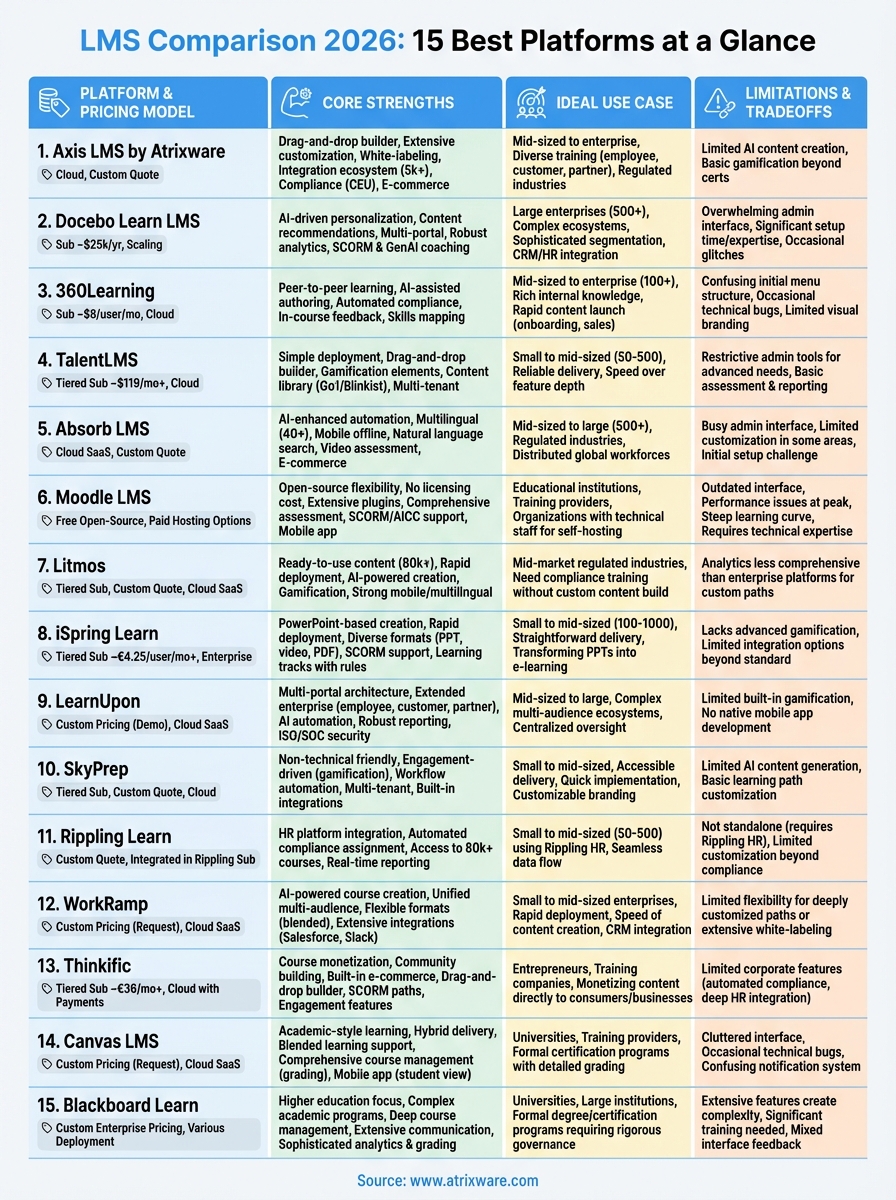
This comprehensive comparison examines 15 leading LMS platforms for 2026, breaking down their core strengths, ideal use cases, limitations, and pricing structures. You’ll see exactly how each system handles critical functions like compliance tracking, content creation, reporting, and learner engagement. We’ve organized everything into consistent sections so you can quickly spot the differences that matter to your decision. Whether you need a solution for employee training, customer education, compliance management, or channel partner development, you’ll find the practical details that help you move from research to selection with confidence.
1. Axis LMS by Atrixware
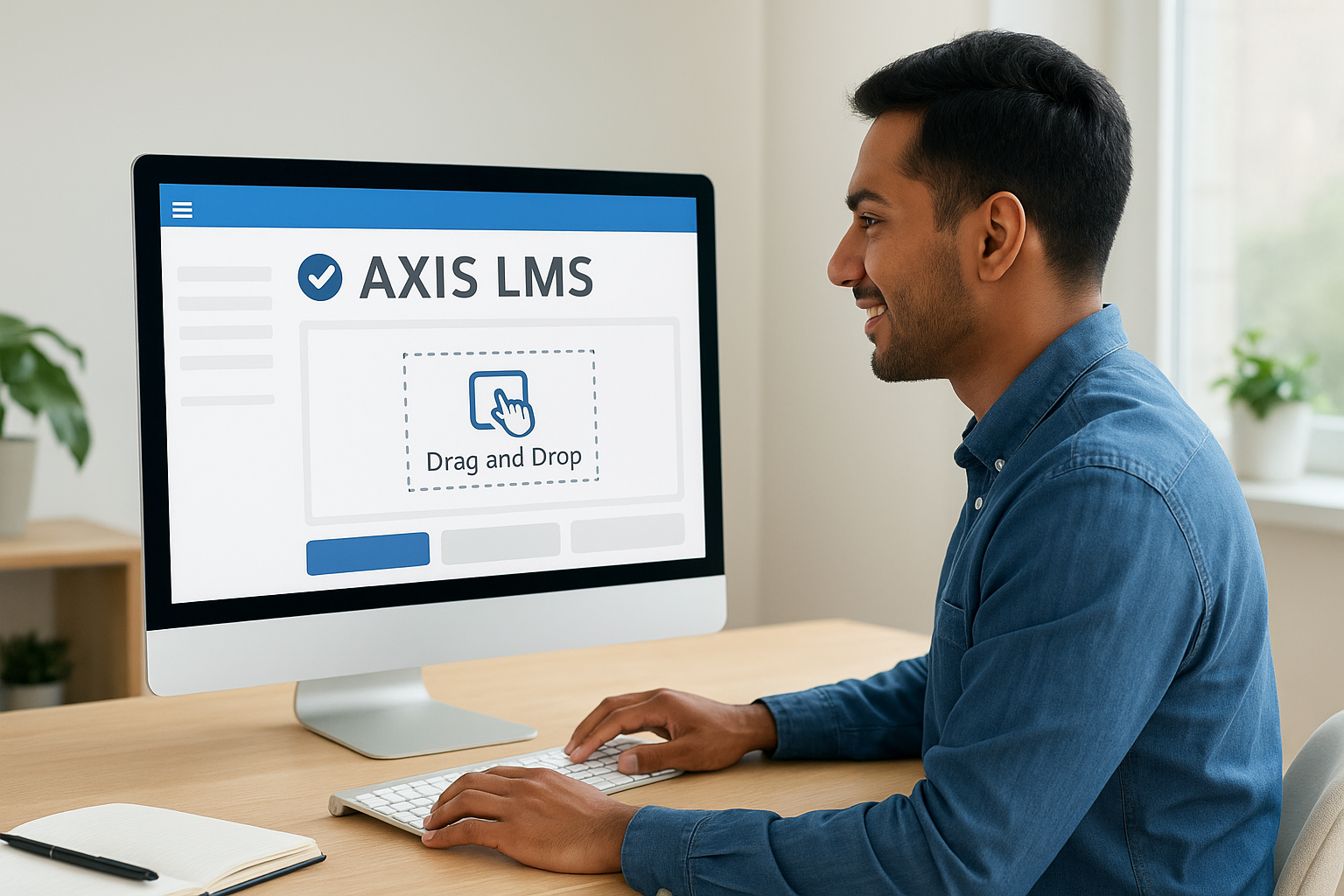
When you compare learning management systems for versatility and user experience, Axis LMS stands out for its drag-and-drop course builder and extensive customization capabilities. This platform delivers a complete training solution that serves multiple audiences, from employees to customers and channel partners. You get a system that balances powerful features with intuitive design, making it accessible for administrators without technical backgrounds while still offering advanced functionality for complex training needs.
Core strengths and standout features
Axis LMS excels in white-label branding control, letting you customize nearly every visual element of the learner interface to match your organization’s identity. The platform includes a comprehensive integration ecosystem with over 5,000 pre-built connections through its Integration Builder, plus REST API and webhook support for custom requirements. You’ll benefit from robust compliance features like automated tracking for CEU credits and certifications, along with built-in e-commerce functionality for selling courses directly to individuals or businesses.
Ideal use cases and organization size
This platform works best for mid-sized to enterprise organizations managing diverse training programs across employee onboarding, customer education, compliance tracking, and partner enablement. You’ll find it particularly valuable if you need strong reporting capabilities, automated communication workflows, or plan to monetize your training content. Companies in regulated industries appreciate the compliance-focused features that support standards like GDPR and FDA 21 CFR Part 11.
Limitations or tradeoffs to consider
Organizations seeking extensive AI-powered content creation tools or advanced gamification features beyond basic certificates and progress tracking may need supplementary solutions.
Pricing and deployment overview
Atrixware offers cloud-based deployment with pricing structured around your user count and feature requirements. You can request custom quotes based on your specific needs, implementation services, and integration complexity.
"Axis LMS combines enterprise-grade capabilities with the accessibility smaller teams need to launch quickly."
2. Docebo Learn LMS
When you compare learning management systems for AI-driven personalization and multi-audience training, Docebo Learn LMS delivers sophisticated capabilities that adapt to diverse learner groups. This platform combines learning management, experience platform features, and artificial intelligence to create tailored educational journeys for employees, customers, and partners within a single system. You get enterprise-grade functionality wrapped in a modern interface that prioritizes user engagement and data-driven insights.
Core strengths and standout features
Docebo excels at AI-powered content recommendations that analyze learner behavior and automatically suggest relevant courses, creating personalized learning paths without manual intervention. The platform includes a robust content library with pre-built courses and supports extensive customization through white-labeling and multi-portal architecture. You’ll benefit from comprehensive analytics that track performance metrics, measure ROI, and integrate external learning activities like conferences and certifications into centralized reporting. The system supports SCORM compliance and offers virtual coaching capabilities powered by generative AI.
Ideal use cases and organization size
This platform serves large enterprises managing complex training ecosystems across multiple departments, locations, and audience types. You’ll find it particularly valuable for organizations requiring sophisticated user segmentation, detailed performance tracking, and integration with existing CRM, HR, and business intelligence tools. Companies with 500+ users and diverse training needs appreciate the platform’s scalability and ability to deliver distinct branded experiences for different learner groups.
"Docebo transforms training data into actionable business intelligence that connects learning outcomes to organizational performance."
Limitations or tradeoffs to consider
Organizations report that the administrative interface can feel overwhelming initially, with some menu structures requiring multiple clicks to access common functions. You may encounter occasional interface glitches, and the extensive customization options demand significant setup time and technical expertise.
Pricing and deployment overview
Docebo operates on a subscription model starting at $25,000 annually for three-year contracts, with pricing scaling based on user count and feature requirements. The platform deploys as a cloud-based SaaS solution with managed hosting and automatic updates.
3. 360Learning
When you compare learning management systems for collaborative knowledge sharing, 360Learning stands out by transforming your subject matter experts into active course creators. This platform combines LMS and learning experience platform capabilities with AI-powered tools that accelerate content development and reduce the burden on training teams. You get a system designed to capture internal expertise quickly, distribute it across your organization, and continuously improve it through learner feedback.
Core strengths and standout features
360Learning excels at peer-to-peer learning through features that enable multiple authors to collaborate on course creation in real time. The platform includes AI-assisted authoring tools that help non-designers build engaging content without instructional design experience, plus automated compliance workflows that handle enrollments, reminders, and expiration tracking. You’ll benefit from in-course feedback mechanisms where learners can comment, rate, and react to content, providing immediate insights for continuous improvement. The system supports skills mapping and learning path tagging, allowing you to identify skill gaps and create targeted development programs.
Ideal use cases and organization size
This platform serves mid-sized companies and enterprises (typically 100+ users) that possess rich internal knowledge and want to scale upskilling without hiring large training teams. You’ll find it particularly valuable for onboarding programs, compliance training, sales enablement, and customer education where you need to launch content quickly and iterate based on real learner engagement data.
"360Learning turns your organization’s expertise into a sustainable learning engine that evolves with your business."
Limitations or tradeoffs to consider
Organizations report that the menu structure can feel confusing initially, requiring time to understand where features live. You may encounter occasional technical bugs, and customization options for visual branding remain limited compared to platforms offering extensive white-labeling capabilities.
Pricing and deployment overview
360Learning operates on a subscription model starting at $8 per registered user monthly, with cloud-based deployment that includes automatic updates and standard integrations with popular HR and business systems.
4. TalentLMS
When you compare learning management systems for simplicity and speed of deployment, TalentLMS delivers a straightforward solution that gets your training programs running quickly without extensive technical setup. This platform prioritizes ease of use for both administrators and learners, making it accessible for organizations that need functional training tools without the complexity that often accompanies enterprise systems. You get essential LMS capabilities wrapped in an interface that reduces the learning curve and accelerates time to value.
Core strengths and standout features
TalentLMS excels at content management through its drag-and-drop course builder that supports multiple file formats and SCORM packages. The platform includes gamification elements like badges, leaderboards, and points to boost learner engagement, plus access to extensive third-party content libraries through integrations with Go1 and Blinkist. You’ll benefit from multi-tenant architecture that lets you create separate branches for different departments, clients, or partner organizations while managing everything from a central dashboard. The system provides real-time reporting on completion rates and learner progress.
Ideal use cases and organization size
This platform serves small to mid-sized organizations (typically 50-500 users) that need reliable training delivery without complex customization requirements. You’ll find it particularly valuable for employee onboarding, compliance training, and customer education where speed of implementation matters more than extensive feature depth.
"TalentLMS removes barriers to launching training programs, letting you focus on content rather than system configuration."
Limitations or tradeoffs to consider
Organizations requiring advanced learning path customization or sophisticated analytics may find the administrative tools restrictive. The assessment and reporting capabilities remain basic compared to enterprise platforms, which can limit your ability to conduct detailed performance analysis.
Pricing and deployment overview
TalentLMS operates on a tiered subscription model with the Core plan starting at $119 monthly, Grow at $229 monthly, and Pro at $449 monthly. Cloud-based deployment includes automatic updates and standard support.
5. Absorb LMS
When you compare learning management systems for AI-enhanced automation and global accessibility, Absorb LMS provides intelligent features that streamline training delivery across diverse teams and locations. This platform combines modern design with enterprise-grade functionality, offering multilingual support in over 40 languages and robust mobile capabilities that work offline. You get a system built to reduce administrative burden through automation while maintaining the flexibility to support complex organizational structures and compliance requirements.

Core strengths and standout features
Absorb LMS excels at AI-driven recommendations that analyze learner behavior to suggest relevant courses and automatically generate content summaries and assessments. The platform includes natural-language search capabilities that help learners find training materials quickly, plus video assessment tools that support diverse learning formats. You’ll benefit from extensive integration options with 30+ pre-built connectors for CRM, HR, and business systems, along with open APIs for custom development. The system supports external training portals and e-commerce functionality, allowing you to monetize courses through public storefronts while managing internal programs simultaneously.
Ideal use cases and organization size
This platform serves mid-sized to large organizations (typically 500+ users) operating in regulated industries that require consistent compliance tracking and certification management. You’ll find it particularly valuable for companies with distributed workforces needing mobile-first access, multilingual content delivery, and automated renewal alerts for mandatory training programs.
"Absorb LMS transforms compliance training from a manual tracking burden into an automated system that keeps pace with regulatory requirements."
Limitations or tradeoffs to consider
Organizations report that the administrative interface feels busy with navigation requiring multiple clicks to complete common tasks. Customization options remain limited in specific areas, and initial setup can challenge teams without technical expertise.
Pricing and deployment overview
Absorb LMS offers cloud-based SaaS deployment with custom pricing based on user count and feature requirements. Contact their sales team for detailed quotes tailored to your organization’s needs.
6. Moodle LMS
When you compare learning management systems for open-source flexibility and academic-focused features, Moodle LMS delivers unmatched customization potential at no licensing cost. This platform operates as a community-driven solution with thousands of plugins, themes, and extensions that let you tailor every aspect of the learning environment to your specifications. You get enterprise-grade functionality without subscription fees, though you’ll need technical resources to manage hosting, updates, and customization work effectively.
Core strengths and standout features
Moodle excels at comprehensive assessment and grading capabilities through extensive quiz types, assignments, rubrics, and a detailed gradebook that tracks learner progress across multiple criteria. The platform supports SCORM 1.2, SCORM 2004, AICC, and IMS standards through its core system and expanded plugins, ensuring compatibility with third-party content. You’ll benefit from robust user management features that include cohorts, groups, role-based permissions, and activity restrictions that control course access based on completion requirements. The system provides mobile access through the Moodle App with offline functionality, letting learners download content and submit work without internet connectivity.
Ideal use cases and organization size
This platform serves educational institutions, training providers, and organizations of any size that possess technical staff and prioritize customization control over plug-and-play convenience. You’ll find it particularly valuable for academic-style learning environments requiring detailed grading structures, extensive course materials, and collaborative tools like forums and wikis.
"Moodle’s open-source foundation gives you complete control over your learning environment without vendor lock-in constraints."
Limitations or tradeoffs to consider
Organizations report that the interface feels outdated compared to modern commercial platforms, with visual design and navigation requiring significant customization effort to match contemporary user experience expectations. You may encounter performance issues during peak usage periods, and the steep learning curve challenges administrators without technical backgrounds.
Pricing and deployment overview
Moodle offers free open-source software with optional paid hosting services starting at approximately $130 annually through Moodle Cloud or partner providers. You can self-host on your own servers, though this requires technical expertise for installation, maintenance, security updates, and backup management.
7. Litmos
When you compare learning management systems for ready-to-use content libraries and rapid deployment, Litmos provides a solution that combines ease of implementation with extensive pre-built training materials. This platform serves organizations seeking to launch training programs quickly without building courses from scratch, offering access to over 80,000 courses through partnerships with Go1 and Blinkist. You get a cloud-based system that balances simplicity with powerful automation features designed to reduce administrative overhead.
Core strengths and standout features
Litmos excels at AI-powered content creation through natural-language search capabilities that help learners discover relevant materials and automated tools that generate assessments from video content. The platform includes comprehensive gamification elements like leaderboards and badges that boost engagement, plus 30+ pre-built integrations connecting your training data with CRM, HR, and business intelligence systems. You’ll benefit from strong mobile and offline support with multilingual capabilities spanning numerous languages, making it effective for global workforces.
Ideal use cases and organization size
This platform serves mid-market companies in regulated industries that need compliance-focused training with automated tracking and certification management. You’ll find it particularly valuable if you want to avoid building custom content, instead leveraging the extensive Go1 library for topics ranging from cybersecurity to leadership development.
Limitations or tradeoffs to consider
Organizations requiring highly customized learning paths or advanced reporting beyond standard completion tracking may find the platform’s analytics capabilities less comprehensive than enterprise-focused alternatives.
Pricing and deployment overview
Litmos operates through tiered subscription plans (Foundation and Platinum AI) with pricing available upon request based on user count and feature requirements. The platform deploys as a cloud-based SaaS solution with automatic updates.
8. iSpring Learn
When you compare learning management systems for PowerPoint-based course creation and structured learning paths, iSpring Learn provides an efficient solution that converts existing presentation files into interactive training modules. This platform combines rapid content deployment with SCORM compliance, making it ideal for organizations that already possess substantial training materials in familiar formats. You get a system designed to minimize content creation time while maintaining professional learning experiences through enforced progression and comprehensive tracking.
Core strengths and standout features
iSpring Learn excels at accepting diverse content formats including PowerPoint, video, audio, PDF, DOC, and XLS files that upload directly without complex conversions. The platform supports SCORM 1.2 and SCORM 2004 standards without compatibility issues, ensuring your existing e-learning content integrates seamlessly. You’ll benefit from learning track structures that organize courses into chapters with enforced progression rules, preventing learners from advancing until they complete prerequisite materials. The system includes detailed reports covering content performance, user engagement, and quiz breakdowns, plus automated email notifications for completion milestones.
Ideal use cases and organization size
This platform serves small to mid-sized businesses (100-1,000 users) that need straightforward course delivery without extensive customization demands. You’ll find it particularly valuable if your training team creates content in PowerPoint and wants to transform presentations into structured e-learning programs quickly.
"iSpring Learn bridges the gap between familiar content creation tools and professional learning delivery systems."
Limitations or tradeoffs to consider
Organizations requiring advanced gamification features or extensive integration options beyond standard connections may need supplementary tools to achieve complete training ecosystem functionality.
Pricing and deployment overview
iSpring Learn operates on tiered business plans starting at €4.25 per user monthly for 300 users, €3.78 for 500 users, and €3.40 for 1,000 users. Enterprise plans with custom pricing accommodate larger organizations requiring additional features.
9. LearnUpon
When you compare learning management systems for multi-portal architecture and extended enterprise training, LearnUpon delivers a platform specifically designed to manage separate learning environments for different audiences within a single system. This solution addresses the complexity of training employees, customers, and partners through distinct branded portals that maintain independent content, user bases, and administrative controls. You get enterprise-grade functionality that scales across diverse stakeholder groups without requiring multiple platform subscriptions or complicated workarounds.

Core strengths and standout features
LearnUpon excels at AI-powered automation that handles user enrollments, notification scheduling, and course renewals without manual intervention. The platform provides robust reporting and analytics tied directly to business metrics, offering out-of-the-box dashboards that connect training outcomes to organizational performance indicators. You’ll benefit from comprehensive user and group management capabilities that support dynamic assignment rules based on roles, departments, or custom criteria. The system maintains strong integration capabilities with CRM and HR systems, ensuring accurate data synchronization across your technology stack while meeting ISO and SOC security standards for enterprise-grade data protection.
Ideal use cases and organization size
This platform serves mid-sized to large organizations managing complex training ecosystems across multiple audience types. You’ll find it particularly valuable if you need to deliver distinct learning experiences to employees, customers, and channel partners while maintaining centralized oversight and reporting. Companies requiring role-based content delivery with automated compliance tracking appreciate the platform’s ability to scale learning environments without administrative burden.
"LearnUpon transforms the complexity of multi-audience training into manageable, branded experiences that operate independently yet report cohesively."
Limitations or tradeoffs to consider
Organizations seeking extensive built-in gamification features or native mobile app development may require supplementary solutions to achieve complete learner engagement functionality.
Pricing and deployment overview
LearnUpon operates through custom pricing models available upon demo request, with cloud-based SaaS deployment that includes automatic updates and enterprise-level support services.
10. SkyPrep
When you compare learning management systems for non-technical administrators and engagement-driven training, SkyPrep delivers an intuitive platform that prioritizes simplicity without sacrificing essential functionality. This system combines workflow automation with gamification elements that motivate learners through leaderboards, badges, and point systems. You get a solution designed for organizations that want straightforward course delivery with multi-tenant capabilities that support separate branded portals for different business units, clients, or partners.
Core strengths and standout features
SkyPrep excels at learner engagement through gamification mechanics that track progress and reward accomplishments visibly. The platform includes comprehensive course creation tools supporting assessments, checklists, knowledge checks, and multiple content formats without requiring technical expertise. You’ll benefit from workflow automation that handles enrollments, alerts, and notifications automatically, plus multi-tenant architecture that lets you manage distinct learning environments under a single administrative dashboard. The system provides built-in integrations with ADP, Zoom, and Google, along with robust role-based permission controls for secure data management.
Ideal use cases and organization size
This platform serves small to mid-sized organizations seeking accessible training delivery with strong engagement features. You’ll find it particularly valuable if you need quick implementation, customizable branding across multiple portals, and straightforward administrative controls that don’t require extensive training documentation or technical support.
"SkyPrep removes complexity from training administration while maintaining the features that drive learner participation and completion."
Limitations or tradeoffs to consider
Organizations requiring extensive AI-powered content generation or advanced learning path customization beyond basic course sequences may need supplementary tools to achieve complete training ecosystem functionality.
Pricing and deployment overview
SkyPrep operates through tiered subscription plans (Lite, Premium, and Enterprise) with pricing available upon request based on your user count and feature requirements. The platform deploys as a cloud-based solution with automatic updates and standard customer support.
11. Rippling Learn
When you compare learning management systems for HR platform integration and automated compliance training, Rippling Learn provides a deeply connected solution that embeds learning directly within your existing workforce management tools. This platform operates as a unified HR and IT ecosystem component rather than a standalone system, eliminating data synchronization issues and manual enrollment processes. You get streamlined training delivery that leverages employee data already stored in your Rippling account to automatically assign courses based on roles, departments, and tenure.
Core strengths and standout features
Rippling Learn excels at course assignment automation that triggers training based on employee attributes tracked in your HR system, removing manual administrative work from onboarding and compliance programs. The platform includes access to over 80,000 ready-made courses through Go1 integration, covering topics like sexual harassment prevention and cybersecurity awareness without requiring custom content creation. You’ll benefit from real-time reporting that monitors completion rates, identifies overdue training, and tracks progress metrics across teams. The system supports 15+ languages with mobile accessibility, ensuring global workforces receive training in their preferred formats.
Ideal use cases and organization size
This platform serves small to mid-sized businesses (typically 50-500 users) already using Rippling for HR and payroll functions. You’ll find it particularly valuable if you need seamless data flow between employee records and training requirements, eliminating duplicate data entry and reducing administrative overhead.
Limitations or tradeoffs to consider
Organizations seeking standalone LMS functionality independent of Rippling’s HR platform or requiring extensive customization beyond standard compliance training may need alternative solutions.
Pricing and deployment overview
Rippling Learn operates through custom pricing available upon quote request, with cloud-based deployment integrated directly into the Rippling platform subscription.
12. WorkRamp
When you compare learning management systems for AI-powered course creation and unified multi-audience training, WorkRamp delivers a modern platform that accelerates content development while supporting employees, customers, and partners within a single environment. This system combines intelligent automation with flexible learning formats that accommodate self-paced modules, instructor-led training, virtual sessions, and microlearning. You get a solution built to reduce the time investment traditionally required for course authoring while maintaining professional quality and engagement standards.
Core strengths and standout features
WorkRamp excels at AI Assist functionality that automatically generates course outlines, assessment questions, and content recommendations based on your training objectives. The platform includes extensive integration capabilities connecting Salesforce, Zendesk, Slack, and major HR systems to synchronize learner data across your technology ecosystem. You’ll benefit from blended learning support that combines instructor-led and virtual sessions with on-demand content, plus custom reporting features that track version control and compliance requirements. The interface prioritizes simplicity, making it straightforward for content creators to build and update training materials without extensive technical knowledge.
Ideal use cases and organization size
This platform serves small to mid-sized enterprises needing rapid deployment across multiple training audiences. You’ll find it particularly valuable for organizations prioritizing speed of content creation, real-time learner feedback, and seamless CRM integration that connects training data directly to business outcomes.
"WorkRamp transforms course creation from a time-intensive process into an automated workflow that maintains quality while accelerating delivery."
Limitations or tradeoffs to consider
Organizations requiring deeply customized learning paths or extensive white-labeling capabilities may find the platform’s flexibility constraints limiting compared to enterprise-focused alternatives.
Pricing and deployment overview
WorkRamp operates through custom pricing available by request, with cloud-based SaaS deployment that includes standard integrations and ongoing platform updates.
13. Thinkific
When you compare learning management systems for course monetization and community building, Thinkific provides a specialized platform designed specifically for creating, selling, and delivering online training as a business. This system functions as an integrated course marketplace that combines learning delivery with e-commerce capabilities, payment processing, and community engagement tools. You get a solution built for organizations and individuals who want to generate revenue from educational content while building engaged learner communities around their courses.

Core strengths and standout features
Thinkific excels at built-in e-commerce functionality that handles course sales, membership subscriptions, and digital product transactions through native payment integrations. The platform includes a drag-and-drop course builder that creates multimedia learning experiences combining video, text, quizzes, and downloadable resources without coding requirements. You’ll benefit from SCORM-compliant learning paths that structure complex curricula with progress tracking, plus community engagement features like discussion forums and live event hosting that foster interaction between learners. The system provides comprehensive analytics tracking course performance, completion rates, and sales metrics that inform content strategy decisions.
Ideal use cases and organization size
This platform serves entrepreneurs, training companies, and organizations seeking to monetize educational content through direct sales to consumers or businesses. You’ll find it particularly valuable if you want to build a branded learning business with membership tiers, course bundles, and community features that increase learner retention and lifetime value.
Limitations or tradeoffs to consider
Organizations requiring advanced corporate training features like automated compliance tracking or deep HR system integrations may find the platform’s consumer-focused orientation limiting for internal employee training programs.
Pricing and deployment overview
Thinkific operates through tiered subscription plans with Basic starting at €36 monthly, Start at €73 monthly, and Grow at €146 monthly. The platform deploys as a cloud-based solution with integrated payment processing and hosting services.
14. Canvas LMS
When you compare learning management systems for academic-style learning and hybrid training delivery, Canvas LMS provides a platform designed around educational institution needs that also serves corporate training environments. This system combines blended learning capabilities with synchronous virtual classroom features, supporting both real-time instruction and self-paced modules within a unified interface. You get a solution that balances traditional academic structures like gradebooks and assignment management with modern collaborative tools, making it effective for organizations that value formal learning methodologies.
Core strengths and standout features
Canvas LMS excels at course management through comprehensive tools that handle grading, scheduling, assessment creation, and content organization in structured formats familiar to educators and trainers. The platform provides blended learning support that seamlessly integrates in-person, virtual, and asynchronous training components, letting you design flexible programs that adapt to different learning preferences. You’ll benefit from real-time progress tracking dashboards that monitor learner engagement, completion rates, and performance metrics across all course activities. The system includes mobile app access with student view preview functionality, allowing learners to access materials from any device while instructors can test course experiences before launch.
Ideal use cases and organization size
This platform serves universities, training providers, and organizations requiring higher-education-level structure and governance features. You’ll find it particularly valuable for formal certification programs, academic-style courses with detailed grading requirements, and training environments where instructors need robust assessment tools and learner communication capabilities.
Limitations or tradeoffs to consider
Organizations report that the interface feels cluttered with multiple tabs and inconsistent layouts that complicate navigation. You may encounter technical bugs affecting reliability, and the notification system receives frequent criticism for confusing learners about assignment due dates and course updates.
Pricing and deployment overview
Canvas operates through custom pricing available upon request, with cloud-based SaaS deployment that includes standard support services and platform maintenance.
15. Blackboard Learn
When you compare learning management systems for higher education institutions and complex academic programs, Blackboard Learn provides an established platform with decades of development focused on formal educational environments. This system delivers comprehensive course management with deep functionality for assignments, gradebooks, assessments, and learner communication that mirrors traditional academic structures. You get a solution built to support rigorous educational standards, accessibility requirements, and institutional governance needs that extend beyond typical corporate training scenarios.
Core strengths and standout features
Blackboard Learn excels at course authoring and content management through tools that support SCORM, AICC, and diverse multimedia formats within structured learning modules. The platform includes extensive communication features like discussion boards, announcements, and messaging systems that facilitate instructor-learner interaction at scale. You’ll benefit from sophisticated analytics and gradebook functionality that tracks attendance, assessment performance, and learner progress with audit trail capabilities that support academic integrity requirements. The system provides responsive design across devices with built-in accessibility features that comply with education accessibility standards.
Ideal use cases and organization size
This platform serves universities, colleges, training institutions, and large organizations requiring academic-grade structure and detailed governance controls. You’ll find it particularly valuable for formal certification programs, degree courses, and training environments where comprehensive grading systems, assignment workflows, and learner communication tools justify the platform’s complexity.
"Blackboard Learn delivers the depth of functionality that academic institutions require, though this comprehensiveness demands significant administrative investment."
Limitations or tradeoffs to consider
Organizations report that the platform’s extensive feature set creates complexity that requires substantial training time for both instructors and administrators to utilize effectively. The interface receives mixed feedback about navigation efficiency and modern user experience expectations.
Pricing and deployment overview
Blackboard Learn operates through custom enterprise pricing with options for cloud hosting, on-premises deployment, or managed services. Contact their sales team for detailed quotes based on your institution’s size and deployment preferences.
Making your final choice
When you compare learning management systems across these 15 platforms, your decision ultimately depends on matching features to your specific training needs and organizational context. Consider your primary use case, whether that involves employee onboarding, compliance tracking, customer education, or partner enablement. Factor in your team’s technical expertise, your integration requirements with existing systems, and your budget constraints alongside expected growth.
Testing the platform before committing proves essential. Most vendors offer trial periods or demonstrations that let you evaluate the interface, explore core features, and assess how well the system fits your workflows. Your selection should balance immediate requirements with long-term scalability, ensuring the platform grows alongside your training programs without forcing you into costly migrations.
Take our LMS readiness quiz to determine which features matter most for your organization and discover whether Axis LMS delivers the comprehensive functionality you need to transform your training programs.
